
Are you thinking about building a website with WordPress.org but wonder if it will cost you money? You’re not alone.
Many people get confused about the expenses involved with WordPress. org and whether it’s really free. Understanding the true costs can save you from surprises and help you plan your website better. Keep reading to find out exactly what you need to pay for, what comes free, and how you can make the most of WordPress.
org without breaking your budget.
WordPress.org Basics
WordPress.org is a popular platform for creating websites. It offers tools to build and manage sites easily. Many people wonder if using WordPress.org costs money. Understanding its basics helps clear this question.
This section explains what WordPress.org offers and how it differs from WordPress.com. Knowing these points helps you decide if WordPress.org fits your needs.
What WordPress.org Offers
WordPress.org provides free software to build websites. You can download and install it on your own web hosting. This means you control your website fully.
It allows you to use any theme or plugin. You can customize your site’s design and features freely. There are no limits on monetization or ads.
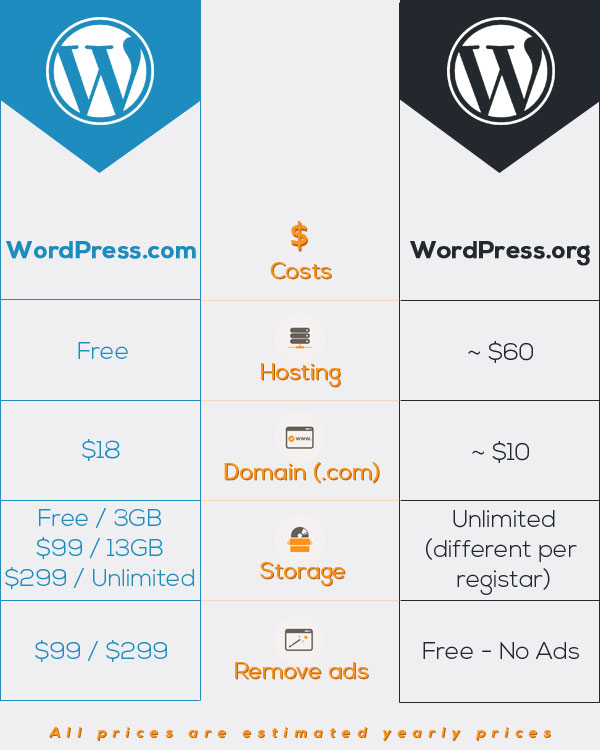
However, you need to pay for hosting and domain name separately. These are the only costs involved with WordPress.org. The software itself is free and open-source.
Difference Between WordPress.org And WordPress.com
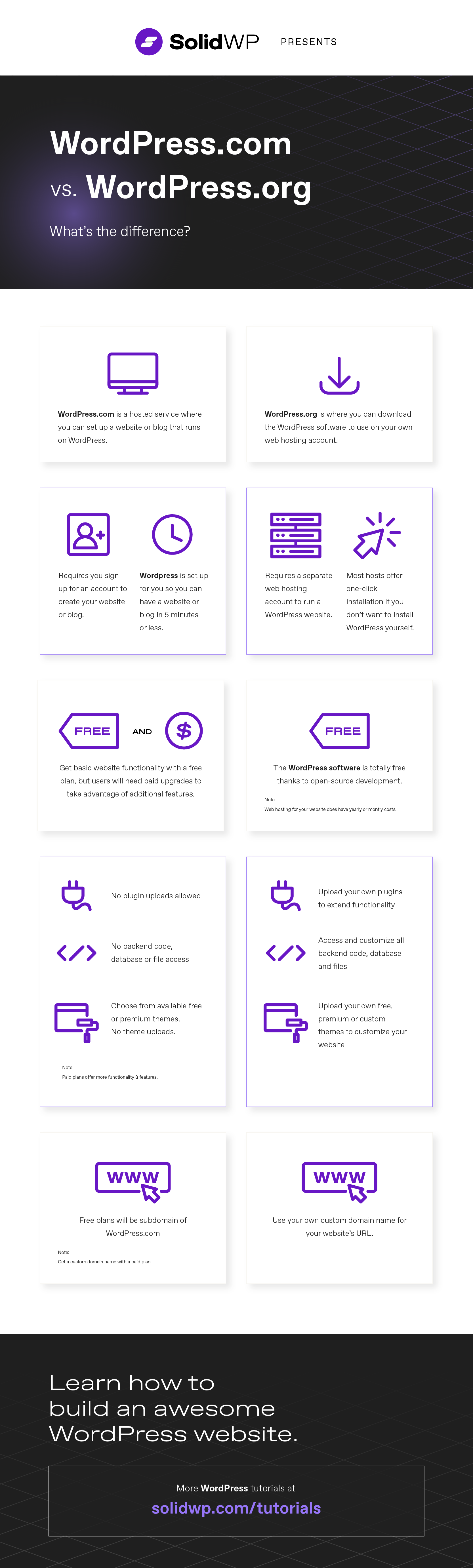
WordPress.org and WordPress.com are different services. WordPress.org is self-hosted, giving full control over the website. You manage hosting, themes, and plugins yourself.
WordPress.com is a hosted platform. It handles hosting and maintenance but has restrictions on customization. Some plans cost money depending on features.
WordPress.org suits users who want more control and flexibility. WordPress.com fits those who prefer easy setup without managing hosting.

Credit: www.theblogstarter.com
Core Software Costs
Many people ask about the cost of WordPress.org’s core software. The software is the heart of your website. It controls how your site looks and works. Understanding its cost helps you plan your website budget well.
The core software is designed to be accessible to everyone. That means you do not pay for the basic software itself. You can download and use it without any charge. This makes WordPress.org a popular choice for websites of all sizes.
Free Nature Of WordPress.org
WordPress.org’s core software is completely free. You do not pay for the download or installation. This is because it is open-source software. Many developers from around the world contribute to its growth. The software is shared freely for anyone to use and improve.
Using free software lowers the cost of building a website. You only pay for hosting, themes, and plugins if you choose. The core software itself has no price tag. This freedom attracts millions of users globally.
Why The Software Is Free
The software is free because it follows open-source principles. Open-source means the code is open to everyone. People can see, use, and modify the code. This encourages collaboration and innovation.
WordPress.org is supported by a large community. Developers contribute their time and skills. They want to create a tool that anyone can use. This community-driven approach keeps the software free and up to date.
Free software also promotes fairness. It lets small businesses and individuals build websites. No one is left out due to high costs. This is a key reason for WordPress.org’s success and popularity.
Hosting Expenses
Hosting is a key expense for any WordPress.org website. WordPress.org itself is free to download and use. But to make your site live on the internet, you need a web host. Hosting means renting space on a server where your website files stay. This space lets people visit your site anytime. Choosing the right hosting affects your website speed and security.
Types Of Hosting Options
Shared hosting is the cheapest option. Many websites share the same server and resources. It suits small sites or blogs with low traffic. VPS hosting gives more power and control. It splits a server into virtual parts. Each part acts like its own server. Good for medium-sized websites or growing businesses. Dedicated hosting means renting a whole server. You have full control and resources. This is best for large websites with high traffic. Cloud hosting uses many servers to host your site. It offers great speed and reliability. You pay for what you use.
Estimated Hosting Costs
Shared hosting usually costs between $3 and $10 per month. VPS hosting can range from $20 to $60 each month. Dedicated hosting starts at about $80 and can go over $200 monthly. Cloud hosting costs vary but often start around $10 per month. Some hosts offer discounts for yearly payments. Prices depend on server features and support. Budget hosting works fine for new sites. Bigger sites need stronger, more expensive hosting.
Domain Name Fees
Choosing a domain name is a key step in building a WordPress.org website. It is the address where visitors find your site online. Domain name fees are costs you pay to own that web address. These fees are separate from hosting or WordPress software costs. Understanding these fees helps plan your website budget better.
Importance Of A Domain
A domain name creates your website’s identity on the internet. It helps people remember and visit your site easily. A clear and simple domain boosts trust and professionalism. It also affects search engine rankings and how users find your content. Without a domain, your website cannot be reached online.
Domain Registration Costs
Registering a domain usually costs between $10 and $20 per year. Prices vary based on domain extensions like .com, .net, or .org. Some special domains can cost more. You must renew your domain yearly to keep ownership. Some providers offer discounts for multiple years. Extra services, like privacy protection, might add to the cost.
Themes And Design
The look and feel of your WordPress site depend on themes and design. Themes control colors, layout, and style. They shape the visitor’s first impression and user experience. Choosing the right theme affects your site’s cost and flexibility. WordPress offers many options, from free themes to custom designs. Understanding these choices helps you plan your budget and site appearance.
Free Vs Premium Themes
Free themes come with zero cost. Many are well-made and easy to use. They often have basic features and limited support. Premium themes cost between $20 and $100. These themes offer more customization and regular updates. Premium themes include better support and extra tools. Choosing between free and premium depends on your needs and budget. Free themes work well for simple sites. Premium themes suit businesses or advanced users needing more options.
Custom Theme Development Costs
Custom themes are built from scratch by developers. This option gives full control over design and features. Custom themes match your brand perfectly. Costs vary based on complexity and developer rates. Simple custom themes start around $1,000. Complex projects with special functions can cost several thousand dollars. Custom themes take longer to create than pre-made ones. They require ongoing maintenance and updates. Custom development suits businesses wanting unique, tailored websites.
Credit: solidwp.com
Plugins And Functionality
Plugins expand WordPress.org’s capabilities. They add features and improve site performance. Many users choose plugins to customize their websites. Understanding plugin costs helps plan your budget well.
Free Plugins Availability
Thousands of free plugins exist in the WordPress plugin directory. These plugins cover many functions like SEO, security, and design. Free plugins often meet basic website needs. They receive regular updates and support from developers. Using free plugins can keep your costs low.
Premium Plugin Costs
Premium plugins offer advanced features beyond free versions. Prices vary from $20 to several hundred dollars. Some require a one-time fee; others charge yearly. Premium plugins often include dedicated support and frequent updates. Investing in them can enhance your site’s function and security.
Custom Plugin Development
Custom plugins match unique website needs. Hiring a developer for custom work can be costly. Prices depend on complexity and developer rates. Custom plugins offer full control over features. They are useful when no existing plugin fits your needs.
Maintenance And Security
Maintaining a WordPress.org site is crucial for its performance and safety. Without regular care, your website may slow down or face security risks. Understanding the costs related to maintenance and security helps you plan your budget wisely. Let’s explore these key areas.
Regular Updates
WordPress releases updates for its core software often. These updates fix bugs and improve features. Themes and plugins also need updates to stay compatible and secure. Updating regularly prevents errors and keeps your site fast. You can update manually or use automatic tools. Regular updates require time but usually do not cost money.
Security Services And Costs
Security is vital to protect your site from hackers and malware. Basic security tools like free plugins can help. Premium security services offer advanced protection. These services often charge monthly or yearly fees. Costs vary based on features and support level. Investing in good security reduces risks and potential losses. Remember, no security service guarantees 100% safety.
Additional Costs To Consider
WordPress.org itself is free to use. Yet, building a full website often requires spending money. Many extra costs come with making your site work well and look good. These costs can add up. Understanding them helps you plan your budget better.
Seo Tools And Marketing
SEO tools help your website get found on search engines. Some basic SEO plugins are free. But advanced tools usually charge a fee. These tools track your visitors and improve your site’s ranking.
Marketing costs include email services and social media ads. Paid marketing helps you reach more people fast. Without marketing, your site may stay hidden online.
Professional Support And Services
Sometimes, you need expert help. Hiring developers or designers costs money. They fix issues and make your site look great.
Support services include website maintenance and security checks. These keep your site safe and running smoothly. Paying for support saves time and stress.
Budgeting For A WordPress.org Site
Budgeting for a WordPress.org site is key to a smooth start. Understanding costs helps avoid surprises. Planning your budget lets you build a site within your means.
WordPress.org itself is free, but other expenses come up. These include hosting, themes, plugins, and maintenance. Knowing these costs early helps you prepare wisely.
Estimating Initial Setup Costs
First, you need web hosting. Prices start around $3 to $10 per month. A domain name costs about $10 to $15 yearly. Buying a premium theme can cost $30 to $100. Some plugins may require one-time or yearly fees.
Consider website design help if you want a unique look. Freelancers or agencies charge extra. But you can use free themes and plugins to cut costs.
Ongoing Expenses To Plan For
Hosting bills repeat monthly or yearly. Domain renewal happens every year. Premium plugins and themes may need renewals. Security and backup services might add small fees.
Regular updates keep your site safe and fast. Sometimes, you need help fixing issues. Budget for occasional professional support or tools.
Credit: psdtowp.net
Cost-saving Tips
Saving money on your WordPress.org site is possible with smart choices. You can build a great website without spending too much. Focus on using free tools well and spending only on what really helps your site grow. This section shares easy tips to keep costs low while getting good results.
Choosing Free Resources Wisely
Many free themes and plugins offer solid features. Pick those with good reviews and regular updates. Avoid tools that seem outdated or have poor support. Free resources save money but may lack advanced options. Test a few to find the best fit for your site’s needs. Stick with popular and trusted options to avoid problems later.
When To Invest In Premium Features
Sometimes, free options limit your website’s growth. Investing in premium themes or plugins can add useful features. Buy only what improves your site’s performance or user experience. For example, premium security or SEO tools may be worth the cost. Upgrade when you need better speed, design, or support. This way, you spend money wisely and get real value.
Frequently Asked Questions
Does WordPress.org Require Any Payment To Use?
WordPress. org software is free to download and use. However, you must pay for hosting, domain, and optional premium themes or plugins.
What Are The Hidden Costs Of Using WordPress.org?
Hidden costs include web hosting, domain registration, premium themes, plugins, and potential developer fees. These vary based on your needs.
Can I Use WordPress.org Without Buying Hosting?
No, WordPress. org needs a web host to store your site files. Hosting is essential and usually involves a monthly fee.
How Much Does Hosting For WordPress.org Typically Cost?
Hosting costs range from $3 to $30 monthly, depending on the provider and plan. Shared hosting is usually the cheapest option.
Conclusion
WordPress. org itself is free to use and download. Costs come from hosting, domain names, and extra features. You control your website and can choose what to spend. Many hosting plans are affordable and suit different budgets. You can start small and grow your site over time.
This makes WordPress. org a flexible choice for many users. Knowing the costs helps you plan your website better. Now, you can decide if WordPress. org fits your needs and budget. Simple, clear, and effective for building your online presence.



