

Are you worried about your website’s safety? If you use WordPress or are thinking about it, you might wonder, “Does WordPress have security issues?” You’re not alone.
Many website owners ask this question because keeping your site secure is crucial. Imagine losing your hard work to hackers or facing unexpected downtime—scary, right? You’ll discover the truth about WordPress security. You’ll learn what risks exist, how serious they are, and what simple steps you can take to protect your site.
Keep reading to make sure your website stays safe and strong.
Common WordPress Security Risks
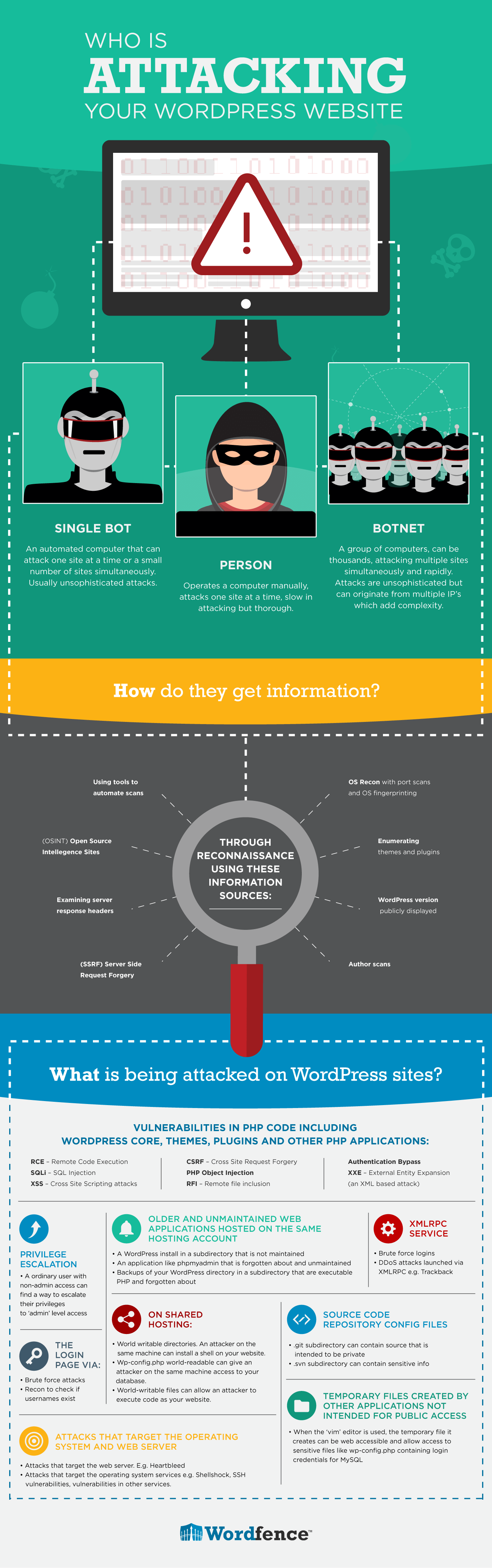
WordPress is popular for building websites. This popularity also makes it a target for hackers. Understanding common security risks helps protect your site. Many attacks exploit weak spots in WordPress setups.
Knowing these risks lets you take steps to keep your site safe. Let’s explore some typical vulnerabilities that WordPress users face.
Vulnerabilities In Plugins And Themes
Plugins and themes add features and style to websites. Some are poorly coded or not updated often. Hackers find weaknesses in these add-ons to break into sites. Using too many or unknown plugins increases risk. Always choose trusted plugins and keep them updated.
Weak Passwords And User Roles
Simple passwords are easy targets for attackers. Many users use common or short passwords. Weak passwords let hackers access your admin area quickly. Assigning too many users with high privileges is risky. Limit access and enforce strong password rules.
Outdated WordPress Core
WordPress regularly releases updates to fix bugs and security issues. Running an old version leaves known gaps open. Hackers scan sites for outdated software to exploit. Updating your WordPress core is essential to close these holes. Automatic updates help keep your site safe.
Brute Force Attacks
Attackers try many username and password combinations fast. This method is called a brute force attack. It aims to guess login details by trial and error. Sites without limits on login attempts are vulnerable. Use tools that block repeated failed logins to stop attacks.
Sql Injection And Cross-site Scripting
These are common code-based attacks on websites. SQL injection tricks your database into revealing data. Cross-site scripting injects harmful code into pages. Both can steal information or damage your site. Proper coding and security plugins reduce these risks.
Credit: www.wordfence.com
Signs Of A Compromised WordPress Site
Detecting a hacked WordPress site is crucial for website owners. Early signs help stop damage fast. Watch for unusual changes or odd actions on your site. These signs often point to security issues that need fixing.
Unexpected Website Behavior
Your site may show strange pop-ups or ads. Pages might redirect to unknown sites. Content can change without your input. These behaviors often mean hackers have control.
Slow Performance And Downtime
Sudden slow loading or frequent crashes are warning signs. Hackers can overload your server or use your resources. This causes poor site speed and downtime.
Unauthorized User Accounts
Check your user list regularly. Unknown accounts with admin rights are a red flag. Hackers create accounts to access your site easily.
Blacklisting By Search Engines
Search engines may flag your site as unsafe. Visitors get warnings before entering. This hurts your traffic and reputation severely.
Effective Security Measures
Effective security measures protect WordPress sites from many risks. Taking simple steps lowers the chance of hacks and data loss. These steps keep your site safe and running smoothly.
Regular Updates And Backups
Always update WordPress, themes, and plugins. Updates fix security holes and bugs. Back up your site often. Backups save your data if something breaks or is hacked. Store backups in a safe place outside your website.
Strong Password Policies
Use strong passwords with letters, numbers, and symbols. Avoid common words or easy patterns. Change passwords regularly. Strong passwords stop hackers from guessing your login details.
Installing Security Plugins
Security plugins add extra protection. They scan for malware and block suspicious activity. Choose trusted plugins with good reviews. These tools help monitor and defend your site automatically.
Implementing Two-factor Authentication
Two-factor authentication adds a second step to login. After entering a password, users confirm identity with a phone or email code. This stops hackers even if they know the password.
Limiting Login Attempts
Limit how many times users can try to log in. Too many tries can mean a hacker is guessing passwords. Lock accounts temporarily after several failed attempts. This reduces the chance of unauthorized access.
Best Practices For Plugin And Theme Security
Plugins and themes add features and style to WordPress sites. They also pose security risks if not handled properly. Following best practices for plugin and theme security keeps your site safe.
Careful management reduces vulnerabilities. Focus on trusted sources, updates, and cleaning unused items. These steps build a strong defense against attacks.
Choosing Trusted Sources
Select plugins and themes only from reliable providers. Use the official WordPress repository or well-known developers. Check reviews and ratings before installing. Avoid free or unknown sites that offer software.
Trusted sources provide regular security fixes. They also follow WordPress standards. Using them lowers the chance of malware or backdoors.
Regularly Updating Components
Keep all plugins and themes up to date. Updates fix bugs and security holes. Old versions are common targets for hackers. Set reminders to check for updates weekly.
Update WordPress core alongside plugins and themes. Compatibility improves with the latest versions. This practice ensures smooth and secure site operation.
Removing Unused Plugins And Themes
Delete plugins and themes that are not in use. Inactive components still pose risks. They may contain outdated code exploitable by attackers.
Cleaning up reduces the attack surface. It also improves site speed and management. Regular audits help maintain a secure environment.
Securing WordPress Hosting And Server
Securing your WordPress hosting and server is a key step in protecting your website. The hosting environment plays a major role in your site’s safety. A secure server stops many attacks before they reach your WordPress site. Proper setup and maintenance can reduce risks significantly.
Choosing Secure Hosting Providers
Pick hosting providers known for strong security. Look for features like malware scanning and automatic backups. Providers should offer regular software updates and strong access controls. Avoid cheap hosts that do not focus on security. Reliable hosts often have firewalls and intrusion detection systems.
Using Ssl Certificates
SSL certificates encrypt data between users and your site. This keeps information safe from hackers. Most hosts provide free SSL certificates through services like Let’s Encrypt. Always enable SSL to protect login pages and user data. Browsers show a padlock icon for secure sites, building trust.
Configuring Firewalls And Security Headers
Firewalls block unwanted traffic before it reaches your server. Use a web application firewall (WAF) to filter harmful requests. Security headers instruct browsers how to handle your site’s content safely. Headers like Content Security Policy reduce risks from cross-site attacks. Proper configuration improves overall site defense.
Credit: kaydee.net
Monitoring And Responding To Threats
Monitoring and responding to threats is vital for any WordPress site. It helps catch problems early and limits damage. Constant vigilance keeps your site safe from hackers and malware. A good plan lets you react fast and smart.
Setting Up Security Alerts
Security alerts notify you about suspicious activity. These alerts can come from plugins or hosting services. They warn about login attempts, file changes, or malware detection. Set up email or SMS alerts for quick responses. Alerts keep you informed without checking the site all the time.
Performing Regular Security Audits
Security audits review your site’s defenses. Check for outdated software, weak passwords, and vulnerabilities. Use trusted tools to scan your site for malware. Audits reveal hidden risks before hackers find them. Schedule audits monthly or after major updates.
Steps To Take After A Security Breach
Start by isolating the site to stop further damage. Change all passwords and update all software. Remove any suspicious files or code found on the site. Inform your hosting provider and follow their guidance. Restore your site from a clean backup if needed.

Credit: www.malcare.com
Frequently Asked Questions
Does WordPress Have Common Security Issues?
Yes, WordPress faces common security issues like outdated plugins, weak passwords, and vulnerabilities in themes. Regular updates and strong security practices help protect your site from attacks.
How Can I Improve WordPress Security?
You can improve WordPress security by using strong passwords, updating plugins/themes, installing security plugins, and enabling two-factor authentication. Regular backups also reduce risks of data loss.
Are WordPress Sites Prone To Hacking?
WordPress sites can be prone to hacking if not properly maintained. Most attacks exploit outdated software or weak credentials. Staying updated and using security tools reduces hacking risks effectively.
What Are The Best Security Plugins For WordPress?
Top WordPress security plugins include Wordfence, Sucuri, and iThemes Security. These plugins offer firewall protection, malware scanning, and login security to keep your site safe from threats.
Conclusion
WordPress can face security issues like any other platform. Regular updates help keep it safe. Strong passwords block many hacking attempts. Using trusted plugins reduces risk significantly. Backing up your site protects your data. Staying aware helps you act quickly.
WordPress security depends on user care. Keep your site clean and monitored. Small steps build a safer website. Security is a shared responsibility. You hold the key to protect your site.



