
Are you thinking about building a website with WordPress but wondering, “Does WordPress cost anything?” You’re not alone. Many people want to know if they have to spend money upfront or if it’s truly free.
Understanding the costs behind WordPress can save you from surprises and help you plan your budget wisely. You’ll get clear answers about the real expenses, what’s free, and when you might need to invest. Keep reading—you’ll discover exactly what you need to know to make the best choice for your website.
Credit: www.hostinger.com
WordPress Pricing Basics
Understanding WordPress pricing helps you choose the right option for your site. WordPress offers both free and paid versions. Each has different features and costs. Knowing these basics saves money and time.
Costs depend on your needs, such as hosting, themes, and plugins. WordPress pricing is simple once you know the differences. Let’s explore the key points now.
Free Vs Paid Versions
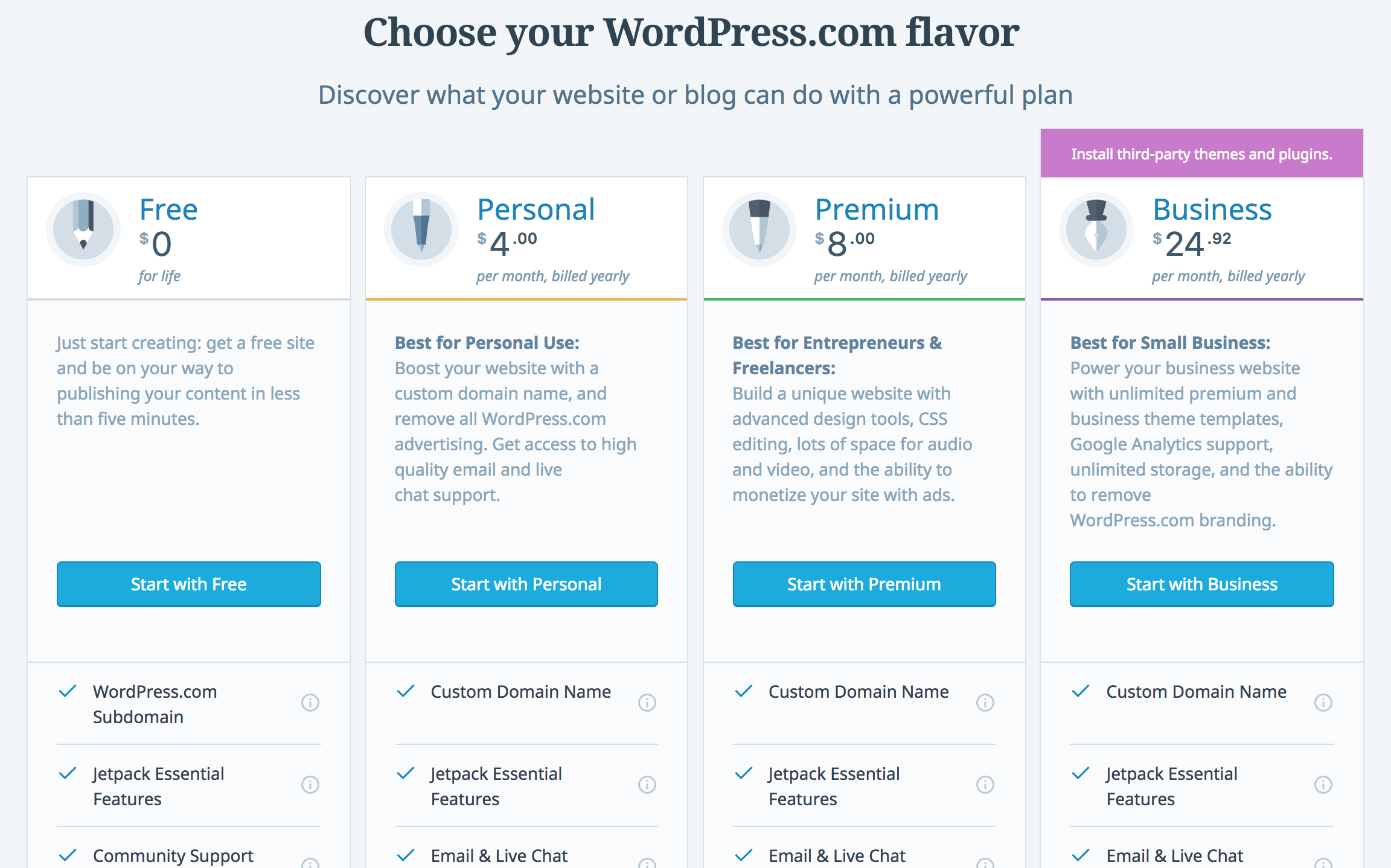
The free version of WordPress is great for beginners. It includes basic features and limited customization. You get a WordPress subdomain, like yoursite.wordpress.com. Storage space and themes are also limited.
Paid versions offer more options. You can use custom domains like yoursite.com. Paid plans give extra storage, premium themes, and advanced support. You can install plugins to add new functions. Paid plans suit businesses and serious bloggers.
WordPress.com Vs WordPress.org
WordPress.com hosts your website for you. It manages security and updates. This is easier but limits control. Free plans have ads and limited features. Paid plans remove ads and add tools.
WordPress.org is self-hosted. You need to buy hosting and a domain separately. This gives full control over your site. You can install any theme or plugin. It needs more technical skills but offers flexibility. Costs vary based on hosting and services chosen.
Domain And Hosting Costs
Domain and hosting costs form the basic expenses when starting a WordPress site. They cover the website’s name and the place where your site lives online. Understanding these costs helps plan your budget well.
Choosing A Domain Name
A domain name is your website’s address on the internet, like www.example.com. It usually costs between $10 and $15 per year. Some domains with popular extensions like .com or .net might be more expensive. Short, simple names are easy to remember and good for visitors. Choose a domain that matches your site’s purpose. Avoid complicated spellings to reduce typing errors.
Hosting Options And Prices
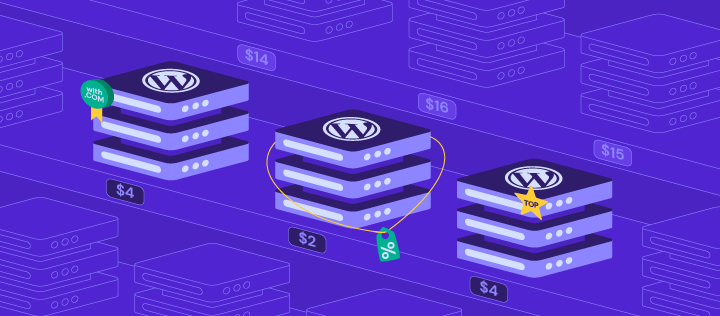
Hosting is the service that stores your website files and shows your site online. Prices vary depending on the type of hosting you select. Shared hosting is the cheapest, costing $3 to $10 per month. It is good for small websites or blogs. Managed WordPress hosting costs more, about $20 to $50 per month. It offers better speed and security. VPS and dedicated hosting are more expensive but give more control and power. Your website’s size and traffic will affect which hosting is best.
Themes And Design Expenses
Themes and design shape the look of your WordPress site. They affect user experience and brand image. Choosing the right theme can cost nothing or a bit more. Understanding theme costs helps plan your budget well.
Free Themes Availability
WordPress offers many free themes in its directory. These themes cover basic needs and simple styles. They work well for blogs and small sites. Free themes get regular updates and community support. You can customize them with some effort. They are a good start without spending money.
Premium Themes Pricing
Premium themes usually cost between $30 and $100. These themes have advanced features and better designs. They include customer support and regular updates. Premium themes offer more customization options. They often come with built-in SEO tools. Buying a premium theme can save time and effort. It suits sites needing a professional look and extra tools.
Credit: elementor.com
Plugins And Functionality Fees
WordPress offers many plugins to add features to your website. These plugins can be free or paid. Understanding the costs helps you plan your budget well. Plugins improve your site’s look, speed, and security. Some plugins come with no cost but have limits. Others require payment for full use or extra features. Knowing these differences helps you choose the right tools for your site.
Free Plugins Limitations
Free plugins offer many useful features at no cost. They are easy to install and use. Many popular plugins have free versions. Yet, these versions often have limited functions. You might not get full support or updates. Some plugins show ads or ask for donations. They may not work well with all themes. Free plugins suit small sites or beginners. But bigger sites need more advanced tools.
Paid Plugins And Add-ons
Paid plugins unlock extra features and better support. They usually require one-time payment or subscription. Paid plugins receive regular updates and bug fixes. Add-ons extend free plugins with new options. These can improve security, SEO, or design. Payment covers developer costs and customer help. Investing in paid plugins can save time. They offer more control and customization. Choose paid plugins carefully to match your needs.
Maintenance And Security Charges
Maintaining a WordPress site requires ongoing effort and some cost. These costs often include keeping the site updated and safe from threats. Understanding maintenance and security charges helps manage your budget well.
Regular Updates
WordPress updates its software regularly. These updates fix bugs and improve performance. Themes and plugins also need updates to work well. Regular updates protect your site from errors and attacks. Many users do updates themselves, which costs no money. Some hire professionals, and this service can cost monthly or yearly fees.
Security Services Costs
Security is important for every website. WordPress sites face risks like hacking and malware. Security services include firewalls, malware scanning, and backups. Some security tools are free, but premium options cost extra. Hiring experts for security can add to your expenses. These services keep your site safe and running smoothly. Investing in security can save money by avoiding bigger problems later.
Developer And Customization Costs
Developer and customization costs can vary widely with WordPress. These costs depend on how much help you need and the changes you want. Some users hire professionals to build or tweak their sites. Others use tools to make changes by themselves. Both ways have their pros and cons.
Hiring Professionals
Hiring a developer brings expert skills to your project. A professional can create custom features and fix issues quickly. Prices depend on the developer’s experience and project size. Small tasks may cost a few hundred dollars. Complex projects can run into thousands. Expect to pay more for ongoing support and updates. Clear communication helps avoid surprises and extra fees.
Diy Customization Tools
DIY tools let you customize without coding knowledge. Page builders and themes offer drag-and-drop interfaces. Many tools have free versions with limited features. Premium versions unlock more options at a cost. These tools save money on hiring developers. They may not handle very complex changes. Perfect for simple design tweaks and content updates. Choose tools that are easy to use and well supported.
Hidden Fees To Watch Out For
WordPress itself can be free, but extra costs often appear. These hidden fees can surprise new users. Knowing them helps you plan better. Understanding these charges keeps your budget clear. Below are key fees to watch for.
Renewal Rates
Many WordPress services offer low initial prices. These prices often rise sharply after the first term. Domains and hosting plans usually renew at higher rates. Budget for these increases to avoid surprises. Check renewal prices before buying any plan.
Transaction And Service Fees
Using payment gateways or e-commerce tools may add fees. Each sale can include a percentage fee or fixed charge. Some plugins also charge monthly or yearly service fees. These costs add up quickly with more sales. Always review fee policies before launching your store.
Credit: kinsta.com
Tips To Manage WordPress Expenses
Managing WordPress expenses helps keep your website costs clear and controlled. Planning your budget and using smart strategies can save money. This way, you pay only for what you really need.
Budget Planning
Start by listing all possible WordPress costs. Include hosting, themes, plugins, and any custom work. Set a monthly or yearly limit for these expenses. Track your spending regularly to avoid surprises. Prioritize essential features over extras. This focus prevents overspending on unnecessary items.
Cost-saving Strategies
Choose free or low-cost themes and plugins with good reviews. Use built-in WordPress tools before buying add-ons. Look for hosting plans that offer good value and reliability. Avoid expensive customizations unless they add real value. Use discounts and deals from trusted providers. Regularly review your expenses and cancel unused services.
Frequently Asked Questions
Does WordPress Cost Money To Use?
WordPress software is free to use and download. However, hosting, domains, and premium themes or plugins may require payment. Costs vary based on your website needs.
What Are The Hidden Costs Of WordPress?
Hidden costs include web hosting, domain registration, premium themes, plugins, and security services. These add to the total expense of running a WordPress site.
Can I Use WordPress For Free?
Yes, you can use WordPress. com’s free plan with basic features and a WordPress-branded domain. For full control, self-hosted WordPress. org is recommended, but it requires paid hosting.
How Much Does WordPress Hosting Cost?
WordPress hosting ranges from $3 to $30 per month. Prices depend on hosting type, provider, and included features like speed, security, and support.
Conclusion
WordPress can be free to start but may cost for extras. Themes, plugins, and hosting often require payment. You choose what fits your budget and needs. It suits both small blogs and big websites. Costs depend on how much you want to add.
Planning helps avoid surprise expenses later. WordPress offers flexibility with clear pricing options. This makes it a popular choice worldwide. You can build a site that works for you. Simple or complex, WordPress adapts to your goals.



