
Are you thinking about creating a website with WordPress.com but wondering if hosting is included? This question is important because hosting affects how your site performs and how much you’ll spend.
Understanding whether WordPress. com takes care of hosting can save you time, money, and headaches. Keep reading to find out exactly what you get with WordPress. com, so you can make the best choice for your website.
WordPress.com Hosting Basics
WordPress.com offers a simple way to create a website without worrying about technical details. Hosting is included with every WordPress.com site. This means your website files, images, and data are stored on WordPress.com servers. You do not need to buy separate hosting or manage servers yourself.
Understanding WordPress.com hosting helps you choose the right plan. It also shows what features you get and how your site will perform. Below are the basics of hosting on WordPress.com.
What Hosting Means On WordPress.com
Hosting is the service that keeps your website online. WordPress.com takes care of hosting for you. Your site’s data is saved on their servers. These servers run 24/7 to make sure your site is always available.
With WordPress.com hosting, you do not need to install software or update servers. The platform handles all security, backups, and speed optimizations. This makes it easy to focus on creating content.
Types Of Hosting Plans Available
WordPress.com offers several hosting plans to fit different needs. Each plan includes hosting but adds different features. The Free plan gives basic hosting with limited storage and WordPress.com ads.
Paid plans include Personal, Premium, Business, and eCommerce. These plans offer more storage, no ads, custom domains, and advanced design tools. Business and eCommerce plans add plugins and SEO tools to help grow your site.
How Hosting Works On WordPress.com
WordPress.com includes hosting as part of its service. This means your website files and data are stored on WordPress servers. The hosting handles all the technical parts so you can focus on your content. Understanding how hosting works helps you use WordPress.com effectively.
Server Management And Maintenance
WordPress.com manages all servers for you. They handle updates, security, and backups. You do not need to worry about server issues or downtime. The team ensures your site stays online and safe. This makes running a website easier for beginners.
Storage And Bandwidth Limits
WordPress.com sets limits on storage space and bandwidth. Storage is how much data your site can hold, like images and files. Bandwidth is the amount of traffic your site can handle. Different plans offer different limits. Choose a plan that fits your website needs.
Comparing WordPress.com And WordPress.org Hosting
Comparing WordPress.com and WordPress.org hosting helps you choose the best option for your website. Both platforms use WordPress software but differ in hosting and control. Understanding these differences is key for your website’s success.
Differences In Hosting Control
WordPress.com includes hosting by default. It manages the servers and takes care of technical tasks. You cannot access the backend server or change hosting settings.
WordPress.org requires separate hosting. You must buy a hosting plan from providers like Bluehost or SiteGround. This gives you full control over your server and files.
With WordPress.org, you can install custom themes and plugins. On WordPress.com, customization depends on the plan you choose.
Costs And Flexibility
WordPress.com offers free and paid plans. The free plan limits storage and features. Paid plans increase storage and allow more customization.
WordPress.org hosting costs vary by provider and plan. You pay for hosting, domain, and extras. It can be cheaper or more expensive depending on your needs.
WordPress.org gives more flexibility to grow your site. You can upgrade hosting and add any feature. WordPress.com has fixed plans with specific limits.

Credit: www.hostinger.com
Benefits Of Using WordPress.com Hosting
WordPress.com hosting offers many benefits for people who want a simple way to start a website. It combines web hosting with the WordPress platform in one place. This setup removes technical steps and lets users focus on creating content and growing their site.
Using WordPress.com hosting means less worry about servers and software updates. The platform handles those details, making website management easier and faster for beginners and small business owners.
Ease Of Setup And Use
WordPress.com hosting sets up websites quickly. Users choose a theme, add content, and publish without complex steps. The interface is clear and user-friendly. It guides users through every stage, even for first-time site creators. No need to install software or manage servers. The platform takes care of hosting, updates, and backups automatically.
Security Features Included
Security is a key benefit of WordPress.com hosting. The platform includes built-in protection against hackers and malware. It offers automatic updates to keep software safe. SSL certificates come standard, ensuring secure connections. Daily backups protect data from loss. These features help keep websites safe without extra effort from users.
Limitations Of WordPress.com Hosting
WordPress.com offers hosting as part of its service, but there are some limits. These limits affect how much you can customize and control your site. Understanding these limits helps decide if WordPress.com fits your needs.
Customization Restrictions
WordPress.com limits how much you can change your site’s design. You cannot edit the core code or use custom scripts. This restriction keeps your site secure but reduces flexibility. Some advanced design changes are not possible on WordPress.com.
Plugin And Theme Limitations
WordPress.com allows only a set number of themes and plugins. You cannot upload custom plugins or themes unless you use a costly plan. This limits adding special features or designs that are not in the WordPress.com library. For full control, self-hosted WordPress is better.

Credit: www.greengeeks.com
Choosing The Right WordPress.com Plan
Choosing the right WordPress.com plan is important for your website’s success. Each plan offers different features and hosting options. Understanding these differences helps you pick the best fit for your needs.
WordPress.com includes hosting with all its plans. Your site will be live and managed on their servers. This means no need to buy separate hosting or manage technical details.
Free Vs Paid Plans
The free plan is good to start with. It offers basic features and includes WordPress.com ads on your site. You get a WordPress.com subdomain like yoursite.wordpress.com. This plan has limited storage and customization options.
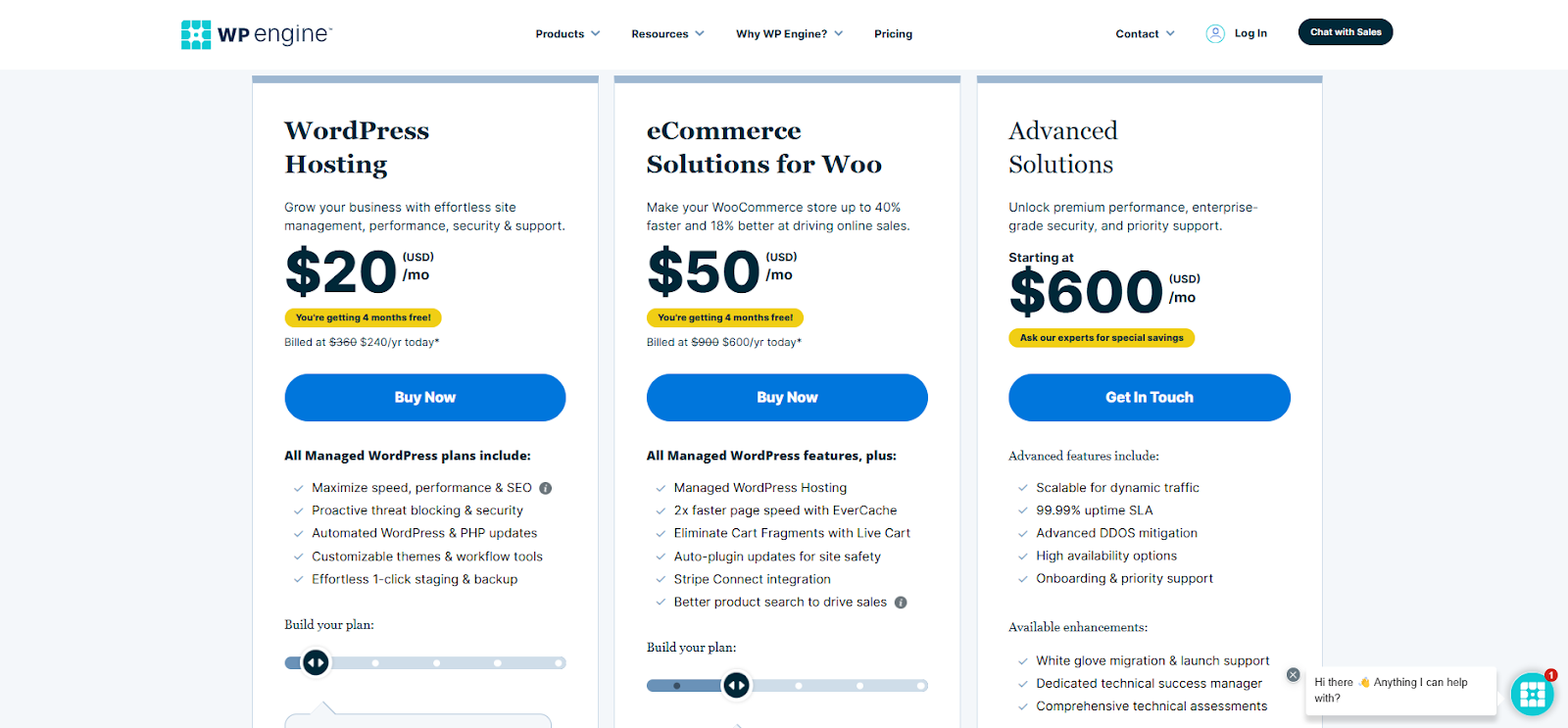
Paid plans remove ads and offer more storage. You get a custom domain name without “wordpress.com.” Paid plans include better design tools and more plugins. They also provide access to support for technical help.
Which Plan Fits Your Needs
Choose a free plan if you want to test WordPress and create a simple blog. It is suitable for personal use or small projects.
For business or professional websites, paid plans are better. They give more control, better branding, and extra features. If you want to sell products or use advanced tools, pick a higher-tier paid plan.
Think about your website goals and budget. Match them with the plan features before deciding.
Migrating From WordPress.com To Other Hosts
Migrating from WordPress.com to other hosts means moving your website to a new place. This step gives you more control over your site. It lets you customize with plugins and themes. Moving requires careful steps to keep your content safe and running well.
The process is not hard but needs attention. You must export your data and set up new hosting. These steps ensure your website works after moving.
Exporting Your Content
Start by logging into your WordPress.com account. Go to the dashboard and find the export tool. This tool lets you download your posts, pages, and media. The export file is in XML format. Save this file on your computer. It holds all your website content.
Images and videos may need extra care. WordPress.com stores them separately. After export, check that all media is included. Sometimes, manual download is necessary for some files.
Setting Up Hosting Elsewhere
Choose a hosting provider that fits your needs. Many offer easy WordPress installation. After buying hosting, access the control panel. Upload your exported XML file into the new WordPress site.
Install themes and plugins you want on the new host. Customize your settings to match your old site. Check that all links and images load correctly. Test your site to ensure smooth operation.
Credit: elementor.com
Frequently Asked Questions
Does WordPress.com Include Web Hosting Services?
Yes, WordPress. com provides hosting as part of its platform. Users don’t need separate hosting since websites are hosted on WordPress servers. This simplifies setup and maintenance, ideal for beginners or those seeking an all-in-one solution.
What Types Of Hosting Plans Does WordPress.com Offer?
WordPress. com offers free and paid plans. Paid plans include Personal, Premium, Business, and eCommerce options. Each plan varies in storage, features, and support, catering to different website needs and budgets.
Can I Use My Own Domain With WordPress.com Hosting?
Yes, WordPress. com allows domain mapping. You can use a custom domain by upgrading to a paid plan. This enhances branding and professionalism for your website hosted on their platform.
Is WordPress.com Hosting Suitable For Large Websites?
WordPress. com hosting suits small to medium sites best. Large websites with heavy traffic may require more control and resources, better served by self-hosted WordPress. org or specialized hosting providers.
Conclusion
WordPress. com does include hosting with its plans. You do not need to buy hosting separately. This makes it easy to start a website fast. The hosting is managed by WordPress, so you focus on content. Keep in mind, some features depend on your plan choice.
Overall, WordPress. com offers a simple way to get online. Choose the right plan to fit your website needs.



