
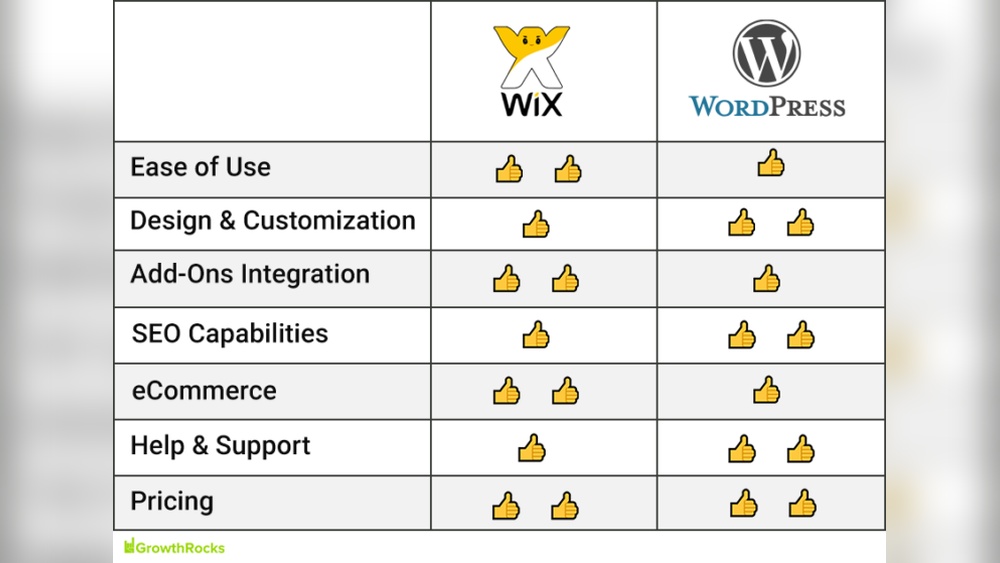
Are you wondering if Wix supports WordPress? If you’re building a website, this question can make a big difference in how you plan your online presence.
You want to know if these two popular platforms work together smoothly or if you’ll face challenges. Understanding their relationship can save you time, money, and frustration. Keep reading to discover the truth about Wix and WordPress, and find out what this means for your website’s future.

Credit: www.wix.com
Wix And WordPress Basics
Understanding Wix and WordPress basics helps you choose the right platform. Both are popular tools for building websites. Each has unique features and ways to manage content. Knowing the differences can guide you toward the best fit for your needs.
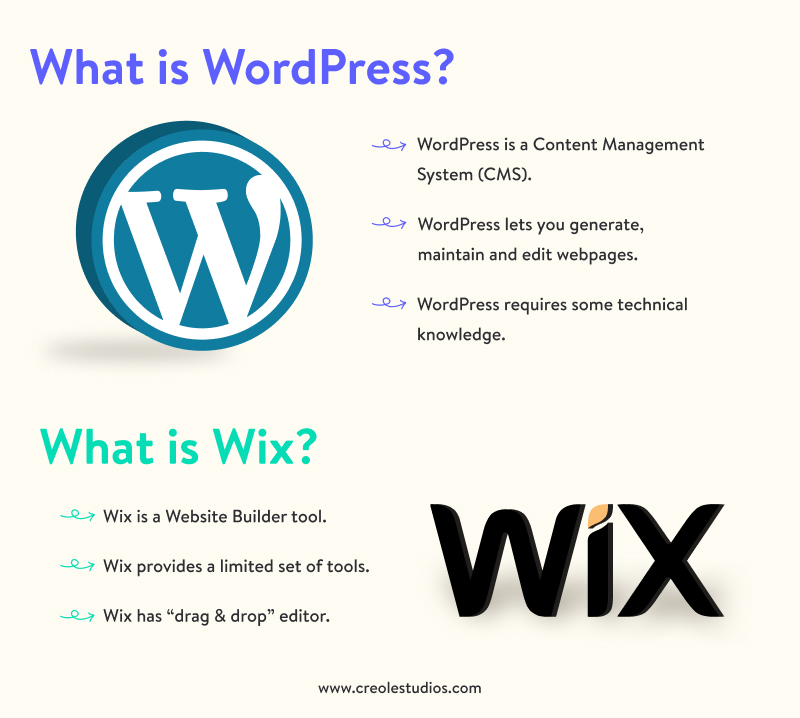
Wix offers an all-in-one website builder. WordPress is a flexible content management system. They serve similar purposes but work differently.
Key Features Of Wix
Wix provides an easy drag-and-drop editor. No coding skills are needed to build a site. It offers many ready-made templates for quick setup. Hosting and security come included with the platform. Wix handles updates and maintenance automatically. It suits small businesses and personal websites well. The platform includes built-in SEO tools for better search rankings.
Core Aspects Of WordPress
WordPress is open-source and highly customizable. It requires separate hosting and domain setup. Users can add plugins to extend site functions. Thousands of themes let you change website design. It supports blogs, e-commerce, portfolios, and more. WordPress gives full control over website data and code. SEO depends on plugins and manual settings.
Platform Compatibility
Platform compatibility is key when choosing between Wix and WordPress. Both serve website creation but differ in structure. Understanding how they connect helps users decide the best fit for their needs.
Direct Integration Possibilities
Wix and WordPress are built on different systems. Wix is a closed platform, while WordPress is open-source. This difference limits direct integration options. There is no official plugin to link Wix with WordPress. Content cannot be shared automatically between the two. Users must manually move content or use third-party tools. Some tools export blog posts from Wix to WordPress but with limited features. Direct syncing of design or functionality is not possible.
Limitations Between Wix And WordPress
Wix does not support WordPress themes or plugins. WordPress users cannot host their site on Wix servers. Wix’s drag-and-drop editor cannot be used inside WordPress. SEO settings on Wix do not transfer to WordPress. Site backup and migration tools work differently for each platform. Users face challenges moving large websites between Wix and WordPress. These limitations affect site control and customization choices. Users must choose one platform carefully based on their needs.
Migrating From Wix To WordPress
Migrating from Wix to WordPress is a common step for website owners seeking more control. WordPress offers more customization and flexibility than Wix. Moving your content can feel tricky but is manageable with the right approach. Understanding the migration process helps avoid data loss and downtime. Here is a clear guide to help you switch smoothly.
Step-by-step Migration Process
First, export your Wix content. Wix does not allow direct export, so copy content manually or use RSS feeds for blogs. Next, set up a WordPress site on your hosting platform. Install a suitable theme that matches your Wix design. Import your blog posts using the WordPress Importer tool. Manually add images, pages, and other media files. Check all links and fix any broken URLs. Finally, test the new site thoroughly before going live.
Tools And Plugins For Migration
Several tools simplify migration from Wix to WordPress. The “FG Wix to WordPress” plugin helps import content and images. “All-in-One WP Migration” assists in backing up and transferring files. Use “Redirection” to manage URL changes and avoid SEO loss. “Duplicator” can create a package of your WordPress site for easy transfer. These tools reduce manual work and save time during migration.
Common Migration Challenges
Wix does not provide a direct export option, making content transfer slower. Some design elements may not copy perfectly to WordPress. SEO settings might need manual adjustments to keep rankings. Media files sometimes require re-uploading and linking. URL structures differ, causing broken links if not handled properly. Expect some technical learning during the process. Planning and patience help overcome these issues easily.
Credit: www.creolestudios.com
Using Wix Content On WordPress
Using Wix content on WordPress can be tricky but possible. Wix and WordPress are different platforms with unique structures. Directly transferring content from Wix to WordPress is not seamless. Still, there are ways to include Wix elements and blog posts on your WordPress site. This section explains two main methods to bring Wix content into WordPress.
Embedding Wix Elements
Embedding Wix elements involves copying specific parts of your Wix site into WordPress. You can embed Wix widgets, forms, or galleries using iframe codes. Wix provides HTML embed codes for some features. Paste these codes into the WordPress text editor or a custom HTML block.
This method keeps the Wix content live and interactive on WordPress. The content updates automatically on both platforms. Some Wix elements may not support embedding, so test them first. Embedding is good for small features, not entire pages.
Importing Wix Blog Posts
Importing Wix blog posts requires exporting content and uploading it to WordPress. Wix does not offer direct export tools for blogs. You can copy posts manually or use RSS feeds to transfer posts.
Use the WordPress Import tool to bring in RSS feed content. This method imports post titles, dates, and text but not images or comments. Manually adding images might be necessary. Importing works best for moving blogs, not other Wix content.
Alternatives For Combining Wix And WordPress
Combining Wix and WordPress can offer unique website solutions. Each platform has strengths that can serve different needs. Many users want to use both without losing the benefits of either. Below are simple ways to use Wix and WordPress together effectively.
Using Wix For Landing Pages
Wix lets you build quick, attractive landing pages easily. These pages can promote products or collect emails. You can create landing pages on Wix and link them to your WordPress site. This keeps your main site organized and powerful. Wix landing pages load fast and look modern. Great for marketing campaigns or special offers.
WordPress As Main Site With Wix Widgets
WordPress works well as a full website platform. You can add Wix widgets to enhance specific parts of your site. Widgets include contact forms, booking tools, or galleries. Embedding Wix widgets lets you keep WordPress features and add Wix’s design tools. This approach combines WordPress’s flexibility with Wix’s user-friendly apps. A smart way to mix both platforms without extra hassle.
Performance And Seo Considerations
Performance and SEO are key factors to consider when choosing between Wix and WordPress. These platforms handle website speed, search rankings, and user experience differently. Understanding these differences helps make the right choice for your site goals.
Seo Differences Between Platforms
WordPress offers more SEO tools and plugins than Wix. It allows full control over meta tags, URLs, and content structure. This control can improve search rankings significantly.
Wix has built-in SEO features that are easy to use. It guides beginners to optimize titles, descriptions, and keywords. But Wix limits advanced SEO customizations compared to WordPress.
WordPress supports many SEO plugins like Yoast and Rank Math. These tools provide detailed SEO analysis and recommendations. Wix’s SEO options are simpler but less flexible for experts.
Impact On Site Speed And User Experience
Site speed affects user satisfaction and search rankings. WordPress speed depends on hosting, themes, and plugins. Good hosting and light themes create fast loading pages.
Wix controls hosting and server speed directly. It optimizes images and content automatically. This can lead to consistent performance but less customization for speed tuning.
WordPress allows caching plugins and CDN integration. These tools reduce load time and improve user experience. Wix has built-in caching but fewer options for advanced speed tweaks.
User experience also depends on design flexibility. WordPress themes offer more customization for mobile and desktop views. Wix uses templates that are easy but less adaptable to specific needs.
Cost And Maintenance Factors
Cost and maintenance are key points when choosing between Wix and WordPress. Both platforms have different pricing styles and upkeep needs. Understanding these helps pick the best fit for your website goals and budget.
Pricing Models Compared
Wix offers fixed monthly plans. These include hosting, templates, and support. Plans vary by features and storage size. It suits users who want all-in-one pricing. No surprises later on bills.
WordPress itself is free to use. But costs come from hosting, themes, and plugins. Hosting prices depend on the provider and site traffic. Premium themes and plugins add extra fees. Costs can grow as your site grows.
Ongoing Maintenance Needs
Wix handles updates and security for you. This means less time fixing issues. Users focus on content and design only. Maintenance is mostly automatic and simple.
WordPress requires regular updates for its core, themes, and plugins. Users must watch for security patches and backups. This can take time and tech skill. Some hire experts to manage these tasks.
Credit: www.hostinger.com
Frequently Asked Questions
Does Wix Support WordPress Integration?
Wix does not support direct WordPress integration. Both platforms are separate website builders with different systems. You can’t embed WordPress features directly into Wix. However, you can link between Wix and WordPress sites using URLs or custom menus for navigation.
Can I Migrate From Wix To WordPress Easily?
Migrating from Wix to WordPress requires manual work. Wix doesn’t offer an automated export option. You must recreate content and design on WordPress. Use plugins or professional services to simplify migration and preserve SEO rankings during the process.
Is WordPress Better Than Wix For Blogging?
WordPress offers more flexibility and advanced blogging features than Wix. It supports custom plugins, themes, and SEO tools. Wix is user-friendly but limited for complex blogs. WordPress suits bloggers seeking growth and full control over their site.
Can Wix Host A WordPress Site?
No, Wix cannot host WordPress sites. Wix is a proprietary platform with its own hosting. WordPress requires separate hosting providers like Bluehost or SiteGround. You must choose hosting compatible with WordPress software to run your site.
Conclusion
Wix and WordPress serve different purposes and users. Wix offers easy drag-and-drop site building with hosting included. WordPress provides more flexibility and control but needs separate hosting. You cannot directly use WordPress inside Wix or vice versa. Choosing depends on your needs, skills, and goals.
Both platforms have strong communities and plenty of resources. Think about what fits your project best before deciding. The right choice will help you build a site that works well for you.



