
Are you wondering if Wix has WordPress features or if they work together? You’re not alone.
Many people want to know which platform suits their needs best. Whether you’re building a blog, an online store, or a simple website, understanding how Wix and WordPress compare can save you time and money. You’ll discover the key differences, benefits, and limitations of both.
By the end, you’ll feel confident making the right choice for your website. Keep reading to unlock the answers you need.
Wix And WordPress At A Glance
Wix and WordPress serve as two popular platforms for building websites. Each offers unique features and tools that fit different needs. Understanding their basics helps choose the right option for your project. This section explains the core aspects of both platforms.
Wix Platform Basics
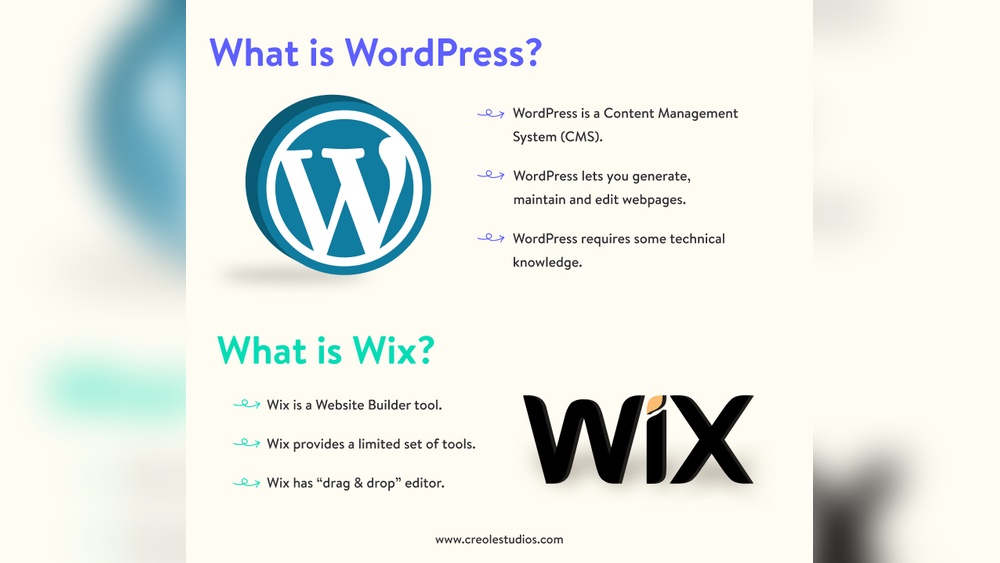
Wix is a website builder with drag-and-drop tools. It allows easy design without coding skills. Users pick templates and customize content quickly. Hosting and security come included with Wix plans. This platform suits small businesses and personal sites. It simplifies the process with built-in features.
WordPress Platform Basics
WordPress is an open-source content management system. It offers full control over website design and functionality. Users install themes and plugins to extend features. Hosting is separate and requires setup. WordPress fits bloggers, businesses, and developers. It requires more technical knowledge than Wix.
Key Features Compared
Comparing Wix and WordPress means looking at their key features. These features shape your website’s look, function, and reach. Understanding differences helps you choose the right tool for your needs.
Design Flexibility
Wix offers many ready-made templates. You can drag and drop elements easily. Changing layouts is simple and fast. WordPress has thousands of themes. Some themes need coding knowledge to customize. WordPress allows deeper design changes than Wix. It fits users who want unique website styles.
Ease Of Use
Wix is beginner-friendly with a clear editor. You see changes live as you edit. WordPress requires some learning at first. It has a dashboard with many options. Wix suits those who want quick setup. WordPress works well for users ready to learn more.
Customization Options
WordPress has many plugins for extra features. You can add almost anything to your site. Wix has apps but fewer than WordPress. Coding skills improve WordPress customization. Wix keeps things simple without coding. WordPress is best for complex sites.
Seo Capabilities
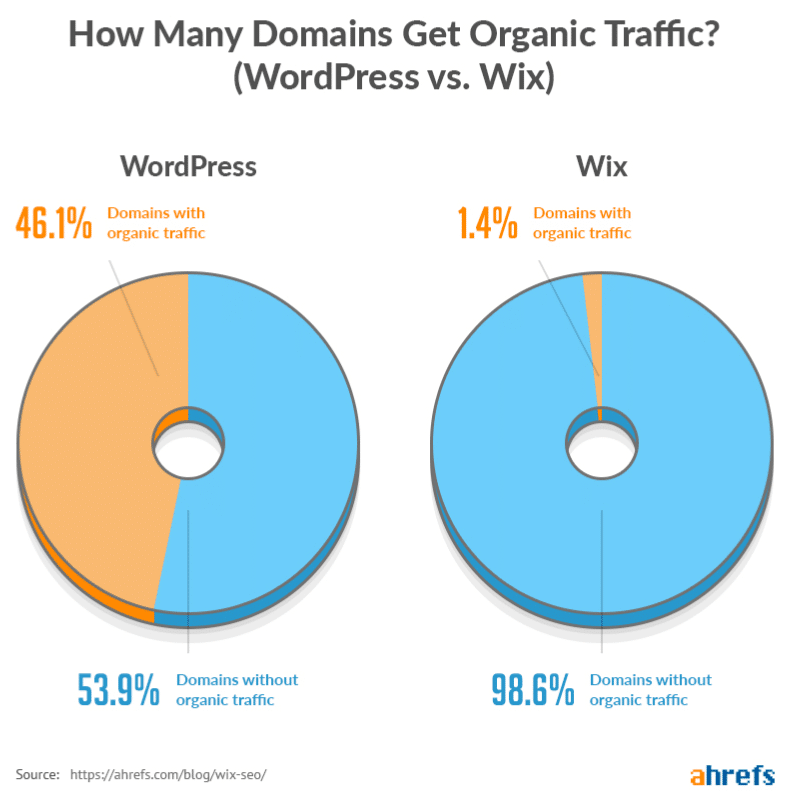
WordPress offers strong SEO tools and plugins. You control metadata, URLs, and more. Wix provides basic SEO features for beginners. It guides you with built-in SEO tips. WordPress suits those who want detailed SEO control. Wix fits users who prefer easy SEO setup.
Pricing And Plans
Choosing the right platform depends a lot on pricing and plans. Understanding costs helps you pick what fits your budget and needs. Both Wix and WordPress offer different pricing models. These models affect your website features and flexibility.
Wix Pricing Structure
Wix uses a simple pricing structure with clear monthly plans. It offers a free plan with limited features and Wix ads. Paid plans start low and increase with more storage and tools. You get options for personal sites, business, and eCommerce. Each plan includes hosting, templates, and customer support. The price is fixed and easy to understand. You pay one fee for everything you need.
WordPress Cost Factors
WordPress itself is free to use and download. Costs come from hosting, themes, and plugins you choose. Hosting prices vary based on speed, storage, and provider. Premium themes and plugins may require one-time or yearly fees. You may also pay for security or SEO services. Managing costs can be flexible but needs more effort. WordPress gives full control over what you spend.
Hosting And Maintenance
Hosting and maintenance are key for any website. They keep your site online and running well. Both Wix and WordPress have different approaches to these tasks. Understanding these differences helps you choose the best platform for your needs.
Wix Hosting Services
Wix includes hosting with every website plan. You do not need to find a separate host. Wix servers take care of speed and uptime. Security updates and backups happen automatically. This removes many technical worries for users. The hosting is optimized for Wix websites only.
WordPress Hosting Options
WordPress does not provide hosting. You must select a web host yourself. This gives freedom to choose from many providers. Hosts vary by price, features, and performance. You can pick shared, VPS, or dedicated hosting. Some hosts offer WordPress-specific plans. These plans include tools for easy installation and updates.
Maintenance Responsibilities
Wix handles most maintenance tasks for you. It updates software and security behind the scenes. You focus on creating content and design. WordPress requires more hands-on care. You must update plugins, themes, and WordPress core. You also handle backups and security settings. This gives more control but needs time and skill.
E-commerce Capabilities
E-commerce is a vital part of many websites today. Both Wix and WordPress offer tools to create online stores. Each platform has unique features and options for selling products.
Understanding the e-commerce capabilities of Wix and WordPress helps you choose the right platform. This section explores their online store features and plugins.
Wix Online Store Features
Wix provides a built-in online store solution. It allows easy product listing and inventory management. Users can add product images, descriptions, and prices quickly.
Wix supports multiple payment methods like credit cards and PayPal. It also offers automatic tax and shipping calculations. Mobile-friendly store designs help customers shop on any device.
Marketing tools such as discount coupons and email campaigns are included. Wix provides real-time analytics to track sales and customer behavior. These features simplify running a small to medium online store.
WordPress E-commerce Plugins
WordPress itself does not include an online store by default. Instead, it relies on plugins to add e-commerce features. WooCommerce is the most popular plugin for WordPress stores.
WooCommerce supports unlimited products and flexible payment gateways. It offers advanced options like subscriptions and digital product sales. Users can customize their stores with numerous themes and extensions.
Other plugins like Easy Digital Downloads focus on specific types of products. WordPress plugins allow deep control over store functionality and design. This flexibility suits businesses with complex or unique needs.
Credit: kinsta.com
Support And Community
Support and community play a big role when choosing a website builder. They help solve problems and guide users through challenges. Wix and WordPress offer different types of support and community resources. Understanding these can help you decide which platform fits your needs.
Wix Customer Support
Wix offers direct customer support to its users. You can contact them through email and a ticket system. Phone support is available but only during certain hours. Wix also provides a detailed help center full of tutorials and guides. The articles are easy to read and cover common issues. This support is useful for beginners who want quick answers.
WordPress Community Resources
WordPress relies on a large, active community for support. There is no official customer service like Wix. Instead, users turn to forums, blogs, and online groups. The WordPress support forums are full of helpful advice from experienced users. Many tutorials and videos exist to guide users step by step. This community approach suits those who like to learn by exploring. It also means help is available 24/7 from people worldwide.
Which One Suits Your Needs?
Choosing between Wix and WordPress depends on your specific needs. Both platforms offer unique features. Understanding which fits your project helps save time and effort. Consider your skills, budget, and website goals before deciding.
Each platform suits different users and purposes. Here is a clear guide to help you decide.
Best For Beginners
Wix provides a simple drag-and-drop editor. No coding skills required. You can build a site quickly with ready-made templates. It offers easy tools for design and content. WordPress has a learning curve that may confuse new users. Wix fits those who want a fast, simple start.
Best For Developers
WordPress is open-source, allowing full control over code. Developers can customize themes and plugins easily. It supports advanced functions and integrations. Wix limits code access and backend changes. WordPress suits developers who want flexibility and growth options.
Best For Small Businesses
Wix offers built-in tools for small business needs. Features like online stores, booking, and marketing are ready to use. It requires less technical setup and maintenance. WordPress can work too but needs more time to configure. Wix fits small businesses wanting a quick online presence.
Best For Large Websites
WordPress handles large, complex sites well. It supports many pages, users, and custom functions. Its plugins and themes help scale websites over time. Wix may struggle with high traffic or complex needs. WordPress is better for big projects and long-term growth.
Credit: www.elegantthemes.com
Credit: kinsta.com
Frequently Asked Questions
Does Wix Support WordPress Integration?
No, Wix does not support direct WordPress integration. Wix is a standalone website builder with its own platform. WordPress operates independently as an open-source content management system. You can migrate content between them, but they function separately without native integration.
Can I Use WordPress Themes On Wix?
No, Wix does not allow the use of WordPress themes. Wix provides its own customizable templates. WordPress themes are designed specifically for the WordPress platform and are incompatible with Wix’s system and editor.
Is Wix An Alternative To WordPress?
Yes, Wix is a popular alternative to WordPress. Wix offers easy drag-and-drop design, hosting, and support. WordPress is more flexible but requires technical skills. Choose Wix for simplicity and WordPress for advanced customization.
Can Wix Import WordPress Content?
Wix allows limited import of WordPress blog content via RSS feed. However, full site migration requires manual effort or third-party tools. Wix and WordPress have different structures, so some content may not transfer perfectly.
Conclusion
Wix and WordPress serve different needs for website building. Wix offers simple, all-in-one solutions for beginners. WordPress provides more control and flexibility for advanced users. Both platforms have pros and cons depending on your goals. Choose the one that fits your skills and project size.
Remember, success depends on how you use the tool. Explore options, try features, and decide what works best for you. Your website’s future starts with the right choice today.



