
Are you thinking about starting a website with WordPress but worried about unexpected ads popping up? You’re not alone.
Many people wonder, “Does free WordPress have ads? ” Before you dive in, it’s important to know what to expect. Ads can affect how your site looks and how visitors feel about your content. If you want to keep full control over your site’s appearance and avoid distractions, understanding WordPress’s free plan is key.
Keep reading to find out exactly how ads work on free WordPress and what choices you have to keep your site clean and professional.

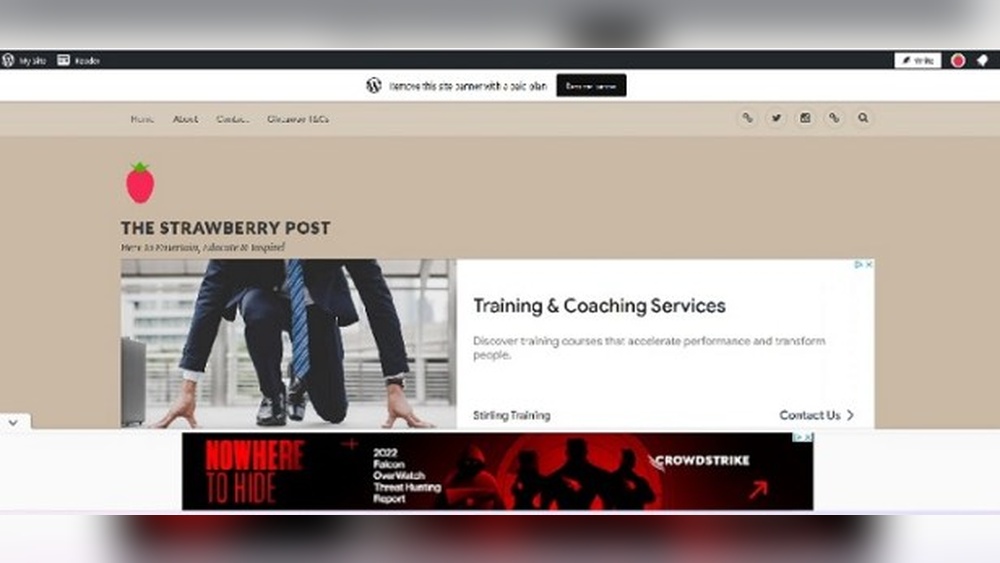
Credit: thestrawberrypost.wordpress.com
Free WordPress Plan And Ads
The Free WordPress plan is a popular choice for many beginners. It lets users create websites without paying. One thing to know is that free plans include ads. These ads help WordPress cover costs and keep the service free.
Understanding how ads work on free WordPress sites is important. It helps users decide if the free plan fits their needs. Below, we explore where ads appear, what kinds show up, and who controls them.
Ad Placement On Free Sites
Ads on free WordPress sites usually appear in visible spots. Common locations include the header, footer, or sidebar. Sometimes ads show within blog posts or pages. These placements ensure ads get enough attention from visitors.
The ads do not block content but remain noticeable. WordPress chooses the best spots based on site layout. This approach keeps ads from feeling too intrusive.
Types Of Ads Displayed
WordPress shows various ad types on free plans. These ads often promote WordPress.com services or partners. Some ads feature banners, while others use text links. Occasionally, image or video ads appear as well.
The ads focus on products or services related to website building. They avoid unrelated or harmful content. This keeps the site safe and relevant for visitors.
Who Controls The Ads
WordPress fully controls the ads on free plans. Users cannot remove or change these ads. This control helps WordPress manage ad quality and placement. Paid plans offer more freedom to remove ads.
Users on free plans trade ad control for zero hosting fees. WordPress monitors ads to avoid spam or offensive content. This ensures a good experience for site owners and visitors.
Impact Of Ads On User Experience
Ads on free WordPress sites affect how visitors see and use the website. They can change the look, speed, and interaction on the site. Understanding this impact helps in making better decisions about hosting and design.
Effect On Website Design
Ads take up space on the page. This space can cover parts of your content or push it down. Visitors may find the design less clean and harder to read. Ads can also clash with your site’s colors and fonts. This lowers the overall appeal and professionalism.
Loading Speed And Performance
Ads add extra files to load on your site. This slows down the page loading time. Visitors may leave if the site loads too slowly. Slow sites rank lower on search engines. A fast site keeps visitors happy and engaged.
Visitor Engagement
Ads can distract visitors from your main content. Visitors might click on ads instead of your links. This reduces the chance they will explore your site. Too many ads can frustrate visitors, causing them to leave quickly. Clear, ad-free spaces help visitors focus and stay longer.
Removing Ads Options
Free WordPress sites often show ads to cover hosting costs. These ads can distract visitors and reduce your site’s professionalism. Removing ads improves user experience and site credibility. There are a few ways to remove ads from your WordPress site. Understanding these options helps you choose the best method for your needs.
Upgrading To Paid Plans
Paid WordPress plans remove all WordPress ads from your site. These plans offer more features and customization options. You get access to premium themes and plugins. Your site looks clean and professional without forced ads. Upgrading is the simplest way to remove ads completely.
Using Custom Domains
Custom domains help you build a unique web address. Free WordPress sites use a WordPress subdomain and may show ads. Paid plans let you use your own domain name. This change often removes WordPress ads automatically. A custom domain makes your site easier to remember.
Third-party Ad Management
Third-party ad managers let you control your site’s ads. Free WordPress restricts adding external ad codes. Paid plans allow ad management plugins and scripts. You can run your own ads or remove ads entirely. This method offers control but requires some technical knowledge.

Credit: ar.wordpress.org
Alternatives To Free WordPress
Free WordPress plans often show ads to cover their costs. This can disrupt your site’s look and your visitors’ experience. Many users want to avoid ads without paying high fees. There are several good alternatives to free WordPress that offer different benefits. Exploring these options helps you find the best fit for your site needs.
Other Free Platforms Without Ads
Some platforms offer free plans with no ads. They use other ways to make money, like paid upgrades. Examples include Blogger and Wix’s free plan. These platforms limit some features but keep your site ad-free. You get a simple, clean website experience without extra costs.
Self-hosting WordPress
Self-hosting means you buy your own web hosting. You install WordPress software on your server. This option gives you full control over your site. No ads appear unless you add them yourself. Self-hosting needs some technical skills but offers the most freedom. You can choose themes, plugins, and customize as you like.
Cost Vs Control
Free platforms save money but limit control and features. Self-hosting costs more but gives full control and no ads. Consider your budget and site goals before choosing. Small blogs may prefer free platforms without ads. Businesses might benefit more from self-hosting for growth and branding. Balance cost and control to make the best choice.
Tips For Managing Ads Effectively
Managing ads on your WordPress site can be tricky. You want to earn money but keep visitors happy. Ads that are too many or too loud may drive people away. Use smart strategies to balance ads and user experience. This section offers tips to help you handle ads well.
Balancing Monetization And User Experience
Put ads where they do not annoy visitors. Avoid pop-ups and large banners that cover content. Use fewer ads but place them in visible spots. Make sure ads load quickly to keep your site fast. A smooth site keeps visitors coming back.
Choosing The Right Plan
Free WordPress plans often show their own ads. Upgrading to a paid plan lets you control ads better. Paid plans allow you to add your own ads or remove others. Pick a plan that fits your budget and ad goals. This helps you grow your site without losing visitors.
Monitoring Ad Performance
Track how well your ads perform regularly. Use simple tools to see which ads get clicks. Remove ads that do not work or annoy visitors. Try different ad types and placements to find the best fit. Keep testing to improve your ad income and user experience.
Credit: www.isitwp.com
Frequently Asked Questions
Does Free WordPress Display Ads On My Site?
Yes, free WordPress. com sites display ads to cover hosting costs. You cannot remove or control these ads unless you upgrade to a paid plan.
Can I Remove Ads From Free WordPress Websites?
No, removing ads is not allowed on free WordPress plans. Only paid plans offer the option to disable ads for a cleaner site appearance.
How Do WordPress Ads Affect My Website Visitors?
WordPress ads may distract visitors and reduce site professionalism. Paid plans improve user experience by removing ads and allowing custom branding.
Are WordPress Ads Customizable On Free Plans?
No, ads on free WordPress sites are automatically placed and non-customizable. Paid plans offer more control over ad placement and removal.
Conclusion
Free WordPress plans do include ads on your site. These ads help WordPress cover hosting costs. You cannot remove them without upgrading to a paid plan. Ads might affect your site’s look and visitor experience. For no ads and more control, consider paid options.
Remember, free plans are great to start and learn. Choose what fits your needs and budget best.



