

Are you building a website and wondering if you really need a WordPress theme? Choosing the right design can make or break your site’s success.
Your website’s look affects how visitors feel, trust, and engage with your content. But should you pick a ready-made theme or go without one? You’ll discover why a WordPress theme might be exactly what your site needs to stand out, save time, and grow your audience.
Keep reading to find out how the right theme can give your website the edge you’re looking for.
What Is A WordPress Theme
A WordPress theme controls how your website looks and feels. It sets the design, layout, and style. This helps your website stand out and stay consistent.
The theme affects colors, fonts, and page structures. It also controls menus, buttons, and widgets. Changing a theme can completely change your site’s appearance.
What Does A WordPress Theme Include?
A theme includes files that create the website’s design. These files tell the site how to show pages and posts. They also add special features and layouts.
Templates in the theme decide the look of different parts. For example, the homepage, blog pages, and contact pages. Themes can also add custom widgets and menus.
How Does A WordPress Theme Work?
The WordPress system uses the theme files to display content. It pulls your text and images and shows them with the theme’s style. This happens every time someone visits your site.
You can switch themes anytime. Your content stays the same but looks different. This makes it easy to refresh your website’s design.
Why Choose A WordPress Theme?
Themes help you build a website without coding. They give your site a professional look fast. Many themes come with built-in tools to customize your site easily.
Choosing a theme saves time. It also keeps your website organized and user-friendly. Good themes support mobile devices and improve user experience.

Credit: meancreative.com
Why Themes Matter
The theme of a WordPress site shapes its look and feel. It controls how visitors see your content. A good theme makes your site easy to use. It also helps your site load faster. Themes affect both design and performance.
The right theme builds trust with your audience. It shows professionalism and care. Visitors are more likely to stay and explore. A poor theme can drive people away quickly.
Html Syntax For Themes
Themes use HTML to structure site pages. Clean HTML code ensures pages display properly. It makes your content clear and organized. Good HTML helps search engines read your site well.
Visual Appeal And Branding
The theme sets the style of your site. Colors, fonts, and layouts create a mood. Consistent design supports your brand image. This helps visitors recognize your site fast.
Functionality And Features
Themes add special functions to your site. Some include sliders, contact forms, or galleries. Choosing a theme with needed features saves time. It avoids extra plugins that slow the site.
Mobile Responsiveness
A responsive theme works well on phones and tablets. It adjusts layout to fit any screen size. Mobile-friendly sites rank better on search engines. They also provide a better user experience.
Types Of WordPress Themes
WordPress themes shape the look and feel of your website. Choosing the right type is key. Themes vary by features, cost, and customization options. Understanding the main types helps you pick one that fits your needs.
Free Themes
Free themes come at no cost. Many are available in the WordPress theme directory. They offer basic designs and essential features. Ideal for beginners or simple websites. Updates and support might be limited. Still, they provide a good start without spending money.
Premium Themes
Premium themes require a purchase. They offer advanced features and more design options. Support and regular updates are included. Best for users wanting professional looks and more control. Prices vary, but quality and flexibility improve significantly. A good choice for growing websites.
Custom Themes
Custom themes are made just for you. Built from scratch or heavily modified. They match your brand and specific needs perfectly. This option costs more and takes time. Great for businesses needing unique design and features. Offers full control over site appearance and functions.

Credit: jvf.com
Key Features To Look For
Choosing the right WordPress theme is important. The theme shapes your website’s look and feel. It also affects how your site works on different devices. Some themes offer more control than others. Key features help you pick the best theme for your needs.
Design And Layout
Design and layout set the first impression. A clean and clear design keeps visitors interested. Look for themes with simple navigation and organized content areas. A good layout helps your content stand out. It should fit the style of your website’s purpose.
Responsiveness
Responsiveness means your site looks good on all devices. Phones, tablets, and desktops all show your site well. Choose a theme that adapts to different screen sizes automatically. A responsive theme improves user experience and keeps visitors longer.
Customization Options
Customization lets you change colors, fonts, and layouts easily. Some themes offer drag-and-drop builders or simple settings panels. This saves time and avoids coding. Pick a theme with enough options to make your site unique without confusion.
Compatibility
Compatibility with plugins and WordPress versions is vital. Your theme must work with popular plugins like SEO or contact forms. Also, it should update along with WordPress core files. This prevents errors and keeps your site secure.
Support And Updates
Good support helps fix problems fast. Check if the theme developer offers help through forums or email. Regular updates fix bugs and add features. A theme with ongoing support lasts longer and stays reliable.
When You Need A Theme
Choosing the right WordPress theme matters for your website’s success. A theme controls your site’s look and feel. It shapes how visitors see your content. Knowing when to use a theme can save time and effort.
Here are key moments when you need a WordPress theme.
Starting A New Website
Begin with a theme to set your website’s style fast. Themes provide ready-made layouts and designs. They make your site look professional from day one. This helps attract and keep visitors.
Changing Your Website’s Design
Update your site’s appearance by switching themes. New themes offer fresh looks and modern features. This keeps your site interesting and easy to use. Visitors enjoy a clean and attractive design.
Adding Specific Features
Themes often include special tools and options. Choose a theme that fits your site’s needs. For example, a portfolio theme highlights images well. A blog theme focuses on text and readability.
Improving Mobile Experience
Many themes are mobile-friendly. They make your site look good on phones and tablets. This improves user experience and boosts search rankings. Mobile-ready themes reach more visitors everywhere.
Enhancing Website Speed
Some themes are built for fast loading. Speed matters for visitor satisfaction and SEO. A lightweight theme reduces wait time. This keeps visitors engaged and lowers bounce rates.
How To Choose The Right Theme
Choosing the right WordPress theme shapes your website’s look and function. A good theme fits your needs and helps your site grow. Consider your goals, user feedback, and how the theme works before picking one.
Assess Your Website Goals
Think about what your website should do. Is it for a blog, store, or portfolio? A theme must support your content and features. Check if it offers customization options and matches your style.
Check User Reviews
Read what other users say about the theme. Reviews reveal real experiences and common issues. Look for themes with many positive reviews and recent updates. Avoid themes with many complaints or no support.
Test Demo Versions
Try the theme’s demo to see it in action. Check how it looks on phones and computers. Test loading speed and ease of use. A demo helps you decide if the theme feels right for your site.
Installing And Activating A Theme
Installing and activating a WordPress theme is the first step to change your website’s look. It sets the style and layout your visitors see. The process is simple and quick. Anyone can do it without special skills.
Choose a theme that fits your website’s purpose. After that, upload and activate it to start using its design. This section explains how to install and activate a theme in WordPress.
Finding The Right Theme In WordPress
Go to your WordPress dashboard. Click on “Appearance” then “Themes.” Here, you find many free themes. Use the search bar to type keywords that match your site’s style. Preview themes to see how they look on your site.
Uploading A Theme Manually
If you buy a theme from another site, you get a .zip file. Back in “Themes,” click “Add New” then “Upload Theme.” Choose the .zip file from your computer. Click “Install Now” and wait a few seconds.
Activating Your New Theme
After installation, click the “Activate” button. Your site immediately uses the new theme. Check your homepage to see the changes. Customize it to match your brand and needs.
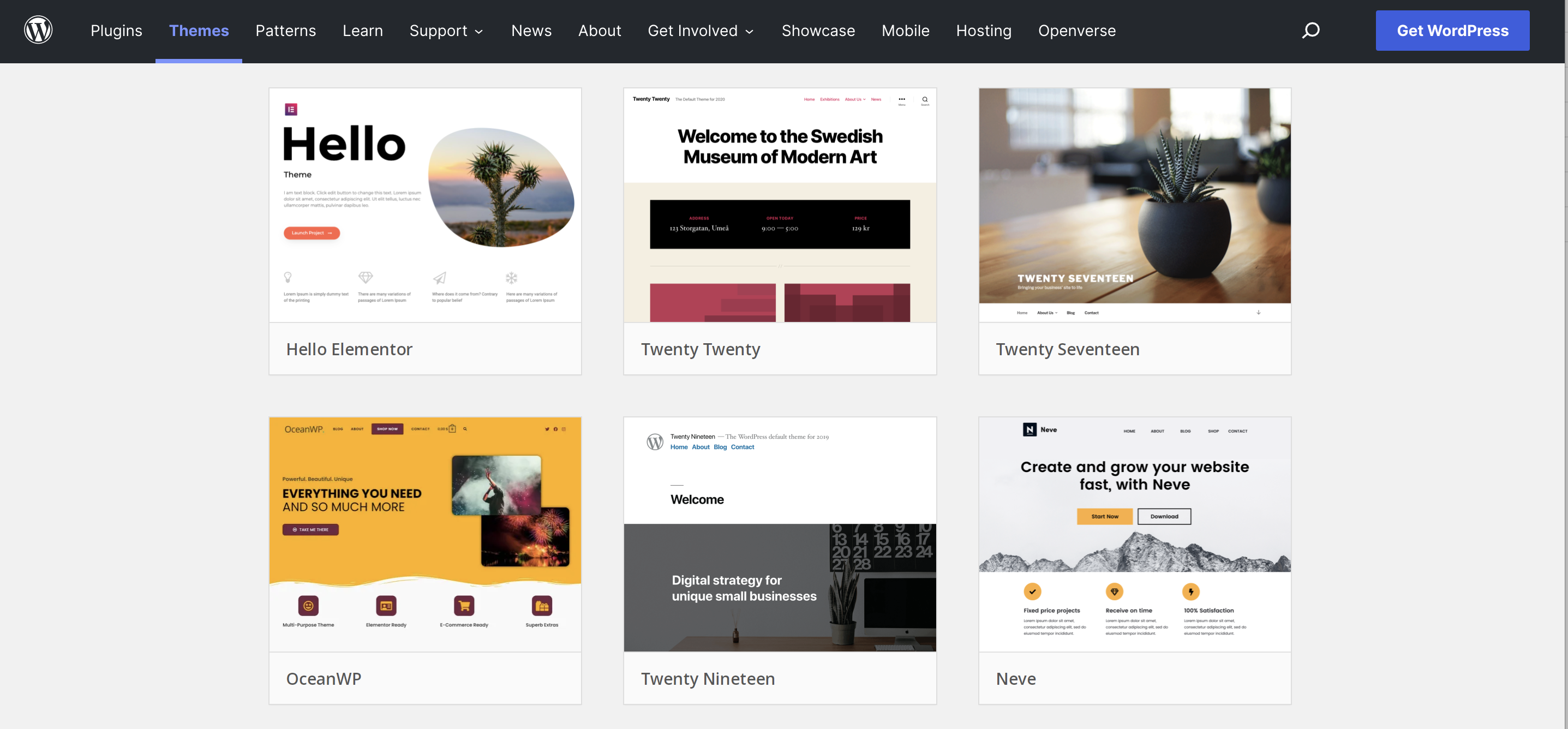
Credit: jetpack.com
Common Mistakes To Avoid
Choosing the right WordPress theme is crucial for your website’s success. Many beginners make avoidable mistakes. These errors can slow down your site or cause design problems. Knowing what to avoid helps save time and effort.
Below are common mistakes to watch out for when selecting a WordPress theme.
Not Checking Theme Responsiveness
Many themes look good on desktop but fail on mobile devices. A non-responsive theme harms user experience. Test the theme on different screen sizes before deciding.
Ignoring Theme Speed Performance
Slow themes hurt your website’s loading time. Visitors leave fast if pages take too long to load. Choose themes optimized for speed and performance.
Overlooking Compatibility With Plugins
Some themes do not work well with popular plugins. This causes errors and broken features. Confirm that your theme supports essential plugins.
Choosing A Theme Without Support
Themes without developer support can cause trouble. Updates and help may be unavailable. Select themes with active support and regular updates.
Using Overly Complex Themes
Complex themes often confuse beginners. Too many features can slow your site. Pick simple themes that fit your needs and are easy to customize.
Customizing Your Theme
Customizing your WordPress theme helps make your website unique and fit your style. It allows you to change colors, fonts, layouts, and more. Even small changes can make a big difference in how your site looks and feels. You do not need to be a coding expert to customize your theme. WordPress offers easy tools to help you personalize your site quickly.
Using The WordPress Customizer
The WordPress Customizer is a simple tool to change your theme’s appearance. You can find it in the WordPress dashboard under “Appearance” and then “Customize.” It shows a live preview of your site as you make changes. You can adjust site identity, colors, menus, and widgets. The Customizer works with most themes and does not require coding knowledge. Changes appear instantly, so you see exactly how your site looks.
Adding Plugins For Extra Features
Plugins add new features to your WordPress site. They can help you customize your theme beyond the basics. For example, you can add sliders, contact forms, or SEO tools. Many plugins are free and easy to install. You find plugins in the WordPress dashboard under “Plugins” and then “Add New.” Always choose plugins that are well-rated and updated often. Plugins help improve your site’s function and user experience.
Frequently Asked Questions
Do I Need A WordPress Theme For My Website?
Yes, a WordPress theme defines your site’s design and layout. It enhances user experience and ensures mobile responsiveness. Without a theme, your website lacks structure and visual appeal, making it essential for any WordPress site.
Can I Customize A WordPress Theme Easily?
Most WordPress themes offer easy customization options. You can change colors, fonts, and layouts using the WordPress Customizer or theme settings. This flexibility allows you to create a unique website without needing advanced coding skills.
Are Free WordPress Themes Safe To Use?
Free WordPress themes can be safe if downloaded from reputable sources like the official WordPress repository. Always check user reviews, update frequency, and developer reputation to avoid security risks or poor performance.
How Does A WordPress Theme Affect Seo?
A well-coded WordPress theme improves website speed, mobile usability, and clean HTML structure. These factors boost search engine rankings and user experience. Choosing an SEO-friendly theme is crucial for better online visibility.
Conclusion
Choosing a WordPress theme can shape your website’s look and feel. It helps organize content and improves user experience. A good theme supports your site’s goals and keeps visitors interested. Themes also save time by offering ready designs. Think about your needs and style before picking one.
A theme is more than just colors and fonts—it guides how people see your site. Take your time and choose wisely for the best results.



