
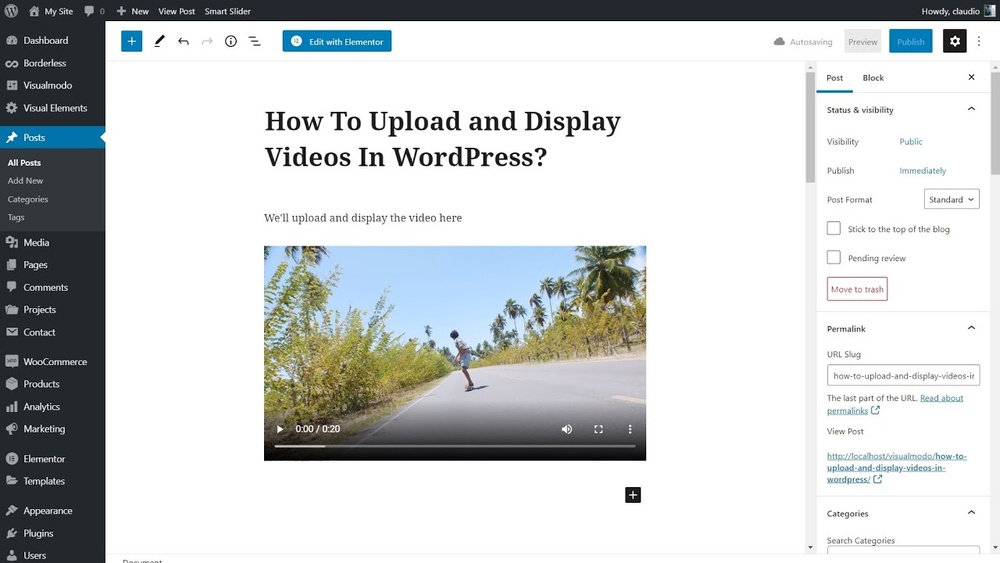
Are you wondering if you can post videos on WordPress? Maybe you want to make your website more engaging or share important moments with your visitors.
Videos grab attention faster than text or images, but how easy is it to add them to your WordPress site? If you’ve ever struggled with embedding videos or worried about slowing down your site, this guide is for you. Keep reading, and you’ll discover simple ways to share videos that look great and work smoothly—no tech headaches needed.
Benefits Of Posting Videos On WordPress
Posting videos on WordPress offers many benefits that help your website grow. Videos attract attention and keep visitors interested. They make your content more dynamic and easier to understand. Adding videos can also improve your site’s performance in search engines.
Videos are a powerful tool to connect with your audience. They show your message clearly and quickly. Using videos on WordPress pages or posts can make your site stand out from others.
Boosting Engagement
Videos grab visitors’ attention faster than text. People watch videos longer than they read articles. This increases the time spent on your website. Longer visits lower bounce rates and signal quality content to search engines. Engaged visitors are more likely to share your content.
Enhancing Seo
Search engines favor websites with video content. Videos increase the chances of your site appearing in search results. Properly titled and described videos help improve keyword relevance. Video sitemaps make indexing easier for search engines. This results in better visibility and higher rankings.
Improving User Experience
Videos help explain complex topics simply. Visitors prefer watching a video over reading long text. Videos make your site more interactive and enjoyable. They cater to different learning styles and preferences. A good user experience encourages repeat visits and builds trust.
Credit: www.wpbeginner.com
Supported Video Formats
WordPress supports various video formats for uploading and embedding. Knowing which formats work best helps avoid playback issues. Choosing the right format improves your site’s speed and user experience.
Common File Types
WordPress accepts many popular video file types. MP4 is the most common and widely supported format. Other files include WebM, Ogg, and AVI. Some formats may not play well on all browsers.
MP4 uses H.264 video codec, making it compatible with most devices. WebM supports modern browsers and provides good quality. Ogg is an open format but less common. AVI files tend to be large and less efficient.
Recommended Formats For WordPress
MP4 is the best format for WordPress videos. It offers a good balance of quality and file size. WebM is a good alternative for newer browsers. These formats load faster and play smoothly.
Keep video files small by compressing them before upload. Smaller files reduce page load time. Use tools to convert videos into MP4 or WebM formats. This ensures your videos work well on WordPress sites.
Methods To Upload Videos
Uploading videos on WordPress can enhance your website’s content and engage visitors. There are several ways to add videos to your posts or pages. Each method has its benefits and suits different needs. Understanding these options helps you choose the best approach for your site.
Direct Upload To Media Library
You can upload videos directly to WordPress through the Media Library. This method lets you store videos on your website’s server. It is simple and quick for short videos. Just click “Add Media” in the editor and select your video file. WordPress supports common video formats like MP4.
Keep in mind, uploading large videos may slow down your website. Web hosting limits might also restrict file sizes. Use this method for small, important videos that need quick access.
Using Video Hosting Platforms
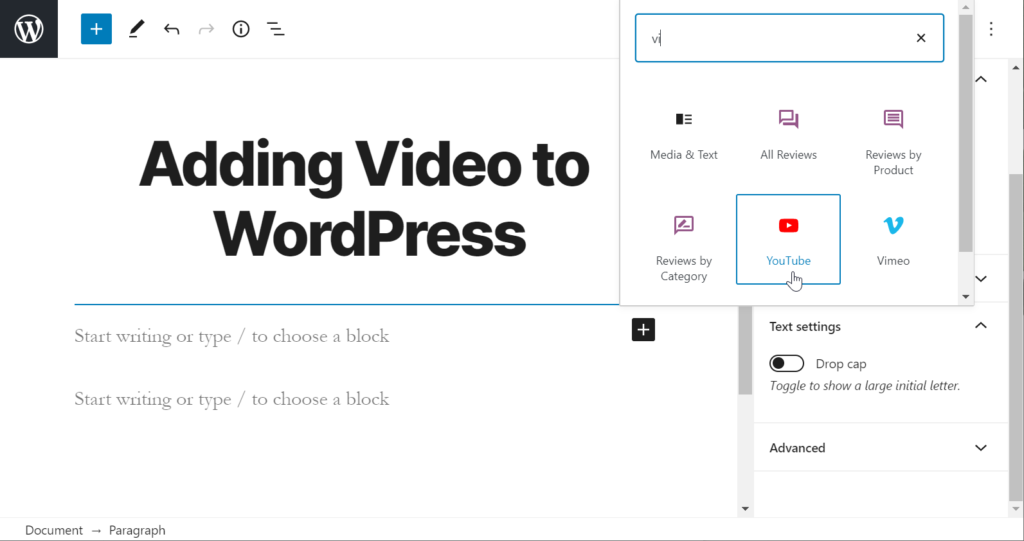
Using platforms like YouTube or Vimeo helps save server space. Upload your video to these platforms first. Then, you can link or embed videos on your WordPress site. This approach improves site speed and video loading times. Hosting platforms also offer extra features like video analytics and custom players.
This method works well for longer videos or high traffic sites. It reduces the risk of crashing your server due to heavy video files.
Embedding Videos From External Sources
Embedding videos means inserting code from external sites into your WordPress content. Most video platforms provide an embed code to paste into your post. WordPress supports many embed formats automatically. Just paste the video URL, and it converts to a video player.
This method is easy and keeps your site fast. It also gives access to video controls like play, pause, and fullscreen. Embedding is great for sharing videos without using your server space.
Credit: cloudinary.com
Using Plugins For Video Management
Managing videos on WordPress is easier with plugins. Plugins add tools to handle videos smoothly. They help upload, organize, and display videos on your site. This saves time and improves user experience. Many plugins support different video formats and sources. They also improve loading speed and playback quality.
Top Video Plugins
Several plugins stand out for video management. “Video Gallery” offers easy video display options. “FV Player” supports many video formats and subtitles. “YouTube Embed Plus” helps embed YouTube videos with customization. “WP Video Lightbox” creates a pop-up video effect. These plugins fit various needs and skill levels.
Features And Benefits
Most plugins provide simple video uploads and embedding. They let you create video galleries or playlists. Some support autoplay and loop options. Mobile-friendly designs ensure videos work on all devices. SEO features help videos rank better in search engines. Plugins also reduce buffering by optimizing video delivery. Customization options let you match videos to your site style.
Installation And Setup
Installing video plugins is quick and easy. Go to WordPress dashboard and select “Plugins” then “Add New.” Search for your chosen plugin by name. Click “Install Now” and then “Activate.” After activation, find the plugin settings in the dashboard menu. Follow the setup guide to connect or upload videos. Adjust settings to fit your site’s needs.
Optimizing Video Performance
Videos can slow down your WordPress site if not handled well. Optimizing video performance helps your pages load faster. It improves user experience and keeps visitors longer. Proper optimization saves bandwidth and reduces server load. Use smart techniques to make videos work smoothly on your site.
Compression Techniques
Compress videos to reduce their file size. Smaller files load quickly and use less data. Use tools like HandBrake or online compressors. Choose formats like MP4 with H.264 codec for good quality. Balance quality and size to avoid pixelated videos. Always test videos after compression to ensure clarity.
Lazy Loading Videos
Lazy loading delays video loading until needed. Videos load only when users scroll to them. This cuts initial page load time significantly. WordPress plugins can add lazy loading easily. It helps save bandwidth and improves speed on mobile. Users see content faster, which boosts engagement.
Choosing The Right Video Player
Pick a video player that works well on all devices. It should support fast loading and different video formats. Players like Video.js and Plyr are lightweight and customizable. Ensure the player supports controls like play, pause, and volume. A good player improves viewing experience and site performance.
Troubleshooting Common Issues
Posting videos on WordPress can sometimes be tricky. Common issues may stop your videos from working well. Understanding these problems helps fix them fast. Below are some typical video issues and ways to solve them.
Playback Problems
Videos may not play smoothly on your WordPress site. This can happen if the video file is too large. Slow internet speeds also cause playback delays. Another reason is unsupported video formats. Use standard formats like MP4 for better results. Clear browser cache and update your browser to fix playback errors.
Upload Failures
Uploading videos to WordPress can fail due to size limits. WordPress sets a maximum file size for uploads. Check your hosting provider’s upload limit. Use smaller video files or compress them before uploading. Network interruptions can also cause upload failures. Try uploading videos during low traffic times for better success.
Compatibility Concerns
Some videos may not work on all devices or browsers. Older browsers might not support newer video formats. Mobile devices sometimes have trouble playing certain videos. Use widely supported formats like MP4 and WebM. Test your videos on multiple devices to ensure compatibility. Plugins or themes may also affect video playback. Disable conflicting plugins if videos fail to play.
Tips For Video Seo On WordPress
Video SEO helps your videos reach more people on WordPress. It improves how search engines find and rank your videos. Good SEO means more views and better engagement. Focus on a few key tips to boost your video SEO on WordPress.
Using Video Sitemaps
Video sitemaps tell search engines about your videos. They list all videos on your site with details like title and duration. This helps search engines find and index your videos faster. Use plugins or tools to create video sitemaps easily. Submit your sitemap to Google Search Console for better visibility.
Adding Transcripts And Captions
Transcripts and captions make videos easier to understand. They help people who cannot hear or read well. Search engines also read transcripts to understand video content. Write clear transcripts and add captions to every video. This increases accessibility and improves SEO by adding more text for search engines.
Optimizing Video Titles And Descriptions
Titles and descriptions should be clear and include keywords. Use simple words that describe your video content. Keep titles short but informative. Descriptions can explain the video in more detail. Good titles and descriptions attract clicks and help search engines rank your videos better.
Credit: www.inmotionhosting.com
Frequently Asked Questions
Can You Upload Videos Directly To WordPress?
Yes, WordPress allows direct video uploads via its media library. However, file size limits depend on your hosting plan. Large videos may slow your site, so embedding from platforms like YouTube is often recommended for better performance.
How Do I Embed Videos From Youtube On WordPress?
To embed YouTube videos, copy the video URL. Paste it directly into the WordPress editor. The platform automatically converts it into an embedded video, making it easy to display without affecting site speed.
What Video Formats Are Supported By WordPress?
WordPress supports common video formats like MP4, MOV, and AVI. MP4 is the most recommended due to its compatibility and small file size. Using compatible formats ensures smooth playback across all devices.
Can I Use Plugins To Enhance Video Posting On WordPress?
Yes, plugins like VideoPress or WP Video Lightbox enhance video posting. They add features such as galleries, lightboxes, and custom players. These tools improve user experience and provide more control over video display.
Conclusion
Posting videos on WordPress is easy and effective. You can upload videos directly or embed from platforms like YouTube. Videos help make your content more interesting and keep visitors longer. Just remember to optimize video size for faster loading. Use clear titles and descriptions for better search visibility.
Adding videos can boost your website’s appeal and user experience. Start sharing your videos today to connect better with your audience. Simple steps lead to great results.



