
Are you wondering if you can create a landing page on WordPress? Maybe you want to boost your sales, capture leads, or promote a special offer.
The good news is, you don’t need to be a tech expert or hire a designer to make a powerful landing page. You’ll discover simple, effective ways to build a landing page that grabs attention and drives results—all using WordPress.
Keep reading, and you’ll learn how to turn your website into a conversion machine.
Choosing The Right WordPress Setup
Choosing the right WordPress setup is key to creating a great landing page. The setup affects how easy it is to build and customize the page. It also impacts the site’s speed and security. Picking the right setup helps you focus on design and content, not technical issues.
Self-hosted Vs WordPress.com
A self-hosted WordPress site uses WordPress.org software. You buy hosting and a domain name. This option gives full control over your site. You can install any plugin or theme. It suits those who want flexibility and growth.
WordPress.com is a hosting service. It offers free and paid plans. It is easier for beginners. No need to manage hosting or updates. But it has limits on plugins and themes. It fits small projects or simple landing pages.
Selecting A Suitable Theme
The theme controls your site’s look and layout. Choose a theme made for landing pages. It should be fast and mobile-friendly. Simple themes help visitors focus on your message.
Look for themes with easy customization options. Drag-and-drop builders make editing simple. Pick a theme that works well with popular plugins. This ensures smooth design and functionality.
Credit: elementor.com
Essential Plugins For Landing Pages
Creating an effective landing page on WordPress needs more than just a good design. Essential plugins help build pages that attract visitors and turn them into customers. These plugins simplify tasks like designing pages and capturing leads. Choosing the right tools improves your site’s performance and user experience.
Page Builder Plugins
Page builder plugins let you design landing pages without coding. They offer drag-and-drop features to arrange elements easily. Popular options include Elementor, Beaver Builder, and Divi. These tools provide ready templates and allow custom designs. They help create responsive pages that look good on phones and tablets. Using page builders saves time and gives control over the layout.
Lead Capture Tools
Lead capture tools collect visitor information for follow-up. They include forms, pop-ups, and opt-in boxes. Plugins like WPForms, Thrive Leads, and OptinMonster are common choices. These tools connect with email services to send newsletters and offers. Good lead capture plugins increase sign-ups and grow your email list. They make your landing page more interactive and useful.
Designing Your Landing Page
Designing your landing page is key to attracting visitors and turning them into customers. A well-designed page guides users to take action. It should be simple, clear, and focused on one goal. Good design helps keep visitors interested and reduces distractions.
Setting A Clear Goal
Start by deciding what you want your landing page to do. Do you want visitors to sign up, buy a product, or download a file? A clear goal helps you design the page around that action. Keep the page focused on this goal. Avoid extra links or information that can confuse visitors.
Crafting Compelling Headlines
Your headline is the first thing visitors see. Make it strong and clear. It should explain what your offer is in simple words. Use short sentences and action words. The headline must grab attention and make visitors want to learn more. A good headline sets the tone for the whole page.
Using Effective Call-to-actions
Call-to-action buttons tell visitors what to do next. Use clear and direct language like “Buy Now” or “Sign Up Today.” Make the buttons big and easy to find. Use colors that stand out but fit your design. Place them where visitors can see them without scrolling too much.
Credit: blog.hubspot.com
Building The Landing Page Step-by-step
Building a landing page on WordPress is simple and clear. Follow these steps to create a page that attracts visitors and meets your goals. Each step focuses on a key part of the process. This approach helps keep your page organized and effective.
Creating A New Page
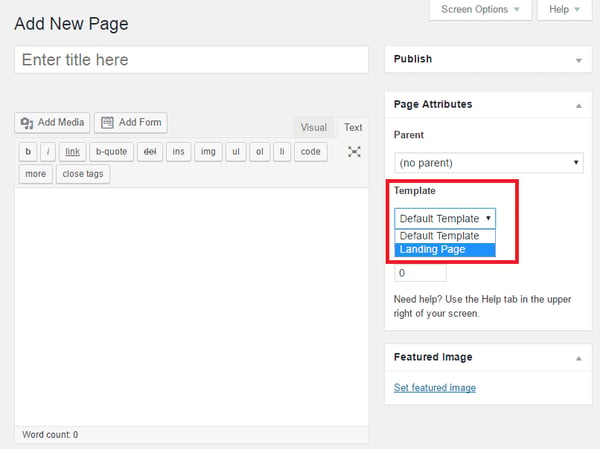
Start by logging into your WordPress dashboard. Look for the “Pages” section and click “Add New.” Give your page a clear, descriptive title. This title appears in search results and browser tabs. Choose a blank template if your theme offers one. It keeps the design clean for a landing page.
Customizing Layout And Elements
Use the block editor or a page builder plugin to arrange your content. Add headings, text blocks, and buttons that guide visitors. Keep the layout simple and focused on your goal. Use white space to make the page easy to read. Highlight important parts with bold or color changes.
Adding Images And Media
Images catch attention and explain your message quickly. Upload pictures that relate to your product or service. Keep file sizes small to speed up page loading. Add videos or audio if they help explain your offer. Use alt text for all media to improve SEO and accessibility.
Optimizing For Speed And Mobile
Optimizing your WordPress landing page for speed and mobile is essential. Visitors expect fast loading pages. They also want pages that look great on any device. A slow or poorly designed page can push users away quickly. Focus on responsive design and fast loading times to keep visitors engaged. This improves user experience and helps your SEO rankings.
Responsive Design Tips
Make sure your landing page adjusts to all screen sizes. Use a flexible grid layout that changes with device width. Choose fonts that are easy to read on small screens. Keep buttons large and easy to tap. Avoid using fixed-width elements that break on mobile. Test your page on phones and tablets regularly. Use WordPress themes that support responsive design. This creates a smooth experience for every visitor.
Improving Page Load Times
Speed up your landing page by optimizing images. Compress images without losing quality. Use modern file formats like WebP. Limit the number of plugins to reduce server load. Use caching plugins to serve pages faster. Minify CSS, JavaScript, and HTML files to reduce size. Choose a reliable hosting service with fast servers. A fast page keeps visitors interested and reduces bounce rates.
Testing And Publishing Your Page
Testing and publishing your landing page is a key step in your WordPress project. It helps ensure your page looks good and works well. You must check every element before making it live. This avoids mistakes and improves user experience.
Proper testing catches errors early. It also shows how your page appears on different devices. After testing, publishing your page lets visitors see your content. The process is simple and straightforward on WordPress.
Preview And Debug
Use WordPress’s preview feature to see your page before publishing. It shows the page exactly as visitors will see it. Check all images, text, and links carefully. Make sure buttons and forms work correctly.
Look for errors like broken links or misplaced elements. Test your page on mobile and desktop devices. Fix any issues you find using WordPress’s editor. Previewing prevents problems after publishing.
Setting The Landing Page As Homepage
After testing, you may want your landing page as the homepage. Go to WordPress dashboard and select “Settings.” Choose “Reading” from the menu. Set “Your homepage displays” to “A static page.”
Select your landing page from the dropdown menu. Save changes to apply the new homepage. Now visitors see your landing page first when they visit your site. This setup improves focus and conversion chances.
Tracking Performance And Making Improvements
Tracking the performance of your WordPress landing page is key to its success. It shows what works and what needs change. Regular checks help improve user experience and increase conversions. Small adjustments based on real data can lead to better results.
Integrating Analytics Tools
Analytics tools provide detailed insights into visitor behavior. Google Analytics is a popular choice for WordPress sites. It tracks page views, bounce rates, and visitor sources. You can see which parts of your landing page attract attention. Setting up analytics is simple with WordPress plugins. These plugins connect your site to the analytics service without coding.
A/b Testing Strategies
A/B testing means creating two versions of a landing page. Each version has one small change. This could be a different headline, button color, or image. You then compare which page performs better. WordPress plugins like Split Test or Nelio help run these tests easily. Testing helps find the best design and content to boost conversions.
Credit: elementor.com
Frequently Asked Questions
Can You Create A Landing Page Using WordPress?
Yes, you can easily create a landing page using WordPress. Use page builders or themes designed for landing pages. WordPress offers flexibility and many plugins for customization without coding.
What Are The Best Plugins For WordPress Landing Pages?
Popular WordPress landing page plugins include Elementor, Beaver Builder, and Thrive Architect. These plugins offer drag-and-drop features, templates, and optimization tools for fast page creation.
Is WordPress Free For Making Landing Pages?
WordPress itself is free, but premium themes and plugins may cost money. Free options exist, but investing in paid tools enhances design and functionality.
How Do I Optimize A WordPress Landing Page For Seo?
Use SEO plugins like Yoast SEO, optimize page speed, add relevant keywords, and create clear calls-to-action. Proper SEO improves your landing page’s search ranking and visibility.
Conclusion
Creating a landing page on WordPress is simple and effective. You can choose from many templates and plugins to fit your needs. No coding skills are needed to build a clean, professional page. This makes WordPress a great choice for beginners and small businesses.
Just follow clear steps, and your page will be ready soon. Start with a goal, pick a design, and add your content. WordPress gives you control and flexibility to reach your audience. Try it today and see how easy it can be.



