
Unlocking the potential of your website starts with choosing the right WordPress theme. If you’ve set your sights on the Highend WordPress theme, you’re in for a treat.
Known for its versatility and rich features, Highend can transform your site into a stunning digital presence that captivates visitors. But how do you get started? Installing a WordPress theme might seem daunting, especially if you’re new to website design.
Don’t worry—you’re not alone. Imagine effortlessly customizing your site’s look and feel, while maintaining a professional edge that draws in traffic and boosts engagement. This guide is here to walk you through each step of installing the Highend theme, ensuring that you maximize its capabilities without the stress. Whether you’re looking to revamp an existing site or launch a new one, you’ll find this tutorial both helpful and empowering. Get ready to make your website not just functional, but extraordinary.
Preparing For Installation
Before installing, check your WordPress version. It should be compatible with the theme. Ensure your server meets the minimum requirements for installation. PHP version should be 7.4 or higher. MySQL version must be 5.6 or above. Check your browser settings too. Ensure JavaScript is enabled. Some features depend on it. Compatibility is crucial for smooth operation.
Backing up is important. Always save your current site. Use plugins like UpdraftPlus or BackupBuddy. They are easy to use. Store backups on cloud or external drives. Restoring is simple if something goes wrong. Keep backups regular. It protects your data. Safety first!

Credit: www.theclassictemplates.com
Downloading The Theme
First, go to the ThemeForest website. Search for the Highend Theme. Click the buy button. Create an account if you do not have one. After purchase, you will receive a download link. Click the link to start downloading. Save the theme file on your computer. Remember where you save it.
Open your computer’s file manager. Locate the downloaded theme file. It is usually in the Downloads folder. The file is in .zip format. Do not unzip it. You will need this file for installation. Make sure you have it ready.
Uploading To WordPress
Installing the Highend WordPress Theme is simple. First, download the theme file. Then, upload it to WordPress through the ‘Themes’ section. Activate it to enjoy a new look for your website.
Using WordPress Dashboard
First, open your WordPress dashboard. Click on “Appearance”, then “Themes”. Look for the “Add New” button. Click it. Then, find the “Upload Theme” button. Choose your Highend theme file. It should be a .zip file. After selecting, click “Install Now”. Wait for it to upload. Once done, click “Activate”. Your theme is now live. Easy, right?
Ftp Upload Method
First, install an FTP client like FileZilla. Connect to your website’s server. Enter your FTP credentials. Find the wp-content/themes folder. Upload the Highend theme folder here. Remember, unzip the file first. Once uploaded, go back to your WordPress dashboard. Click on “Appearance”, then “Themes”. Your theme should appear in the list. Click “Activate” to use it. Now, your site has a fresh look!
Activating The Theme
Theme Activation Process is simple and easy to follow. First, go to your WordPress dashboard. Click on “Appearance” then “Themes.” You will see a button named “Activate.” Click this button to activate your theme. You need to make sure it’s the Highend theme.
License Key Setup is the next step. Find your license key. Usually, it’s in your email or purchase receipt. Copy the key. Return to the WordPress dashboard. Click on “Highend” settings. You will see a field for the license key. Paste your key there and hit “Save.” Your theme is now ready to use. Enjoy the new look on your website.
Configuring Theme Settings
Customizing Appearance is easy with Highend. Start by accessing the dashboard. Navigate to “Appearance” and click “Customize”. Here, you can change colors and fonts. You can adjust the layout too. Preview changes instantly. Make sure your site looks fresh and unique. Save changes often. This keeps your work safe. Use simple designs for clarity. Visitors love clean sites.
Setting Up Widgets and Menus is essential for navigation. Go to “Appearance” and select “Widgets”. Choose where each widget appears. Add useful features like search bars. Customize menus by clicking “Menus”. Organize pages neatly. Users find information quicker. Ensure links work. Broken links frustrate visitors. Check menus regularly. Update when needed. Keep navigation simple and clear.
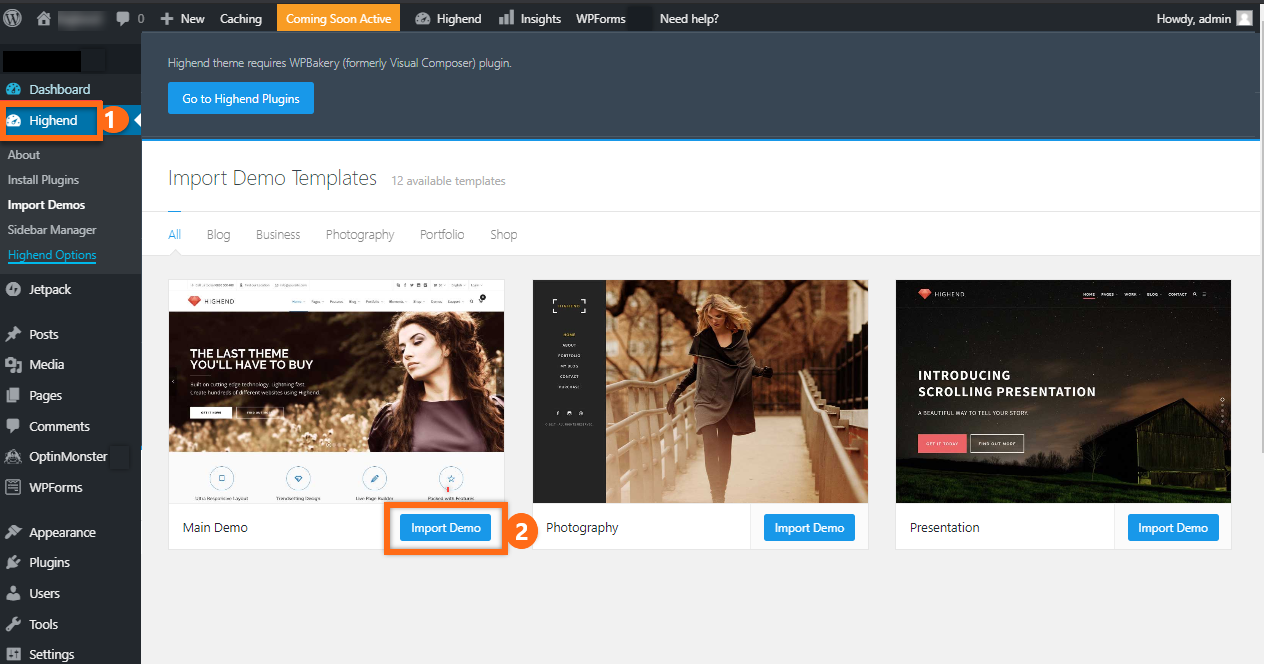
Credit: www.hostgator.com
Installing Essential Plugins
Plugins make your website work better. They add special features. Some plugins are important for the Highend theme. They help you get the best experience.
Here is a list of plugins you should use:
- Elementor – Makes page building easy.
- Yoast SEO – Helps improve your site’s search ranking.
- WooCommerce – Perfect for online stores.
- Contact Form 7 – Lets visitors reach you easily.
Activating plugins is simple. Go to your WordPress dashboard. Click on “Plugins”. Find the plugin you need. Click “Activate”. The plugin is now ready to use. Repeat for each plugin.
Troubleshooting Common Issues
Installing the Highend WordPress theme can sometimes be tricky. Common issues include incorrect file uploads or missing plugins. Follow the step-by-step guide to ensure a smooth installation process and enjoy the theme’s features effortlessly.
Dealing With Installation Errors
Facing installation errors can be frustrating. Make sure your WordPress version is up-to-date. An old version might cause problems. Check file permissions on your server. Incorrect settings can block the theme installation. Ensure your PHP version meets the theme’s requirements. If not, update it. Look for any missing files in the theme package. Re-download if necessary. Contact your hosting provider for server-related issues. Sometimes, server configurations need adjustments. Read the theme documentation carefully. It often has solutions to common issues. If errors persist, consider seeking help from WordPress forums.
Performance Optimization Tips
Optimizing performance keeps your website fast. Use a caching plugin. It helps reduce load times. Optimize images before uploading. Large files slow down pages. Minimize the use of heavy plugins. Each plugin adds load to your site. Enable compression to reduce file sizes. Faster loading improves user experience. Monitor your website’s speed regularly. Tools like GTmetrix can help. Check your hosting provider’s speed capabilities. Sometimes, a slow server is the issue. Regularly update themes and plugins. Updates often include performance improvements.

Credit: www.webfulcreations.com
Frequently Asked Questions
How Do I Manually Install A WordPress Theme?
To manually install a WordPress theme, download the theme zip file. Go to your WordPress dashboard, navigate to Appearance > Themes, and click “Add New. ” Select “Upload Theme,” choose your downloaded zip file, and click “Install Now. ” Once installed, activate the theme to apply it to your site.
How To Install An Extra Theme In WordPress?
To install an extra theme in WordPress, go to the dashboard. Click “Appearance” and then “Themes. ” Select “Add New,” search for your desired theme, and click “Install. ” Finally, activate the theme to make it live. Always choose a theme compatible with your WordPress version for optimal performance.
How Do I Import A Theme Into WordPress?
To import a theme into WordPress, log in to your dashboard. Navigate to “Appearance,” then “Themes. ” Click “Add New,” choose “Upload Theme,” and select your theme file. Click “Install Now,” then “Activate” to apply the theme. Make sure the theme is compatible with your WordPress version.
How To Install An Envato Theme On WordPress?
Download the theme file from Envato. Log in to your WordPress dashboard. Navigate to “Appearance” > “Themes” > “Add New”. Click “Upload Theme” and select your downloaded ZIP file. Install and activate the theme.
Conclusion
Installing the Highend WordPress theme is a simple task. With the right steps, your website gets a fresh look. Follow the guide, and you’ll have a stylish site in no time. Customization options are vast, allowing you to shape your vision.
Don’t rush the process; ensure each step is complete. A well-set theme enhances user experience and site appearance. Remember, practice makes perfect. Try different layouts to find what suits your needs. Keep exploring the theme’s features. Enjoy the creative journey.
Your website reflects your unique style and goals. Happy website building!



