
Are you looking to boost your website’s revenue potential? Adding custom ad spaces to your WordPress theme can be a game-changer.
Imagine having full control over where ads appear, tailored to your site’s unique design. This not only enhances your site’s look but also maximizes ad visibility, increasing click-through rates and your earnings. Whether you’re a blogger, entrepreneur, or digital marketer, customizing ad spaces allows you to optimize your site’s monetization strategy without compromising your brand’s aesthetics.
Dive into this guide, and discover how easy it is to add custom ad spaces that align perfectly with your WordPress theme. Let’s unlock your site’s earning potential together!

Credit: docs.themeisle.com
Choosing The Right WordPress Theme
Themes come in all shapes and sizes. First, check if the theme supports custom ad spaces. Some themes allow easy placement of ads. Others may need extra settings. Look for themes with good support. Themes should have regular updates. This ensures the best performance. Compatibility is crucial. Ensure the theme works well with your plugins. Consider the theme’s design. It should match your website style. Check user reviews for real experiences. They often highlight issues and benefits. Finally, choose a theme that fits your budget.
Many themes offer ad space options. Newspaper is popular for news sites. It has flexible ad spaces. Ad-Sense is designed for monetization. It comes with various ad spots. Avada and Divi are top choices. They offer customization and ad placements. Each theme has unique features. Pick one that suits your needs. Look for themes with easy-to-use interfaces. This makes setting up ads simple. Choose themes with responsive designs. This ensures ads look good on all devices.
Identifying Ad Placement Areas
The header and footer are prime spots for ads. These areas are always visible. Ads here catch the eye. They can fit well with site design. Place a banner ad in the header. A text ad can fit in the footer. Both spots help in generating ad revenue.
Sidebars are perfect for ads. They stay on the side of the page. This makes them noticeable. A vertical ad can fit here. Ads like these don’t interfere with content. They allow users to focus on both content and ads. Sidebars offer a natural space for ad integration.
Ads can also go inside the content. This means ads show up between paragraphs. They blend in with the text. This helps users see them. An ad after the first paragraph works well. It catches attention early. But balance is key. Too many ads can annoy readers.
Creating Custom Ad Space
WordPress widgets make it easy. Drag and drop the widget. Place it where you want the ad. Go to the Appearance section. Find Widgets. Click and explore. Insert the Text widget. Add your ad code. That’s it. Your ad shows up now.
Ad plugins are helpful tools. They help manage ads. Install a plugin from the WordPress store. Activate it after installation. Configure settings for your ad. Choose size and location. Some plugins offer ad rotation. This means different ads can show. It keeps content fresh.
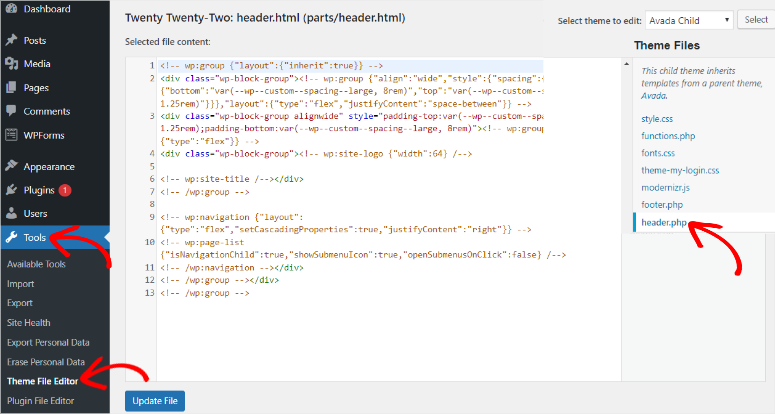
Editing theme files needs care. Backup files before changes. Go to the Theme Editor. Locate header or footer files. Insert your ad code. Save changes to see results. Be cautious. Wrong edits might break the site. Seek help if unsure.
Editing Theme Files Safely
Safely edit theme files to add custom ad space in WordPress. Access your theme editor and locate the header file. Insert your ad code and save changes carefully to avoid errors.
Backing Up Your Theme
Always make a backup of your theme files. Save them on your computer. This prevents loss of data. Mistakes can happen. Backups keep your site safe.
Utilizing A Child Theme
Use a child theme for custom changes. This protects the main theme. A child theme is easy to create. It keeps your changes safe. Your main theme remains untouched.
Integrating Advertisements
Adding Google AdSense to your site is simple. First, create an account. Then, get your AdSense code. Copy this code and paste it into your WordPress theme. Choose the right spot for ads. Widgets or header are popular choices. Save changes. Check your site for ad display. Make sure ads fit your design. Follow AdSense rules to avoid issues.
Several third-party ad networks offer ad codes. Sign up and get their code. Paste it into your WordPress theme. Like AdSense, place ads wisely. Common places are sidebar and footer. Each network has its rules. Read them carefully. Some networks pay more. Others have different ad styles. Choose the one that fits your audience. Test different networks to see which works best.
Credit: www.isitwp.com
Testing Ad Performance
Use analytics tools to check ad performance. Tools show you how many people see your ad. They also tell you if people click the ad. This information is very helpful. It helps you make decisions. You can make your ads better with this data. Always keep an eye on these numbers.
Place ads where people look often. The top of the page is a good spot. Near the content people read is also smart. Some places work better than others. Test different spots. See which ones get more clicks. Move ads around to find the best place. Keep testing to improve results.
Maintaining User Experience
Balancing ads and content is very important. Too many ads annoy users. A good mix keeps users happy. Place ads where they are not in the way. Important content should be easy to find. This balance helps in keeping users on your site longer.
Ensuring mobile compatibility is also key. Many users browse on phones. Ads should look good on small screens. Use responsive designs for better results. Mobile-friendly ads can improve user experience and keep them engaged.

Credit: themeforest.net
Frequently Asked Questions
How Do I Add An Ad Banner In WordPress?
Install a plugin like Ad Inserter. Navigate to the plugin settings. Add your ad code in the designated area. Choose the placement options. Save your settings. Your ad banner should now appear on your WordPress site.
How Do I Add A Custom Field In WordPress?
Navigate to the WordPress dashboard. Click “Custom Fields” under “Tools. ” Select “Add New” to create a custom field. Enter the field name and type, then save changes. Use the field by adding it to posts or pages through the editor.
How To Place Ads On A WordPress Site?
Install an ad management plugin like Ad Inserter. Create ad blocks and set display conditions. Insert ads using widgets or shortcodes. Ensure compliance with ad network policies. Optimize for mobile responsiveness.
How Do I Add A Custom Menu Location In WordPress?
To add a custom menu location in WordPress, edit your theme’s `functions. php` file. Use the `register_nav_menu()` function. Example: `register_nav_menu(‘new_menu_location’, ‘New Menu Location’);`. Save the changes. Now, assign menus to this new location in the WordPress admin under Appearance > Menus.
Conclusion
Creating custom ad spaces in WordPress is simple and effective. Follow the steps to enhance your site’s appearance. Custom ads bring more engagement and revenue. Personalizing ads improves user experience and keeps visitors longer. Use your theme’s flexibility to customize ad placements.
Ensure your ads blend well with your content. Test different positions for better results. Regular updates keep your site fresh and appealing. Optimize your theme and make the most of your ad spaces. Enjoy the benefits of a well-designed WordPress site.



