

Have you ever wondered what exactly the “host” of a domain means and why it matters for your website? Understanding this simple yet powerful concept can change the way you manage your online presence.
Whether you’re starting a blog, setting up an online store, or just curious about how websites work, knowing what a domain host is will give you the confidence to make smarter choices. Keep reading, and you’ll discover how this key piece fits into the bigger puzzle of getting your site live and running smoothly.
Credit: www.youtube.com
Domain Host Basics
A domain host is a key part of getting your website online. It stores all your website’s files and data. Without a host, your website cannot be seen on the internet.
Choosing the right domain host affects your website’s speed and security. It also impacts how easy it is to manage your site.
Role Of A Domain Host
A domain host keeps your website files safe on a server. This server is a powerful computer that runs all day. It sends your website data to visitors when they type your domain name.
The host also manages important services like email linked to your domain. It ensures your website stays online and works well.
How Hosting Connects To Domains
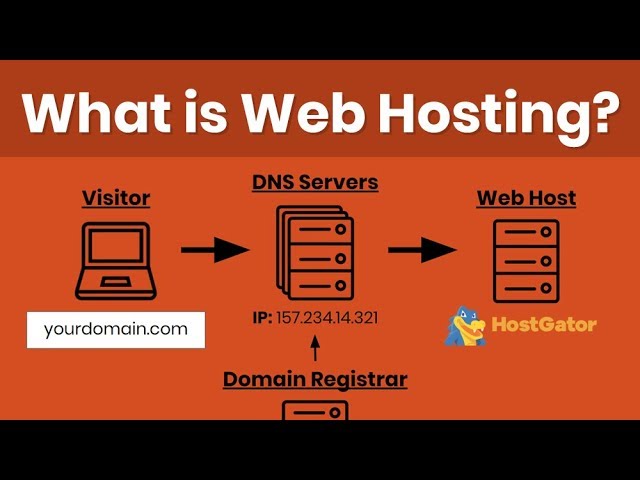
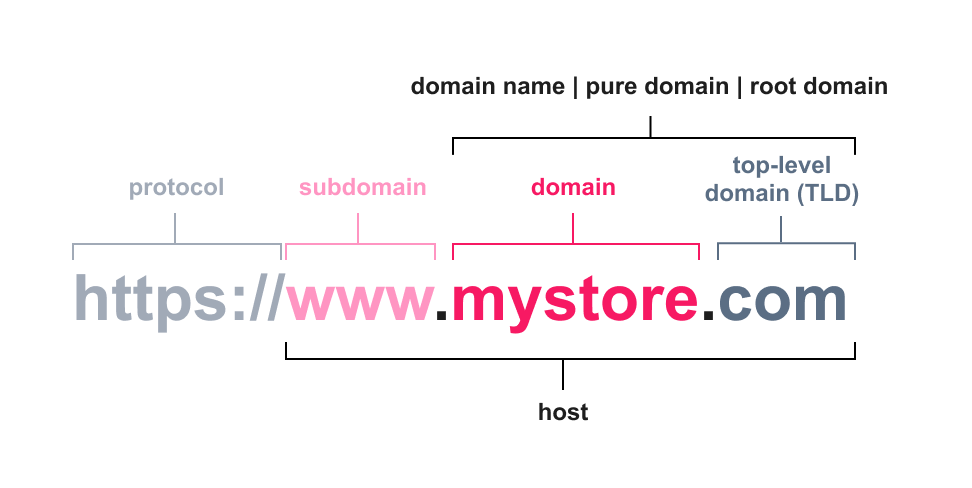
A domain name is your website’s address on the internet. The host provides the space where the website lives. The domain name points to the host’s server using DNS settings.
This connection helps browsers find your website fast. It links the simple domain name to the complex server location behind the scenes.
Credit: help.vtex.com
Types Of Web Hosting
Web hosting is where your website lives online. Different hosting types suit different needs. Choosing the right type helps your site run smoothly.
Here are the main types of web hosting to know about.
Shared Hosting
Shared hosting means many websites share one server. It is the cheapest option. Good for small sites or beginners. Resources like memory and CPU are shared. This can slow your site if others use a lot.
Vps Hosting
VPS stands for Virtual Private Server. It splits a server into virtual parts. Each part acts like its own server. You get more control and power than shared hosting. It works well for growing websites.
Dedicated Hosting
Dedicated hosting means you rent a whole server. No other websites share it. You get full control and high performance. Ideal for large sites with heavy traffic. It costs more but offers maximum speed.
Cloud Hosting
Cloud hosting uses many servers working together. Your site runs on multiple machines at once. This increases reliability and scalability. Good for sites that need to handle traffic spikes. You pay for the resources you use.
Choosing The Right Host
Choosing the right host for your domain is a key step. It affects your website’s speed, uptime, and user experience. The right host keeps your site running smoothly and securely. You want a host that fits your needs and budget. This guide helps you find the best hosting service.
Factors To Consider
Start by thinking about your website’s size and traffic. Small blogs need less power than online stores. Check if the host offers enough storage and bandwidth. Look for easy-to-use control panels. Consider if the host supports your website’s technology, like WordPress or PHP. Pricing is important. Find a host that fits your budget without cutting corners.
Performance And Reliability
Fast loading times keep visitors happy. Choose hosts with strong servers and good hardware. Check uptime guarantees. A host with 99.9% uptime means your site is rarely down. Avoid hosts with frequent outages. Reliable performance helps your site rank better in search engines.
Customer Support
Good support saves time and trouble. Pick hosts with 24/7 customer service. Look for multiple ways to contact support, like chat, email, or phone. Read reviews about their response time and help quality. Support teams should be friendly and knowledgeable. This helps solve problems quickly and keeps your site online.
Credit: www.youtube.com
Hosting Setup Process
Setting up hosting for a domain involves a few clear steps. Each step builds on the previous one. Following these steps helps make your website live and accessible online.
The hosting setup process starts with registering your domain name. Then, you connect that domain to your hosting service. Finally, you upload your website files to the hosting server. This process brings your website to life.
Registering A Domain
Choose a domain name that fits your website. Use a domain registrar to buy it. The registrar holds your domain name for a set time. This step gives your website a unique address on the internet.
Linking Domain To Hosting
After registering, link your domain to your hosting provider. Change the domain’s DNS settings to point to your hosting server. This tells the internet where to find your website files.
Installing Website Files
Upload your website files to the hosting server. Use a file manager or FTP client for this. Once uploaded, your website files are ready to be viewed online.
Common Hosting Features
Common hosting features make domain hosting simple and effective. They ensure websites work well and stay safe. These features help manage your site without stress. Understanding them helps you choose the right host for your needs.
Storage And Bandwidth
Storage is the space to save your website files. It holds images, videos, and text. Bandwidth is the amount of data your site can send and receive. High bandwidth means your site can handle many visitors. Both are important for a fast and smooth website.
Security Measures
Security keeps your website safe from hackers and threats. Hosts use firewalls and malware scanners. SSL certificates protect data during transfer. Regular backups help restore your site if problems occur. Good security builds trust with your visitors.
Control Panels
Control panels let you manage your hosting easily. They have tools to upload files, create emails, and install software. Popular panels include cPanel and Plesk. A clear control panel saves time and avoids errors.
Costs And Pricing Models
Understanding the costs and pricing models of domain hosting helps you pick the right service. Hosting prices vary widely based on features, performance, and support. Knowing what to expect avoids surprises and helps manage your budget. This section breaks down common cost types and what each means for you.
Free Vs Paid Hosting
Free hosting often attracts beginners with zero upfront cost. It usually offers limited storage, bandwidth, and basic support. Ads may appear on your site, which can affect professionalism. Paid hosting costs money but provides more resources and better uptime. It also offers stronger security and customer service. Paid plans suit serious websites needing reliability and growth.
Subscription Plans
Most hosts offer monthly or yearly subscription plans. Monthly plans give flexibility to change or cancel anytime. Yearly plans often come with discounts, lowering overall cost. Plans vary by storage size, number of domains, and included features. Higher-tier plans may include faster servers and extra tools. Choose a plan that matches your website’s size and needs.
Hidden Fees To Watch
Some hosts charge extra fees beyond the listed price. Setup fees, domain renewal fees, and migration costs are common examples. Overuse charges for bandwidth or storage can increase bills. SSL certificates and backups might not be included and cost extra. Always check the fine print to avoid unexpected expenses. Transparency saves money and stress later.
Troubleshooting Hosting Issues
Troubleshooting hosting issues is key to keeping a website online and fast. Problems with a domain host can cause frustration for site owners and visitors. Understanding common issues helps fix them quickly. This section explains typical hosting problems and simple ways to solve them.
Downtime Causes
Downtime means your website is not accessible. It can happen due to server crashes or maintenance. Sometimes, too much traffic overloads the server. Power outages or hardware failure also cause downtime. Checking your host’s status page can reveal planned maintenance. Contacting support helps if downtime lasts long.
Dns Problems
DNS connects your domain name to the website’s IP address. If DNS settings are wrong, visitors can’t reach your site. Common issues include expired domain registration or incorrect DNS records. Clearing your browser cache may help. Use online tools to check DNS health. Fixing DNS records or renewing your domain often solves the problem.
Performance Bottlenecks
Slow website speed hurts user experience and rankings. Bottlenecks happen when the server is slow or overloaded. Large images and too many plugins also slow sites. Optimizing images and limiting plugins improves speed. Upgrading hosting plans can reduce server load. Regularly checking website speed helps catch issues early.
Frequently Asked Questions
What Does The Host Of A Domain Mean?
The host of a domain refers to the server or service that stores and delivers a website’s files. It enables users to access the site via its domain name. Hosting ensures your website is available online 24/7 and manages data traffic efficiently.
How Is Domain Hosting Different From Domain Registration?
Domain registration reserves your website’s name, while hosting stores your site’s content. Registration links your domain to an IP address, and hosting provides the space and technology to display your website online.
Why Is Hosting Important For A Domain?
Hosting is crucial because it makes your website accessible on the internet. Without hosting, your domain name cannot display any content. Good hosting improves website speed, uptime, and security, enhancing user experience and SEO rankings.
Can One Host Multiple Domains On A Single Server?
Yes, a single server can host multiple domains using shared or virtual hosting. This method is cost-effective for small websites but may affect performance if traffic is high. It’s ideal for businesses managing several sites under one account.
Conclusion
A domain host stores your website’s files and makes them accessible online. Without a host, your domain cannot show your website to visitors. Choosing a reliable host ensures your site runs smoothly and stays online. Understanding what a domain host does helps you make better decisions for your website.
Keep this knowledge handy when setting up or managing your site. It makes the whole process clearer and less confusing. Simple but important.


