
Have you ever wondered if your reverse DNS should match your domain or your host? Getting this right can make a big difference in how your emails are delivered and how your network is trusted.
If your reverse DNS setup is off, you might face issues like blocked emails or security warnings. You’ll discover exactly what reverse DNS means, why matching it correctly matters, and how to set it up so your systems run smoothly.
Keep reading to avoid common pitfalls and make sure your domain and host play well together.
Reverse Dns Basics
Understanding reverse DNS is key to grasping internet address systems. It helps verify IP addresses and their linked domain names. This verification enhances email delivery and network security.
What Is Reverse Dns
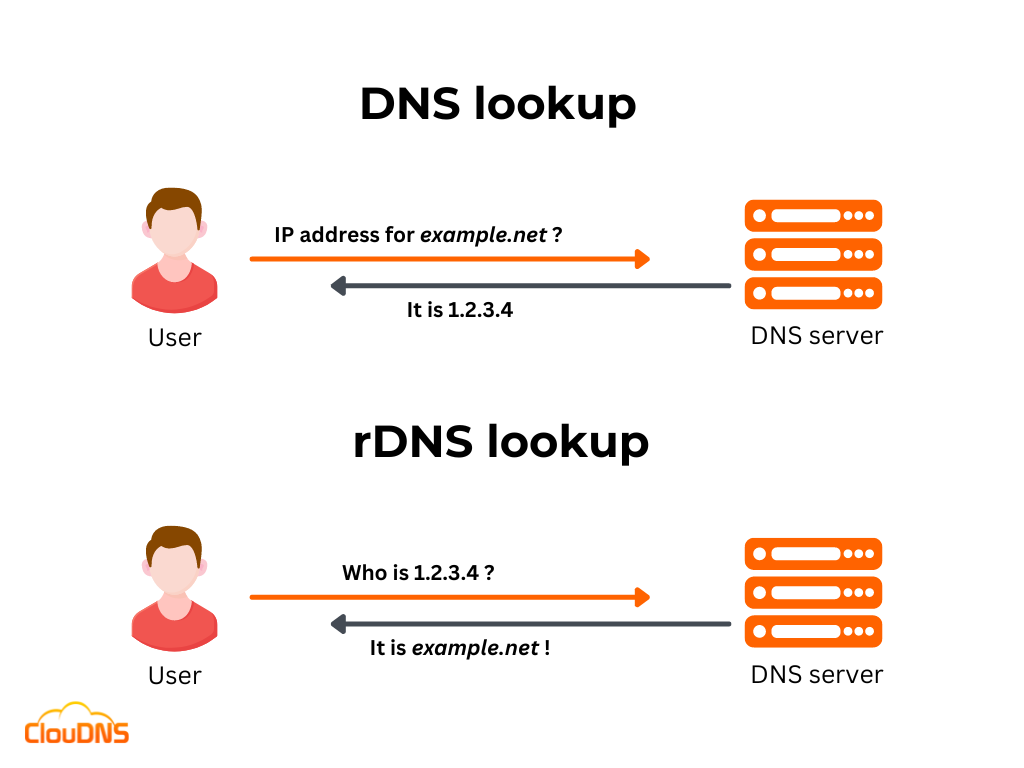
Reverse DNS, or rDNS, is the opposite of normal DNS. Normally, DNS converts domain names into IP addresses. Reverse DNS does the reverse. It converts an IP address back into a domain name.
This process helps confirm which domain is linked to an IP address. It is useful for tracking and security purposes.
How Reverse Dns Works
Reverse DNS uses special DNS records called PTR records. These records store the domain name linked to an IP address.
When a system queries an IP address, the DNS server checks the PTR record. It then returns the domain name associated with that IP.
This lookup helps verify the origin of internet traffic or email messages. It adds a layer of trust and reduces spam or fraud.

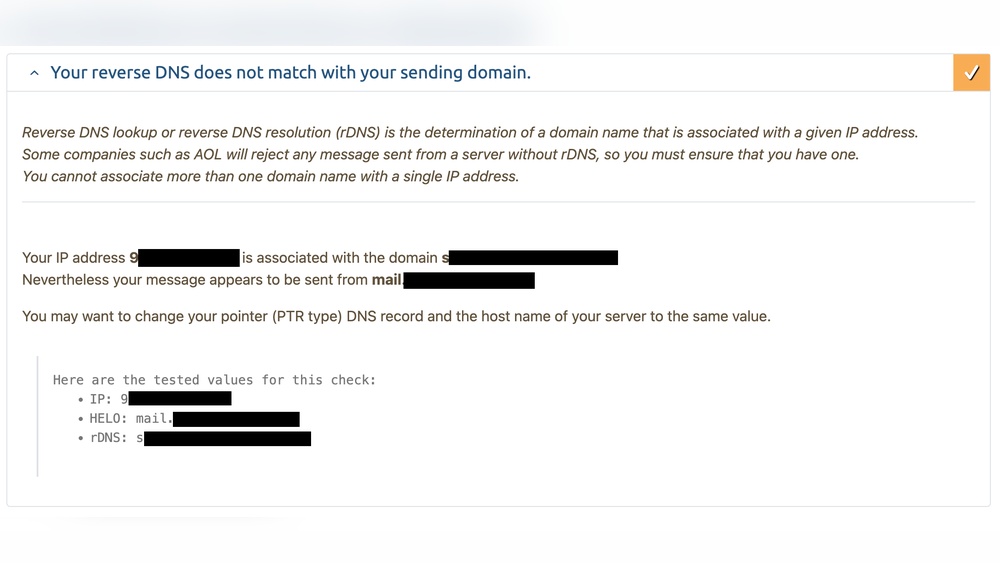
Credit: forum.virtualmin.com
Domain Vs Host Matching
Understanding whether reverse DNS should match a domain or a host is crucial for network setup. It affects email delivery, security, and how servers identify each other. This section explains the difference between domain and host matching in reverse DNS.
Differences Between Domain And Host
A domain is the main name like example.com. It represents a website or an organization.
A host is a specific machine or server within that domain. For example, mail.example.com is a host.
Reverse DNS can match the domain or the host name. Matching the domain points to the general site.
Matching the host points to a specific server or service. This detail matters for some applications.
Importance Of Matching Reverse Dns
Matching reverse DNS helps verify server identity. It reduces the chance of email being marked as spam.
It improves trust between servers during communication. Many email providers check reverse DNS to block fake mail.
Correct reverse DNS matching also helps with network troubleshooting. It shows clear information about the source of traffic.
Matching the host is often better for precise identification. Matching the domain works for general purposes.
Seo Impact Of Reverse Dns
Reverse DNS (rDNS) is a technical setting that links an IP address to a domain name. It helps servers verify where internet traffic comes from. This verification plays a small but important role in SEO. Search engines and email servers use rDNS to check website authenticity and trustworthiness.
Understanding how rDNS affects SEO can help improve your website’s online presence. It is not a direct ranking factor, but it influences other elements that impact SEO. Proper rDNS setup can enhance credibility and reduce the chances of being flagged as spam.
Role In Search Engine Ranking
Search engines use many signals to rank websites. Reverse DNS helps confirm that the IP address matches the domain or host. This match shows the website is genuine and not trying to hide its identity. A consistent rDNS setup can prevent search engines from doubting your site.
Sites with mismatched rDNS may face slower indexing or lower trust. While rDNS alone does not boost rankings, it supports a healthy SEO environment. It helps maintain a good relationship between your domain and server.
Effects On Website Credibility
Email servers rely on rDNS to reduce spam and phishing attacks. If rDNS matches the domain, emails from your site look more trustworthy. This reduces the chance your messages go to spam folders. Trusted emails improve communication with users and partners.
Visitors also trust websites that appear secure and consistent. Proper rDNS settings add a layer of legitimacy to your domain. This trust can lead to better user engagement and lower bounce rates, indirectly helping SEO.
Credit: www.cloudns.net
Best Practices For Reverse Dns
Reverse DNS is important for email delivery, security, and network management. Setting it correctly improves trust and reduces spam issues. Follow clear best practices to ensure your reverse DNS records work well with your domain and host setup.
Aligning Reverse Dns With Domain
Reverse DNS should match your main domain name. This match helps email servers verify your identity. It builds trust with recipients and reduces chances of emails going to spam. Use your domain name in the PTR record for clarity. Keep domain names consistent across all DNS records.
Aligning Reverse Dns With Host
The reverse DNS can also match the hostname of your server. This is useful for tracking and network management. The PTR record should point to the exact host name. The host name must resolve back to the same IP address. This two-way match improves network reliability and reduces errors.
Common Mistakes To Avoid
Do not leave reverse DNS unset or incorrect. Avoid mismatching reverse DNS with domain or host names. Do not use generic or unrelated names in PTR records. Make sure the PTR record resolves to a valid name. Always check your records with online tools to avoid errors.
Troubleshooting Reverse Dns Issues
Troubleshooting reverse DNS issues is important for smooth email delivery and network communication. Reverse DNS helps verify that an IP address matches a domain name. Problems with reverse DNS can cause emails to be marked as spam or rejected.
Understanding how to find and fix reverse DNS errors saves time and avoids service disruptions. The process involves checking for mismatches and updating DNS records properly. This section explains key steps in troubleshooting reverse DNS problems clearly and simply.
Identifying Mismatches
Start by checking if the reverse DNS matches the domain or host. Use tools like “nslookup” or online reverse DNS checkers. Enter the IP address to see the associated domain name.
If the returned name does not match your domain or host, you found a mismatch. This mismatch often causes email servers to reject messages. Also, check your forward DNS. The domain name should point back to the same IP address.
Look for typos or outdated records that cause mismatches. Note any differences to fix later. Knowing exactly where the problem lies is key to solving it.
Fixing Reverse Dns Records
Fix reverse DNS by updating PTR records on your DNS server. Contact your hosting provider or ISP if you do not control the IP address. They usually manage reverse DNS zones.
Provide the correct hostname that matches your domain or host. Ensure the PTR record points to a valid name with a matching forward DNS record. After changes, allow time for DNS propagation, which can take hours.
Test the fix by running the reverse DNS check again. Confirm the IP address resolves to the correct domain. Proper reverse DNS reduces email delivery issues and improves trust with other servers.
Tools To Check Reverse Dns
Checking reverse DNS helps verify the link between IP addresses and domain names. It shows if the reverse DNS matches the domain or host, which is important for security and email delivery. Many tools make it easy to perform these checks quickly.
Some tools work online through web browsers. Others use commands typed into your computer. Both methods give useful information about reverse DNS.
Online Reverse Dns Lookup Tools
Online tools let you check reverse DNS without any software installation. You enter an IP address, and the tool shows the linked domain or host name. These tools are simple and fast. They work on any device with internet access. Examples include MXToolbox and WhatIsMyIPAddress. These sites provide clear results and extra details about the IP.
Using Command Line Utilities
Command line tools offer direct and detailed reverse DNS checks. On Windows, the “nslookup” command helps find the PTR record for an IP. On Mac and Linux, you can use “dig -x” or “host” commands. These commands return the domain name linked to the IP address. They require basic knowledge of command lines but are very powerful for network troubleshooting.

Credit: community.cloudflare.com
Frequently Asked Questions
What Is Reverse Dns And Why Is It Important?
Reverse DNS maps an IP address back to a domain name. It helps verify the legitimacy of mail servers and improves email deliverability. Many security systems use it to detect spam or phishing attempts, enhancing network trust and credibility.
Should Reverse Dns Match The Domain Or The Host?
Reverse DNS should typically match the host’s fully qualified domain name (FQDN). Matching the host ensures accurate identification and avoids confusion in network communications. This alignment supports proper mail server authentication and reduces the risk of being flagged as suspicious.
How Does Reverse Dns Affect Email Delivery?
Reverse DNS helps email servers verify the sender’s IP address. A matching reverse DNS reduces the chance of emails being marked as spam. Many receiving servers require this check to accept messages, improving overall email deliverability and reputation.
Can Mismatched Reverse Dns Cause Connection Issues?
Yes, mismatched reverse DNS can lead to connection refusals or delays. Some servers reject connections if the reverse DNS lookup fails or doesn’t align with the hostname. Ensuring proper reverse DNS setup helps maintain smooth network and email operations.
Conclusion
Matching reverse DNS to your domain or host helps improve trust online. It makes email servers check your identity easier. This reduces the chance of your messages being marked as spam. Always keep your DNS records clear and consistent. Simple steps like this protect your website and emails.
Clear matches show you care about security. Small details can make a big difference in online reputation. Keep it simple and correct for best results.


