
Are you looking to make money from your WordPress site? Adding adverts is one of the easiest and most effective ways to do that.
But if you’re unsure where to start or worried about slowing down your site, you’re not alone. This guide will walk you through simple, step-by-step methods to add adverts that fit your site perfectly. By the end, you’ll know how to boost your income without frustrating your visitors.
Ready to turn your WordPress site into a powerful revenue stream? Let’s dive in!
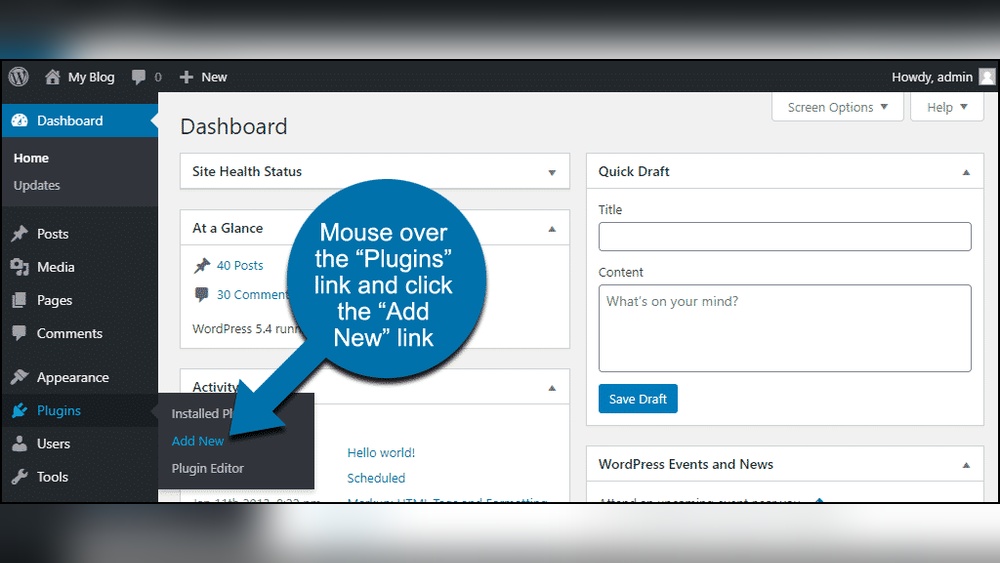
Credit: help.one.com
Choosing The Right Ad Network
Choosing the right ad network is key for earning money with WordPress ads. The right network fits your site’s style and audience. It helps you show relevant ads that visitors want to see. This makes them more likely to click, which increases your revenue.
Not all ad networks are the same. Some work better for blogs, others for business sites. Some pay per click, others pay per view. Knowing the options helps you pick the best one for your needs.
Popular Ad Networks For WordPress
Google AdSense is the most popular choice. It offers many ad formats and high-quality ads. It is easy to set up and works with most WordPress themes. Amazon Associates is good for sites that review products. It lets you earn commissions by linking to Amazon items. Media.net is a good alternative to AdSense. It focuses on contextual ads that match your content. Other options include AdThrive and Ezoic, which work well for high-traffic blogs.
Factors To Consider When Selecting
Think about your audience size. Some networks require a minimum number of visitors. Consider the type of ads you want to show. Text ads, image ads, or video ads all have different impacts. Look at how the network pays you. Some pay per click, others pay per impression or action. Check the network’s reputation for timely payments. Also, choose a network that offers good support and easy setup. Finally, make sure the ads fit well with your website design.
Credit: wpcode.com
Setting Up Your WordPress Site For Ads
Setting up your WordPress site for ads is the first step to earning from your content. A well-prepared site ensures your ads perform better and do not annoy visitors. This section covers how to arrange your site and install tools for smooth ad management.
Optimizing Site Layout
Choose a simple, clean layout that highlights your content and ads. Place ads where visitors naturally look, such as above the fold or near posts. Avoid cluttering the site with too many ads. Balance ads and content to keep visitors engaged and not distracted.
Use sidebars and footers wisely to add ads without disturbing the reading flow. Test different positions to find what works best for your audience. Fast loading pages improve ad display and user experience. Remove unnecessary widgets or elements that slow down your site.
Installing Required Plugins
Plugins help manage ads efficiently on WordPress. Install popular ad management plugins like Ad Inserter or Advanced Ads. These plugins allow you to place ads in various locations easily. They support different ad types such as Google AdSense, banners, or affiliate ads.
Look for plugins that offer scheduling and targeting options. This helps show relevant ads to specific visitor groups. Keep plugins updated to avoid security risks and compatibility issues. Activate only the plugins you need to keep your site fast and secure.
Adding Ads Manually
Adding ads manually to WordPress gives you full control over ad placement. It lets you insert ads exactly where you want. This method works well for simple ad codes from networks like Google AdSense or other services.
Manual insertion requires copying ad code and pasting it into your site. It may need basic knowledge of WordPress and HTML. The process is quick once you get used to it.
Inserting Code Snippets
Copy the ad code from your ad provider. Log in to your WordPress dashboard. Go to the page or post where you want the ad.
Switch to the HTML or Text editor in WordPress. Paste the ad code in the spot you want the ad to appear. Save or update the content.
Preview the page to check if the ad shows up correctly. Adjust placement if needed by moving the code snippet.
Placing Ads In Widgets And Posts
Go to Appearance > Widgets in your WordPress dashboard. Add a Custom HTML widget to your sidebar or footer area. Paste your ad code into this widget.
For posts, open the post editor. Use the Custom HTML block to insert ad code inside the content. You can place ads between paragraphs or at the end.
Widgets and post blocks let you add ads without editing theme files. This keeps your site safe and easy to manage.
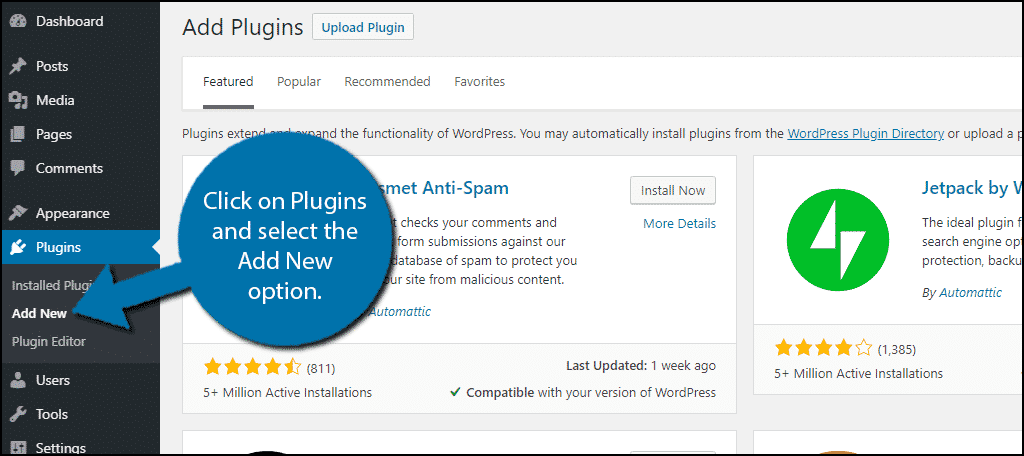
Credit: www.greengeeks.com
Using Ad Management Plugins
Using ad management plugins makes placing adverts on your WordPress site simple and efficient. These plugins help control where and when ads appear. They reduce the need to touch code. This saves time and avoids errors.
Ad management plugins offer features like scheduling ads, targeting specific pages, and tracking performance. You can manage multiple ad networks from one place. This keeps your site organized and your ads effective.
Top Plugins For Ad Integration
Several plugins stand out for easy ad integration. Ad Inserter supports many ad types and placements. Advanced Ads offers user-friendly controls and targeting options. WP Quads works well with Google AdSense and other networks.
These plugins work well for beginners and experienced users. They include features for automatic ad placement. This helps keep your site looking professional.
Configuring Plugin Settings
Start by installing your chosen plugin from the WordPress dashboard. Activate it and go to the plugin settings page. Here, you can add your ad code or connect ad networks.
Choose where ads will appear, such as before content or in sidebars. Set rules for displaying ads on certain pages or devices. Adjust settings to avoid showing too many ads, which can annoy visitors.
Test your ads on different devices to ensure they display correctly. Use plugin tools to track ad views and clicks. This helps you understand what works best for your site.
Optimizing Ad Placement
Optimizing ad placement is key to earning more from your WordPress site. The right spots catch visitors’ eyes without annoying them. Thoughtful placement improves clicks and keeps your readers happy.
Best Positions For Higher Clicks
Place ads where visitors focus most. The top of the page grabs attention fast. Ads inside content work well because readers scroll there. Sidebars attract clicks but avoid crowding them. Footer ads get views but fewer clicks.
Try placing ads near headings or images. These spots draw eyes naturally. Testing different positions helps find what works best. Track clicks to see which ads perform well.
Balancing User Experience And Revenue
Too many ads can frustrate readers. They might leave before seeing your content. Use ads sparingly to keep your site clean. Match ad style with your website design. This keeps ads from feeling out of place.
Focus on ads that fit your audience’s interests. Relevant ads get more clicks and less annoyance. Respect your visitors by avoiding pop-ups or auto-play videos. A smooth experience leads to better results over time.
Tracking And Analyzing Ad Performance
Tracking and analyzing ad performance is crucial for a successful WordPress advertising strategy. It helps you see which ads work best. You can learn what grabs visitors’ attention and what does not. This knowledge saves time and money.
By studying ad data, you improve your site’s revenue. You also create a better experience for your visitors. Let’s explore how to use tools and data to track and analyze ads effectively.
Using Analytics Tools
Analytics tools show how visitors interact with your ads. Google Analytics is a popular choice for WordPress sites. It tracks clicks, views, and user behavior. This data tells you which ads attract the most attention.
Some WordPress plugins offer built-in ad tracking features. These tools provide easy reports inside your dashboard. They help monitor ad impressions and click rates. Set up conversion tracking to see if ads lead to sales or signups.
Use heatmaps to understand where visitors click most. This insight helps place ads in the best spots. Regularly check analytics reports to spot trends and changes.
Adjusting Strategies Based On Data
Data shows what works and what does not. Change ad designs or positions based on this information. Test different ad formats like banners, pop-ups, or video ads.
Focus on ads with the highest click rates and conversions. Remove or improve low-performing ads to increase overall revenue. Experiment with ad frequency and timing to find the best balance.
Monitor results after each change. Keep improving your ads with fresh data. This cycle ensures your advertising stays effective and profitable.
Increasing Revenue With Advanced Techniques
Increasing revenue from adverts on WordPress requires smart strategies. Basic ad placement is good, but advanced techniques can boost earnings. Small changes can make a big difference in ad performance and income.
A/b Testing Ad Formats
A/B testing means trying two versions of an ad to see which works best. Test different ad sizes, colors, and text to find what attracts visitors. Track clicks and views to choose the top performer. This method helps improve user engagement and increases ad revenue.
Implementing Responsive Ads
Responsive ads adjust to fit any screen size. They work well on mobiles, tablets, and desktops. Using responsive ads ensures that visitors always see the ad clearly. This leads to better user experience and more clicks. WordPress supports responsive ad plugins that make setup easy.
Avoiding Common Mistakes
Adding adverts to WordPress can increase your income. Many beginners make mistakes that hurt user experience and site performance. Avoiding these errors helps keep visitors happy and your site running smoothly.
Preventing Ad Overload
Too many ads can annoy visitors. It makes your site look cluttered and unprofessional. Limit the number of ads on each page. Choose spots that do not block important content. Balance ads with useful information to keep users engaged.
Ensuring Site Speed And Security
Ads can slow down your website. Slow sites lose visitors quickly. Use lightweight ad plugins and avoid heavy scripts. Keep your WordPress and plugins updated for security. Scan your site regularly to prevent malware from malicious ads.
Frequently Asked Questions
How Do I Add Adverts To WordPress Site?
To add adverts, use plugins like Ad Inserter or manually insert ad code. Choose ad networks like Google AdSense for monetization. Place ads in widgets, headers, or posts to maximize visibility and revenue.
Which WordPress Plugins Help Manage Adverts Effectively?
Popular plugins include Ad Inserter, Advanced Ads, and WP Quads. They offer easy ad placement, scheduling, and targeting options. These tools optimize ad management without coding knowledge, improving site monetization efficiently.
Can I Add Google Adsense Ads To WordPress Easily?
Yes, Google AdSense ads integrate smoothly with WordPress. Sign up for AdSense, get ad codes, then use plugins or widgets to insert ads. Ensure your site complies with AdSense policies for approval.
Where Is The Best Place To Display Ads On WordPress?
Best ad spots include above the fold, sidebar, within content, and footer areas. These locations get high visibility without disrupting user experience. Experiment to find what works best for your audience.
Conclusion
Adding adverts to your WordPress site can boost your income. Choose the right ad type for your audience. Use plugins or manual code to place ads easily. Keep your site user-friendly and avoid too many ads. Check your ad performance often and make changes if needed.
Simple steps lead to better results. Start adding adverts today and watch your site grow.



