
Are you wondering if you can use multiple themes in WordPress to make your site stand out? You might want different looks for different parts of your website or want to test which design works best.
But is it really possible to have more than one theme active at the same time? Understanding this can save you time and help you create a site that truly fits your style. Keep reading to discover the truth about using multiple WordPress themes and how you can achieve the best results for your website.
Multiple Themes In WordPress
Many WordPress users wonder if they can use multiple themes on one website. This question comes from wanting different looks on various pages. WordPress is flexible but has some limits in theme management. Understanding how WordPress handles themes helps clarify this topic.
How WordPress Handles Themes
WordPress uses one active theme at a time. This theme controls the site’s design and layout. You can install many themes, but only one theme works live. The active theme applies to all pages and posts by default.
You can switch themes anytime from the WordPress dashboard. This change affects the whole website’s appearance immediately. Developers can customize themes with child themes for specific needs.
Single Theme Limitation
WordPress does not support multiple active themes on one site natively. Using more than one theme can cause conflicts and errors. The platform expects one theme to manage the entire site’s style.
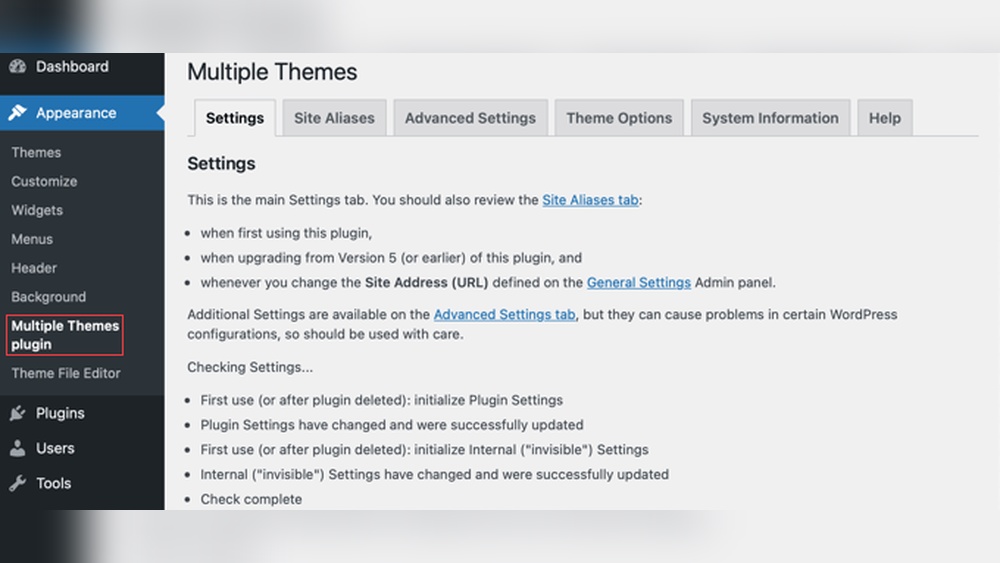
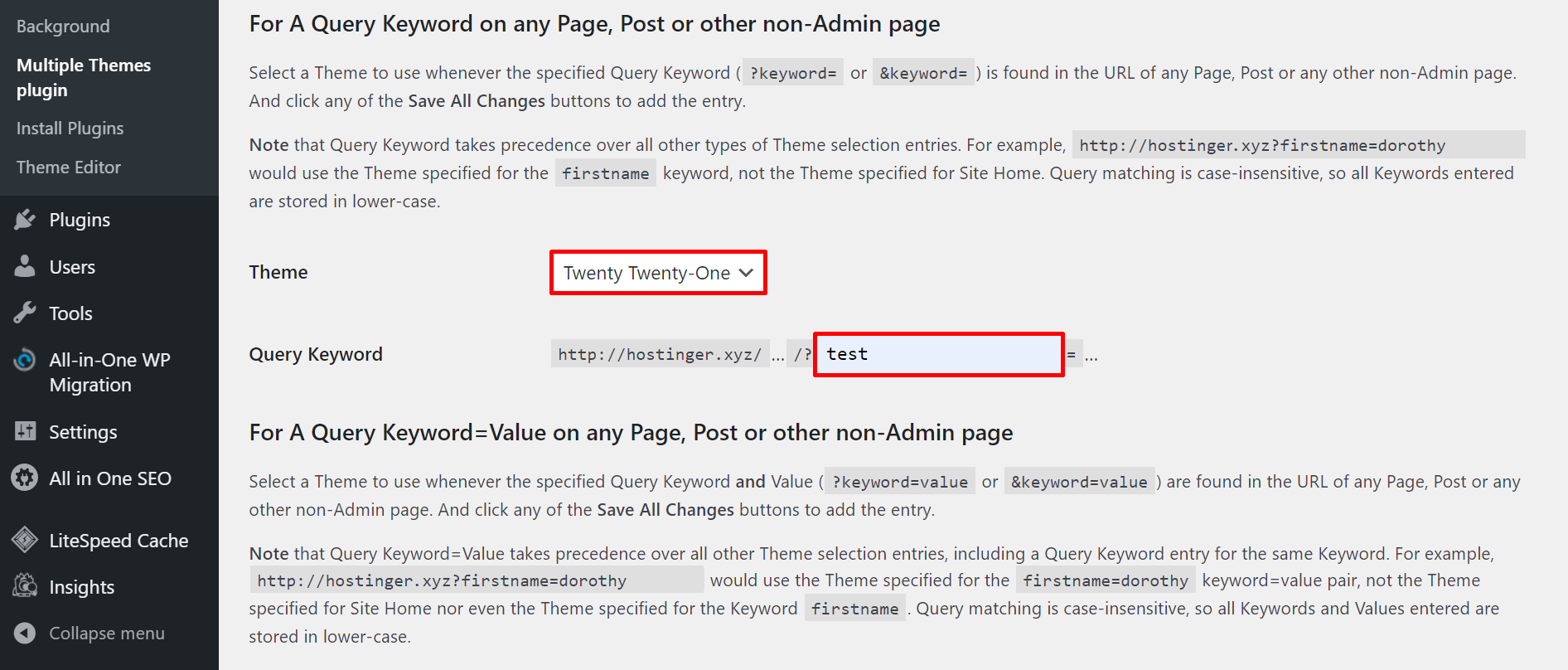
Some plugins allow partial theme changes for specific pages. These tools help add variety but keep one main theme active. This method is limited and requires careful setup.
Credit: www.hostinger.com
Methods To Use Multiple Themes
Using multiple themes in WordPress can help you create unique designs for different parts of your site. Various methods allow you to switch themes or combine them efficiently. These methods suit different needs and skill levels.
Theme Switcher Plugins
Theme switcher plugins let visitors see different themes on your site. You can set rules to change themes by user role, device, or page. These plugins work without coding skills. They give flexibility to test or show multiple looks.
Child Themes And Parent Themes
A child theme inherits styles and functions from a parent theme. You can customize the child theme without changing the parent. This method lets you keep the main design while adding new features. It helps maintain site updates safely.
Using Multisite Networks
WordPress multisite allows running many websites from one installation. Each site can have its own theme. This way, you can manage multiple themes under one dashboard. It suits businesses or blogs needing separate designs.
Pros And Cons Of Multiple Themes
Using multiple themes on a WordPress site has both advantages and disadvantages. It can offer unique design options but also bring challenges. Understanding these pros and cons helps you decide if this approach fits your needs.
Benefits For Different Pages
Multiple themes allow distinct looks for various pages. A blog page can have one style, while the store page uses another. This helps create a better user experience. It can also highlight special content or promotions. Visitors see a fresh design that matches the page purpose.
Potential Performance Issues
Using more than one theme may slow down your site. Each theme adds extra code and files to load. This can increase page loading time. Slow sites often lead to higher bounce rates. Visitors may leave before the page fully appears. Performance drops can hurt your search rankings too.
Maintenance Challenges
Managing multiple themes means more updates and fixes. Each theme needs regular updates for security and compatibility. It can be hard to keep all themes working well. Conflicts between themes may cause errors. Troubleshooting becomes complex and time-consuming. Regular backups are essential to avoid data loss.
Step-by-step Setup
Using multiple themes in WordPress lets you create unique designs for different parts of your site. Setting this up is easier than you might think. Follow these steps to get started quickly and smoothly.
Installing Theme Switcher Plugins
Start by installing a theme switcher plugin. These plugins allow you to use different themes on the same website. Go to your WordPress dashboard and click on “Plugins.” Search for “theme switcher” and pick one with good ratings. Install and activate it. The plugin will guide you to set rules for switching themes on pages or posts.
Configuring Multisite For Multiple Themes
WordPress Multisite lets you create a network of sites under one installation. Each site can have its own theme. To enable Multisite, edit your wp-config.php file and add a line of code. After activating Multisite, you can create new sites from the dashboard. Assign different themes to each site easily through the theme settings.
Customizing Themes Per Site Or Page
Once multiple themes are active, customize them for each site or page. Use the WordPress customizer or theme settings to change colors, fonts, and layouts. Some plugins also allow theme changes per page or post. This way, each section of your website can have its own unique look that matches its purpose.
Common Issues And Fixes
Using multiple themes in WordPress can cause some problems. These issues often affect how your site looks and works. Knowing the common problems helps you fix them quickly. This keeps your website running smoothly and looking good.
Theme Conflicts
Different themes have unique styles and codes. Using more than one theme can cause clashes. These conflicts may break your site’s layout or features. You might see missing buttons or broken pages. To fix this, test themes on a staging site first. Use child themes to keep changes safe. Remove unused themes to avoid confusion.
Plugin Compatibility
Plugins add extra functions to WordPress. Some plugins work well with certain themes only. Multiple themes can cause plugins to stop working right. This can slow down your site or cause errors. Check plugin compatibility before installing. Update both plugins and themes regularly. Use trusted plugins to reduce risks.
Seo Considerations
Search engines value site speed and clean code. Using many themes can slow your site down. It can also create duplicate content issues. These problems harm your search rankings. Keep your site simple with one main theme. Optimize images and code for better performance. Use SEO plugins to monitor and fix issues.

Credit: www.greengeeks.com
Best Practices
Using multiple themes in WordPress can be tricky. Following best practices helps avoid common problems. These tips keep your site safe and running smoothly. They also improve user experience and site speed. Focus on compatibility, updates, and testing for best results.
Choosing Compatible Themes
Pick themes that work well together. Check for similar coding standards and design styles. Avoid themes with conflicting scripts or styles. Compatibility reduces errors and display issues. Use themes from trusted sources only.
Regular Updates And Backups
Update themes regularly to fix bugs and security issues. Outdated themes can cause site crashes or hacks. Backup your site before each update. Backups protect your content if something goes wrong.
Testing Before Going Live
Test your site on a staging environment first. Check how themes interact and load. Look for broken links and design problems. Testing prevents downtime and keeps visitors happy.
Credit: www.wpbeginner.com
Frequently Asked Questions
Can You Activate Multiple Themes In WordPress?
No, WordPress allows only one active theme at a time. You can switch between themes but cannot run multiple simultaneously.
How To Use Different Themes On One WordPress Site?
To use multiple themes, install plugins like “Multiple Themes” that enable assigning themes to specific pages or posts.
What Are The Risks Of Using Multiple Themes In WordPress?
Using multiple themes can cause design inconsistencies and compatibility issues. Proper testing is essential to avoid site errors.
Can Child Themes Help In Using Multiple WordPress Themes?
Child themes extend a parent theme’s design and functionality but don’t allow multiple themes to run simultaneously.
Conclusion
Using multiple themes in WordPress is possible but comes with limits. Each site can have only one active theme at a time. To use different themes, you might need plugins or special setups. Think about your website’s purpose before trying multiple themes.
Keep your site simple to avoid issues. Choose the best theme that fits your needs well. This approach keeps your site fast and easy to manage. Experiment carefully and always back up your website first. Your site will run smoother and look better with one strong theme.



