
Your website needs an About Us page that truly connects with your visitors. It’s where you tell your story, build trust, and show what makes you unique.
But if you’re wondering how to add an About Us page in WordPress without any hassle, you’re in the right place. This guide will walk you through simple steps to create a page that grabs attention and keeps people interested.
Ready to make your site more personal and professional? Let’s get started!

Credit: www.sitesaga.com
Choosing The Right Theme
Choosing the right theme is important for your About Us page. The theme controls how your page looks and feels. It can help you share your story clearly. A good theme makes your page easy to read and navigate. You want visitors to understand who you are quickly.
Themes With Built-in About Pages
Some themes come with ready-made About Us pages. These themes have sections designed for your story and team details. You just replace the sample text with your own. This saves time and effort. The design is already set, so your page looks neat and professional. It also fits well with the rest of your website.
Customizable Theme Options
Other themes offer flexible options for your About Us page. You can change colors, fonts, and layouts easily. This helps you match your brand style. Customizable themes let you add images, videos, and text blocks. You control how much detail to show. This way, your page feels unique and personal. It can grow with your business over time.
Creating A New About Us Page
Creating a new About Us page in WordPress is simple and essential. This page tells visitors who you are and what your site offers. A clear About Us page builds trust and connects with your audience. Follow these easy steps to create a page that stands out.
Using The WordPress Editor
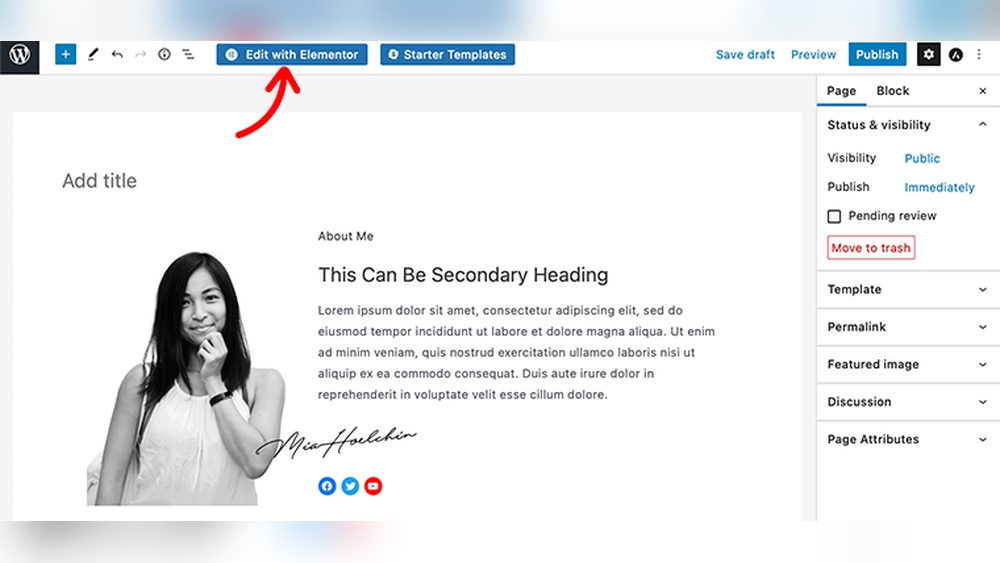
Start by logging into your WordPress dashboard. Go to the Pages section and click on “Add New.” This opens the WordPress editor where you create your content. The editor has blocks for text, images, and more. You can type directly or paste content. It shows a preview of your page as you work. Use the editor tools to format text and add headings. Save your draft often to avoid losing work.
Adding Text And Media
Write a short introduction about your business or website. Use simple language that visitors can understand quickly. Add images or videos to make the page more engaging. Click the “+” button in the editor to insert media blocks. Upload your files or select from the media library. Place images near related text for better flow. Use captions to explain pictures briefly. Keep paragraphs short and clear for easy reading.
Design Tips For An Engaging About Page
Designing an About Us page that connects with visitors is essential. It builds trust and shows the human side of your brand. Simple design tips can make your page clear and inviting. Focus on storytelling, visuals, and team highlights. These elements create a strong, lasting impression.
Writing A Compelling Story
Start with why your business exists. Share your mission and values in plain words. Tell a story that visitors can relate to. Keep sentences short and direct. Use a friendly tone to engage readers. Avoid jargon or complex terms. Let your passion and purpose shine through.
Using Visual Elements
Images and videos catch attention fast. Use photos that show your workspace or products. Add graphics that match your brand colors. Visuals break up text and make reading easier. Choose clear, high-quality pictures. Keep the layout clean and simple for quick scanning.
Highlighting Team Members
People like to see the faces behind a company. Add photos and short bios of key team members. Mention their roles and a fun fact to add personality. This builds trust and makes your company feel more real. Keep introductions brief and friendly. Show your team’s diversity and strengths.

Credit: www.youtube.com
Adding The About Page To Navigation
Adding your About page to the navigation menu helps visitors find it easily. This page shares your story and builds trust with your audience. Clear navigation improves user experience and keeps visitors on your site longer.
Editing Menus
Go to your WordPress dashboard and select Appearance. Click on Menus to open the menu editor. Choose the menu you want to edit or create a new one. Find your About page in the list of pages. Check the box next to it and click Add to Menu. Drag the page to the spot you want it to appear. Save your changes to update the menu on your site.
Placement Best Practices
Place the About page where visitors expect to find it. The top menu or header is the most common spot. Avoid hiding it in dropdowns or footers. Keep the menu simple with few items. Group related pages together for easy navigation. Clear labels help visitors understand what to expect.
Using Plugins To Enhance About Pages
Plugins can improve your About Us page easily. They add features and style without coding. Using plugins helps you create a page that stands out. This makes your website more interesting and professional.
Plugins offer tools like team member profiles, timelines, and animations. These tools keep visitors engaged. They help show your story and values clearly. Choose plugins that fit your brand and message.
Popular About Page Plugins
Several plugins focus on enhancing About Us pages. “About Me” plugins add personal profiles with photos. “Team Members” plugins display your staff with roles and bios. “Timeline” plugins show your company history step-by-step. These plugins are easy to install and use. They save time and improve design quickly.
Adding Interactive Features
Interactive features make your page active and fun. Use plugins to add sliders or carousels for photos. Add clickable team members to show more details. Some plugins allow video introductions or animations. These features help visitors connect with your brand. Interaction keeps visitors on your page longer.
Optimizing For Seo And User Experience
Optimizing your About Us page improves both SEO and user experience. A well-optimized page helps search engines understand your content. It also makes visitors stay longer and explore your site. Clear, relevant information keeps users interested and builds trust.
Using Keywords Effectively
Choose keywords related to your business and audience. Use them naturally in your text, headings, and meta description. Avoid keyword stuffing as it harms readability and SEO. Focus on main terms that describe your brand and services. Place keywords in the first 100 words for better impact.
Improving Page Load Speed
Fast pages keep visitors engaged and reduce bounce rates. Optimize images by compressing them without losing quality. Use caching plugins to speed up loading times. Choose a reliable hosting provider for better performance. Minimize the use of heavy scripts and unnecessary plugins.

Credit: www.youtube.com
Frequently Asked Questions
How Do I Create An About Us Page In WordPress?
To create an About Us page, go to your WordPress dashboard. Click “Pages” > “Add New. ” Enter your content and publish. Customize with images and formatting to match your brand.
Can I Use A Template For The About Us Page?
Yes, WordPress offers many templates. You can select one under “Page Attributes” or use a page builder plugin for more design options.
Should I Add An About Us Page To My Menu?
Yes, adding the About Us page to your menu improves site navigation. It helps visitors find your story quickly, boosting engagement and trust.
What Content Is Essential For An About Us Page?
Include your business story, mission, team info, and values. Keep it clear and authentic to connect with your audience effectively.
Conclusion
Adding an About Us page helps visitors trust your website. It shares your story and mission clearly. WordPress makes this task easy and quick. You just need to follow simple steps. A good About Us page connects with your audience.
It shows who you are and what you do. Keep the content honest and easy to read. This page builds a stronger relationship with visitors. Start now and make your site more inviting.



