

Are you thinking about starting a website with WordPress.org but wondering if it will cost you money? You’re not alone.
Many people get confused about the difference between WordPress. com and WordPress. org, especially when it comes to pricing. Understanding the true costs behind WordPress. org can save you time, money, and frustration. Keep reading, and you’ll discover what expenses to expect – or not – so you can make the best decision for your website without any surprises.
WordPress.org Basics
WordPress.org is a popular platform for creating websites. Many people wonder about its cost and features. Understanding the basics helps you decide if it fits your needs.
This section explains what WordPress.org offers and how it differs from WordPress.com.
What WordPress.org Offers
WordPress.org provides free software to build websites. You get full control over your site’s design and content. It allows you to use custom themes and plugins. This means you can add many features to your site. You also own your data and hosting. Hosting means where your website lives online. You choose the hosting provider and pay for it separately.
Differences From WordPress.com
WordPress.com is a hosted service with limited control. It manages hosting and updates for you. You cannot install all plugins or themes there. WordPress.org needs more work but offers freedom. You decide on hosting, themes, and plugins. It is better for those who want full control. WordPress.com suits beginners who want a simple setup.
Core Software Costs
The core software of WordPress.org is a key topic for anyone starting a website. Understanding the costs involved helps in planning your budget. The software itself is the foundation of your website. It powers everything from pages to posts and plugins. Knowing if you need to pay for this software is important.
Is WordPress.org Free?
Yes, WordPress.org software is free to download and use. You do not pay for the core files. This means anyone can create a website using WordPress without buying the software. You get access to all basic features without cost. This open access encourages many users worldwide.
Open-source Advantages
WordPress.org is open-source software. This means its code is public and can be changed. Developers from around the world improve and secure the software. Users benefit from constant updates and new features. You can also customize the software to fit your needs. This flexibility is rare in other platforms.
Hosting Expenses
Hosting expenses are a key part of using WordPress.org. Unlike WordPress.com, WordPress.org is free to download and use. But, you must pay for web hosting to store your website files. This cost varies based on your hosting type and provider.
Types Of Hosting
Several hosting types suit different needs. Shared hosting is the cheapest and best for beginners. It means sharing a server with other websites. VPS hosting offers more power and control. Dedicated hosting gives you a whole server alone. Cloud hosting uses many servers for more reliability. Each type affects your website speed and security.
Price Ranges
Shared hosting starts as low as $2 to $10 per month. VPS hosting ranges from $20 to $100 monthly. Dedicated servers cost between $80 and $300 each month. Cloud hosting varies widely, from $10 to hundreds monthly. Prices depend on storage, bandwidth, and support levels. Renewals often cost more than the initial price.
Choosing The Right Provider
Select a provider with good uptime and customer support. Check if they offer easy WordPress installation. Look for features like SSL, backups, and security tools. Read reviews from real users before deciding. Choose hosting that fits your budget and website goals. A reliable host ensures your site stays online smoothly.
Domain Name Fees
When setting up a website with WordPress.org, domain name fees are an important cost to consider. A domain name is the address people type to visit your site. This fee is separate from hosting and themes. Understanding domain fees helps you plan your budget better.
Importance Of A Domain
A domain name gives your website a unique identity. It makes your site easy to find and remember. A good domain builds trust with visitors. It also helps improve your site’s ranking on search engines.
Typical Costs
Domain prices usually range from $10 to $20 per year. Some domains cost more if they are popular or short. Renewal fees can be slightly higher than the first purchase price. Always check the renewal price before buying.
Tips For Domain Selection
Choose a domain that matches your brand or topic. Keep it short and easy to spell. Avoid numbers and hyphens to reduce confusion. Use common extensions like .com or .net for better recognition.
Themes And Design Costs
The cost of themes and design is a key part of using WordPress.org. Themes control how your website looks. Design costs can vary widely. You can choose free themes or pay for premium ones. Custom designs add another layer of expenses. Understanding these options helps you plan your budget well.
Free Vs Premium Themes
WordPress.org offers many free themes. These are good for simple websites. Free themes have basic features and layouts. They may lack advanced options or support. Premium themes cost money but add value. They offer better design and more tools. Premium themes come with updates and support. This can save you time and trouble.
Custom Design Expenses
Custom designs require hiring a web designer. This option suits unique or complex websites. Costs depend on the designer’s experience and project size. Custom work can be expensive but very flexible. You get a website that matches your exact needs. This cost is separate from theme prices. Planning for this helps avoid surprises later.
Credit: www.elegantthemes.com
Plugin Costs
Plugins add extra functions to your WordPress site. They help you build features without coding. Some plugins are free. Others require payment. Knowing plugin costs helps plan your budget well.
Free Plugins Availability
WordPress.org offers thousands of free plugins. These cover many needs like SEO, security, and design. You can install them directly from your dashboard. Free plugins get updates from developers regularly. They are a great start for beginners or small sites.
Many free plugins have enough features to run a good site. They can improve speed, add contact forms, or boost traffic. Testing free plugins helps find what works best for you.
When To Invest In Premium Plugins
Some plugins require payment for full features. Premium plugins offer advanced options and better support. They help with complex needs like e-commerce or membership sites. Investing in premium plugins can save time and improve site quality.
Buy premium plugins if you want reliable updates and customer help. They often include extra tools not in free versions. Choose premium plugins when your site grows or needs more security.
Maintenance And Security
Maintaining and securing a WordPress.org website needs time and effort. These tasks keep your site safe and running smoothly. Understanding the costs involved helps plan your budget better.
Ongoing Maintenance Needs
WordPress sites need regular updates. Themes, plugins, and the WordPress core must stay current. Updates fix bugs and improve features. Ignoring updates can cause errors or site crashes.
Backups are essential. They protect your data from loss. Schedule backups often and store them safely. Monitoring your site’s performance helps spot issues early. Maintenance may require technical skills or hiring help.
Security Measures And Costs
Security is crucial for every website. WordPress is popular and a target for hackers. Use strong passwords and limit login attempts. Installing security plugins adds protection against threats.
Some security tools are free, but premium versions cost money. Costs vary based on features and support. SSL certificates secure data and improve trust. Many hosts include SSL for free, but some charge fees.
Regular security scans detect vulnerabilities. Fixing issues quickly prevents damage. Investing in security reduces risks and potential expenses later.
Additional Expenses To Consider
WordPress.org itself is free to use, but setting up and running a website can involve extra costs. These costs vary depending on your needs and goals. You should plan for these additional expenses to avoid surprises.
Professional Help And Development
Building a website can be simple or complex. Hiring a web developer or designer can save time. Professionals help with custom themes, plugins, and site fixes. Their fees depend on the project size and skills needed. Small tasks may cost less, while full site builds cost more. If you want a unique look or special features, expect to pay for expert help.
Marketing And Seo Tools
Getting visitors to your site often requires marketing tools. SEO tools help improve your site’s ranking on search engines. Some basic SEO plugins are free, but advanced tools usually cost money. Email marketing services, social media ads, and analytics tools add to expenses. These tools help reach your audience and track your progress. Budgeting for these tools supports your site’s growth and success.
Cost Comparison With Other Platforms
Understanding the costs of WordPress.org is easier by comparing it to other platforms. This helps you see what you pay for and what you get. Different platforms charge differently based on features and hosting needs.
WordPress.org Vs WordPress.com
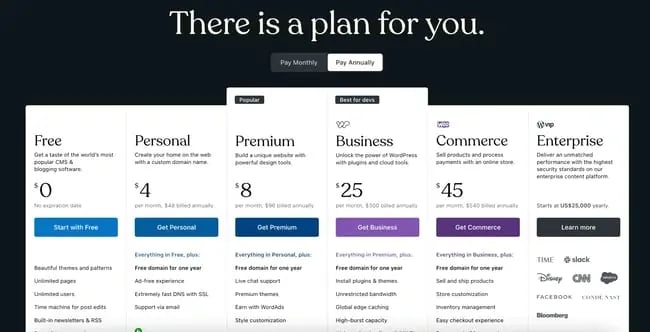
WordPress.org is free to download and use. Hosting and domain costs apply, depending on your provider. You control your site fully. WordPress.com offers free plans but limits customization and ads. Paid plans on WordPress.com can be more expensive than self-hosted WordPress.org. You pay for simplicity on WordPress.com but less control.
WordPress.org Vs Website Builders
Website builders like Wix or Squarespace include hosting and tools in one price. Monthly fees cover everything, which can be higher over time. WordPress.org requires separate hosting and domain fees but often costs less long term. Website builders are easier to use but less flexible. WordPress.org suits users wanting full control and growth options.
Credit: blog.hubspot.com
Maximizing Value On A Budget
Maximizing value on a budget means getting the most from WordPress.org without spending too much. WordPress.org itself is free, but costs can come from hosting, themes, and plugins. Smart choices help keep these costs low. Focus on essentials and use free options to build a strong site.
Cost-saving Tips
Choose affordable hosting plans that fit your needs. Many providers offer low-cost options for beginners. Use free themes instead of paid ones to save money. Avoid unnecessary premium plugins; pick only those needed for your site’s function. Regularly review your expenses and cancel unused services. Keep your site simple to reduce costs on design and maintenance.
Free Resources And Tools
WordPress.org offers many free themes and plugins. The official WordPress plugin directory has thousands of options. Use free SEO tools like Yoast SEO’s basic version to improve your site’s visibility. Take advantage of free image libraries for quality visuals. Use free website builders and editors included in WordPress. Learning resources and forums help solve problems at no cost.
Credit: www.elegantthemes.com
Frequently Asked Questions
Does WordPress.org Cost Money To Use?
WordPress. org software itself is free to download and use. However, you must pay for web hosting, domain name, and any premium themes or plugins you choose. These additional costs vary based on your needs and provider.
What Are The Main Expenses Of WordPress.org?
The main costs include web hosting, domain registration, premium themes, and plugins. Hosting typically starts around $3 to $10 monthly. Domain names usually cost $10 to $15 per year. Premium themes and plugins vary widely in price.
Can I Use WordPress.org Without Paying Anything?
You can use the WordPress. org software without paying for it. However, free hosting options are limited and often unreliable. To build a professional website, investing in hosting and domain is essential.
How Does WordPress.org Differ From WordPress.com Pricing?
WordPress. com offers free plans with limitations and paid plans starting around $4 monthly. WordPress. org is free software, but you pay for hosting and domain separately. WordPress. org offers full control and flexibility, unlike WordPress. com’s managed service.
Conclusion
WordPress. org itself does not charge money. You only pay for hosting and domain name. Many free themes and plugins are available to start. Some advanced features or premium tools might cost extra. This setup gives you full control over your website.
It suits people who want flexibility and growth. Choosing WordPress. org means understanding some technical steps. Overall, it’s a cost-effective way to build a website. You decide how much money to spend based on needs. Simple, affordable, and powerful for many users.



