
Are you running a software business and wondering exactly where to list your expenses on Schedule C? Tracking your business costs correctly is crucial to maximizing your tax deductions and keeping your finances in order.
But with so many categories and rules, it can feel confusing. This guide will help you understand where your software business expenses belong on Schedule C, making tax time less stressful and more rewarding. Keep reading to discover simple tips that can save you money and keep your records clear.
Software Business Expenses On Schedule C
Software business expenses appear on Schedule C of your tax return. This form reports income and expenses for a sole proprietorship. Knowing where to list software costs saves time and avoids mistakes. It also helps track your business spending accurately.
Software expenses include the cost of programs, subscriptions, and licenses. These costs can reduce your taxable income. Properly reporting them on Schedule C ensures you pay the right taxes.
What Is Schedule C?
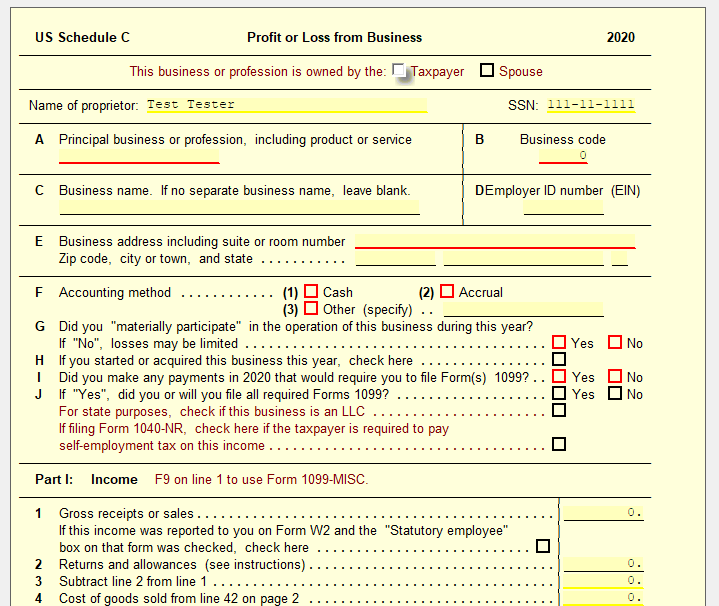
Schedule C is a tax form for sole proprietors. It reports your business income and expenses. The IRS uses it to calculate your profit or loss. The form has sections for different expense types. Software expenses fit into the right category here. You send Schedule C with your personal tax return.
Why Track Business Expenses?
Tracking expenses helps manage your business budget. It shows where your money goes each month. Accurate records make tax time easier. You can claim deductions for costs like software. This reduces your taxable income and lowers taxes owed. Good tracking also supports your claims if audited. It keeps your business finances clear and organized.
Credit: support.taxslayer.com
Common Expense Categories
Business expenses must be recorded carefully on Schedule C. Understanding common expense categories helps organize your records. These categories cover most costs a software business faces.
Tracking expenses correctly can reduce your taxable income. It also gives a clear picture of how your money is spent. Let’s explore typical expense categories for a software business.
Office Supplies And Equipment
Office supplies include pens, paper, and other small items. Equipment means computers, printers, and desks needed for work. Both are necessary to keep your business running smoothly.
Software And Subscriptions
Software expenses cover programs you buy or subscribe to. This includes development tools, antivirus, and cloud services. Keep receipts to prove these costs are business-related.
Marketing And Advertising
Marketing costs help attract clients and grow your business. Expenses here include online ads, flyers, and website fees. These costs are important for reaching new customers.
Travel And Meals
Travel expenses cover trips for meetings or conferences. Meals can be included if related to business activities. Record dates and reasons for travel to support deductions.
Professional Services
These expenses include fees paid to lawyers, accountants, or consultants. Hiring experts helps your business stay compliant and efficient. Keep invoices to document these payments.
How To Report Software Costs
Reporting software costs on Schedule C can be tricky. It depends on the type of software and how you use it. You must decide if the cost is a one-time purchase or a long-term investment. This choice affects where and how you report the expense on your tax form.
Capitalizing Vs. Expensing Software
Capitalizing means treating software as a long-term asset. You spread the cost over several years. This applies to software you develop or buy for long use. Expensing means deducting the full cost in the year you buy it. This is common for off-the-shelf software and small purchases.
Choosing between capitalizing and expensing depends on the software’s cost and lifespan. Capitalizing can lower your taxes over time. Expensing gives you a bigger deduction now. The IRS has rules that help you decide which method to use.
Where To Enter Software Expenses
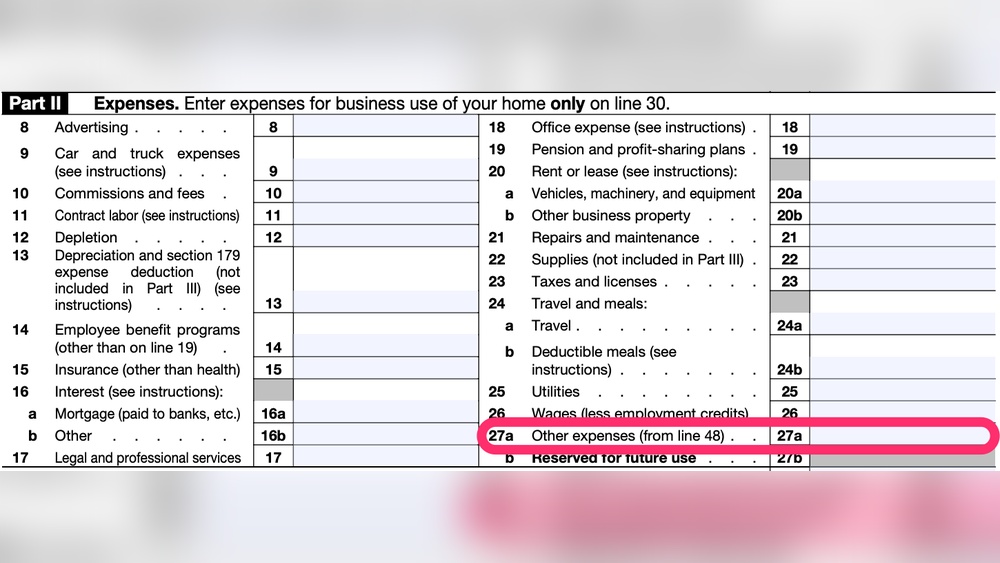
Software costs usually go on Line 18 of Schedule C, under “Office Expense.” This applies to most small software purchases. If you capitalize the software, report it on Form 4562. This form covers depreciation and amortization. Include the software as a business asset and spread the cost over time.
Keep clear records of all software purchases. It helps during tax filing and audits. Record the date, cost, and purpose of each software expense. Proper reporting can save money and avoid IRS issues.

Credit: www.keepertax.com
Home Office And Utilities
Home office and utilities are common expenses in a software business. These costs can be written off on Schedule C. They help lower your taxable income. Understanding how to report these expenses is important. It saves money and keeps your taxes accurate.
Calculating Home Office Deduction
Start by measuring your home office space. Calculate the square footage used only for work. Divide this by your home’s total square footage. This gives the percentage of your home used for business.
Apply this percentage to your home expenses. Include rent or mortgage interest, property taxes, and insurance. The result is your home office deduction. Keep records of your calculations and expenses. The IRS may ask for proof.
Utilities And Internet Costs
Utilities like electricity and water are partly for business. Use the same percentage from your home office calculation. Apply it to your total utility bills. This portion is deductible on Schedule C.
Internet costs are also important. If you use the internet for business, deduct a reasonable part. Estimate the business use percentage. Document your method and keep bills for proof.
Employee And Contractor Payments
Employee and contractor payments are important expenses in a software business. These costs cover the money paid to people who help run the business. Properly reporting these payments on Schedule C is key for tax purposes. It ensures accurate records and helps avoid problems with the IRS.
Reporting Wages On Schedule C
Wages paid to employees appear on Schedule C as business expenses. These wages include salaries, hourly pay, and bonuses. Report the total wages paid during the tax year. Also, include payroll taxes and benefits paid by the business. Keep detailed records of all employee payments. This information supports the amounts shown on Schedule C.
Contractor Expenses And Forms
Payments to contractors are also deductible business expenses. These costs go on Schedule C under “Contract labor” or a similar category. Contractors must receive Form 1099-NEC if paid $600 or more in a year. Keep copies of all 1099 forms issued. Proper reporting helps track contractor payments and meets IRS rules.
Credit: support.ultimatetax.com
Depreciation And Amortization
Depreciation and amortization help you spread out the cost of your software business expenses. These methods let you deduct the cost over several years. This matches the expense with the time you use the item or software. It helps keep your taxes fair and accurate.
Depreciating Equipment
Equipment used for your software business loses value over time. You cannot deduct the full cost in one year. Instead, you claim a portion each year as depreciation. This includes computers, servers, and other hardware. The IRS sets rules on how long to depreciate each item. Usually, the period ranges from three to seven years.
Amortizing Software Development Costs
Software development costs often qualify for amortization. This means spreading the expense over the software’s useful life. You cannot write off the entire cost at once. Amortization helps match the cost with the revenue the software generates. The IRS generally allows amortization over 15 years. It applies to software created or purchased for your business.
Record Keeping Tips
Keeping good records is key for tracking software business expenses on Schedule C. Clear and organized records help during tax time and keep your business running smoothly. Proper record keeping also reduces errors and saves time.
Organizing Receipts And Invoices
Start by collecting all receipts and invoices related to your software expenses. Sort them by date or category to make finding them easier. Use folders or envelopes to keep paper documents neat and safe. For digital receipts, create separate folders on your computer or cloud storage. Label each file with the date and vendor name for quick access.
Using Accounting Software
Accounting software helps track expenses automatically. Enter your software purchases and subscriptions regularly. Many programs allow you to upload receipts directly. This keeps all data in one place and reduces paperwork. Choose software that fits your business size and needs. Regular updates ensure your records stay accurate and ready for Schedule C reporting.
Common Mistakes To Avoid
Understanding where software business expenses go on Schedule C is key to filing taxes properly. Many small business owners make simple mistakes. These errors can lead to missed deductions or audits. Avoiding common pitfalls helps keep your finances clear and organized. Here are two frequent mistakes to watch out for.
Mixing Personal And Business Expenses
Mixing personal and business expenses causes confusion. The IRS wants clear records of business costs only. Using the same account for both can blur the lines. Keep separate bank accounts and credit cards for your business. This makes tracking easier and more accurate. It also prevents accidental reporting of personal spending as business expenses.
Missing Deductions
Many business owners miss valid deductions on Schedule C. Software costs often qualify as deductible business expenses. Forgetting to include these means paying more taxes. Keep detailed records of all software purchases and subscriptions. Review the IRS rules for deductible expenses regularly. Proper documentation ensures you claim every valid deduction available.
Frequently Asked Questions
Where Do Software Business Expenses Appear On Schedule C?
Software business expenses are listed under Part II, Expenses, on Schedule C. Commonly, they fall under categories like “Office Expense,” “Supplies,” or “Other Expenses,” depending on the nature of the cost. Proper categorization ensures accurate tax reporting and maximizes deductions.
Can Software Development Costs Be Deducted On Schedule C?
Yes, software development costs can be deducted on Schedule C. They are usually treated as business expenses or capitalized as assets. Deducting these costs reduces taxable income, benefiting your software business financially.
How To Categorize Software Subscriptions On Schedule C?
Software subscriptions are typically categorized under “Office Expense” or “Other Expenses” on Schedule C. Recording them correctly helps track recurring costs and ensures proper deduction during tax filing, saving you money.
Are Hardware Purchases For Software Business Deductible?
Yes, hardware purchases like computers and peripherals are deductible on Schedule C. They may be listed under “Depreciation” or “Other Expenses,” depending on their cost and useful life, providing valuable tax relief for your business.
Conclusion
Understanding where to place software business expenses on Schedule C helps keep taxes clear. Track each cost carefully for accurate reporting. This makes tax time easier and reduces mistakes. Always separate personal and business expenses to stay organized. Clear records support your claims if the IRS asks questions.
Keeping expenses in the right categories saves money and stress. Remember, simple steps now lead to smoother tax filings later.


