
Are you looking to make your WordPress website stand out? Maybe you’ve heard about Custom Post Types but aren’t quite sure what they are or how they can transform your site.
Imagine having the ability to tailor your content precisely to your needs, enhancing both functionality and user experience. With Custom Post Types, your site can transcend the limitations of standard posts and pages, offering a more personalized and engaging experience for your visitors.
Curious to learn more about how this powerful feature can revolutionize your website? Let’s dive into the world of WordPress Custom Post Types and discover their potential.
What Is A Custom Post Type?
A custom post type is a special kind of content in WordPress. It is different from regular posts and pages. This type lets you create and manage unique content. Examples include portfolios, recipes, or products.
Custom post types help organize content better. They make your site more flexible. You can add fields and taxonomies. This gives your content a richer detail.
Creating a custom post type needs a bit of coding. Plugins can help too. They make the process easier. WordPress provides tools and guides for this. It is important to plan your content structure.
Benefits Of Using Custom Post Types
Custom Post Types allow you to organize your content better. You can create different types of posts for different needs. This makes your website look neat and professional. Visitors find what they need easily.
Businesses often have diverse content like portfolios, testimonials, or events. Using Custom Post Types, you can manage these efficiently. This helps in showcasing your work in a structured way. It’s easier for users to navigate.
Search engines love structured content. Custom Post Types improve your site’s SEO. They make it easier for search engines to index your pages. Better SEO means more visitors to your site.
Developers find it easier to add features with Custom Post Types. You can customize your site without changing the core code. This flexibility is a big advantage.
Common Use Cases
Artists and designers use portfolios to show their work. Custom post types help them create unique displays. They can include images, descriptions, and links. This makes their work stand out. Each project can have its own page.
Businesses use testimonials to show customer feedback. Custom post types make this easy. Each testimonial can have a name, photo, and text. This builds trust with new customers. They see real stories from real people.
Online shops list items as products. Custom post types allow detailed descriptions. They include price, images, and features. Shoppers learn about the product quickly. It makes buying easy and fun.
Creating A Custom Post Type
Plugins help create custom post types easily. They offer user-friendly options. No coding skills are required. Popular plugins include Custom Post Type UI and Toolset Types. These tools guide users step-by-step. They simplify the process. Users can define post names, labels, and features. This customization enhances website functionality.
Manual coding offers more control. It requires some coding skills. Users need to edit the functions.php file. Registering a custom post type is essential. This involves specifying labels and arguments. It provides flexibility. Users can tailor features to meet specific needs. This method suits those who want custom solutions.
Custom Post Type Vs Default Post Types
Posts are for blog entries or news updates. They show up in a list. The latest post comes first. Posts can have tags and categories. They help in sorting. Posts can have comments too. They are great for interaction.
Pages are for static content. They do not change often. They do not show up in a list. Pages are good for “About” or “Contact” info. They don’t have tags or categories. No comments either. Pages are more formal. They show key information.

Credit: learn.wordpress.org
Customizing Custom Post Types
Custom Fields allow extra information in posts. They can store details like author names or dates. These fields make posts unique. Users can add fields easily. Fields help in organizing data better. They enhance the post’s value.
Taxonomies are like labels. They group posts together. Categories and tags are common taxonomies. They help users find related posts. Custom taxonomies can be created. They organize content in a special way. This makes searching easier.
Best Practices
Custom Post Types in WordPress allow users to create unique content structures. They expand beyond standard posts and pages, offering flexibility. Perfect for portfolios, testimonials, or any specialized content needs.
Naming Conventions
Choose names that are clear and easy to understand. Avoid using long words. Short names are better. Use lowercase letters for names. Spaces are not allowed in names. Always use underscores instead of spaces. Names should show the content purpose. This helps users know what to expect. Consistent naming is important. It aids in organization and searching.
Security Considerations
Protect custom post types from unauthorized access. Use permissions wisely. Always keep plugins updated. Regular updates fix security holes. Choose plugins carefully. Not all plugins are safe. A trusted plugin enhances security. Review settings often. Check who can edit or delete posts. Restrict access where needed. Proper settings prevent harmful actions. Stay informed about security threats. Knowledge helps in protection.
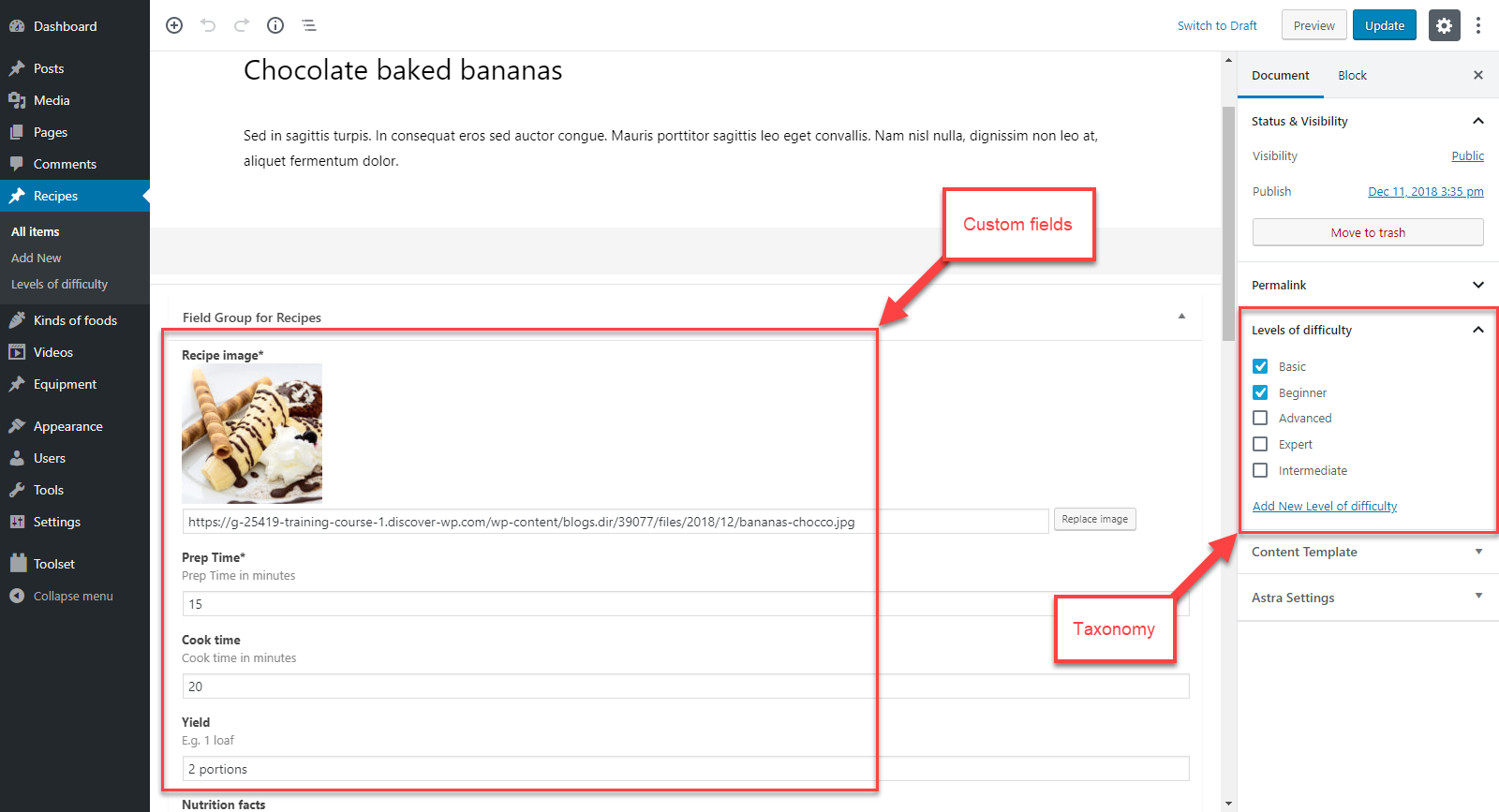
Credit: toolset.com
Troubleshooting Common Issues
Navigating WordPress can be tricky, especially with custom post types. They allow unique content organization beyond standard posts and pages. Understanding them can solve many common issues, enhancing your site’s functionality and user experience.
Compatibility Problems
Custom Post Types may not work with all themes and plugins. Sometimes, these tools can conflict. This can make your site act weird or break. Always check if the theme or plugin supports Custom Post Types. You can do this by reading the theme or plugin documentation. Updates are important, too. Outdated tools can cause issues. Keep everything up-to-date for best results. If problems persist, consider reaching out for support. Many developers offer help through forums or support tickets.
Visibility Issues
Custom Post Types might not show up on your site. This can happen if settings are wrong. Check your settings in the dashboard. Make sure the post type is set to “public.” Sometimes, you need to adjust your menu settings. Add the custom type to your navigation menu. If still invisible, review your theme’s settings. Some themes need extra steps for custom types. Always double-check these settings for visibility.

Credit: kinsta.com
Frequently Asked Questions
What Is A Custom Post Type In WordPress?
A custom post type in WordPress is a unique content type. It allows you to create and manage different types of content. Examples include portfolios, testimonials, or products. These are beyond the default posts and pages. Custom post types enhance your site’s functionality and organization.
How To Create A Custom Post Type?
Creating a custom post type involves coding or using plugins. You can use the “register_post_type()” function in your theme’s functions. php file. Alternatively, plugins like Custom Post Type UI simplify the process. They provide a user-friendly interface for setting up custom post types without coding.
Why Use Custom Post Types In WordPress?
Custom post types offer flexibility and organization. They help structure your content more effectively. You can tailor content types to fit your site’s needs. This enhances user experience and SEO. Custom post types also enable better content management, making your WordPress site more versatile.
Can Plugins Help With Custom Post Types?
Yes, plugins can simplify creating custom post types. Popular plugins like Custom Post Type UI or Toolset Types offer intuitive interfaces. They allow users to set up and manage custom post types easily. These plugins eliminate the need for coding, making it accessible for non-developers.
Conclusion
Custom Post Types expand WordPress’s flexibility. They allow tailored content creation. You can build specific content types suited to your needs. This enhances site organization and user experience. Using Custom Post Types makes your website more dynamic. They cater to diverse content requirements, helping engage your audience better.
Simplified content management becomes possible. Custom Post Types are a practical solution for unique content display. This can make your website stand out. Explore and utilize these features to enhance your WordPress site effectively. Your website can become more versatile and user-friendly with these tools.



