
Are you curious about what makes WordPress a powerhouse in the world of website creation? You’re not alone.
Whether you’re planning to start a blog, build a business site, or launch an online store, understanding the ins and outs of WordPress can be your secret weapon. With its user-friendly interface and endless customization options, WordPress empowers you to create a professional site without needing to be a tech wizard.
Imagine having the ability to tailor every detail of your site to reflect your personal style or business ethos. Exciting, right? You’ll discover what WordPress truly is, why it matters, and how it can transform your online presence. Keep reading to unlock the potential of your website dreams.
Credit: www.youtube.com
WordPress Basics
WordPress is a popular website builder. Many people use it. It helps you create websites easily. It started in 2003. Today, it powers over 40% of websites. That’s a lot! You can make blogs, shops, or even a news site. It’s open-source. This means anyone can use it for free. You can also change it to fit your needs.
WordPress is easy to use. You don’t need to know coding. It has many themes and plugins. Themes change how your site looks. Plugins add new features. Want a shop? There’s a plugin for that! Want a photo gallery? There’s a plugin for that too! It’s also SEO friendly. This helps your site be found on search engines. Many people trust WordPress. It’s a safe choice for your website.
Setting Up WordPress
Start by downloading the WordPress software from the official site. Unzip the file on your computer. Next, access your hosting account’s control panel. Look for the file manager option there. Upload the unzipped files to the public_html folder. Once done, open your web browser. Enter your domain name in the address bar. The setup wizard will start. Follow the steps to complete the installation.
A good host makes your website fast and reliable. Choose a provider with excellent customer support. Ensure they offer a one-click WordPress install feature. This makes setup easier. Also, check if they have strong security features. This keeps your site safe. Lastly, compare prices and plans. Pick what fits your budget.
Your domain name is your online address. It should be easy to spell. Keep it short and memorable. Avoid numbers or hyphens. They can confuse visitors. Ensure it’s related to your content or business. Check for availability. Register it through your hosting provider or a domain registrar.
Themes And Customization
WordPress offers many themes. Each theme has a unique look. Some themes are simple. Others are more fancy. You can pick a theme that fits your style. Themes change how your website looks. Choose a theme that matches your content. Popular themes are often easy to use. They may have lots of features. Themes can be free or paid. Free themes are a good start. Paid themes offer more options.
Themes can be customized. Change colors, fonts, and layouts. Add a logo or a menu. Use the WordPress Customizer tool. It helps you make changes easily. You can see changes live. Try different settings. Find what looks best. Customization makes your site unique. It shows your personal touch. Even small changes can make a big difference.
Plugins And Functionality
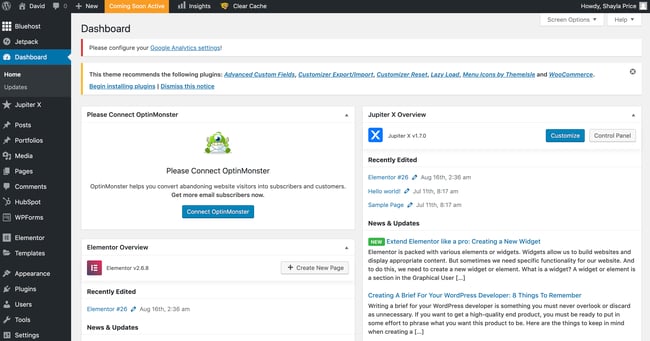
Plugins are like tools for your WordPress site. Some plugins are very important. They help your site work better. One must-have plugin is a security plugin. This keeps your site safe. Another important plugin is Yoast SEO. It helps your site show up in searches. A backup plugin is also needed. It saves your site data. These plugins make your site strong and safe.
You can make your site better with plugins. Use a contact form plugin. It lets visitors message you. A social media plugin is also good. It helps share your site on social media. Image optimization plugins make your site fast. They make pictures load quickly. Pick plugins that fit your needs.
Content Management
WordPress makes it easy to write and share stories. Create posts to share news and updates. Use pages for important info like contact details. Each post or page can have a title. Add pictures or videos to make it more fun. Editing is simple. Click the button to change text. Use the toolbar to make words bold or add links. Preview before publishing. Make sure it looks good.
Categories help group similar posts together. Choose a category that fits the post. Tags are like labels. They help find posts faster. Add tags to describe the post. Use them wisely. Too many tags can be confusing. Both categories and tags help users find what they need. Keep content neat and tidy. It makes the site easier to use.
Credit: blog.hubspot.com
Seo And Performance
WordPress offers tools to enhance SEO and performance. Plugins optimize site speed, boosting user experience. Keywords improve visibility, attracting more visitors.
Optimizing For Search Engines
Search engines love well-structured websites. Use keywords wisely. Add them to titles and headings. Write clear and simple content. Use short sentences. Good keywords help people find your site. Don’t use too many keywords. Keep it natural. Check the meta tags. They should be neat and clear. Meta tags tell search engines what your site is about. Ensure images have alt text. Search engines can’t see pictures. Alt text helps them understand images. This improves your site’s visibility.
Improving Site Speed
Fast websites are better. People leave slow sites. Use smaller images. They load quickly. Choose good hosting. It affects your site’s speed. Compress your files. Smaller files load faster. Remove extra plugins. They slow your site. Check your site’s speed regularly. Fix speed issues quickly. A fast site makes visitors happy. It also helps with search rankings. Search engines prefer fast sites.
Security Measures
WordPress security is very important. Bad people try to break into your site. Use strong passwords to keep them out. Change passwords often. Install security plugins for extra protection. These plugins find and stop attacks. Always update WordPress and plugins. Updates fix security problems. Lock important files so others can’t change them.
Backups save your site if something goes wrong. Use backup plugins to help. Store backups in different places. Keep them safe and updated. Regular backups help fix problems fast. Recovery solutions bring your site back. Learn how to use them before a problem happens. Test backups to make sure they work.
Engaging With The Community
WordPress forums are great for learning. They help solve problems fast. Users share tips and tricks. Ask questions anytime. Get answers from experts. New users find them very helpful. They improve skills quickly. Forums are free. Everyone can join. No special skills needed. Learn by reading posts. Help others too. Share your experience. Build friendships with other users.
WordPress events bring people together. They are fun and educational. Meet developers and designers. Learn new things every event. Workshops teach useful skills. Talks inspire you. Events are everywhere. Big cities have many. Small towns have some too. Online events are popular now. Join from home. Make new friends at events. Share ideas with others. Be part of the community.
Future Of WordPress
WordPress is changing fast. New trends are coming. Block editors are improving. They make building websites easy. AI tools are being added. These help with content creation. Headless CMS is gaining popularity. It separates the front-end and back-end. This gives more flexibility.
Mobile optimization is a must now. Most people browse on phones. Security is a big concern. Plugins are making sites safer. SEO features are built-in. This helps sites rank better. WordPress is also focusing on speed. Faster sites keep users happy.
In the next ten years, WordPress will grow more. It will be more user-friendly. Accessibility will improve. More people can use it easily. Virtual Reality (VR) is coming. WordPress will support VR content. Voice search is rising. Sites will be optimized for it.
E-commerce is booming. WordPress will have better tools for online stores. Community support will stay strong. Developers will share more resources. Users will find more themes and plugins. WordPress will keep evolving. It will meet the needs of the future.
Credit: kinsta.com
Frequently Asked Questions
What Is WordPress?
WordPress is a popular content management system (CMS) used for building websites. It is open-source and highly customizable. Users can create blogs, business sites, or e-commerce stores with ease. WordPress offers thousands of themes and plugins to enhance functionality.
How Do I Start Using WordPress?
To start, choose a hosting provider and install WordPress. Select a theme that suits your website’s needs. Customize it with plugins and widgets. Add content by creating posts and pages. Regularly update and maintain your site for optimal performance.
Is WordPress Free To Use?
Yes, WordPress itself is free to download and use. However, costs can arise from hosting, premium themes, and plugins. Some features or services might require additional expenses. Users have the flexibility to choose free or paid options based on their needs.
Can I Customize My WordPress Site?
Absolutely, WordPress allows extensive customization. You can change themes, add plugins, and modify settings. Use page builders for custom designs without coding. WordPress’s flexibility lets you create a unique and personalized site. Regular updates ensure your site remains functional and secure.
Conclusion
WordPress offers many tools for website building. It’s user-friendly and flexible. Beginners and experts find it useful. Themes and plugins enhance functionality. Customization options suit various needs. Support and community resources are abundant. Regular updates keep it secure. WordPress adapts to different business sizes.
Blogs, e-commerce, and portfolios all thrive. Exploring its features can improve your site. Start small, learn as you go. Step by step, build your online presence. WordPress makes it possible. Easy, efficient, and effective. It’s a trusted choice for many.
Consider WordPress for your website needs.



