
Have you ever wondered what’s happening behind the scenes of your WordPress website? You might be surprised to learn that your WordPress database is the heart of your site.
It’s where all your posts, pages, comments, and settings are stored. Imagine it as a giant digital filing cabinet, organizing everything neatly so your website runs smoothly. Understanding your WordPress database can unlock new levels of control and efficiency for your site.
Curious about how this hidden powerhouse works and how it can benefit you? Keep reading to discover the secrets of your WordPress database and how it can transform your website management.
WordPress Database Basics
A WordPress database stores all your website’s data. This includes posts, pages, user information, and settings. Without it, WordPress cannot function. The database uses MySQL, a popular database system. This system organizes data into tables. Each table holds different types of data. For example, one table holds post data. Another holds user data. This makes finding information fast and easy.
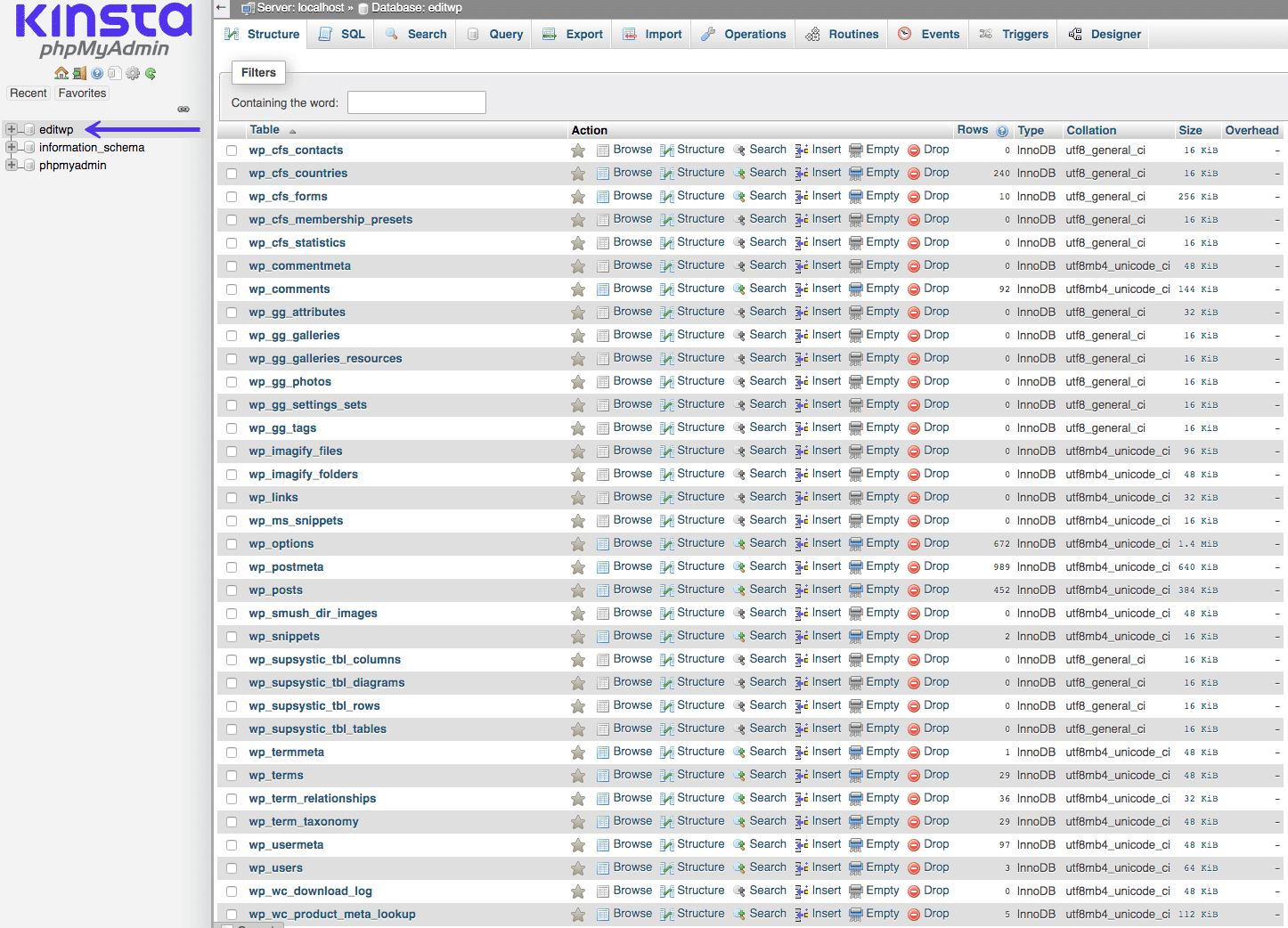
WordPress databases have a simple structure. There are default tables like wp_posts, wp_users, and wp_comments. These tables work together to run your site. It’s important to keep your database clean. Regular backups help protect your data. If something goes wrong, you can restore your site. This keeps your website safe and reliable.
Core Components
The WordPress database is made up of different tables. Each table has a special job. For example, the wp_posts table holds all your posts and pages. The wp_users table keeps track of user information. It stores usernames and passwords securely. The wp_comments table saves all comments on your posts. Other tables handle settings, themes, and plugins. These tables work together to keep your site running smoothly. They help WordPress store and organize information efficiently.
Primary keys are unique identifiers in tables. They help locate specific data quickly. Think of them as ID cards for each row. Indexes make searching faster. They speed up data retrieval. Without them, finding information would take longer. They help keep your site fast and responsive. These components are essential for database performance. They ensure your data is organized and easy to find.
Key Tables In WordPress
The wp_posts table stores all your blog posts. It keeps track of pages and custom post types. Every piece of content has a unique ID. This table includes post titles and authors. You can find post dates and status here. Drafts, published posts, and more.
The wp_users table lists all users. This table saves usernames and passwords. Emails and user roles are stored too. Administrators and subscribers are included. Each user has a unique ID. This helps manage permissions and access.
Comments live in the wp_comments table. It holds every comment and reply. You find the comment author and date here. Comments have status like approved or pending. This table connects comments to posts. Each comment has a unique ID.
The wp_options table keeps site settings. It holds theme choices and plugin settings. This table saves general settings like site title. You find options for widgets here. Configuration details are stored in key-value pairs. This helps customize your site.
Credit: www.malcare.com
Database Configuration
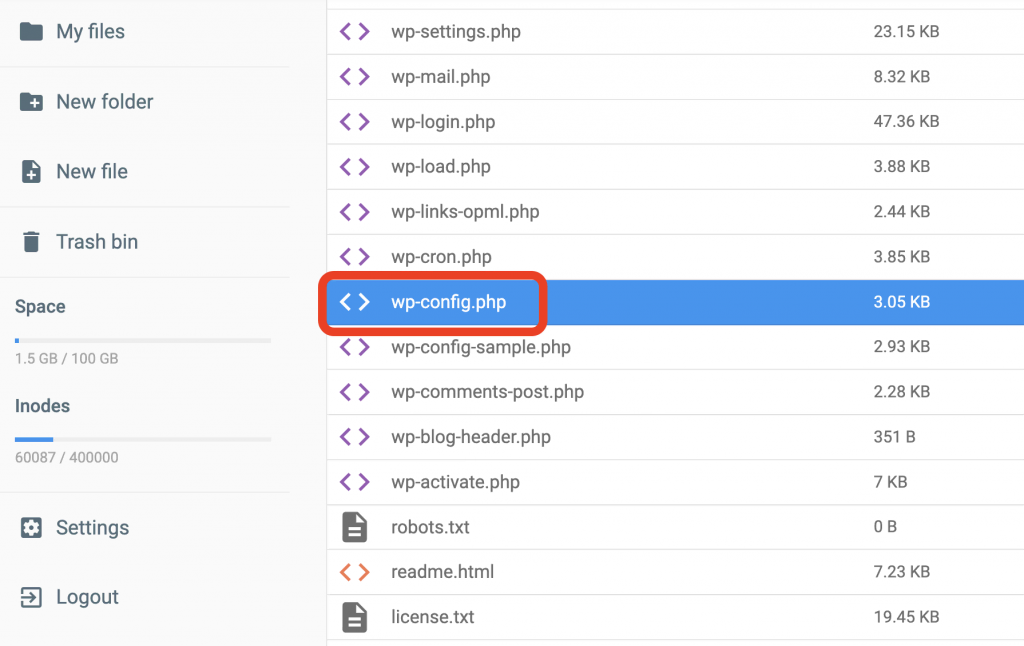
The wp-config.php file holds the key to your WordPress database. It stores important information for your site. This file is located in the root directory. It contains database connection details like database name, username, and password.
Your site connects to the database using these details. DB_NAME is the name of your database. DB_USER is your username. DB_PASSWORD is your secret code. DB_HOST tells where your database lives. These settings allow WordPress to talk to your database. Changing these details can break your site. So, handle them carefully.
Managing The Database
phpMyAdmin is a tool. It helps manage your database. It is user-friendly and easy to use. You can view tables and edit data. You can also delete data if needed. phpMyAdmin is web-based. This means you can use it in your browser. Many hosting providers offer it. It’s great for beginners. No need to be a database expert. Just follow the steps and use the buttons.
Always keep a backup of your database. This is important. Use plugins to make backups. Or use phpMyAdmin to export your data. Save the file on your computer. Schedule regular backups. Maybe once a week. This keeps your data safe. In case of problems, you can restore it. Backups are like a safety net. They protect you from data loss.
Optimizing Performance
WordPress database stores all site data. This includes posts, comments, and settings. For quick access, the database needs fine-tuning. One way is through indexing techniques. Indexing speeds up data retrieval. It organizes data in a smart way. This reduces the time for queries. Another key technique is query optimization.
Indexing Techniques
Indexes work like a book’s table of contents. They help find data fast. Without indexes, databases must search each entry. This takes time. Proper indexing improves performance. It makes queries run smoothly and quickly.
Query Optimization
Query optimization is crucial for databases. It modifies queries for speed. Well-optimized queries use fewer resources. This helps in handling large amounts of data. Efficient queries mean less load on servers. This improves overall site performance.
Common Issues And Fixes
WordPress databases often face common issues like connection errors or slow performance. Solutions include checking login credentials and optimizing database tables regularly. Use plugins to automate these tasks and ensure smooth functioning of your website.
Database Connection Errors
Sometimes, WordPress shows a database connection error. This means it can’t talk to the database. Check your database login details in the wp-config.php file. Make sure they are correct. Another fix is restarting your web server. This can help. If the problem continues, contact your hosting provider for help.
Corrupted Tables
Corrupted tables can cause many issues. First, go to your phpMyAdmin tool. Select your database. Then, choose the tables you want to fix. Click on the “Repair table” option. This can solve many problems. Always keep a backup before making changes. If repairs do not work, consider restoring from a backup. This ensures your data stays safe.
Credit: kinsta.com
Security Measures
SQL injections are attacks on your database. They can steal your data. To stop them, use prepared statements. These help keep your data safe. Use plugins that offer protection. Always keep plugins updated. This blocks new threats. Regularly check your site for issues. This helps you find problems early. Secure your login details too. Use strong passwords. Avoid using simple words. Make sure your site uses SSL certificates. They encrypt data between users and your site. This keeps information private.
Proper user roles are vital for security. Each role has limits. Administrators have full access. Editors can change content but not settings. Authors can write posts only. Contributors can suggest changes. Subscribers can read posts. Assign roles based on needs. This keeps your site safe. Avoid giving unnecessary permissions. Review user roles regularly. This helps catch any mistakes. Use plugins to manage roles easily. They offer extra features. Always keep your WordPress updated. This ensures the latest security patches are active.
Credit: www.hostinger.com
Frequently Asked Questions
What Is A WordPress Database?
A WordPress database stores all your website data. This includes posts, pages, comments, and settings. It uses MySQL as its database management system. Every piece of content and site preference is stored in tables within this database. Proper management ensures your website runs efficiently and securely.
How Do I Access My WordPress Database?
To access your WordPress database, use a tool like phpMyAdmin. This is typically available through your web hosting control panel. Log in to your hosting account, navigate to the databases section, and select phpMyAdmin. From there, you can view and manage your database tables.
Why Is My WordPress Database Important?
Your WordPress database is crucial because it contains all your site’s data. This includes posts, pages, and user information. Without it, your site would not function. It’s essential for backups, migrations, and troubleshooting issues. Proper database maintenance ensures site stability and performance.
How Can I Optimize My WordPress Database?
To optimize your WordPress database, use plugins like WP-Optimize. These tools help clean and repair database tables. Regularly remove unnecessary data, such as spam comments and post revisions. Also, consider using a caching plugin to reduce database queries. This ensures faster load times and improved performance.
Conclusion
Understanding your WordPress database is crucial. It stores all your site data. Posts, pages, comments, and settings. Everything lives there. Regular backups are important. They keep your data safe. Optimize the database for better performance. This helps speed up your site.
Use plugins carefully. Too many can slow things down. Keep your database clean. Delete unnecessary data and tables. This ensures smooth operation. Secure it with strong passwords. Protects against unauthorized access. Learning about your database boosts control. You manage your WordPress site better.
More efficiently, too. Stay informed and keep exploring. Your site deserves it.



