
Have you ever wondered what the homepage of a blog on WordPress really is and why it matters? You might be looking to create your own blog or improve an existing one, and understanding the homepage is crucial.
It’s the first impression you give to your visitors, and you want it to be a great one. Think of it as the front door to your blog; it invites visitors in and sets the tone for their entire experience.
But how do you make sure your WordPress homepage is effective and engaging? This article will guide you through everything you need to know, from layout tips to essential features. By the end, you’ll have a clear vision of how to craft a homepage that not only looks good but also keeps readers coming back for more. Discover how to turn your WordPress homepage into a powerful tool that works for you and your blog. Keep reading, and unlock the secrets to a successful blog homepage!
Definition Of A Blog Homepage
A blog homepage is the first page visitors see. It acts as the face of the blog. This page shows a list of the latest posts. Links to different sections are also available. It serves as a central hub for readers. A well-designed homepage can attract more readers. It makes the blog easy to navigate.
The homepage can also show a featured post. Sometimes, it includes a small about section. This tells visitors more about the blog. A blog homepage should be clean and inviting. It should be easy to read and understand. This helps keep visitors engaged and interested.

Credit: www.youtube.com
Key Features
The header is at the top. It shows the blog’s name. The navigation has links. These links help users find pages. Users can click to go to different sections.
Featured content highlights important posts. It draws attention. Users see these posts first. Images and titles are often large. This makes them easy to notice.
The latest posts show new updates. Users find fresh content here. Posts are in order. The newest post is at the top. This helps users stay updated.
Sidebars are on the side. They have extra info. Users find popular posts here. Sometimes there are ads. Sidebars also have search boxes.
The footer is at the bottom. It has contact info. Users find social media links here. There’s often a copyright notice. Some footers have a site map.
Customization Options
Choosing a theme is fun. Themes change the look of your blog. Many templates are available. Some are free, others cost money. Pick a theme that suits your style. Templates help to set up pages. They make your blog look neat.
Widgets add extra features. They can show recent posts or comments. Plugins add more tools. You can use them to enhance your blog. Some plugins are for security. Others are for speed. Widgets and plugins make blogs better.
Menus help readers find content. You can create custom menus. They make navigation easy. Add links to important pages. Arrange menu items as you like. This helps readers explore your blog.
Colors make blogs lively. Choose colors that match your theme. Fonts change text style. Pick fonts that are easy to read. Colors and fonts set the mood. They make your blog unique.

Credit: www.youtube.com
Importance Of Design
The homepage sets the first impression. Visitors decide to stay or leave in seconds. A clean design helps them find content easily. Navigation should be simple and direct. Visuals must be attractive. They should not distract from the main message.
A consistent look builds trust. Colors and fonts must match the blog’s theme. Logos and taglines should be visible. They help in recognizing the blog. Consistency in design makes the brand memorable.
Text should be easy to read. Font size must be clear. Contrast between text and background is important. Images should have alt text. This helps people who use screen readers. Links should be descriptive. They help users know where they lead.
Seo Considerations
Keywords are very important. Pick relevant words for your blog. They help search engines find your page. Use them in titles and text. But don’t use too many. Keep it natural. This helps your blog show up in searches.
A meta description is a short text. It tells what your page is about. It shows up in search results. Make it clear and catchy. Use main keywords here too. It should be about 150-160 characters long. This helps people click your link.
Many people use phones to read blogs. So, your homepage must look good on small screens. It should load fast and be easy to read. A mobile-friendly page keeps visitors happy. This also helps with search rankings. Ensure buttons are easy to tap.
Common Mistakes
A messy homepage can confuse visitors. Too much information is hard to read. It’s better to keep things simple. Use clear sections. Each section should have a purpose. Avoid adding too many colors or fonts. This makes it hard to focus. A clean design helps the eyes rest. Make sure everything is in its place. Organize your content well. A tidy layout makes reading easy.
Visitors do not like slow pages. They may leave if it takes too long. A fast website is important. Use smaller images. Large files can slow things down. Choose a good hosting service. It should be reliable and quick. Too many plugins can also slow your site. Use only what is necessary.
Every homepage needs a call-to-action. This tells visitors what to do next. It can be a button or link. Words like “Buy Now” or “Learn More” work well. Make sure it’s easy to see. Use a bright color for buttons. Place it where visitors will see it first. A clear call-to-action guides the visitor.
Examples Of Effective Homepages
Many popular blogs have unique homepages. These pages attract visitors and keep them engaged. Take The Minimalists, for example. Their homepage is simple and clean. It focuses on the main message. Visitors find it easy to read.
Cupcakes and Cashmere is another example. Their homepage features bright colors and eye-catching images. It draws attention quickly. Readers know what the blog is about right away.
Some blogs use creative layouts. They have unusual designs that make them stand out. Brain Pickings is a great example. They use colorful graphics. This style is both fun and informative. It makes reading more enjoyable.
Zen Habits keeps it simple. Their homepage has lots of white space. This makes the text easy to read. Visitors find it calming and less cluttered.
Credit: www.wpexplorer.com
Frequently Asked Questions
What Is A WordPress Blog Homepage?
The homepage of a WordPress blog is the main landing page. It provides visitors with a first impression of the blog’s content. It typically features recent posts, categories, and navigation links. Its design can be customized to reflect the blog’s theme and purpose, enhancing user engagement and accessibility.
How To Customize WordPress Blog Homepage?
You can customize your WordPress blog homepage using the theme settings. Many themes offer options for layout, colors, and widgets. Additionally, using the WordPress Customizer, you can adjust the appearance and functionality. Plugins also allow for more advanced customization, enabling you to tailor the homepage to your specific needs.
Can I Use A Static Page As Homepage?
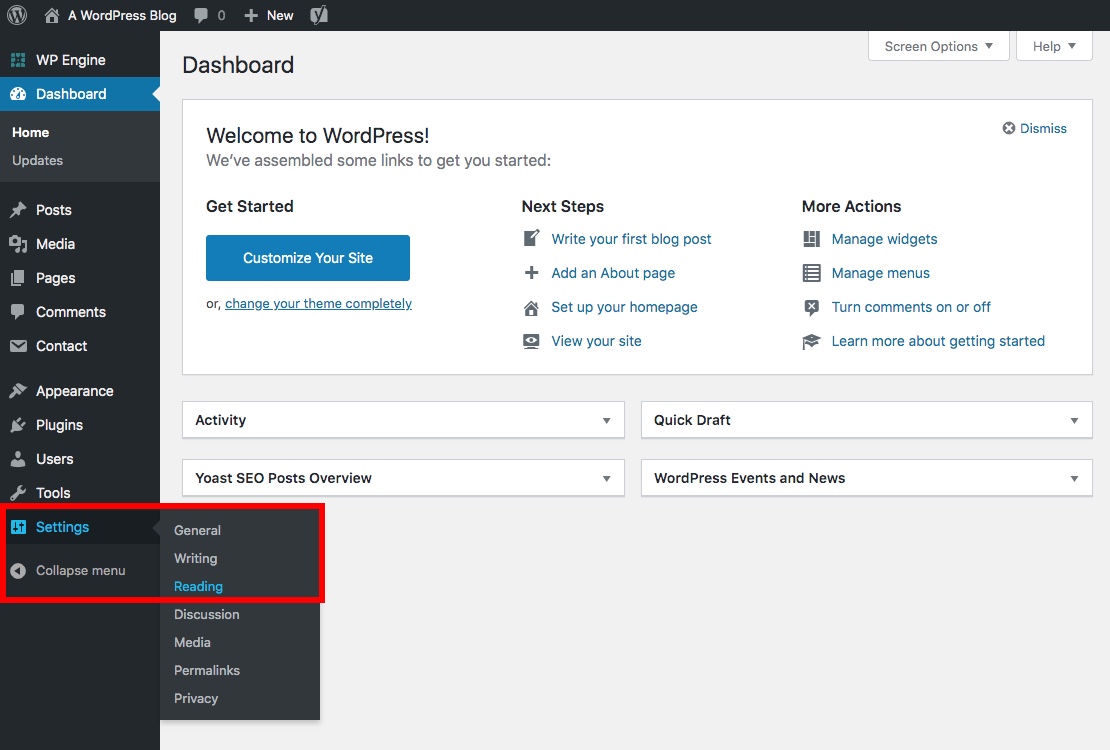
Yes, you can set a static page as your WordPress homepage. This option is available under ‘Settings’ > ‘Reading’. It allows you to display specific content rather than the latest blog posts. A static homepage is useful for emphasizing particular information or guiding users through specific sections of your site.
How To Set Homepage For Blog Posts?
To set your blog posts as the homepage, go to ‘Settings’ > ‘Reading’. Select ‘Your latest posts’ as the homepage display option. This setting ensures visitors see your most recent content first. It keeps your blog dynamic, constantly updating with new articles, enhancing user engagement and retention.
Conclusion
Understanding your blog’s homepage is essential. It sets the first impression. A clean and organized homepage attracts readers. It guides them effortlessly. Choosing the right layout boosts readability. Simple navigation keeps visitors engaged. Customize your homepage to reflect your brand.
Use visuals to enhance appeal. Consistent updates keep it relevant. Remember, a user-friendly homepage invites more interaction. Spend time designing it carefully. Your blog deserves a welcoming entry point. Keep it informative yet concise. Let your homepage be the gateway to your content.
Happy blogging!



