
Are you curious about the differences between Blogger and personal WordPress? Choosing the right platform for your blog can feel like a daunting task, especially when both offer unique benefits.
Whether you want to share your thoughts with the world or create a professional online presence, understanding the strengths and weaknesses of each can help you make an informed decision. Imagine a space tailored just for your ideas, easy to navigate, and visually appealing.
That’s what you could achieve by selecting the right blog platform. Dive into this article to uncover the key differences that could transform the way you share your passion online.

Credit: themeforest.net
Platform Ownership
Blogger is owned by Google. This means Google has control over it. They manage all the servers and data. Users do not own the platform. They use it for free. Google can change rules anytime. Sometimes, they can even shut it down. Users depend on Google’s terms. It’s easy to start with Blogger. But, you don’t have full control.
WordPress gives full ownership to users. You own your website. You have control over hosting and data. WordPress is open-source. This means anyone can use it for free. But, you manage your own server. You can change and customize it. Freedom comes with responsibility. You must look after updates and security. WordPress is flexible. But, it needs more work.
Ease Of Use
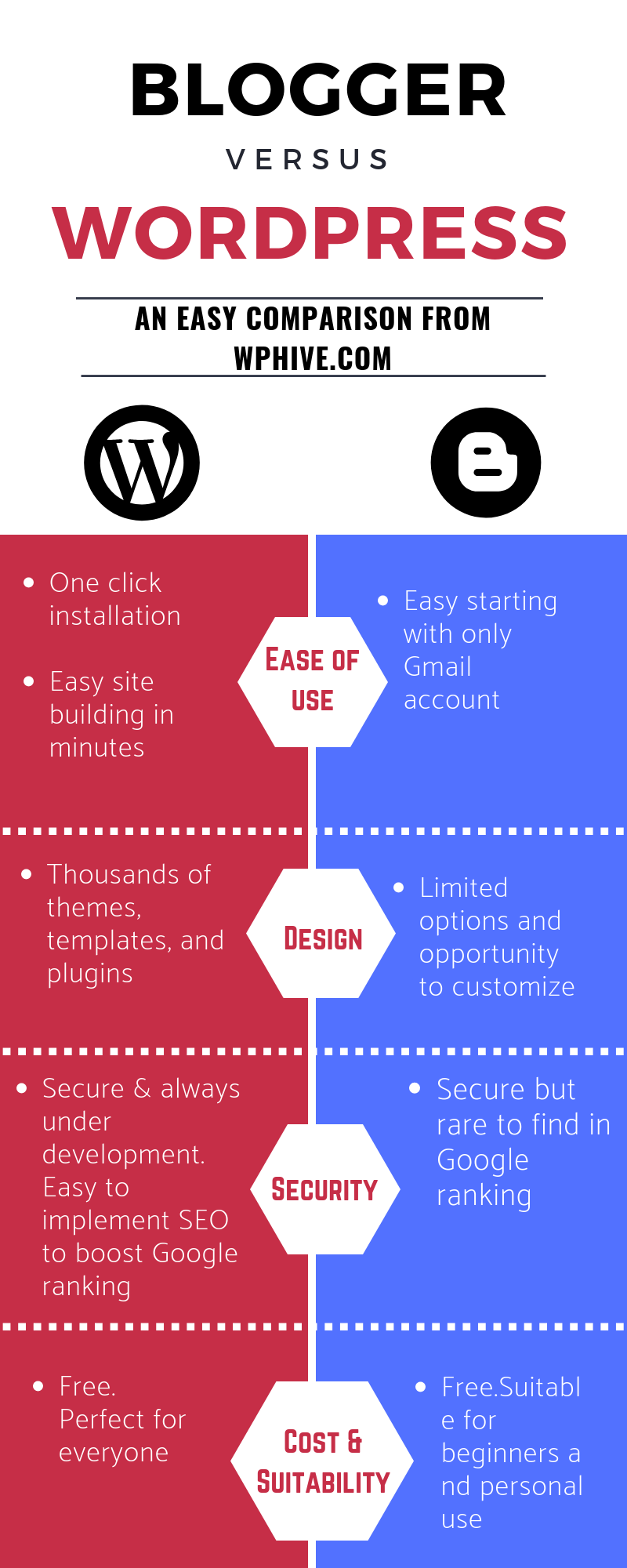
Blogger’s interface is simple and easy. Users see the dashboard first. It shows a list of blog posts. On the left, there are icons for settings, layout, and theme. New users can learn it quickly. There are not many buttons. This makes it less confusing. Blogger is good for those who want to start fast.
WordPress offers a richer interface. It has a dashboard too. But there are more options. Users see posts, pages, and plugins. WordPress has many themes and customizations. This can be a bit much for new users. But it offers more control. Users can make their site look unique. It is ideal for those who want more features.
Customization Options
Blogger offers a limited set of themes and templates. These are easy to use. Choices are fewer compared to other platforms. Users can change colors and fonts. But deeper changes are hard. Templates are simple. Good for beginners. Blogger is less flexible.
WordPress has many themes and plugins. Thousands of options available. Users can make their site unique. Themes change the look. Plugins add features. Almost any design is possible. Users can make it their own. WordPress is highly flexible. Perfect for creative minds.

Credit: feather.so
Monetization Potential
Blogger is a free platform. You can use it to earn money. You can place Google AdSense ads on your blog. These ads can help you make money. But, the options are limited. You cannot use many other ad services. Selling products or services is also possible. But, the tools are not as many as in WordPress. Blogger is great for simple blogs. But, it might not be the best for making a lot of money.
WordPress gives you many ways to earn money. You can use AdSense and other ad networks. You can also sell products using plugins. These plugins make it easy to add a store. With WordPress, you can create membership sites. You can charge users for special content. This makes WordPress a flexible choice for earning. It can help you make more money than Blogger.
Seo Features
Blogger offers basic SEO options. Users can add meta tags and descriptions. It is easy for beginners. Blogger integrates with Google tools. This helps with tracking site traffic. But, there are limitations. Advanced features are not available. Customization is limited. The platform is simple but lacks depth. It suits casual bloggers well.
WordPress provides powerful SEO tools. Users have access to numerous plugins. These plugins enhance SEO options. Yoast SEO is a popular choice. It guides users to improve SEO. Customization is vast and flexible. Users can edit permalinks and tags. WordPress is ideal for advanced users. The platform supports deeper SEO strategies. It is a robust solution for serious bloggers.
Credit: wphive.com
Security And Backup
Blogger has built-in security from Google. Your blog is on Google’s servers. This provides strong protection. Google manages all security updates. You don’t have to worry about hackers. SSL certificates are automatically provided. This keeps data safe. Regular backups are not needed. Google does it for you.
WordPress needs more care. You must handle security updates yourself. There are many plugins to help. Security plugins can stop threats. You must choose a good hosting provider. They should offer firewall and SSL certificates. Backing up your site is important. There are plugins for backups too. Always update them.
Community And Support
Blogger has a small support team. Help comes from user forums. Guides are available online. They help with setup and changes. Tutorials make tasks easier. Answers might take time. Blogger Help Center is useful. It offers tips and solutions. Users share advice too.
WordPress has a large community. Many people use it. Support forums are active. Questions get answers fast. Official guides are easy to follow. They help with problems. Many plugins have support teams. They help users a lot. Paid help is available too.
Cost Considerations
Blogger is a free platform. You can start a blog with no cost. You don’t need to pay for hosting. Also, the domain name can be free. But, if you want a custom domain, you may need to pay. This cost is usually low. Upgrading a site can be cheap on Blogger.
WordPress offers more flexibility, but it can be more costly. You have to pay for hosting services. This is a must. A custom domain name also costs money. Themes and plugins might be free or paid. If you want premium features, prices add up. Overall, WordPress can suit different budgets.
Frequently Asked Questions
What Is Blogger’s Main Advantage?
Blogger’s primary advantage is its simplicity and ease of use. It offers a straightforward platform for beginners, with no technical skills required. Additionally, Blogger is free and integrates seamlessly with Google services, making it ideal for hobbyists and casual bloggers.
How Does WordPress Differ From Blogger?
WordPress offers more customization and flexibility compared to Blogger. It has thousands of plugins and themes, allowing users to create a unique website. WordPress is suitable for professional bloggers who need advanced features and control over their site’s design and functionality.
Which Platform Is Better For Seo?
WordPress is generally considered better for SEO compared to Blogger. It offers numerous plugins and tools to optimize your site for search engines. WordPress allows for more detailed customization of SEO settings, enhancing your site’s visibility and search engine rankings.
Is Blogger Free To Use?
Yes, Blogger is free to use. It’s owned by Google and provides users with a free subdomain and hosting. This makes it an excellent choice for beginners or those looking to create a blog without any financial investment.
Conclusion
Choosing between Blogger and WordPress depends on your needs. Blogger is simple and free. Good for beginners. WordPress offers flexibility and control. Perfect for those wanting customization. Consider your goals and technical skills. Blogger suits casual bloggers. WordPress fits serious bloggers and businesses.
Both platforms have unique benefits. Take time to explore each. Make the best choice for your blog’s future. Remember, the right platform enhances your online presence. Happy blogging!



