
Have you ever found yourself squinting at your screen, struggling to read a blog post on WordPress? You’re not alone.
The font size of a WordPress blog can significantly impact how easily your readers digest your content. But what is the ideal font size for a WordPress blog? And why does it matter to you and your audience? We’ll unravel the mystery of WordPress font sizes.
We’ll explore how the right font size can enhance your blog’s readability, keep your readers engaged, and improve the overall user experience. Get ready to discover the secrets of captivating your audience with perfectly sized fonts that will make your blog not just readable, but irresistible. Dive in, because your blog’s success starts here.
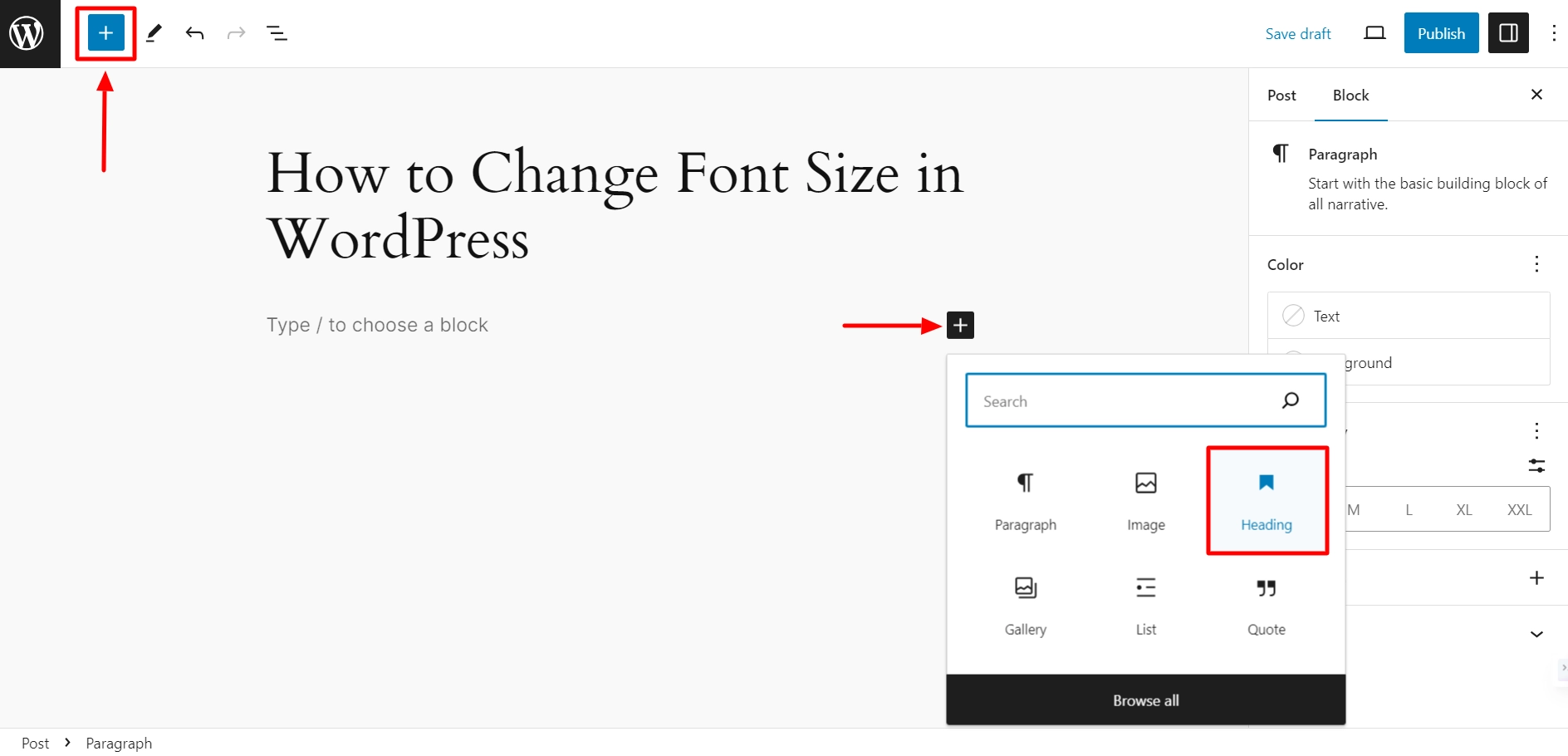
Credit: cyberchimps.com
Default Font Size In WordPress
WordPress is a popular tool for making websites. It uses a default font size to help your text look nice. This size is usually 16 pixels. It helps readers see the words clearly. The default size can change with different themes. Some themes use 14 pixels, while others use 18 pixels.
Changing the font size is easy. You can make words bigger or smaller. This helps your readers. Big words are easier to see. Small words help fit more on the page. Experiment with sizes to find what looks best. Your audience will appreciate it.
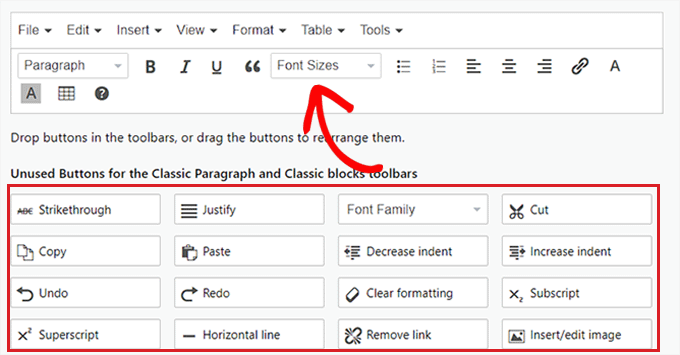
Credit: www.wpbeginner.com
Importance Of Font Size
Font size affects how easy it is to read. Small letters can strain eyes. Bigger letters are easy to read. Clear text keeps readers happy. They stay longer on the page. They understand better.
Good font size makes users happy. They find what they need fast. Easy reading means less confusion. Readers enjoy their time on the site. They might come back again. They share with friends too.
The right font size makes the page look nice. It should match the design. Not too big, not too small. It should fit the style of the page. A pretty page attracts more readers. They like to explore it.
Changing Font Size
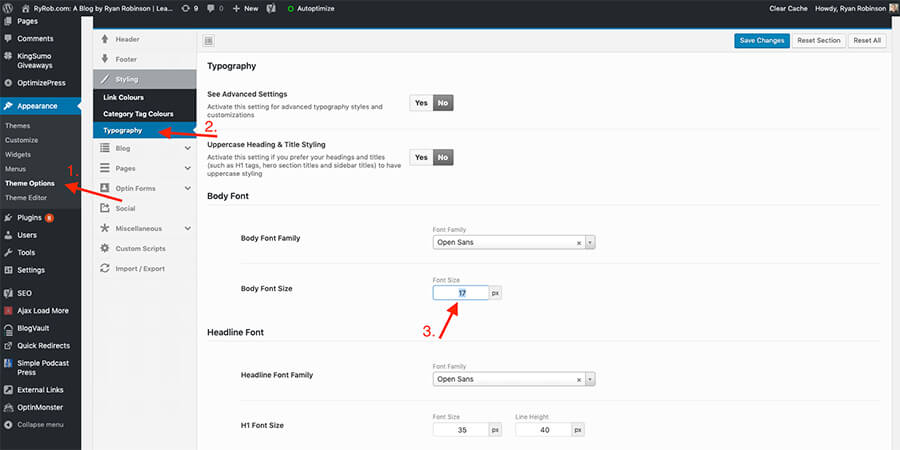
Theme Customizer helps you change font size easily. Open your WordPress dashboard. Go to the Appearance tab. Click on Customize. Navigate to Typography. Here, adjust the font size. It’s simple. Make your text larger or smaller. Preview changes before saving. Ensure readability for all visitors. Customizer is user-friendly. No coding skills needed.
CSS allows precise control. Access your WordPress dashboard. Go to Appearance. Select Editor. Find the style.css file. Locate font-size codes. Edit the values directly. Save changes. Check how it looks on the site. Use caution with CSS. Mistakes can affect site appearance. Backup before editing. CSS requires basic coding knowledge.
Plugins offer flexibility. Search for font size plugins. Install and activate the desired plugin. Navigate to the plugin settings. Adjust font size through the interface. Plugins are easy to use. No coding required. Popular plugins include Easy Google Fonts and WP Font Resizer. Enhance your site’s typography effortlessly. Plugins provide additional features. Ensure plugin compatibility with your theme.
Best Practices
Fonts should be consistent throughout your blog. Use the same size for body text. Headers can be larger, but keep them balanced. This helps readers stay focused. Avoid using too many different sizes. It can confuse readers.
Design must be responsive. Fonts need to look good on all devices. Choose sizes that work on phones and computers. Test your blog on different screens. Adjust font sizes if needed. Keep text readable for everyone.
Accessibility is very important. Choose readable fonts for everyone. Some people have difficulty reading small text. Use larger sizes to help them. Make sure contrast is high. This makes text easier to see.
Popular WordPress Themes And Font Sizes
WordPress themes come with default font sizes. These sizes vary by theme. For instance, the “Twenty Twenty-One” theme uses a base font size of 18px. The “Astra” theme has a default size of 16px.
Many themes allow font size changes. Users can adjust sizes via the customizer. This feature provides flexibility. Bloggers can choose from different sizes. This helps match the blog’s style.
Credit: www.ryrob.com
Tools For Font Size Adjustment
WordPress blogs typically have a default font size of 16 pixels, ensuring readability across devices. Adjusting font size is straightforward with plugins or theme settings, allowing customization for better user experience. Such tools enhance accessibility and cater to varied audience preferences.
Typography Plugins
Typography plugins help adjust font size easily. Some popular options include Easy Google Fonts and Advanced Typography. These plugins let users change font size without coding. They offer simple interfaces. Users can preview changes instantly. Plugins often come with other features. You can adjust line height and letter spacing. This makes your text look better. Choosing the right plugin is important. It can improve your blog’s readability and appearance.
Online Font Size Calculators
Online font size calculators are useful tools. They help find the perfect font size for your blog. Users input their current font size. The calculator suggests a new size. This ensures text is readable on all devices. Some calculators offer additional features. You can check how your font looks on different screens. These tools are easy to use. They help create a balanced and pleasing blog design.
Common Font Size Mistakes
Choosing the right font size for a WordPress blog is crucial. Small fonts make reading difficult, while overly large fonts can overwhelm. Balancing readability and aesthetics enhances user experience and keeps visitors engaged.
Overly Small Text
Small text makes reading hard. Visitors may leave your site. Important messages can be missed. Choose a font size that is easy to read. Test different sizes. Find the right one for your audience.
Inconsistent Sizes
Different sizes can confuse readers. Your blog should look neat. Use the same font size for similar text. This makes reading smooth. Consistency helps readers focus on your content. They will find it easier to follow your ideas.
Ignoring Mobile Users
Many people use phones to read blogs. Small screens need larger fonts. Make sure your text is mobile-friendly. Test your blog on different devices. This ensures a good experience for everyone. Happy readers will come back to read more.
Frequently Asked Questions
What Is The Default Font Size In WordPress?
The default font size in WordPress typically ranges from 12px to 16px. It varies depending on the theme used. You can change it through theme customization options. For optimal readability, most bloggers prefer sizes around 14px to 16px. Always choose a font size that enhances user experience and readability.
How Can I Change Font Size In WordPress?
To change the font size in WordPress, navigate to Appearance > Customize > Typography. Many themes offer specific settings to adjust font size. If not, custom CSS can be applied through the Additional CSS section. Always preview changes before publishing to ensure optimal readability across devices.
Is Larger Font Size Better For Readability?
Larger font sizes can enhance readability, especially on mobile devices. They reduce strain on the eyes and make content accessible. However, excessively large fonts may disrupt layout and user experience. Balance is key. Aim for a size that is readable and aesthetically pleasing for your audience.
Do All WordPress Themes Support Font Customization?
Most modern WordPress themes support font customization through the Customizer or theme settings. Some older or basic themes might have limited options. It’s essential to check theme documentation or support forums for guidance. If customization is limited, consider using custom CSS or switching themes.
Conclusion
Finding the right font size matters for WordPress blogs. It impacts readability and user engagement. Smaller fonts may strain the eyes, while larger fonts enhance comfort. Experiment with different sizes to find what fits your content best. Remember, mobile devices need special attention.
Test how your font looks on various screens. A consistent and clear font size strengthens your blog’s appeal. It makes reading enjoyable for everyone. Aim for a font size that balances style and readability. Your audience will appreciate the effort.
Keep experimenting and adjusting for the perfect look. Happy blogging!



