
Imagine effortlessly managing your WordPress site with precision. One of the keys to achieving this is understanding the Page ID in WordPress.
You might be wondering, “What exactly is a Page ID, and why should I care? ” Well, it’s simpler than you think, and mastering it can unlock new levels of control over your website. Picture this: you’re customizing your website, striving for that perfect look and feel, but you hit a roadblock because you can’t quite manipulate the elements the way you want.
This is where knowing your Page ID becomes invaluable. It’s like having a backstage pass to the inner workings of your site, enabling you to make specific changes without hassle. You’ll discover what a Page ID is, how to find it, and why it’s crucial for managing your WordPress site effectively. By the end, you’ll be equipped with practical knowledge that can enhance your web management skills, making your site not just functional but outstanding. Let’s dive in and unravel the mystery behind Page IDs.
Page Id Basics
The Page ID in WordPress is a unique number. It helps identify each page. Every page has its own ID. This ID is different from others. Finding the Page ID is easy. It is not shown on the page. You need to look for it. WordPress uses this ID for many tasks. It helps in managing pages. It is useful for developers. They use it to create features. Knowing the Page ID is important. It helps in editing and organizing.
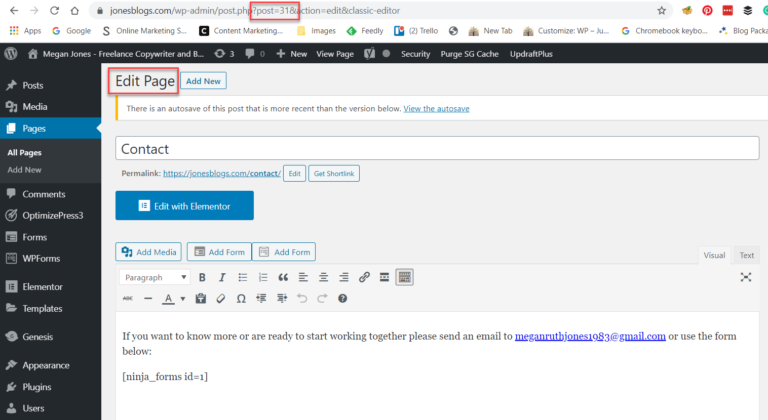
To find the Page ID, go to the admin area. Click on “Pages”. Hover over a page title. Look at the bottom of your browser. You will see a URL. The Page ID is in the URL. It comes after “post=”. Remember this number. It is the Page ID. You can use it later. It makes working with WordPress easier.
Locating The Page Id
Log into your WordPress dashboard. Go to the Pages section. Find the page you need. Click on it. Look at the URL in your browser. It shows numbers at the end. Those numbers are your Page ID. Easy, right?
Open the page you need. Right-click and choose “Inspect”. Look at the URL in the address bar. Numbers after “post=” are the Page ID. This way is quick and simple. No special tools needed.
Some plugins can help find the Page ID. Install a plugin like “Reveal IDs”. Once active, IDs show up in the Pages list. Plugins make tasks easier. They save time and effort.
Importance Of Page Id
Page ID is a unique identifier for each page in WordPress. It helps you customize and style your pages easily. By knowing the Page ID, you can apply specific CSS rules. This makes each page look different. You can also target individual pages with scripts. This gives more control over the website’s appearance.
Plugin configuration often requires Page IDs. Some plugins need these IDs to work on specific pages. This helps in applying plugin features only where needed. Without Page IDs, plugins might affect all pages. This can be messy and unwanted. Page IDs ensure precise plugin application.
Content management becomes simpler with Page IDs. They help in organizing pages. You can quickly find and edit pages using their IDs. This saves time and effort. Page IDs are key for keeping content in order. They provide an easy way to manage numerous pages efficiently.
Credit: athemes.com
Page Id In Theme Development
Understanding Page ID is important in WordPress theme development. It helps you use conditional statements effectively. These statements allow themes to behave differently. For example, they can change looks based on the Page ID. Developers can make certain parts of a theme visible or hidden. This is useful for customizing user experience. It makes themes more dynamic and responsive.
Page ID helps in template customization. With it, you can target specific pages. Each page has a unique ID. Developers use this ID to customize templates. For example, a special template for a homepage. Or a different layout for a contact page. This makes templates flexible. It allows for a tailored design for each page.
Troubleshooting Common Issues
WordPress sometimes fails to show page IDs. This can confuse users. Check your page settings first. Sometimes, plugins hide IDs. Disable plugins one by one. Check if the ID appears. Themes might also cause this issue. Switch to a default theme and check again. Always keep your WordPress version updated. Updates often fix bugs. If these steps fail, seek help from WordPress forums. Many users share solutions there.
Using the wrong page ID can cause errors. Always double-check the ID number. Use the edit screen to find the correct ID. IDs are visible in the URL. Look at the number after “post=”. This number is the ID. Always verify before using it in shortcodes or custom queries. Mistakes in IDs lead to broken links. Double-check to avoid these issues. Correct usage ensures your site runs smoothly.

Credit: themesharbor.com
Best Practices
Use a simple structure for your pages. This helps visitors find what they need. Group similar pages together. Clear categories make navigation easy. Short and descriptive titles work best. They tell users what to expect. Avoid using numbers in titles. They can confuse readers.
Keep the same style across all pages. Use the same fonts and colors. This makes your site look neat. Stick to one tone of writing. It should match your brand. Check spelling and grammar. Errors can look unprofessional. Update content regularly. Fresh content keeps visitors coming back.

Credit: www.fixrunner.com
Frequently Asked Questions
What Is A Page Id In WordPress?
A Page ID in WordPress is a unique identifier assigned to each page. It’s used internally to manage pages. You can find it in the URL when editing a page. Knowing the Page ID is useful for customizing themes and plugins.
How To Find Page Id In WordPress?
To find a Page ID in WordPress, go to the Pages section. Hover over a page title and check the URL at the bottom of your browser. The number after “post=” is the Page ID. You can also edit a page and find the ID in the URL.
Why Is Page Id Important In WordPress?
Page IDs are crucial for customizing and managing WordPress sites. They help in targeting specific pages when using plugins or custom CSS. Developers and site administrators often use Page IDs to apply changes to specific pages without affecting others.
Can Page Ids Be Changed In WordPress?
Page IDs are automatically generated and cannot be changed. They are unique to each page and remain constant. If you delete a page, its ID is not reused. Understanding this helps in maintaining consistent page management.
Conclusion
Understanding the page ID in WordPress is crucial. It helps manage your website effectively. Knowing how to find and use it saves time. This simple number identifies each page uniquely. It assists in organizing content better. Remember, WordPress is user-friendly.
You can navigate its features with ease. Page IDs are just one part of WordPress. But they play an important role. Now you’re ready to handle them confidently. Explore more WordPress features. Enhance your site’s performance and user experience. Keep learning.
Your website will benefit greatly.



