
Imagine crafting a beautiful WordPress site. You’ve chosen the perfect theme, customized it to reflect your brand, and added compelling content.
But as you scroll down, you see a generic footer credit, something like “Proudly powered by WordPress. ” It’s a small detail, yet it speaks volumes about your site’s professionalism and originality. You might be wondering, “What is the correct footer credit for my WordPress site?
” This seemingly minor choice can impact how visitors perceive your brand and even affect your site’s SEO. Curious about making the right decision that aligns with your brand identity and enhances your site’s credibility? Let’s dive into understanding the best practices and options for your WordPress footer credit.
Understanding Footer Credits
Footer credits are small text at the bottom of a website. They show ownership or creators of the site. Many websites use them to give credit. Often, WordPress themes come with default footer credits. These credits may mention the theme creator. Some websites also add their own company name or copyright information.
Customizing footer credits is possible. This can make your site look unique. To edit, check your theme’s settings. Some themes allow easy changes in the WordPress dashboard. If not, you might need to edit the code. Always be careful with code changes. Mistakes can break your site. Backup your site before making changes.

Credit: wordpress.org
Purpose Of Footer Credits
Footer credits sit at the bottom of a website. They tell who made the site. People see them on every page. Designers and developers often put their names there. This shows their work on the site. Sometimes, companies put their names too. They show they own the site. This can be a small logo or name. Visitors trust a site more with footer credits. It shows the site is real. People know who made it. They feel safe to explore more. The credits can also have links. These lead to the designer’s site or the owner’s site. It helps people know more about them.
Common Types Of Footer Credits
Footer credits often show theme developer information. This tells users who made the theme. It can be a name or company. It’s like signing a painting. People see it and know who created the design. Theme developers use footer credits to gain recognition.
Many websites have “Powered by WordPress” in the footer. This shows the site uses WordPress software. It helps users understand the platform behind the site. This credit is simple but important. It connects the site to a popular brand. People trust sites powered by WordPress.
Some sites use custom footer text. This makes the site unique. Owners can add their own words. It might be a company slogan or contact details. Custom text helps personalize the site. It can also add important information. It’s a way to share more with visitors.
Legal Considerations
GPL License Requirements are important for WordPress users. The GPL, or General Public License, allows people to use, change, and share WordPress. This means you can modify the WordPress theme footer. But, you must still follow the GPL rules. Always check the theme’s specific license details. Some themes have extra rules. Knowing these rules is important to stay compliant.
Attribution Obligations may come with many WordPress themes. Some theme creators request or require credit. Usually, you find this credit in the footer. This credit is often a link back to the creator’s website. Not all themes need this credit. But, if it is required, it should not be removed. Check the theme’s documentation for more details. This ensures you are respecting the creator’s work.
Customizing Footer Credits
The WordPress Customizer is a simple tool. It lets you change footer credits easily. Open your dashboard and find “Appearance.” Click on “Customize.” Look for the “Footer” section. You will see a place to edit the text. Remove or change the existing words. Add your own footer credit here. Make sure to save changes. Refresh your site to see updates.
Some themes need changes in code. Use an FTP client or the built-in editor. Go to “Appearance” and select “Theme Editor.” Find the “footer.php” file. Look for the existing footer text code. Edit it carefully. Save your changes. Always back up your files first. This prevents loss if something goes wrong.
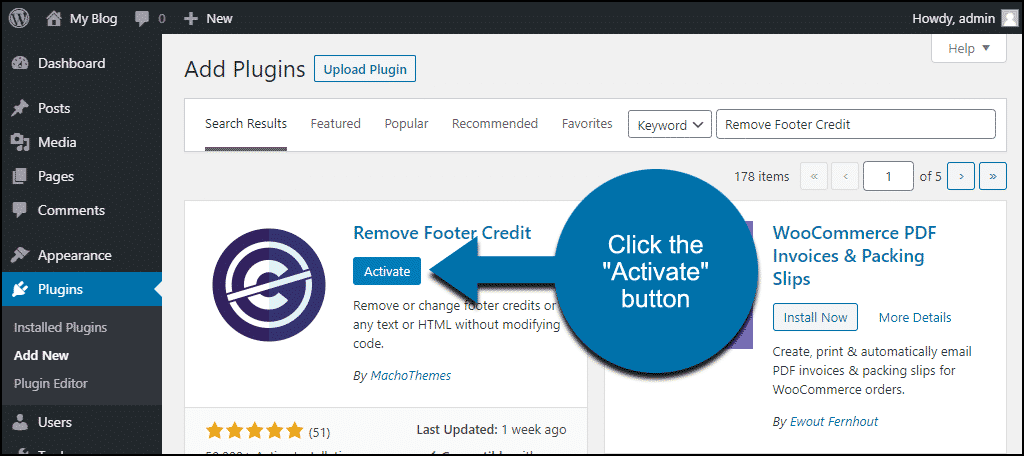
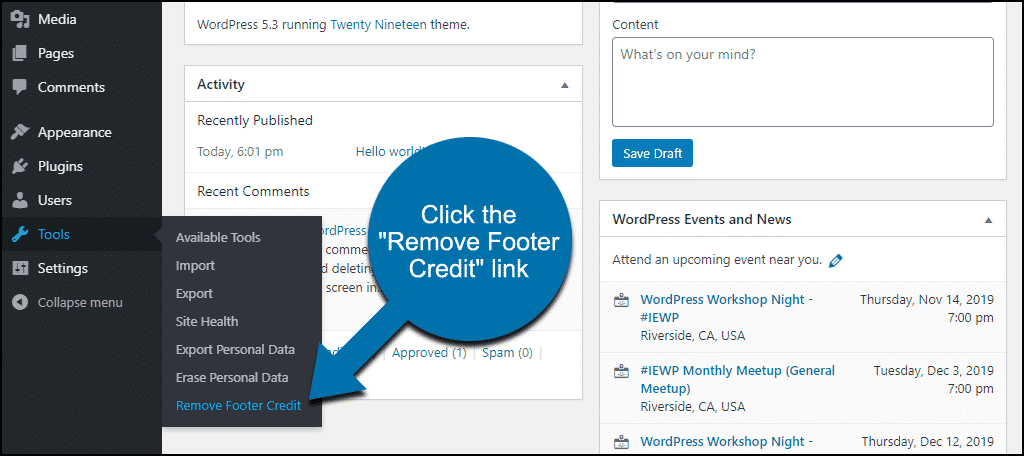
Plugins offer an easy way to change footer text. Search the plugin directory for “footer credits.” Install a plugin that suits your needs. Activate it from your dashboard. Follow the plugin’s settings to edit the footer. No need to change code. This is safe and beginner-friendly. Always check plugin reviews before installing.
Credit: www.greengeeks.com
Best Practices For Footer Credits
Footer credits are important for websites. They give recognition to creators and developers. But, they should not make your site look bad. A simple design is best. Use clean fonts and colors that match your site. Too many words can be confusing. Keep it short and clear.
Professionalism is key for footer credits. Respectful language matters. Use words that show respect to creators. Avoid flashy designs. They can be distracting. A neat footer builds trust. It shows care for details. Keep it tidy. Make sure it does not take up too much space. Small and simple is best.
Common Mistakes To Avoid
Many people forget to update the default footer credit. This can look unprofessional. Always change it to your own name or business name. Some users accidentally remove the entire footer. This can cause issues with site credit or functionality. It’s important to only edit the text you need. Another mistake is using incorrect HTML tags. This can break the design of your site. Double-check your changes before saving. Some themes might not allow changes to the footer. It’s best to choose a theme that offers flexibility. These common mistakes can affect your site’s appearance and performance.
Real-world Examples
Many WordPress themes come with default footer credits. These credits often say “Powered by WordPress” or “Theme by [Theme Name].” Some popular themes like Twenty Twenty-One and GeneratePress include these credits. Users can usually find these in the footer area of their websites. Theme developers add these credits to show their work. It helps them get noticed by new users. But you can change these credits if you want. Make sure to follow the theme’s licensing rules.
Some people like to personalize their footer credits. They add their name or business name. This makes their site look unique. You can also add a message or copyright notice. Some users even add a link to their social media pages. It’s important to keep it simple and clear. Too much information can confuse visitors. Always check your theme’s rules before making changes. This ensures you don’t break any guidelines.
Credit: www.greengeeks.com
Frequently Asked Questions
How To Change Footer Credit In WordPress?
To change footer credit, access your WordPress dashboard. Navigate to Appearance > Customize. Look for the Footer section and edit the credit text. Alternatively, use a child theme or custom CSS to modify footer credits if direct options aren’t available.
Backup your site before making changes.
Can Footer Credit Affect Seo?
Footer credit doesn’t significantly impact SEO directly. However, it influences user experience and site credibility. Properly attributing content builds trust with visitors. Ensure the footer credit is relevant and not overcrowded with keywords to maintain site integrity and readability for search engines.
Is Removing Footer Credit Legal?
Removing footer credit can be legal, depending on the theme’s license agreement. Some themes require attribution, while others allow removal. Check the theme’s documentation or contact the developer for clarification. Ensure compliance to avoid any legal issues or loss of support from theme creators.
Why Is Footer Credit Important?
Footer credit enhances site professionalism and acknowledges theme creators. It provides transparency and builds trust with users. Proper attribution can positively impact user perception and brand credibility. It’s also a courtesy to developers who contributed to the site’s design and functionality.
Conclusion
Choosing the right footer credit boosts your WordPress site’s professionalism. It reflects your brand identity and enhances user trust. Customize with care, ensuring clear and concise information. Avoid clutter and focus on simplicity. A well-designed footer improves navigation and engagement.
Test different layouts to find what works best. Keep the design consistent with the site theme. Remember, your footer is an important part of the user experience. Regular updates keep it relevant and useful. With thoughtful design, your footer credit can be a valuable asset.
Make it meaningful and impactful.



