
Imagine visiting your favorite website and receiving instant updates directly to your device without having to browse through countless pages. Sounds convenient, right?
That’s the magic of push notifications in WordPress. If you’re looking to keep your audience engaged and informed, understanding how push notifications work could be your golden ticket. You might wonder how these notifications can transform your interaction with your audience.
Picture this: your readers receive timely alerts about your latest blog post, special offers, or important updates, all without even being on your site. It’s like whispering directly into your audience’s ear, ensuring they never miss out on what you have to offer. You’ll uncover the secrets behind push notifications in WordPress. You’ll learn how they can skyrocket your engagement rates and boost your website’s visibility. Ready to keep your audience hooked and coming back for more? Let’s dive in and explore how you can harness the power of push notifications to enhance your WordPress experience.
Push Notification Basics
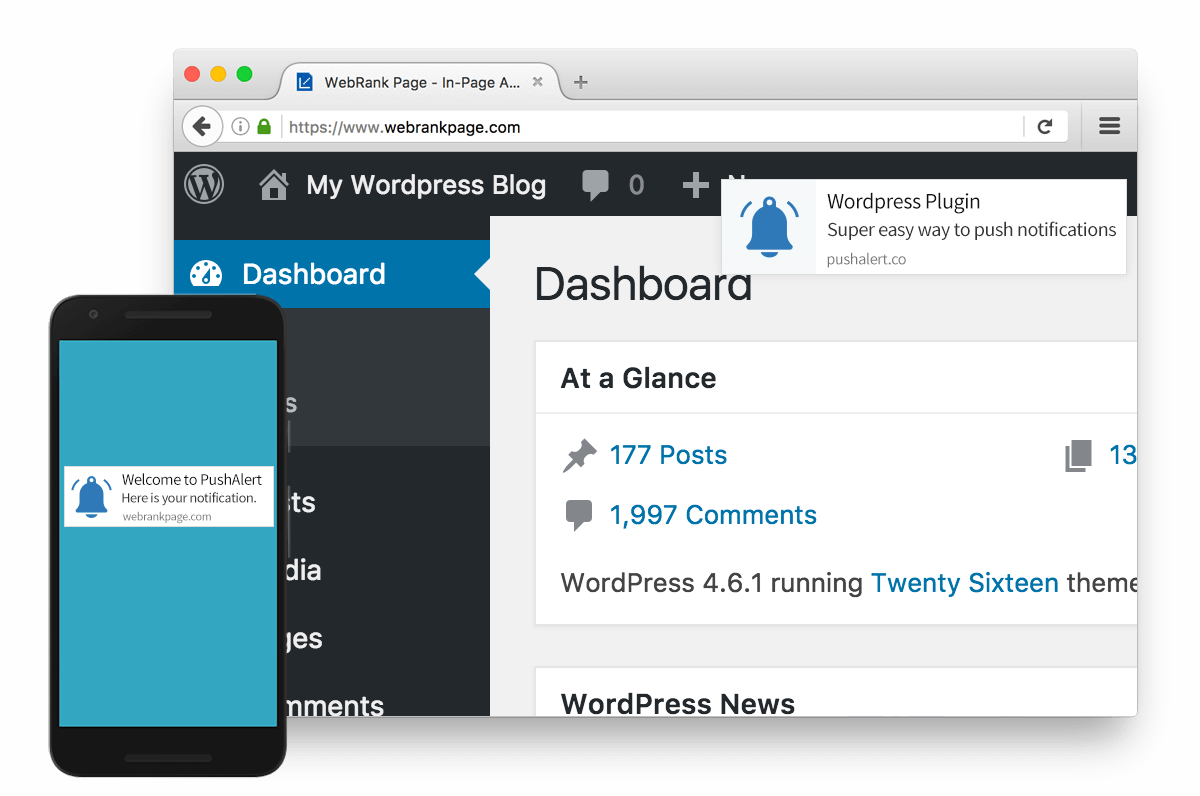
Push notifications are messages sent to users’ devices. They pop up even when users are not on your site. These messages grab attention quickly and effectively. The main goal is to engage users and bring them back. Businesses use them to share updates or promotions. Users can click and visit the website. This instant communication helps keep users informed.
Push notifications are timely and relevant. They can be personalized for each user. Easy to set up on WordPress with plugins. Notifications work on mobile and desktop. They require user permission to send. Users can opt-out if they choose. Notifications boost engagement and keep users coming back.
Benefits For WordPress Sites
Push notifications can keep users updated. Users get important news quickly. These notifications are fast. They appear on screens right away. Readers stay informed without opening the site. This improves engagement.
Visitors return more often. They know there’s fresh content. Instant alerts create excitement. This leads to more visits. More visits mean better site performance.
Push notifications make browsing easy. Users don’t have to search for updates. Content comes to them directly. This saves time and effort.
Users feel valued. They receive information that matters to them. The site becomes more useful. Visitors are happier and more satisfied. Happy users come back often. This boosts the site’s success.
Setting Up Push Notifications
Picking a good plugin is very important. Some plugins work better than others. Check if the plugin is easy to use. Read reviews to know what other users think. Also, check if the plugin is updated regularly. This keeps your site safe. Some popular plugins are OneSignal and PushEngage. These plugins offer good features. They also have free and paid versions. Choose what fits your needs best.
Start by downloading the plugin. Go to your WordPress dashboard. Click on “Plugins” and then “Add New”. Search for your chosen plugin. Click “Install Now”. Wait for a few seconds. Then click “Activate”. The plugin is now ready. Configuration is the next step. Look for the plugin settings. You can find it in the dashboard. Set the notifications style and frequency. Make sure to save all changes. Now, your push notifications are ready to go.
Credit: easydigitaldownloads.com
Crafting Effective Messages
Short and clear words make messages strong. Use simple words. Keep sentences short. This helps everyone understand. Use words that grab attention. Make each word count. Ask questions to make readers think.
Add a call to action. Tell what to do next. Make it easy to follow. Use friendly tones. People like friendly messages. They feel more connected.
Send messages at the right time. Think of when people are free. Do not send too many. People may get annoyed. Find the best time for your audience. Test different times. Keep notes.
Space messages out. Give people time to read. Balance is key. Too many messages can be bad. Keep it steady, not too much.
Analyzing Performance
Push notifications in WordPress are alerts sent directly to users’ devices. They help keep audiences updated with the latest content. These notifications can drive engagement and increase website traffic by directly reaching users.
Key Metrics To Track
Tracking click-through rates helps see user interest. Delivery rates show how many notifications reach users. Open rates tell you how many users open the notification. Conversion rates show if users take action after opening. These metrics help understand user engagement.
Tools For Analysis
Tools like Google Analytics provide insight. Push notification services often offer built-in analytics. Use these tools to monitor user behavior. Tracking software also helps check notification performance. Understanding these tools is important for effective analysis.
Credit: pushalert.co
Best Practices
Segmentation helps in sending the right message. Different groups get different messages. Targeting ensures the message fits the user’s interest. This makes users happy. They like getting messages they care about. Users might ignore messages they find boring. Well-targeted messages lead to better user engagement.
A/B testing is a simple way to find what works best. Create two versions of a message. Send each to a small group. See which one performs better. Look for more clicks or more sign-ups. Choose the winner based on results. This helps in sending the best message to all users.
Avoiding Common Pitfalls
Push notifications in WordPress inform users of updates or new content. Avoid sending too many alerts to prevent annoyance. Customize messages to be engaging and relevant for better user interaction.
Over-notification Risks
Sending too many notifications can annoy users. People might ignore all messages. Balance is key. Send important alerts only. Users prefer quality over quantity. Keep them interested, not overwhelmed.
Privacy Considerations
User privacy is vital. Collect only needed data. Ask for permission before sending notifications. Respect their choices. Don’t share their information. Keep data safe and secure. Users trust sites that care about privacy.

Credit: www.wpexplorer.com
Frequently Asked Questions
How Do Push Notifications Work In WordPress?
Push notifications in WordPress alert users about new content or updates. They send messages directly to users’ devices, improving engagement. Notifications are delivered through browsers or apps, keeping users informed. This feature enhances user interaction and drives traffic to your site by ensuring timely updates.
Can I Customize Push Notifications In WordPress?
Yes, you can customize push notifications in WordPress. Tailor the message content, design, and timing to fit your audience’s preferences. Use plugins to set specific triggers and target segments. Customization helps in maximizing engagement and ensuring relevant information reaches users effectively.
Are WordPress Push Notifications Free?
Some WordPress plugins offer free push notification services. However, premium versions provide advanced features. Free plugins may have limitations on customization and subscriber count. Evaluate your needs and choose a plan that balances cost and functionality for optimal user engagement.
Do Push Notifications Affect WordPress Performance?
Push notifications have minimal impact on WordPress performance. They operate through external servers, reducing load on your site. Properly configured notifications ensure efficient delivery without hindering speed. Choose reliable plugins to maintain site performance while leveraging the benefits of push notifications.
Conclusion
Push notifications in WordPress offer a direct way to engage users. They keep your audience informed with timely updates. Easy to set up, they enhance user interaction. This tool can boost website traffic and retention. Make sure to tailor notifications to your audience’s needs.
Quality content in notifications is key. Avoid overwhelming users with frequent messages. Balance is crucial. Use push notifications wisely to maintain interest. With the right approach, they can greatly benefit your website. Embrace this feature to improve user experience and site performance.
Keep your audience connected and informed effortlessly.



