
Have you ever wondered how you can keep your readers updated with fresh content from your WordPress blog without them having to check your site every day? Imagine if there was a way for them to receive updates automatically, like magic.
Well, that’s exactly what an RSS feed URL can do for your blog. It’s a simple tool that can significantly boost your blog’s visibility and engagement. RSS, which stands for Really Simple Syndication, is a powerful way to distribute your content effortlessly.
By understanding the importance of your RSS feed URL, you can enhance your blog’s reach, allowing your audience to stay connected with your latest posts. You’ll discover how this little URL can make a big difference, turning casual readers into loyal followers. Stick around to learn how you can leverage this tool to maximize your blog’s potential and keep your audience coming back for more.
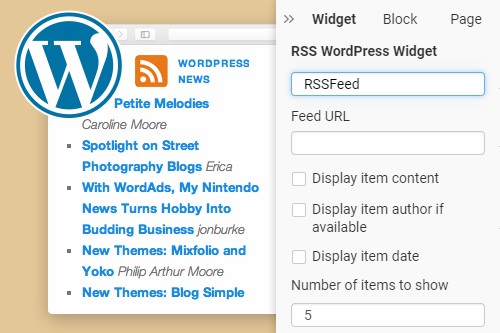
Credit: nicepage.com
Understanding Rss Feeds
RSS stands for Really Simple Syndication. It is a way to share updates. Websites use RSS to send new posts to readers. People can use RSS to read news easily. It saves time. They get all updates in one place. No need to visit many sites.
RSS started in the late 1990s. It was first used by Netscape. It became popular quickly. Many websites began using RSS. Over time, RSS changed. It improved to work better. Today, RSS is still used by blogs and news sites. It helps people stay informed.
Importance Of Rss Feeds For Blogs
RSS feeds help content creators share their work easily. They can reach a wider audience without extra effort. RSS feeds automate updates for new posts. This saves time and energy. Creators can focus on writing more content. It helps build loyal followers who never miss updates. A great way to grow a blog.
Readers enjoy instant updates with RSS feeds. They never miss new blog posts. RSS feeds bring all updates to one place. It helps them save time. They can read from many blogs in one app. This makes reading easy and fun. RSS feeds give readers a better experience.
Finding The Rss Feed Url In WordPress
Default WordPress RSS Feed URL is simple to find. Just add /feed to the end of your website URL. For example, if your site is www.example.com, the RSS feed will be www.example.com/feed. This link gives updates from your blog. Easy and quick.
Locating RSS Feed in Different Themes can change. Some themes have built-in links. These are in the footer or sidebar. Other themes need a plugin for RSS. Check your theme settings. Look for RSS options. Each theme may be different. But finding the RSS is usually simple. Look around your site. You will find it.

Credit: wpengine.com
Customizing Your WordPress Rss Feed
Plugins make RSS feed customization easy. Popular plugins help change feed styles. They can add extra information too. Using plugins, you can show images in your feed. Some plugins offer filtering options. You can choose what content appears. Plugins often have settings for SEO optimization. This helps improve your site’s visibility. Plugins are simple to install. Many plugins have guides for new users. They make customization simple and quick. Explore plugin options in WordPress.
Manual customization gives more control. You can edit your theme’s code. Changes can be made in the functions.php file. This lets you personalize your RSS feed. Add custom fields or extra data. It requires some coding knowledge. You can find tutorials online. They help guide you through the process. Be careful with code changes. Mistakes can cause site problems. Always back up your site first. Manual customization can be rewarding. It allows for unique RSS feeds.
Using Rss Feeds To Boost Engagement
Integrating RSS Feeds with Social Media can be very helpful. It keeps your followers updated. You can share blog updates directly. This saves time and effort. Always keep content fresh and relevant. Your audience will notice. Followers like seeing new things.
Using RSS Feeds for Email Marketing is smart. It helps send updates quickly. Subscribers get new posts in their inbox. This keeps them engaged. Make sure emails are easy to read. Use clear and simple words. This way, everyone can understand. Keep readers happy and informed.
Troubleshooting Common Rss Feed Issues
Finding the RSS feed URL for your WordPress blog can solve many feed issues. Typically, add “/feed/” after your site’s URL. This simple step helps ensure seamless feed delivery to your subscribers.
Resolving Feed Errors
RSS feed errors can be frustrating. Often, they happen due to invalid characters. These characters might be in your content. Always check for extra spaces or symbols. Sometimes, plugins cause conflicts. Disable them one by one to find the problem. Ensure your WordPress version is up to date. Outdated versions may not support feeds well. Always back up your site before making changes. This way, you don’t lose important data. If errors persist, consider seeking professional help.
Ensuring Proper Feed Display
Proper display of your RSS feed is crucial. Use a valid feed URL for your blog. It helps in sharing your content. Check that your feed URL is correct. Look for typos or missing parts. Verify feed settings in WordPress. Make sure they match your needs. Sometimes, themes affect feed display. Switch to a default theme to test it. This can reveal if your theme is the issue.
Future Of Rss Feeds In Blogging
RSS feeds are becoming smarter and faster. Bloggers are using them to share updates quickly. New tools make it easier to customize feeds. These tools help bloggers reach more readers. People can now follow their favorite blogs in one place. This saves time and effort. Visual content is also gaining popularity in feeds. Images and videos attract more attention. They make the content more engaging. Some platforms offer personalized feeds. This means readers get content they like most.
Privacy concerns are a major challenge. Some people worry about sharing too much data. Bloggers need to ensure data is safe. Another challenge is content overload. With so much content, readers may feel overwhelmed. Bloggers should focus on quality, not just quantity. Ensuring compatibility with different devices is important. RSS feeds must work on phones, tablets, and computers. This ensures a smooth experience for all users.
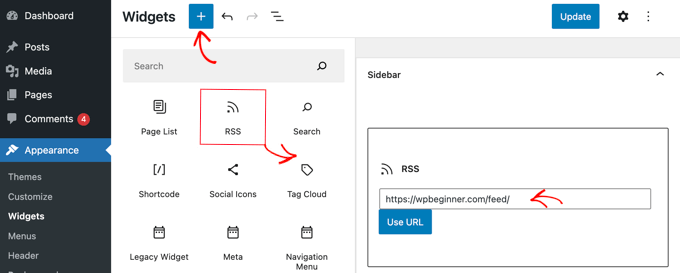
Credit: www.wpbeginner.com
Frequently Asked Questions
What Is An Rss Feed Url In WordPress?
An RSS feed URL in WordPress is a link that allows users to subscribe to blog updates. It automatically delivers new posts to subscribers, ensuring they stay informed. This URL can be found by appending `/feed/` to your site’s URL, like `example.
com/feed/`.
How Do I Find My WordPress Rss Feed?
To find your WordPress RSS feed, simply add `/feed/` to your site’s URL. For example, if your site is `example. com`, your RSS feed URL would be `example. com/feed/`. This URL can be shared with users for easy subscription.
Can I Customize My WordPress Rss Feed?
Yes, you can customize your WordPress RSS feed using plugins or code adjustments. Plugins offer user-friendly options to tailor feed content, while code changes provide more control. Customization can include adding metadata or altering post formats in the feed.
Why Use An Rss Feed For WordPress?
Using an RSS feed for WordPress helps keep your audience updated with new content automatically. It streamlines content delivery, enhances engagement, and increases site traffic. Subscribers receive updates without visiting the site, improving user experience and retention.
Conclusion
Finding your WordPress blog’s RSS feed URL is simple. This URL helps share your content. Readers can use it to follow updates easily. Just locate it in your WordPress settings. Use it to enhance blog visibility. RSS feeds are great tools for content distribution.
They connect your blog with dedicated followers. Remember, clear and simple steps make it easier. Keep your audience engaged with regular updates. Use your RSS feed URL wisely. It can boost your blog’s reach. Happy blogging!



