
Have you ever wondered how certain settings magically control your WordPress site? Meet the .htaccess file—your new best friend.
This tiny, powerful file holds the keys to customizing how your website runs, from enhancing security to improving SEO. Curious about how it works or how you can harness its power? You’re in the right place. We’ll demystify the. htaccess file in WordPress, showing you exactly what it is and how you can use it to your advantage.
Ready to unlock the secrets to a more efficient website? Let’s dive in.
.webp?width=650&height=566&name=Draft%20-%20wordpress%20htaccess%20(1).webp)
Credit: blog.hubspot.com
Htaccess File Basics
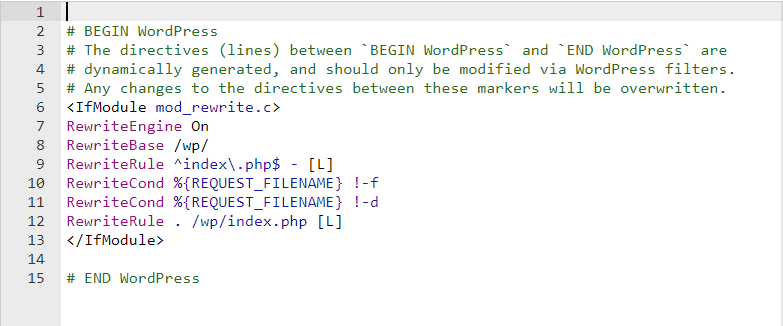
The htaccess file is a small text file. It helps control website settings. This file is very important. It tells the server how to behave. You can find it in the root directory. It manages rules like URL redirects. This file also handles security rules. It can block access to certain parts of your website.
In WordPress, the htaccess file is in the main folder. You can edit it with a text editor. It changes settings for your WordPress site. It helps in URL rewriting for pretty links. Also, it can protect your site from bad bots. Be careful when editing this file. A small mistake can break your site.
Role In WordPress
The Htaccess file plays a key part in WordPress sites. It helps control how URLs look. This is called the permalink structure. Permalinks are the web addresses for your pages. They can be neat and easy to read. This makes your site more friendly to visitors and search engines. A clean permalink can boost your site’s visibility.
Security enhancements are crucial. The Htaccess file can protect your site. It blocks bad people from getting in. It stops harmful actions from happening. With the right settings, your site stays safe. Keeping your site secure is important for trust. The Htaccess file can make your site much safer.
Common Modifications
Htaccess file in WordPress is a powerful tool for managing server configurations. It allows changes like URL redirects, enabling or disabling features, and optimizing security settings. Common modifications include customizing permalinks and restricting access to specific directories, enhancing site performance and security.
Redirects And Rewrites
The .htaccess file in WordPress helps manage website rules. It can redirect users to a new page. This is useful if a page moves. It keeps visitors from seeing errors. Rewrites are another feature. They change URLs to make them look cleaner. A clean URL is easy to read. It also looks better to search engines. This can help improve search rankings. A simple rule can do this magic. No need for coding skills. Just a few lines in the file.
Access Control
Access control is important for site safety. The .htaccess file can block unwanted visitors. It can stop bots or bad users. You can allow only good users in. This makes the site more secure. You can also block specific IPs. This stops them from visiting. It’s a simple way to protect your site. Safety is important for everyone.
Credit: www.hostinger.com
Security Best Practices
The htaccess file can hide important files. This keeps them safe. Add rules to the file. These rules will block access to certain files. For example, use deny from all. This will stop people from seeing them. Protect your WordPress configuration file. This is the wp-config.php file. It is important for security. Make sure it stays hidden.
Use the htaccess file to block bad users. You can do this by IP address. Add their IP to the file. Use deny from 123.456.789. This command will block them. Sometimes, you might see strange activity. This could be a sign of a bad user. Always keep an eye on your site’s visitors. This will help keep your site safe.
Troubleshooting Issues
The. htaccess file in WordPress helps manage server configuration and enhance website performance. It controls redirects, URL rewriting, and security settings. Adjusting this file can solve common issues like permalink errors or access restrictions.
Identifying Common Errors
Htaccess file errors can break your website. Common errors include 500 Internal Server Error and 404 Not Found. These errors often occur due to incorrect file permissions. Wrong syntax in the htaccess file can also cause issues.
Backup your htaccess file before making changes. This helps in restoring if something goes wrong. Try checking the file permissions. They should be set to 644. Correct permissions can fix many problems. Ensure the syntax is correct. A misplaced character can cause errors.
Steps To Resolve Problems
- Backup the htaccess file.
- Check file permissions. Set to 644.
- Review the syntax carefully.
- Use a clean htaccess file template.
- Test changes on a staging site first.
Using a staging site prevents live site errors. This helps in identifying issues early. Once resolved, apply changes to the main site.
Creating And Editing
The htaccess file in WordPress is very important. It controls many settings for your site. It helps with redirects and security. You can create and edit it easily. There are two main ways to do this.
Using File Managers
File managers make it easy to find your htaccess file. They let you see files on your server. To use a file manager, log into your hosting account. Find the File Manager tool. Navigate to your WordPress folder. Look for the htaccess file there. You can open and edit it with a text editor. Make sure to save your changes.
Employing Ftp Clients
FTP clients help you connect to your server. They work like file managers but are different. First, download an FTP client. Enter your server details to connect. Browse to your WordPress folder. Find the htaccess file and download it. Use a text editor to make changes. Upload the file back to the server. Changes take effect immediately.
Backup And Recovery
Files can vanish suddenly. Backups keep your data safe. They are like a safety net. Imagine losing all your work. Scary, right? Backups prevent this. They protect your WordPress site. Regular backups save time and headaches. They are crucial for every website owner. Without backups, recovery is hard. Backups are peace of mind. Always have a backup ready.
Restoring is bringing back lost files. Backups make this easy. Start by finding your backup file. Use tools to restore the site. Follow simple steps to recover data. No coding needed. It’s quick and easy. Backups keep your site safe. Restoring ensures your site is always online. Never worry about lost files again. Backups make recovery simple. Always restore when needed.
Advanced Configuration Tips
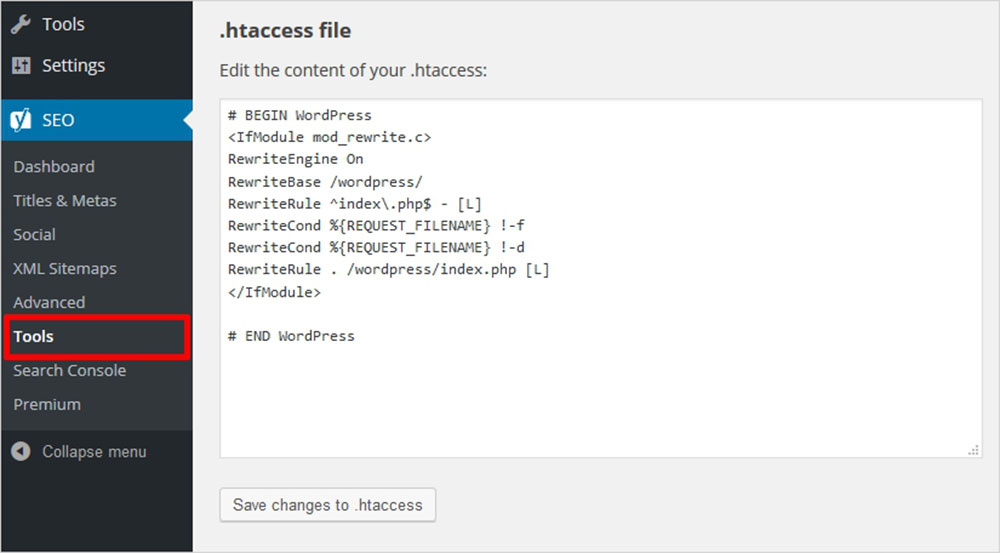
Speed up your WordPress site with the .htaccess file. It helps in caching and compression. Faster sites make users happy. Use Gzip compression to reduce file sizes. Smaller files load quicker. Enable browser caching to store files in browsers. This reduces load times on repeat visits. Always keep your file tidy and organized.
Create custom error pages for a better user experience. Users see these pages on errors. Set up a 404 error page. It shows when a page is missing. Add helpful links on this page. It guides users back to your site. Custom pages make your site look professional. They also help keep visitors on your site longer.
Credit: muffingroup.com
Frequently Asked Questions
What Is The Purpose Of Htaccess In WordPress?
The htaccess file is crucial for WordPress security and configuration. It controls server settings, redirects, URL structures, and access permissions. This file helps improve site performance and manage error pages. Customizing htaccess can enhance SEO by ensuring clean URLs and efficient redirects.
How Can I Edit The Htaccess File In WordPress?
You can edit the htaccess file using FTP or a file manager. Locate the file in the WordPress root directory. Make changes carefully, as errors can cause site issues. Always back up the original file before editing. Use a plain text editor to avoid unwanted formatting changes.
Can Htaccess Affect WordPress Site Speed?
Yes, htaccess can influence site speed. It manages caching, compression, and redirects. Proper configuration enhances loading times and reduces server load. Implementing browser caching through htaccess can significantly improve performance. However, incorrect settings might slow down your site or cause errors.
Is It Safe To Modify Htaccess In WordPress?
Modifying htaccess is safe if done correctly. Always back up your site and the original file. Incorrect changes can lead to server errors or security vulnerabilities. Follow best practices and seek expert advice if needed. Regularly review your settings to ensure optimal performance and security.
Conclusion
The. htaccess file is crucial for WordPress management. It controls website settings. This small file impacts security and performance. Understanding its functions helps protect your site. It can block malicious attacks. Also, it can improve loading times. Regular checks are important.
Back up the file before changes. Use it wisely to avoid errors. Keep learning about. htaccess for better site control. Remember, a well-optimized site attracts more visitors. Stay informed and keep your WordPress site secure and efficient. Proper use of the.
htaccess file leads to a better user experience.



