
Have you ever scrolled to the bottom of a WordPress website and noticed a small line of text that says something like “Powered by WordPress” or “Designed by XYZ”? That’s what we call a footer credit.
It might seem like a tiny detail, but it holds significant importance in the world of web design. If you’re building your own WordPress site or simply curious about how websites work, understanding footer credits can be incredibly beneficial. Imagine having the power to boost your website’s professionalism and credibility with just a few words.
Footer credits are more than just decorative text; they can enhance your site’s reputation, impact SEO, and play a key role in brand trust. You’ll discover why footer credits matter and how you can use them to your advantage. So, stick around to learn how this small detail can make a big difference in your online presence.

Credit: wordherd.io
Footer Credit Basics
The footer credit is a text at the bottom of a website. It often shows who made the site. Many WordPress themes have a default footer credit. It might say “Powered by WordPress” or “Theme by [Developer Name].” This text is a way to give credit to the theme creator. It helps users know who designed the site.
Some website owners want to change this text. They might want their own name there. Or they might want to remove it. Changing the footer credit can make a site look more professional. But be careful. Some theme licenses do not allow changing this text. Always check the theme’s rules before making changes.

Credit: audiotheme.com
Importance Of Footer Credit
Footer credits are found at the bottom of a website. They can show who made the site. Sometimes, they tell what tools were used. Credits can be links to other sites. These links help with SEO. They tell search engines about your site. They can make your site more trusted. If users see well-known names, they might trust your site more. Footer credits also give thanks. It’s polite to thank those who helped build the site.
Website owners can decide what is shown in the footer. Some might not like footer credits. They might remove them. But, removing them might break some rules. It’s important to check before making changes. Footer credits are small but important.
Default Footer Credit In Themes
The default footer credit is a small line in WordPress themes. It often shows who made the theme. Developers add this to get recognition for their work. Many themes come with this credit line. It may say “Powered by WordPress” or the theme’s name.
Some users want to change or remove it. They do this to make the site look unique. But not all themes allow changes easily. In some cases, you might need to edit the theme’s code. Always make sure to check the theme’s license. Some themes require you to keep the credit.
Customizing Footer Credit
The Theme Customizer is a simple tool. It helps change the footer credit. First, open the customizer from the dashboard. Then, look for the footer settings. Some themes allow easy editing here. You can type your own text. Or, remove the default credit. This method is easy for beginners. Not all themes have this option. So, check if yours does.
Editing theme files can change the footer credit. This method is a bit tricky. First, find the footer.php file. Then, locate the credit text in it. You can change the text here. Remember to save your changes. Make a backup before editing. Mistakes can break your site. So, be careful while editing.
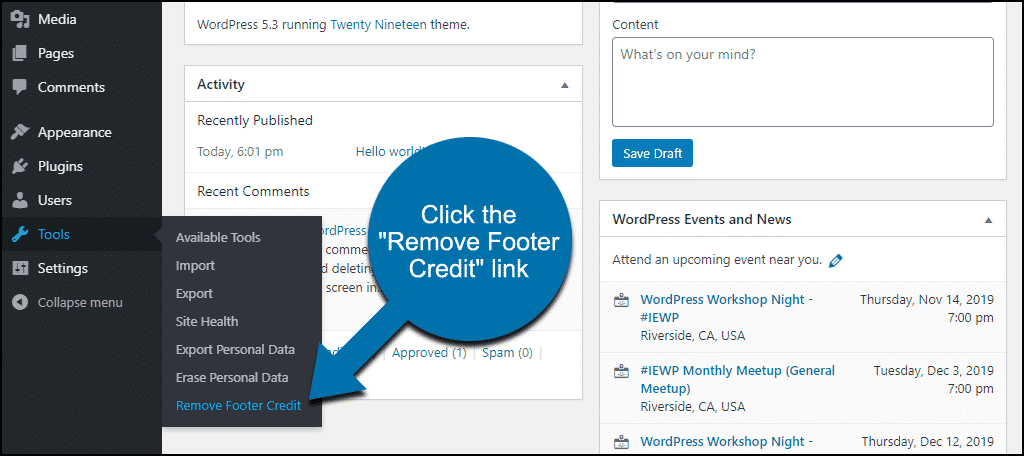
Plugins can help with footer credit too. They offer easy changes. Install a plugin from the WordPress store. Choose one that fits your needs. Many are free to use. Plugins are safe and simple. They prevent coding mistakes. Just activate and configure them. Your footer credit updates quickly.
Legal Considerations
Website owners must know about legal issues with footer credits. It’s important to give proper credit to the theme or plugin creators. Not doing so can lead to legal problems. Check the theme’s terms to see if credit removal is allowed. Some themes let users remove credits for a fee. Others have strict rules about keeping them. Respecting these rules is crucial. Misuse can result in copyright infringement. This can lead to fines or other penalties. Always read the terms carefully before making changes. If unsure, ask an expert for advice. Following the rules keeps you safe and protects your website.
Best Practices
Footer credits show who made the website. They often contain links. These links lead to the developer’s page. It’s good to keep these credits. It gives respect to the creator. Many developers offer free themes with these credits. Removing them can break rules. Always check the theme’s terms before changes.
Using custom footer credits can help branding. Add your own company name. Or link to your main page. This helps people know who you are. Make sure links are useful. They should guide users to helpful places. Clean, simple credits look the best. Too much text can confuse users. Keep it neat and tidy.
Common Mistakes
Many people forget to update the footer credit after installing a new theme. This can lead to outdated or incorrect information. Some users may remove the footer credit without replacing it. This leaves a blank space, which looks unprofessional. Others might use the wrong code, causing errors on the site. It’s important to use the correct HTML or CSS code. Some also ignore the copyright year, keeping it outdated. Updating the year can improve trust with your visitors.
Another mistake is not checking the mobile view. Footers can look different on phones. Always check how your footer looks on all devices. This ensures a consistent and professional appearance. Lastly, avoid adding too many links. A cluttered footer can confuse visitors. Keep it simple and easy to read.
Credit: www.greengeeks.com
Frequently Asked Questions
What Is A Footer Credit In WordPress?
A footer credit is a text or link in a website’s footer. It often credits the site’s designer or theme developer. In WordPress, it appears at the bottom of pages. Customizing footer credits allows personal branding or removing default theme credits.
How Can I Change Footer Credit Text?
You can change footer credit text via WordPress customizer or theme settings. Navigate to Appearance > Customize. Look for the Footer section and edit the credit text. Some themes offer direct editing, while others require custom code changes or plugins.
Can I Remove Footer Credit In WordPress?
Yes, you can remove footer credit by editing your theme’s code. Access the theme editor under Appearance > Theme Editor. Locate footer. php and delete or modify the credit section. Alternatively, use plugins that offer easy removal without coding.
Why Customize Footer Credit In WordPress?
Customizing footer credit helps in personalizing your website. It enhances branding and professionalism by displaying your own or business name. Removing default credits can improve aesthetics and focus on your content or brand instead of the theme developer.
Conclusion
Footer credits are essential for WordPress sites. They provide recognition for creators. They also offer a professional look. Removing or customizing them can enhance branding. It’s important to maintain legal compliance. Check your theme settings carefully. Make sure the changes align with your goals.
Keep user experience in mind. A clean footer boosts site appeal. Consider SEO benefits too. Well-managed footer credits can improve visibility. They contribute to a cohesive site design. Now you can make informed decisions. Your site will appear more polished.
That’s the power of understanding footer credits.



