
Imagine your WordPress website as a bustling city. Just like a city needs well-organized roads and efficient traffic systems, your website requires a streamlined database to function smoothly.
That’s where database optimization steps in, acting as a hidden hero that can elevate your site’s performance to new heights. If you’ve ever experienced slow loading times or glitches, it might be your database crying out for attention. You might wonder, “Why should I care about database optimization?
” Well, it directly impacts your site’s speed, user experience, and even your search engine rankings. In this post, you’ll discover how optimizing your database can transform your website from a sluggish town to a vibrant metropolis. Are you ready to unlock the secrets of a faster, more efficient WordPress site? Keep reading to find out how a few smart tweaks can make all the difference.
Importance Of Database Optimization
Database optimization makes your website run faster. A fast website keeps users happy. They can find what they need quickly. This means they will stay on your site longer. A fast site uses less server resources. This can save you money. It also helps your site rank better in search results. Search engines like fast sites. This means more people can find your site.
Optimizing your database also keeps your data safe. It reduces the chance of errors. Errors can cause your site to crash. A crash can mean lost visitors and lost sales. A clean database is easier to backup. Backups are important in case something goes wrong. A backup can save you a lot of trouble.
Credit: www.hostinger.com
Common Database Issues
Slow queries can make a website load slowly. This frustrates visitors. Optimizing queries can help speed up the site. Use indexes to make searches faster. Avoid complex queries if possible. Simple queries run faster and use less resources.
Data redundancy means storing the same data in multiple places. Redundant data wastes space. It can also make databases confusing. Reducing redundancy helps keep databases clean. Use normalization to organize data better. Proper organization makes updates easier.
Overhead refers to extra data that databases store. Too much overhead slows things down. Cleaning up overhead improves performance. Regularly check databases for unnecessary files. Remove junk to keep things neat and tidy. A clean database runs smoothly.
Benefits Of Optimizing Databases
A fast site makes users happy. Database optimization helps with speed. It removes unnecessary data. This reduces the size of the database. A smaller database loads faster. Faster loading means better user experience.
Users like a smooth browsing experience. A clean database helps with this. Fewer errors happen. Pages load quickly. Visitors stay longer on the site. They find what they need easily.
A heavy database slows down servers. Optimizing databases lightens the load. Servers work less hard. This means they last longer. Websites run more smoothly. Less server load saves money. It’s good for business.
Tools For Database Optimization
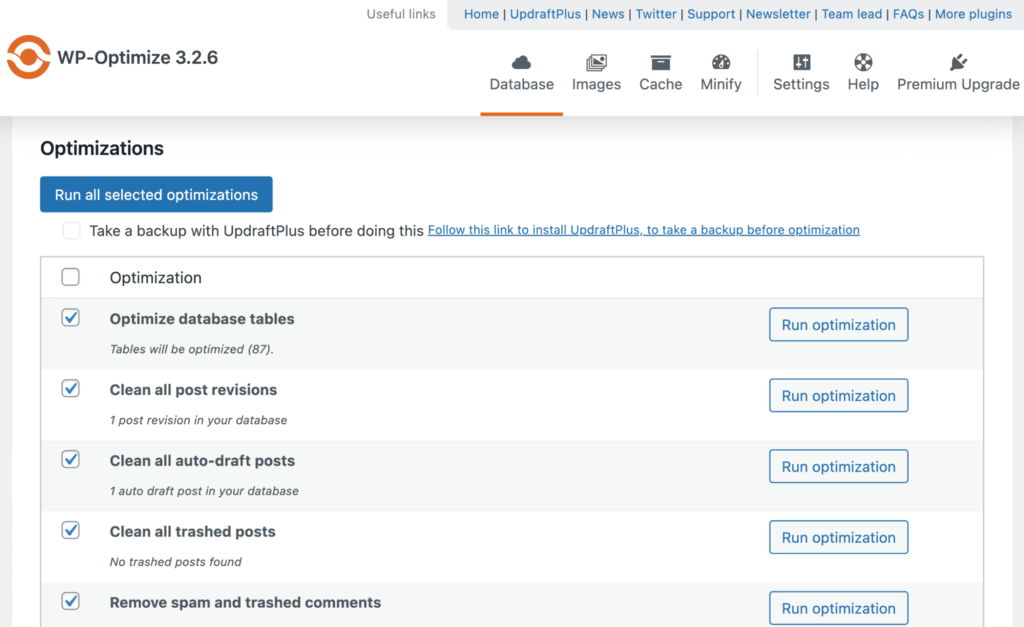
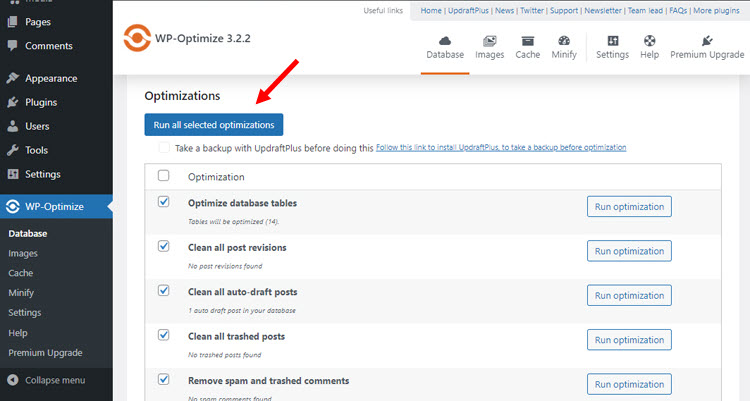
WordPress has many plugins for database optimization. WP-Optimize is a popular choice. It cleans up your database. Another option is WP-Sweep. It removes unnecessary data. Advanced Database Cleaner is also useful. It organizes your database. These plugins make your website run faster. They are easy to use. Just install and activate them. They handle the rest.
Some third-party software can optimize your database. phpMyAdmin is a tool many use. It manages and optimizes databases. Another software is Adminer. It is easy and light. MySQL Workbench is another option. It offers advanced features. These tools help keep your database healthy. They are effective and reliable. Keep your WordPress site fast. Use these tools regularly.
Manual Optimization Techniques
Database tables can become messy. Remove unwanted data to keep them neat. Unused plugins can leave behind data. Old revisions of posts take up space. Clean these to free up space. Use tools like WP-Optimize. It helps clean and tidy up.
Queries fetch data from the database. Slow queries make the site lag. Optimize queries to speed up your site. Use indexes to make queries faster. Check queries regularly. Fix slow ones. Your site will run better.
Unnecessary data can slow down the site. Spam comments and trashed posts are examples. They are not needed. Delete them to make space. Less data means faster site. Keep your database light for best performance.
Automated Optimization Solutions
Scheduled Maintenance keeps the database healthy. It runs checks often. These checks find errors early. Fixing errors quickly stops big problems. Maintenance tools can run daily. They don’t need human help. This saves time and energy. Regular checks help the website run fast. Speed is good for users. It makes them happy.
Automatic Backups protect the data. They make copies of everything. Copies help when data is lost. Backups can be set to happen often. This means data is safe. If something breaks, the backup saves the day. No need to worry about losing important stuff. Backups are like a safety net. They catch data before it falls.
Best Practices
Check your database often. Look for problems. Fix them quickly. It helps keep your website fast. Use tools to make this easier. Tools like plugins can help. Regular monitoring is important. It keeps your site healthy. It also helps find errors early. This saves time later. Your site works better and faster.
Always have a backup of your database. Backups keep your data safe. If something goes wrong, you can restore it. Use plugins for this task. They make backups easy. Set automatic backups. Weekly or daily. Backups give peace of mind. They protect your hard work.
Test changes before making them live. It avoids errors on your site. Use a test environment. This is a safe place to try things. You can see what changes do. If they are good, then go live. Testing saves from surprises. It keeps your site running smoothly.

Credit: wordpress.org
Credit: www.cloudways.com
Frequently Asked Questions
How Can I Optimize My WordPress Database?
Optimizing your WordPress database involves cleaning unnecessary data, indexing tables, and updating plugins. Use tools like WP-Optimize to streamline the process. Regular maintenance helps improve site speed and performance, making your website more efficient for visitors.
Why Is Database Optimization Important For WordPress?
Database optimization enhances site speed, reduces load times, and improves user experience. A well-optimized database prevents crashes and errors, ensuring your website remains accessible and reliable. It also aids in better SEO rankings, contributing to your site’s overall success.
What Tools Are Best For Database Optimization?
Tools like WP-Optimize, phpMyAdmin, and Advanced Database Cleaner are effective for database optimization. These tools help remove unnecessary data, optimize tables, and automate cleaning tasks. They simplify the process, making it accessible even for beginners in WordPress management.
How Often Should I Optimize My WordPress Database?
Regular optimization is recommended, ideally once a month or after major updates. This ensures your database remains clean and efficient. Frequent optimization helps prevent data bloat, maintaining your site’s speed and performance for an optimal user experience.
Conclusion
Database optimization keeps your WordPress site fast and reliable. It reduces loading times and boosts user experience. Regular maintenance prevents data overload and errors. Effective optimization improves site performance and helps with SEO. It ensures your site runs smoothly without hiccups.
Use tools and strategies for better results. Keep monitoring your database health regularly. This approach saves time and keeps your site efficient. Remember, a well-optimized database is crucial. It enhances your site’s functionality and user satisfaction. So, optimize your database wisely.
Your WordPress website deserves the best care for optimal performance.



