
Do you ever find yourself scrambling to post on Facebook at just the right time, only to realize you’re juggling too many tasks at once? Imagine having a tool that lets you schedule your WordPress posts to automatically appear on Facebook when your audience is most likely to see them.
Sounds like a dream, right? This is where Buffer comes in, a magical helper that can make your social media sharing effortless and more effective. With Buffer, you can plan your content strategy ahead of time and ensure your posts go live exactly when you want them to, without lifting a finger.
It’s like having a personal assistant for your social media needs, ensuring your audience never misses a beat. You’ll discover how Buffer can revolutionize your content scheduling, freeing up time and boosting engagement. Get ready to unlock the secrets of seamless social media management. Keep reading to find out how you can make your online presence shine effortlessly!
Buffer And Its Role
Buffer is a tool for social media management. It helps to plan posts. You can schedule posts for later. This is useful for staying active online. It saves time. You don’t need to log in each time. Just set it once. It runs by itself. Simple and easy.
Buffer makes life easier. You can manage many accounts. No need to switch apps. It keeps everything in one place. Analytics are included. You can see what works best. It helps in planning future posts. Team work is simple with Buffer. Share tasks with others. Security is strong. Your data stays safe. It is trusted by many users.
WordPress And Social Media Integration
Connecting WordPress to social platforms is important. It helps share content easily. This connection can increase your audience. You can use plugins to link WordPress with Facebook, Twitter, and more. Plugins like Buffer help in scheduling posts. Scheduling posts saves time and effort. It keeps your social media active all the time.
Social media is key for growing your WordPress site. It drives more traffic to your blog. More visitors can mean more followers. Social media platforms like Facebook and Instagram are popular. They help reach different audiences. Sharing on social media boosts your site’s visibility. It is an effective way to engage with users.
Scheduling Posts With Buffer
Buffer helps to schedule posts for Facebook. You set the time and day. Buffer then shares your posts at the right time. This tool works with WordPress. You write your post first. Then, choose when to share it on Facebook. Buffer saves time. It lets you plan ahead. No need to post every day. Your posts reach people even when you sleep. Buffer is smart and easy. It helps with social media tasks. You can focus on writing more posts. Let Buffer handle the sharing part.
Scheduled posts keep your page active. This helps more people see your content. You get more likes and shares. Scheduling also makes life easy. Plan your posts for weeks ahead. No need to log in daily. You save time and effort. Regular posting keeps your audience engaged. People like pages that update often. Consistent updates grow your followers. It is simple and useful. Planning posts makes social media fun. You have more time for other tasks. Buffer makes it all possible.
Credit: wedevs.com
Setting Up Buffer With WordPress
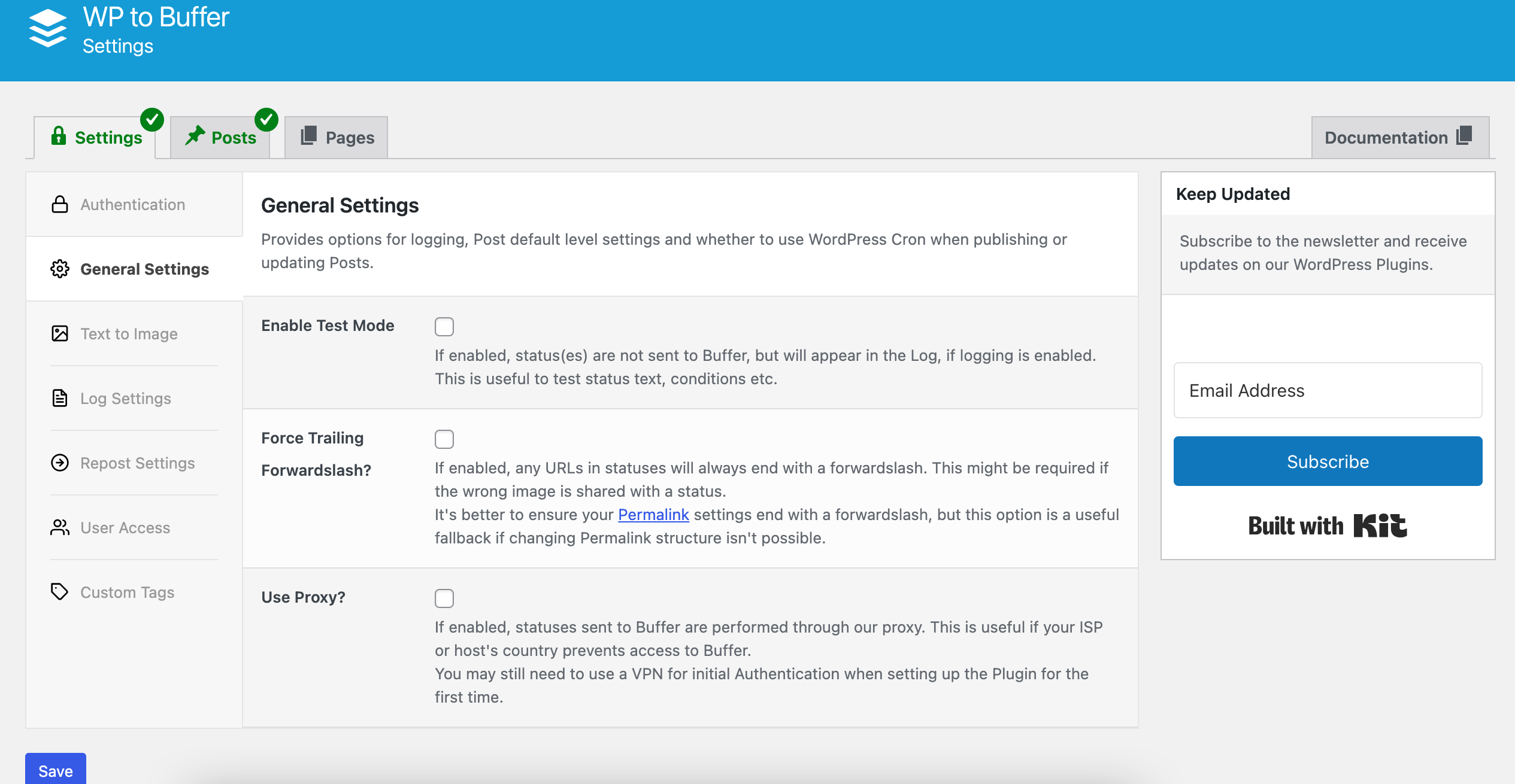
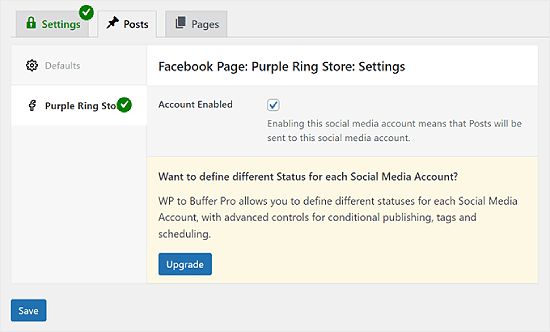
To start, create a Buffer account. It’s free and easy. After that, log in to WordPress. Find a plugin called “WordPress to Buffer”. Install and activate it. Next, connect your Buffer account. Use the plugin settings. Follow the instructions on the screen. This will link WordPress and Buffer.
Several plugins help with Buffer integration. WordPress to Buffer is popular. Another is Revive Old Posts. Both make sharing easy. They save time by automating posts. Choose one that fits your needs. Read reviews. Check features. Both tools work well with WordPress. Ensure your site meets plugin requirements. Regular updates keep plugins working smoothly.
Posting WordPress Content On Facebook
Facebook is a powerful tool for sharing WordPress posts. Many people use Facebook daily. Sharing posts there can reach many eyes. It’s important for bloggers and businesses. Facebook helps to grow audiences. It makes content visible to many people. People can like, share, and comment. This interaction boosts engagement. Content spreads quickly. A simple post can go viral. Facebook is essential for online presence.
WordPress posts gain attention when shared on Facebook. Facebook has billions of users. It’s a huge network. Sharing WordPress content increases visibility. More people see your work. This builds brand awareness. It attracts new followers. Engaged followers are important. They like and share your posts. This interaction can lead to more traffic. More visitors mean more potential customers. Facebook’s platform is valuable for reaching goals.
Posts should be optimized for Facebook. Use eye-catching images. People notice colorful pictures. Write short and clear captions. Clear captions attract attention. Use popular keywords. Keywords help posts appear in searches. Add links to your WordPress site. Links guide people to your page. People like visiting interesting sites. Encourage them to click. More clicks mean more traffic. Keep content engaging. Engaging content holds interest.
Credit: www.wpbeginner.com
Tips For Effective Scheduling
Posting at the right time is important. Morning hours are good. People check their phones then. Afternoons can work too. Try different times. See what works best. Check when your audience is online. Use tools to help. They can tell you the best times. Evenings can be tricky. People might be busy. Test and see what suits you.
Good content gets people interested. Use fun and clear words. Ask questions. This makes people think. Share stories. People love stories. Keep posts short. Images and videos work well. They catch the eye. Use them to tell your story. Engage with your audience. Reply to their comments. This shows you care. Keep it simple and fun.
Analyzing Performance
Buffer Analytics helps track Facebook post success. It shows likes, shares, and comments. This data helps you understand audience preferences. You can see which posts get more attention. It helps in planning future content. Regularly check these numbers to stay updated.
A strong content strategy draws more viewers. Use Buffer data to make better posts. Find out what your audience loves. Create more of what works. This keeps your Facebook page active and fun. Always aim for interesting and useful posts.

Credit: wedevs.com
Frequently Asked Questions
How To Schedule WordPress Posts On Facebook?
To schedule WordPress posts on Facebook, use Buffer or similar tools. Connect your Facebook account to Buffer, then select the post you want to schedule. Set the desired time and date for posting. This way, you can automate your social media sharing and ensure consistent engagement with your audience.
Why Use Buffer For WordPress Post Scheduling?
Buffer simplifies scheduling WordPress posts on Facebook, enhancing productivity. It allows you to plan, schedule, and publish content automatically. You can manage multiple social media accounts from one dashboard. This helps in maintaining a consistent posting schedule, increasing audience engagement, and saving time.
Can Buffer Improve Facebook Post Engagement?
Yes, Buffer can improve Facebook post engagement by optimizing posting times. It analyzes audience activity to suggest the best times to post. Scheduled posts ensure consistent content delivery, keeping your audience engaged. This strategic approach can lead to higher interaction rates and increased visibility on Facebook.
Is Buffer Free For Scheduling Posts?
Buffer offers both free and paid plans for scheduling posts. The free plan allows limited scheduling for a few social accounts. It is ideal for individuals or small businesses. For advanced features, such as analytics and more scheduled posts, consider the paid plans.
Conclusion
Scheduling WordPress posts on Facebook saves time and boosts engagement. It helps maintain a consistent online presence. You can plan and schedule posts ahead of time. This means more freedom and less stress. A buffer schedule tool makes this process simple.
It’s useful for bloggers and businesses alike. With easy steps, you can connect WordPress to Facebook. This strategy helps reach a wider audience. It ensures your content is always fresh and timely. Start today to see the benefits. Your posts deserve to be seen by more people.
Stay organized and efficient with these tools.



