
Imagine you’re building a website on WordPress, and you’re looking for ways to organize or expand it without complicating your life. You’ve come across the term “subdomain” and you’re curious about what it means and how it might benefit you.
Well, you’re in the right place! Understanding subdomains can be a game-changer in managing your WordPress site efficiently. It can help you streamline your site’s structure, improve its SEO, and even enhance user experience. You’ll discover what a subdomain is, how it works, and why it could be the perfect solution for your website needs.
Get ready to unlock a new level of website management that could save you time, effort, and potentially boost your site’s performance. Dive in to find out how subdomains can make your digital life easier and more organized.
Understanding Subdomains
A subdomain is like a smaller part of a website. It has its own name. Think of it as a room in a big house. The house is the main website. The room is the subdomain. Each subdomain is unique. It can have different content. The main website and subdomain share the same domain name.
Subdomains help in organizing content. They keep things neat. For example, a blog can be on a subdomain. Like blog.yoursite.com. This makes it easy to find. Subdomains are great for special topics. They can be used for different languages too. This way, each audience gets content they understand.
Credit: elementor.com
Benefits Of Using Subdomains
Subdomains help in organizing content. Different sections can have their own subdomain. This makes it easy to manage. You can separate blogs, shops, or forums. Each part functions independently. This keeps everything neat and tidy.
Subdomains can impact SEO positively. Search engines treat them as separate sites. This means more chances to rank. It also allows targeting different keywords. Each subdomain can have its own focus. This increases the site’s visibility.
Subdomains offer unique branding opportunities. They allow for creative names. Each subdomain can represent a different brand aspect. This helps in creating distinct identities. It also aids in reaching specific audiences. A structured site enhances brand image.
Creating A Subdomain In WordPress
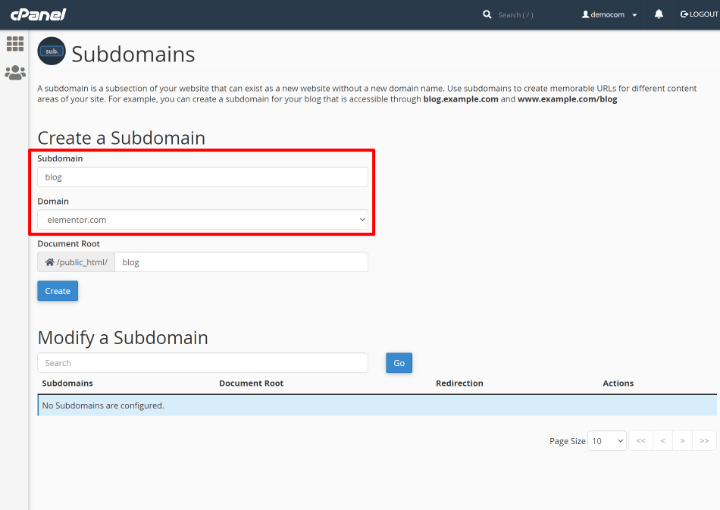
First, log into your hosting account. Look for the option called “Subdomains”. Click on it to start. Enter a name for your subdomain. This will be the first part of your web address. Choose the main domain from the dropdown list. Click on the “Create” button to finish.
Next, go to your WordPress dashboard. Install WordPress on the new subdomain. Use the same process as installing on the main domain. Now your subdomain is ready for use.
Some people face problems with DNS settings. It might take time to update. Others find it hard to manage multiple sites. This can become confusing. Always keep track of all your subdomains. Update them regularly. Check for security issues often.
Subdomains Vs. Subdirectories
Subdomains in WordPress create separate websites under the same domain. They offer flexibility for different content areas. Subdirectories, on the other hand, keep content within the main site structure. This choice impacts SEO and organization. Understanding each helps in deciding the best fit for site needs.
Key Differences
Subdomains create separate websites under a main domain. They act like different sections. For example, blog.example.com is a subdomain. Each subdomain can have its own content. They are treated as individual sites by search engines. This can help organize large websites. Subdirectories, on the other hand, are folders within a website. They look like example.com/blog. They share the same domain. Subdirectories are easier to manage. They often share design and resources.
Choosing The Right Option
Consider the purpose of your content. Subdomains are good for different topics. They suit separate audiences. Subdirectories are best for related content. They keep everything under one roof. Think about SEO impact too. Subdomains may need extra work to rank well. Subdirectories benefit from the main site’s authority. Choose based on your site’s needs.
Practical Applications Of Subdomains
Subdomains on WordPress help organize content by creating separate sections under a main website. They are useful for managing different topics or languages. For example, a blog and an online store can each have their own subdomain, making navigation easier for visitors.
Examples From Popular Websites
Many big websites use subdomains to organize content. Google has maps.google.com for maps. Wikipedia uses en.wikipedia.org for English articles. These help users find specific pages fast.
Industry-specific Uses
Subdomains are helpful for different industries. Schools might use them for classes. A school can have math.school.com. Businesses use subdomains for store sections. A company might use shop.company.com. This makes browsing easy.

Credit: kinsta.com
Managing Subdomains
Keep your subdomains organized and updated. Regular updates ensure smooth operation. Check for any broken links or errors. Fix them quickly. Use strong passwords for safety. Always backup your data. Backups prevent data loss.
Track your subdomain’s performance regularly. Use tools like Google Analytics. These tools help monitor traffic. Look for slow loading pages. Speed is important. Users like fast websites. Optimize images for better speed. Remove unnecessary plugins. They can slow down your site. Keep an eye on your site’s health. Regular checks are crucial.
Potential Drawbacks
Using subdomains on WordPress can confuse visitors and split SEO efforts, impacting search engine visibility. Managing multiple subdomains requires extra work, increasing maintenance costs and complexity.
Technical Considerations
Subdomains on WordPress need extra technical work. They need separate settings. Each subdomain may require its own plugins and themes. This can lead to higher maintenance. Keeping track of updates becomes harder. Separate databases might be needed. This adds to the complexity. Technical skills are often necessary. Beginners may find this challenging. Managing subdomains can be confusing. Errors can easily occur. Regular checks are essential to avoid issues.
Impact On User Experience
Subdomains can confuse visitors. They may seem like separate sites. Users might not know they belong together. This can affect navigation. Consistency is key for a smooth experience. Different designs might confuse users. This can lead to a poor user experience. Branding may become inconsistent. Users may find it hard to trust the site. A unified look helps users feel comfortable.

Credit: kinsta.com
Frequently Asked Questions
What Is A Subdomain On WordPress?
A subdomain is a subset of your main domain on WordPress. It allows you to separate different areas of your website. For instance, you might use a subdomain for a blog or store. Subdomains are useful for organizing content and improving user experience on your site.
How Do Subdomains Affect Seo?
Subdomains can impact SEO by organizing content distinctly. They enable better targeting of keywords for different sections. However, they are treated as separate entities by search engines. Proper linking and consistent branding are essential for maintaining SEO performance across subdomains.
Can Subdomains Be Used For Testing?
Yes, subdomains are ideal for testing new features or designs. They offer a safe environment separate from the main site. This ensures that any changes won’t affect your primary domain’s functionality. Subdomains are commonly used for development and staging purposes.
Are Subdomains Free On WordPress?
Subdomains are generally free when you own the main domain. WordPress allows you to create subdomains without additional costs. However, your hosting provider may have specific rules. Always check with your hosting service for any limitations or fees related to subdomains.
Conclusion
Understanding subdomains on WordPress can boost your website’s organization. They help separate content, making navigation easier for users. Managing different sections becomes more straightforward with subdomains. This tool can enhance your site’s structure without additional costs. It’s beneficial for businesses, personal blogs, or any expanding site.
Remember to choose meaningful names for each subdomain. This aids user experience and SEO. With these insights, you’re ready to use subdomains effectively. Explore their potential and refine your WordPress site. Happy blogging!



