
Have you ever wondered what a script in WordPress is and where you should add it? Understanding scripts in WordPress can unlock a new level of customization and functionality for your website.
Imagine having the ability to enhance your site’s performance, add unique features, or even streamline your operations—all by knowing where and how to place these crucial snippets of code. Think of scripts as the secret sauce that can elevate your WordPress site from ordinary to extraordinary.
They are the behind-the-scenes tools that can help you achieve a smoother user experience, better SEO, and more interactive content. But where do you start, and how do you ensure you’re doing it right? You’ll discover what a script is in WordPress and the best practices for integrating them into your site. Whether you’re a seasoned developer or a curious beginner, you’ll find practical tips to optimize your website and avoid common pitfalls. Keep reading to transform your WordPress site into a powerhouse of functionality and performance.

Credit: jetpack.com
Understanding Scripts In WordPress
Scripts are small pieces of code. They add special features to your website. JavaScript is a popular script type. It makes web pages interactive. CSS scripts help with design. They change colors and fonts. PHP scripts work with data. They connect to databases.
WordPress uses scripts to improve websites. They make your site better and faster. Adding scripts is easy. You can use plugins. Plugins help add scripts without coding. You can also add scripts in the theme editor. Be careful when adding scripts. Wrong scripts can break your site. Always save a backup first.
Types Of Scripts
Core scripts are built into WordPress. They help with basic functions like loading pages and managing content. These scripts are important for the site to work. They make sure everything runs smoothly. Without them, your site might not work right. They are always there, ready to help.
Third-party scripts come from other places. They add extra features to your site. You can use them for things like analytics or advertising. These scripts are not from WordPress. They can be helpful but need careful use. Sometimes they slow your site. So, check them before adding.
Custom scripts are made by you or your developer. These scripts let you add special features. You can make your site look or act different. Custom scripts are unique to your needs. They help make your site stand out. But be careful. They should be tested well.
Benefits Of Using Scripts
Enhanced Functionality is a key advantage of scripts in WordPress. Scripts allow you to add new features to your site. For example, you can add contact forms or image sliders. This makes your site more interactive and engaging.
Scripts can lead to Improved User Experience. They help in making navigation smooth. Users find information quickly. This keeps them happy and they stay longer on your site.
Increased Site Performance is possible with scripts. They optimize how your site loads. Faster loading times make visitors stay. This helps in reducing bounce rates. Efficient scripts improve site speed.
Where To Add Scripts In WordPress
Scripts in WordPress can be added in the header. This helps load them early. Use the wp_head() function. Place your script in the header.php file. This file is in your theme folder. Ensure your script is between the opening and closing tags. This ensures it runs before the page loads.
Scripts can also be placed in the footer. This is useful for non-essential scripts. Use the wp_footer() function. Place your script in the footer.php file. This file is also in your theme folder. Ensure your script is just before the closing tag. This helps speed up page loading.
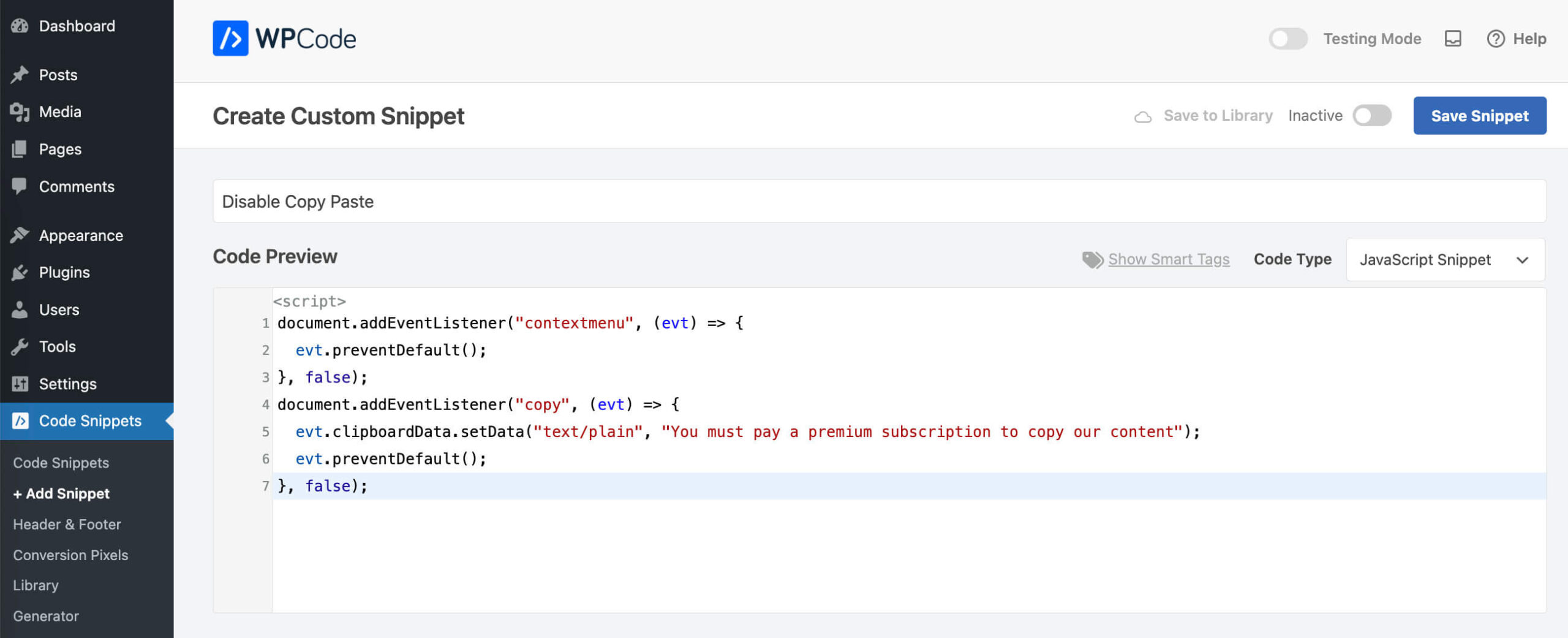
Plugins can help with adding scripts. Some plugins are made for this job. They provide an easy way to add scripts. No need to edit theme files. Popular plugins include Insert Headers and Footers. They let you add scripts without coding. Just paste your script in the plugin settings.
Using Theme Files
Scripts in WordPress are small programs that enhance website functions. Place them in theme files like functions. php. They add features such as contact forms or image sliders. Proper placement ensures smooth operation and better performance.
Header.php File
The header.php file is essential in WordPress themes. It stores the code for the header section of your site. You can add scripts in this file to affect the entire website’s header. This includes adding tracking codes or custom JavaScript. Make sure you place scripts before the closing tag. This ensures they load correctly. Always back up files before editing. Mistakes can break your site.
Footer.php File
The footer.php file manages the footer section of your WordPress site. Adding scripts here can be useful for elements that load last. Scripts in the footer can improve site speed. Place your code before the closing tag. This way, scripts run after the page loads. Be careful with edits. Errors can disrupt site functions.
Credit: wpcode.com
Enqueueing Scripts
The wp_enqueue_script function helps add scripts in WordPress. It keeps your site organized. You don’t need to add scripts directly in the theme files. Using this function, you can avoid script conflicts. It ensures scripts load properly.
Use the wp_enqueue_scripts action to add scripts. It connects your scripts to WordPress. This is where you tell WordPress to load your scripts. Place your function inside this action hook. This method is clean and efficient. It’s the recommended way to add scripts.
Using Plugins For Script Management
Scripts in WordPress are small pieces of code that add features to your site. Plugins help manage these scripts effectively. Add scripts in the header or footer section for optimal performance.
Popular Script Management Plugins
Many plugins help manage scripts in WordPress. Scripts are pieces of code. They add features to your site. Plugins make this easy. They do the hard work for you.
Popular plugins like Insert Headers and Footers are easy to use. They let you add scripts without code. Another one is Code Snippets. It helps add small pieces of code. These plugins save time and effort.
Benefits Of Using Plugins
Plugins offer many benefits. They help you add scripts safely. No need to touch main files. This keeps your site safe. They also make updates easy. You can manage scripts from one place. This saves time.
Using plugins is simple. They have user-friendly interfaces. This means even beginners can use them. You do not need to be an expert. Plugins often have support. You can get help if needed.

Credit: wordpress.com
Best Practices For Adding Scripts
Avoiding Direct Script Insertion is crucial. Directly adding scripts can break your site. Use WordPress functions instead. These functions safely add scripts. They prevent conflicts with other codes.
Ensuring Script Compatibility is important. Check if the script works with your theme. Some scripts may not fit well. Ensure your script matches WordPress standards. This avoids errors and keeps your site running smoothly.
Minifying and Combining Scripts saves space. Minifying removes unnecessary characters. This makes scripts smaller. Combining scripts reduces server requests. This speeds up your site. Faster sites keep visitors happy.
Troubleshooting Script Issues
A script in WordPress is a piece of code that enhances website functionality. Typically, scripts are added in the header or footer sections of a theme. Proper placement ensures they run smoothly, avoiding potential site issues.
Common Errors
Scripts can have errors. Common errors include missing files or wrong paths. Sometimes, a script might not run. A script may cause the site to load slowly. Errors can be due to conflicts with other scripts. A script might not work with the current theme or plugins. Always check for updates. Update themes and plugins regularly. This can fix many problems. Look for error messages in the browser console. They provide clues about what’s wrong. Ensure all scripts are correctly linked. Verify their file paths and names.
Debugging Techniques
Debugging is like solving a mystery. Start by checking the console in your browser. It shows error messages. These messages help find what’s wrong. Use them to pinpoint issues. Turn off all plugins. Then, turn them on one by one. This helps find which plugin causes the problem. Check script loading order. Sometimes, the order matters. Use tools like browser developer tools. They provide more details. They help understand what scripts do. Keep a backup before making changes. It saves your work if things go wrong.
Frequently Asked Questions
What Is A WordPress Script?
A WordPress script is a piece of code that enhances website functionality. Scripts can be JavaScript or PHP. They are used to add dynamic features, improve user experience, or customize the site’s behavior. Scripts are essential for adding interactivity and ensuring smooth performance on WordPress websites.
Where Do I Add Scripts In WordPress?
Scripts are typically added in the WordPress theme’s functions. php file or using a plugin. Alternatively, use the WordPress admin dashboard under Appearance > Theme Editor. For easier management, consider using a plugin like “Insert Headers and Footers. ” This method allows adding scripts without directly editing theme files.
What Types Of Scripts Are Used In WordPress?
WordPress commonly uses JavaScript and PHP scripts. JavaScript enhances interactivity and dynamic content display. PHP handles server-side functions, like database interactions. CSS scripts, though not true scripts, are also essential for styling. Together, they create a seamless, functional, and visually appealing WordPress site.
How Do Scripts Affect WordPress Performance?
Scripts can impact website speed and performance. Heavy or poorly optimized scripts may slow loading times. Minifying and combining scripts can enhance performance. Use caching plugins to mitigate potential slowdowns. Ensuring efficient script management is crucial for maintaining a fast and responsive WordPress site.
Conclusion
Scripts are vital for enhancing WordPress functionality. They add custom features. You can place scripts in the header or footer. Use WordPress plugins for easy script management. Always back up your site before adding new scripts. This prevents data loss.
Test scripts thoroughly to ensure they work correctly. Proper script placement boosts site performance. Understanding scripts empowers your website control. Regularly update scripts for security. Stay informed about new script developments. Your WordPress site will run smoothly with well-managed scripts.
Enjoy the benefits of a customized and efficient website.



