
Imagine clicking on a link to your favorite website, only to be left waiting. Seconds tick by, and your anticipation turns into frustration.
Now, think about your own WordPress site. You want your visitors to have a seamless experience, right? That’s where the concept of Time to First Byte (TTFB) comes in. Understanding TTFB can significantly enhance the speed and performance of your WordPress site, but what exactly is a good TTFB?
How does it impact your site’s success? You will discover why TTFB matters and how you can optimize it to keep your visitors engaged and satisfied. By the end, you’ll have the insights you need to ensure your site runs like a well-oiled machine. Ready to dive in? Let’s explore the ideal TTFB for your WordPress site and unlock the secrets to keeping your audience hooked.
Importance Of Ttfb
TTFB, or time to first byte, is very important. It affects how fast a page loads. A slow TTFB can make users wait. People like pages to load fast. If a page loads slowly, they might leave. Fast TTFB keeps users happy and on the site. It helps to have a good experience online.
TTFB also plays a role in SEO rankings. Search engines like fast sites. A low TTFB can help a site rank better. Slow sites may rank lower. Fast-loading sites attract more visitors. This improves the site’s SEO score. To rank well, keep TTFB low.
Defining Ttfb For WordPress
TTFB stands for Time To First Byte. It shows how fast a server starts loading. When you open a website, the first thing it does is send a signal. This signal goes to the server. TTFB measures the time from the start signal to the first byte received back. It’s like waiting for a letter. The shorter the wait, the better. A fast TTFB means a quick website. It keeps users happy. They don’t like waiting.
A good TTFB is under 200 milliseconds. This is a good speed. Websites with this speed run smoothly. Users enjoy them more. They stay longer. A TTFB over 500 milliseconds is slow. It can cause problems. Users may leave the site. Fast TTFB keeps websites healthy. It helps your site grow.
Factors Influencing Ttfb
A good Time to First Byte (TTFB) for a WordPress site is typically under 200 milliseconds. Server performance, hosting quality, and website code efficiency greatly affect TTFB. Optimizing these factors ensures faster loading times, enhancing user experience.
Server Performance
Good server performance is important for fast TTFB. A slow server can delay your site’s loading time. Servers should have enough resources like CPU and RAM. These help handle requests quickly. A well-optimized server improves TTFB.
Network Latency
Network latency affects how data travels from the server to users. The closer your server is to users, the better. Long distances increase latency, slowing down TTFB. Using a Content Delivery Network (CDN) can help. CDNs store copies of your site closer to users.
WordPress Configuration
WordPress settings can impact TTFB. Poorly optimized themes and plugins slow down your site. Use lightweight themes and only necessary plugins. Caching plugins can also help. They store copies of your pages, reducing load time. Always keep your WordPress site updated.

Credit: jetpack.com
Tools For Measuring Ttfb
Understanding TTFB is crucial for WordPress site performance. A good TTFB for a WordPress site is under 200 ms. Tools like Google PageSpeed Insights and GTmetrix help measure this important metric effectively.
Popular Online Tools
Online tools help check TTFB easily. WebPageTest is a popular choice. It gives detailed results. Google PageSpeed Insights is another tool. It’s free and easy to use. GTmetrix also offers TTFB analysis. All these tools show different aspects. They help in understanding site speed.
Interpreting Results
Understanding results is important. Results show server response time. A good TTFB is under 200 milliseconds. Faster response means better speed. Slow TTFB can affect site performance. It’s crucial for user experience. Use results to improve your site. Aim for faster loading times. Keep checking for better performance.
Optimizing Ttfb On WordPress
Picking a good hosting provider is crucial. Fast servers help improve TTFB. Look for hosts with good reviews on speed. Shared hosting might be slower. Dedicated servers are often faster. Always check the server location. Closer servers mean faster response. Consider hosting plans with built-in optimizations. They help in reducing load times.
Caching makes sites load faster. It stores frequent data for quick access. Use plugins like W3 Total Cache or WP Super Cache. They help in saving server resources. Caching reduces the need to load data again. This makes the site faster. Browser caching keeps data locally. Visitors see pages quicker on return visits.
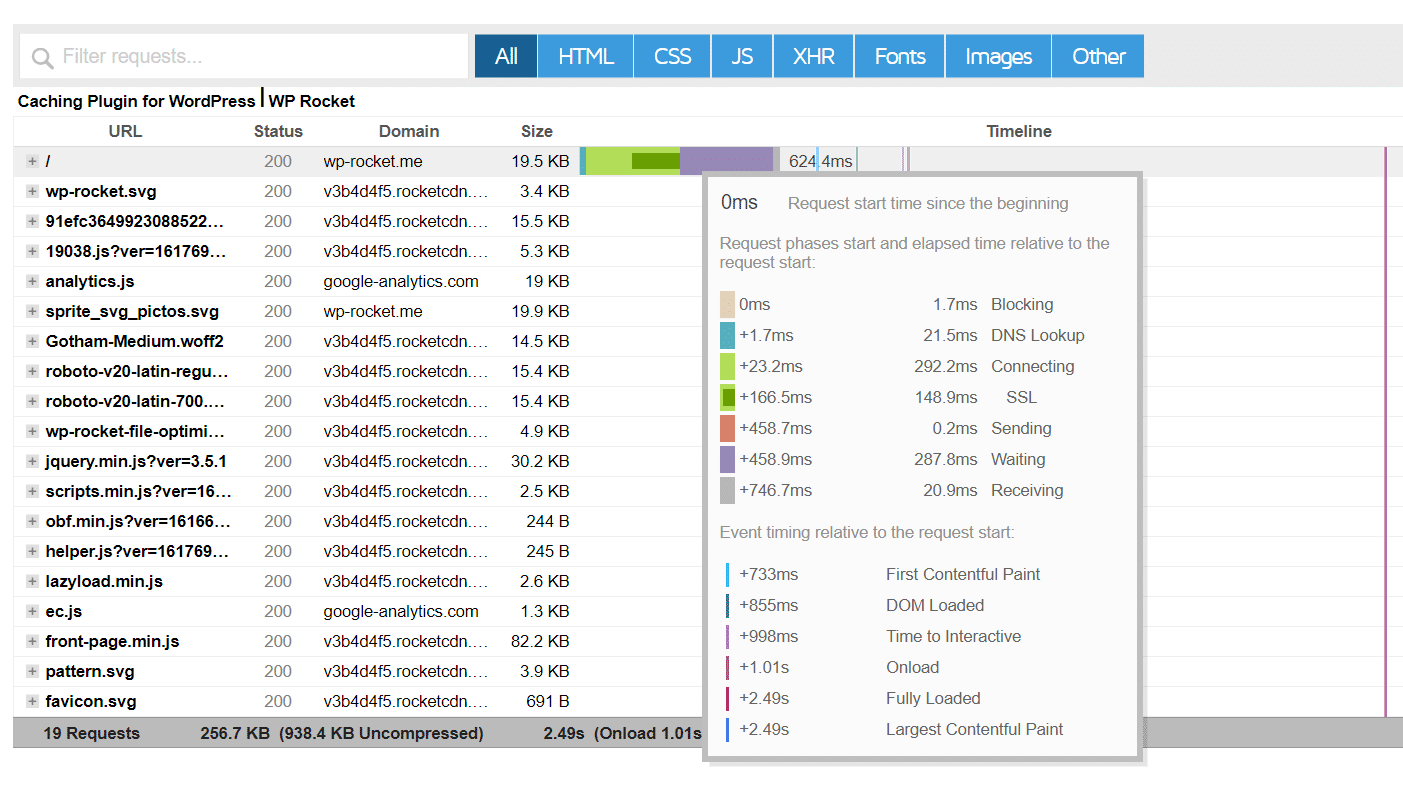
Fewer server requests mean faster loading. Minimize plugins to reduce server calls. Combine CSS and JS files. This cuts down requests. Use a Content Delivery Network (CDN). CDNs store files in many places. Visitors get files from the nearest point. This speeds up loading time. Try to reduce image sizes. Smaller images load faster.
Credit: wp-rocket.me
Common Ttfb Mistakes
Ensuring a good TTFB for a WordPress site involves avoiding common pitfalls. Slow server responses, unoptimized plugins, and large files often cause delays. Aim for a TTFB under 200 milliseconds to improve user experience and boost SEO rankings.
Overloading With Plugins
Many WordPress sites have too many plugins. Each plugin adds extra load time. More plugins can slow your site. It’s like carrying too many bags. Your site struggles to move fast. Always check your plugins. Remove ones you don’t need. This will help your site load faster. A lighter site is a faster site.
Ignoring Database Optimization
Databases store all your site’s data. A messy database can slow your site. Optimizing your database keeps things tidy. It helps your site respond quicker. Think of it as cleaning your room. Everything is easy to find. Your site will thank you by being faster. Regular checks are important. They keep your database healthy.
Case Studies
Many websites saw a big drop in TTFB by using faster servers. This made their sites load quicker. Some sites moved to content delivery networks (CDNs). CDNs help by putting content closer to users. This cuts down the wait time.
Other sites reduced TTFB by optimizing their databases. Simple changes made big differences. These changes helped users get pages faster. Faster pages mean happier users. Happier users often visit more.
Websites with high TTFB often had slow hosting. Bad hosting slows everything down. Too many plugins can also slow sites. Each plugin can add wait time.
Large images are another issue. Big images take longer to load. Compressing images can help. Small images load quicker. Faster loading keeps visitors on the site.
Future Trends In Ttfb Optimization
A good Time to First Byte (TTFB) for a WordPress site is under 200 milliseconds. Future trends in TTFB optimization focus on faster server responses and improved caching techniques. These advancements ensure quicker page loads, enhancing user experience and search engine rankings.
Advancements In Server Technology
Servers are getting faster. New technologies help reduce load times. Fast servers mean better TTFB. More users can visit your site. Upgrades make servers work better. They handle more tasks at once. This means a snappy experience for everyone.
Impact Of 5g And Beyond
5G is here. Internet speeds are getting quicker. Faster internet helps lower TTFB. Sites load fast. Users love it. Beyond 5G, even more speed is coming. Future networks promise even lower TTFB. The web will be quicker and smoother.

Credit: instawp.com
Frequently Asked Questions
What Does Ttfb Mean In Web Performance?
TTFB stands for Time to First Byte. It’s a web performance metric. It measures the time a browser takes to receive the first byte of data from a server. A lower TTFB indicates a faster website, which improves user experience and search engine rankings.
Why Is Ttfb Important For WordPress Sites?
TTFB is crucial for WordPress sites because it affects loading speed. Faster TTFB enhances user experience, boosts SEO performance, and reduces bounce rates. It also contributes to better engagement and higher conversion rates. Improving TTFB can positively impact your site’s overall performance.
What Is A Good Ttfb For WordPress?
A good TTFB for WordPress sites is below 200 milliseconds. This ensures fast response times and optimal performance. Sites with a TTFB under this threshold are typically faster, offering a better user experience. Regularly monitoring and optimizing TTFB can lead to improved site performance.
How Can I Improve Ttfb On My WordPress Site?
To improve TTFB, consider optimizing server performance. Use a reliable hosting provider and implement caching strategies. Minimize server requests by reducing plugins and scripts. Optimize database queries and use a Content Delivery Network (CDN). Regularly monitor TTFB to ensure ongoing improvements.
Conclusion
A good TTFB boosts your WordPress site’s performance. Visitors enjoy faster load times. Search engines prefer sites with quick responses. Aim for a TTFB under 200 milliseconds. It’s achievable with the right tools and optimizations. Regularly check your site speed.
Keep plugins updated and server settings optimized. Choose a reliable hosting provider. These steps help improve your site’s TTFB. Better performance means happier visitors and improved search rankings. Remember, a fast site is a successful site. Focus on speed for better user experience.
Your site deserves the best performance possible.



