
Imagine waking up to a notification on your WordPress dashboard: someone has linked to your blog post! But instead of just a simple link, it’s a pingback.
You’ve probably wondered, “What exactly is a pingback, and should I approve it? ” You’re not alone. Many WordPress users find themselves scratching their heads over this feature. A pingback is essentially a system that allows websites to notify each other when they link to content.
It sounds straightforward, but the decision to approve or ignore can be tricky. Why? Because it impacts your site’s credibility and interaction in ways you might not expect. Here’s the thing: pingbacks can enhance your online presence, or they can clutter your comments section with irrelevant links. The key is knowing when they’re beneficial and when they might be harmful. Curious to know how to make the right choice for your WordPress site? Keep reading, and you’ll discover the insights you need to make informed decisions about pingbacks.

Credit: wpeka.com
Understanding Pingbacks
Pingbacks in WordPress are notifications that a blog has linked to your content. They help track backlinks and can boost SEO. Approving pingbacks depends on their relevance and credibility. Reviewing each one ensures quality links and prevents spam.
Definition And Purpose
A pingback is a way to let someone know you linked to their blog. It is like a digital handshake between blogs. Pingbacks help connect different blogs. They make it easy to see who mentions your blog. They are automatic notifications. This means you don’t have to do anything extra. Just link to another blog, and a pingback is sent.
How Pingbacks Work
First, you write a blog post. You include a link to another blog. Your blog sends a pingback to the other blog. The other blog gets the pingback. It checks if your link is real. If it is, the pingback is approved. The other blog may show the pingback as a comment. This helps readers find new blogs to read. It creates a network of connected blogs.
Credit: www.wpkube.com
Pingbacks Vs Trackbacks
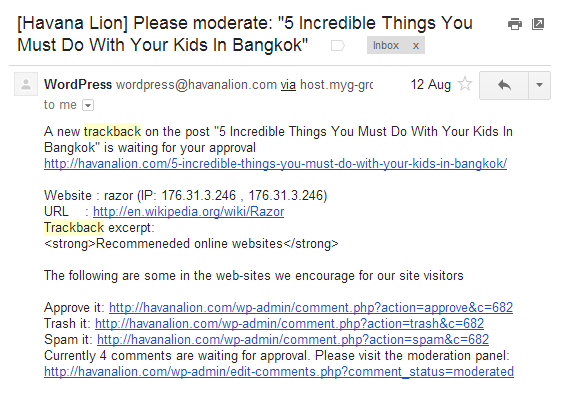
Pingbacks are automatic and use XML-RPC technology. They check if a link is present. The system sends a notification. Trackbacks are manual. They need the writer to send them. They contain an excerpt of the text.
- Pingbacks Pros: Easy to use, no manual work.
- Pingbacks Cons: Can be used for spam.
- Trackbacks Pros: More control over content shared.
- Trackbacks Cons: Need more time and work.
Setting Up Pingbacks In WordPress
Pingbacks let you connect your blog to others. They tell you when someone links to your post. This happens automatically if you enable them. First, go to your WordPress dashboard. Click on Settings. Then, select Discussion.
Check the box next to “Allow link notifications from other blogs (pingbacks and trackbacks).” This enables pingbacks. Now, your blog can send and receive pingbacks. It keeps you connected with other blogs.
Configuring pingbacks is simple. First, decide if you want them. They can be useful or annoying. If you get too many, it might be spam. You can choose to moderate them. Approve only the ones you trust.
To moderate, go to your dashboard. Click on Comments. Check each pingback before approving. This helps keep your blog safe and clean. Pingbacks keep your blog lively and connected. They help share ideas with others.
Managing Pingbacks
Pingbacks in WordPress are notifications alerting you when someone links to your content. Deciding whether to approve depends on the link’s relevance and quality. Approving pingbacks can increase visibility, but it’s crucial to ensure they’re genuine and not spammy, protecting your site’s credibility and user experience.
Reviewing And Moderating
Pingbacks show other sites linked to your blog. Check each pingback carefully. Look for spammy links. These might harm your site. Good pingbacks can boost your site’s reputation. Make sure links are relevant. They should add value to your content.
Approving Or Declining
Decide if a pingback helps your blog. Approve useful pingbacks. They connect your content to new audiences. Decline harmful pingbacks. These can affect your site’s credibility. Use WordPress tools to manage pingbacks easily. They help keep your site clean.
Benefits Of Approving Pingbacks
Pingbacks can help your site’s SEO. They create backlinks to your content. Search engines love backlinks. Quality backlinks can improve your site’s ranking. This means more people can find your site. More visitors can lead to more engagement.
Pingbacks connect you with other bloggers. They show that others are talking about your content. This helps build a sense of community. You can find new friends or partners. Interacting with others can make your blog feel more lively. A connected community means more support for your blog.
Potential Drawbacks
Pingbacks on WordPress can sometimes lead to spam or irrelevant content. This may clutter your site and confuse visitors. Approving every pingback without review might affect your site’s credibility.
Spam Concerns
Pingbacks can attract spam to your site. Many spammy sites send them. This can harm your blog’s reputation. You may find irrelevant links. These links can annoy readers. Your site might look untrustworthy.
Content Relevance Issues
Sometimes, pingbacks have no value. They may not relate to your content. This can confuse your readers. They expect useful links. Instead, they find random sites. This can reduce engagement. It is important to check every link. Make sure it fits your topic.
Best Practices For Pingbacks
A pingback is an automated comment notification in WordPress, linking back to your blog. Approving legitimate pingbacks can boost site engagement and SEO. Always check the source for authenticity to avoid spam.
Monitoring For Quality
Pingbacks let you know when someone links to your content. But not all pingbacks are good. Some might be spammy or irrelevant. It’s important to check each pingback before approving. Look for links that add value to your content. Always ensure the link is from a reliable site. A quick look at the linking site’s content can help. If the content is low-quality, ignore the pingback. This keeps your blog safe and sound.
Regular Maintenance
Keep your site healthy by regularly reviewing pingbacks. Delete any spammy or broken links. This helps keep your site clean and user-friendly. Also, it improves the site’s reputation. Make it a habit to check your pingbacks weekly. This ensures that you are on top of things. Your readers will appreciate the effort.
-2.jpeg?width=650&name=What%20Is%20a%20WordPress%20Pingback%3F%20%5B+%20How%20to%20Disable%20Them%5D%20(freelancer%20-%20Colin)-2.jpeg)
Credit: blog.hubspot.com
Frequently Asked Questions
What Is A Pingback In WordPress?
A pingback is a notification that another blog has linked to your post. It allows bloggers to communicate between sites. When you approve a pingback, it shows a link back to the original post. This feature helps build backlinks and increases traffic to your site.
Should You Approve WordPress Pingbacks?
Approving pingbacks can be beneficial for SEO and networking. They create backlinks, increasing your site’s visibility. However, ensure the linked content is relevant and trustworthy. Approving spammy or irrelevant pingbacks can harm your site’s credibility. Always review the source before approving.
How Do Pingbacks Differ From Trackbacks?
Pingbacks and trackbacks are both link notifications, but they differ technically. Pingbacks are automated, while trackbacks require manual input. Pingbacks use XML-RPC technology, making them more secure. Trackbacks can be more vulnerable to spam. Understanding the differences helps you manage them effectively on WordPress.
Can Pingbacks Increase Website Traffic?
Yes, pingbacks can increase website traffic by creating backlinks. When someone links to your content, their audience might visit your site. This can result in more views and potential followers. Ensure the linking sites are credible to maintain your site’s reputation.
Conclusion
Understanding pingbacks on WordPress is crucial for managing your blog. Approving them can build connections and boost your site’s visibility. But not all pingbacks are beneficial. Some may link to spam or irrelevant content. Always review them carefully before approval.
Consider your blog’s goals and audience. This helps you make informed decisions. A clear strategy for handling pingbacks enhances your blog’s credibility. Stay alert and maintain a clean, engaging site. Your readers will appreciate the effort.



