
Have you ever logged into your WordPress site, ready to update your blog or tweak a page, only to find yourself staring at a completely different editor? You’re not alone.
Many WordPress users have experienced this surprising shift, leaving them wondering what happened to the familiar Visual Editor they once loved. This change can feel like waking up in someone else’s kitchen, trying to make coffee with an unfamiliar setup.
But don’t worry; you’re about to uncover the reasons behind this transformation and how it impacts you and your website. Stick around as we unravel the mystery, ensuring you’re equipped with the knowledge to navigate these changes smoothly and keep your content looking sharp.
Evolution Of WordPress Visual Editor
The WordPress Visual Editor has changed over the years. At first, it was simple and easy to use. People could write and edit posts quickly. Later, developers added more features. These features helped users make posts look better. Users loved these changes.
Then, Gutenberg came along. Gutenberg is a new editor. It uses blocks to build content. This is different from the old editor. Some users liked this change. Others found it confusing. Blocks offer more control over design.
Today, the editor continues to grow. Updates bring new tools often. These tools make editing more fun. Each update aims to help users. The goal is to improve user experience.
Gutenberg Editor Introduction
The Gutenberg Editor is the new tool in WordPress. It uses blocks to build pages. Each block has a special job. Some blocks add text. Others add images or videos. This makes it easy to change layouts. The older editor was like a big text box. Now, you have many blocks to play with. This gives more control to users. You can move blocks up or down. You can also delete blocks. It is fun to try new things with blocks. Many people find it simple and fun. Blocks help make websites look good. Each block is easy to use.
Features Of Gutenberg
Gutenberg uses blocks for writing. Each part of your post is a block. You can add text, images, or videos in these blocks. This makes editing easy. It gives you more control over your design. You can move blocks around. This helps in making a nice layout.
You can drag and drop blocks to change their order. No need for complex steps. It’s simple and fun. Just click and drag. This feature saves time. It makes working with posts easier. You can see changes as you make them. This helps you stay organized.
Adding media is better now. You can upload images fast. Videos are easy to add too. Editing media is more flexible. You can adjust size and position. This helps make posts look nice. It improves the reader’s experience. Good for sharing stories with pictures.
Credit: larryludwig.com
User Reactions
Many users loved the WordPress Visual Editor for its ease. It made creating posts simple. But, some found it confusing. They missed the old ways. Some struggled with new features. They wanted simple tools. Others enjoyed the new look. It felt fresh and modern. Yet, not everyone agreed. Opinions were mixed.
Switching to the new editor was tough for many. People faced learning curves. Some users took time to adjust. Others gave up quickly. Many wanted more tutorials. Help was needed. Some plugins did not work well. This caused frustration. Users hoped for smoother transitions. But, patience was necessary.
The community played a big role. Many shared tips online. Forums were active with advice. Experts offered help. Users felt supported. They found answers quickly. The community grew stronger. People helped each other. This made the transition easier. Everyone learned together. It showed the power of teamwork.
Impact On Content Creation
Enhanced Creativity is a key benefit of the new editor. It offers more tools. Users can add images and videos easily. This makes posts more lively. Writers can express ideas better. The editor brings new ways to write. It helps make content more engaging.
Streamlined Workflows save time. The editor is faster. It lets users drag and drop items. This makes the process quick. Writers can focus on writing. Less time is wasted on editing. The workflow is simpler now. The editor helps writers do more.
Compatibility Issues are a concern. Some plugins may not work well. Old themes can have problems. Users might face errors. This can be frustrating. Updates fix some issues. But not all problems are solved yet. Compatibility needs attention from developers.
Credit: make.wordpress.org
Comparing Classic And Gutenberg
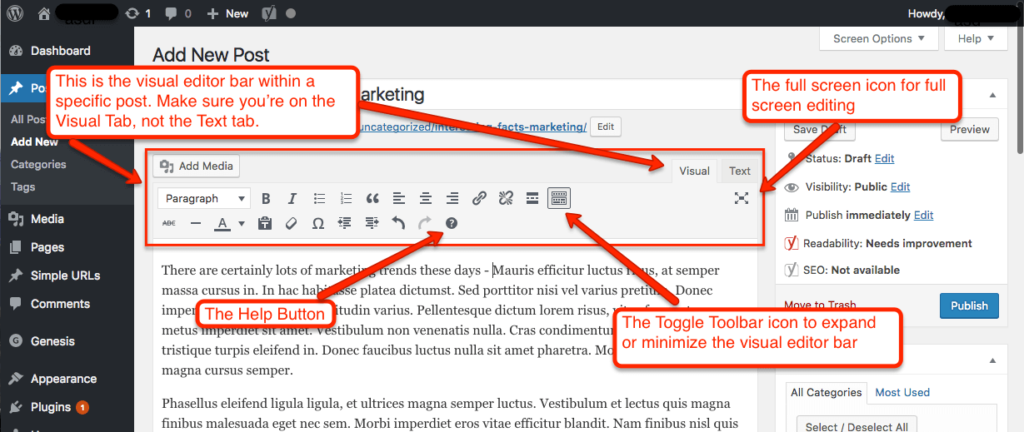
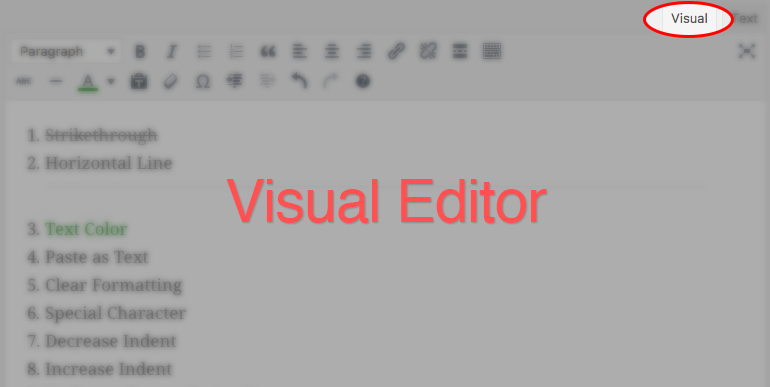
The Classic Editor looks like a word processor. It’s simple and clean. You can see all your tools at once. Gutenberg uses blocks. Each block is like a piece of a puzzle. You build your page block by block. Some find it fun. Others think it’s hard. Which do you like better?
Classic Editor loads fast. It works well on slow internet. Gutenberg can be slower. It has many features. More features can slow things down. Some updates have made it faster. But some users still see delays. Speed matters for busy people.
Gutenberg is very flexible. You can add many blocks. Each block can look different. You can move blocks around. Classic Editor is less flexible. It uses plugins for extra features. Some users like its simple design. Others want more options.
Tips For Transitioning
Learning Resources can help you understand new tools. Online guides and videos are very helpful. They show you how to use the WordPress editor. Books and blogs also offer good advice. Try them to learn more.
Plugin Compatibility is important for smooth functioning. Some plugins may not work with the new editor. Check for updates to keep them compatible. Some plugins have alternative options. Use them if needed.
Troubleshooting Common Issues is key to solving problems. Restart your computer if something does not work. Clear your browser cache for better results. Ask online forums for help. They can give useful tips.

Credit: docs.flothemes.com
Future Of WordPress Editing
The WordPress team works on exciting new features. Better block controls will help users create stunning pages. This means users can design pages easily. Improved media management will make handling images simpler. This feature is important for bloggers and businesses. Collaboration tools are coming soon. These tools help teams work together on projects.
The WordPress community plays a big role. Developers share ideas to improve editing tools. Plugins are created by smart developers. These plugins enhance the editing experience. Themes also come from the community. Themes offer different styles for websites. Community members test and give feedback. This helps make WordPress better.
WordPress aims for a user-friendly platform. Accessibility is a key focus. Everyone should be able to use WordPress easily. Performance improvements are also planned. Faster loading times will please users. Security is another goal. Keeping sites safe is important. WordPress wants to stay the best choice for website building.
Frequently Asked Questions
Why Is WordPress Visual Editor Missing?
The WordPress Visual Editor might disappear due to plugin conflicts or outdated themes. Sometimes, browser extensions can cause issues. Check your WordPress version and update plugins, themes, and the core. Clearing your browser cache may also help restore functionality.
How Can I Fix WordPress Visual Editor Issues?
To fix Visual Editor issues, update WordPress, themes, and plugins. Disable conflicting plugins temporarily to identify the cause. Clear browser cache and cookies. Switching browsers or disabling extensions can help. Ensure JavaScript is enabled for proper functionality.
Are There Alternatives To WordPress Visual Editor?
Yes, there are alternatives like Elementor, Beaver Builder, and WPBakery. These page builders offer advanced design options and user-friendly interfaces. They are compatible with most themes and provide flexible customization. Consider these tools for enhanced editing experiences.
Does Updating WordPress Affect The Visual Editor?
Updating WordPress can affect the Visual Editor if themes or plugins are incompatible. Regular updates ensure security but might cause temporary issues. Always backup your site before updates. Check compatibility and update plugins and themes to avoid conflicts.
Conclusion
WordPress Visual Editor changes stirred curiosity. Users miss familiar editing tools. Simple and user-friendly, it once made content creation easy. Now, new updates offer different features. Some find them helpful, others struggle to adapt. Change can be challenging. Yet, exploring new tools might enhance creativity.
Learning these updates can improve user experience. Embrace the journey of discovery. Experiment with new functionalities. Adaptation is key in tech evolution. Stay open to changes. WordPress continues to evolve, offering fresh possibilities. Keep exploring. Your content creation journey awaits new horizons.



