
Ever wondered how your browser knows what to display when you visit a WordPress site? Imagine you’re diving into a mysterious digital world every time you type a web address into your browser.
There’s a crucial file that guides your journey, ensuring everything appears just as it should. It’s like the director of a play, orchestrating every scene behind the curtains. By understanding this file, you can unlock the secrets of how your WordPress site communicates with browsers, helping you optimize performance and troubleshoot issues.
Stick around to discover which file plays this pivotal role and how it influences your site’s interaction with browsers. This insight could change the way you think about your website’s backend forever.
Core Files In WordPress
The wp-config.php file is very important. It holds settings for your site. It connects your site to the database. Without it, your site won’t work. It is like a map for your site. It tells the site where to go. It is sensitive. Handle it with care.
The index.php file is a key file. It is the heart of your site. It shows what users see. It makes your site look good. Every visitor sees it first. It is always busy. It is the main door for your site.
The wp-load.php file starts your site. It loads needed files. It gets your site ready. It is like a helper. It makes sure everything works. Without it, your site won’t start. It is essential.
Role Of .htaccess
The .htaccess file helps in setting the URL structure for your site. It makes links look clean and readable. Instead of seeing numbers or codes, you see words. This is called a permalink. It tells the browser how to show the page link. Good permalinks help search engines find your site. They make it easier for people to visit your page.
The .htaccess file also adds security to your site. It can block bad users. It can stop unwanted access. This file can protect important parts of your site. It helps keep your site safe. You can decide who can enter. You can stop harmful actions. Security settings in .htaccess are very important. They protect your site from harm.
Browser Interactions With WordPress
Browsers first ask for the index.php file. This file is very important. It directs all traffic. It helps find the right page to show. Without it, sites may not work. Browsers also need the style.css file. This file makes the site look pretty. It holds the site’s colors and fonts. Both files are part of the theme. They shape the site’s look and feel. Every request starts with these files.
WordPress creates pages with dynamic content. It pulls data from the database. This makes each page unique. The wp-config.php file is key here. It links WordPress to the database. This file holds important settings. It is like a bridge. Without it, WordPress cannot talk to the database. Browsers need this to load fresh content each time.
Credit: support.undsgn.com
The Role Of Themes And Templates
In WordPress, themes control the look of your site. Each theme has files called templates. These templates build the site’s structure. The header.php is one such file. It shows the top part of the webpage. This part often has the site’s name or logo. The footer.php is another file. It shows the bottom part of the page. Here, you might find contact info or copyright details. Both these files are very important. They appear on every page of the website. They help make your site look neat and organized.
WordPress uses a system called template hierarchy. This system decides which files to use for each part of a webpage. For example, if a user clicks a blog post, WordPress checks for single.php. This file shows how a single post looks. If it’s not there, WordPress uses a default file. This ensures the site always works right. The template hierarchy makes WordPress flexible and user-friendly. It helps organize content easily.
Function Of Javascript And Css Files
CSS files give websites their look. They control colors, fonts, and spacing. Without CSS, sites would be plain. Browsers use these files to make the site beautiful. CSS files are like clothes for websites.
JavaScript files make websites active. They allow parts of the site to move and change. These files add buttons, slideshows, and forms. JavaScript helps when clicking a button to show a message. It’s like the magic in websites.

Credit: arizonaartslive.com
Caching And Optimization Files
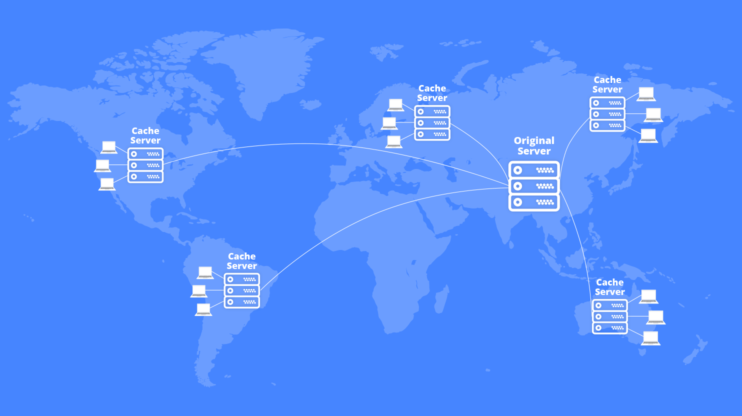
Cache management plugins are important for WordPress sites. They help manage cached files. This makes websites load faster. Popular plugins include WP Super Cache and W3 Total Cache. These plugins store files that are often used. It means less work for the server. Less work means quicker load times.
Using these plugins can make a big difference. Faster websites keep users happy. They also help in improving SEO. Search engines like fast sites. So, using cache plugins is a smart choice. They are easy to set up. Even beginners can do it.
A slow site can lose visitors. Fast loading times are important. Cache plugins help with this. They reduce the time to load pages. Browsers reference cached files. This speeds up the process. Users see the content quickly.
This also reduces bandwidth use. Less data is transferred. It saves resources. Both for the server and the user. Faster sites make users happy. They stay longer and explore more. This can lead to more engagement.
Credit: 10web.io
Frequently Asked Questions
What Is The Main File Browsers Access In WordPress?
The main file browsers access is index. php. It acts as the entry point for WordPress sites. This file directs the site’s content to the browser. It plays a crucial role in loading pages properly.
How Does Index.php Interact With Browsers?
Index. php communicates with the server to deliver requested pages. It processes queries and displays the right content. Its role is essential in ensuring smooth navigation on WordPress sites.
Why Is Index.php Important For WordPress?
Index. php is vital for WordPress as it manages content display. It serves as the foundation for site navigation. Without it, the site cannot properly render pages for users.
Can Browsers Access Other Files Directly?
Browsers generally access files like CSS and JS indirectly. These files are linked within HTML for styling and functionality. Direct access is rare and usually unnecessary for users.
Conclusion
Understanding the key files browsers reference in WordPress boosts site performance. The “index. php” file often guides initial load and navigation. Styles are influenced by “style. css,” controlling appearance. JavaScript files like “scripts. js” enhance interactivity, enriching user experience. Vital for efficient browsing, these files ensure smooth operation and compatibility.
Knowing these components helps maintain and troubleshoot your WordPress site effectively. Keep your files organized and updated. This enhances user satisfaction and keeps your site running smoothly. Regular checks and updates are crucial for optimal performance. Stay proactive for a seamless web experience.



