
Imagine visiting your favorite website, and instead of smooth browsing, you encounter sluggish loading times and frustrating delays. Annoying, right?
This is where understanding WordPress cache can transform your online experience. If you’ve ever wondered, “What does WordPress cache do? ” You’re about to uncover the secret weapon that speeds up your site and enhances user satisfaction. Caching might seem like a techy term, but it’s surprisingly simple and incredibly powerful.
By the end of this article, you’ll know exactly how WordPress cache works its magic to make websites load faster and perform better. Ready to dive in and unlock the full potential of your WordPress site? Let’s make those slow loading times a thing of the past!
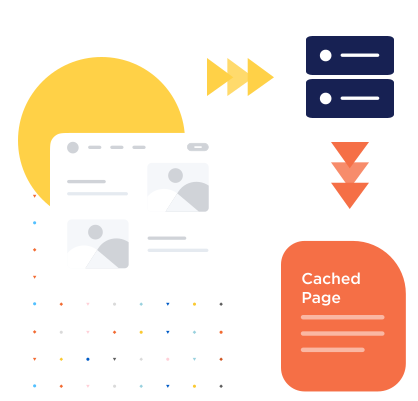
Credit: wp-rocket.me
Purpose Of WordPress Cache
WordPress cache helps your website run faster. It saves copies of web pages. Users get these copies quickly. They don’t wait long for loading. This boosts the user experience. Happy visitors come back more often. Caching reduces server load. It uses less memory for each visitor. Your website can handle more traffic. It works well even on busy days. Cache improves performance. It makes browsing smoother and faster. Visitors like fast websites. They stay longer and explore more.
Cache also saves bandwidth. Less data is used when pages load. This can lower costs. It’s good for websites with many images. Cache stores these images for quick access. Your website gets a higher rank on search engines. Fast sites are ranked better. Search engines prefer quick loading websites. Cache helps achieve this easily.
Types Of Caching In WordPress
Browser cache stores web pages on your computer. This helps load pages faster next time. It saves parts of the website, like images and scripts. Faster loading means a better user experience. It also saves data usage. It makes browsing quicker and more fun.
Server cache holds website data on a server. It sends data to users quickly. Reduces server load and speeds up website performance. Helps in handling many visitors at once. This keeps websites running smoothly. It makes sure everyone gets a fast response.
Object cache keeps data objects in memory. It avoids repeated database queries. Speeds up data retrieval and enhances performance. Useful for dynamic sites with lots of data. It improves efficiency. Websites become more responsive and reliable.
Database cache stores query results temporarily. It reduces the need to access the database often. Enhances website speed by minimizing database load. Helps in quick data access. This is crucial for busy sites. Keeps things smooth and fast for users.
Benefits Of Caching
Caching makes websites load faster. Fast loading keeps visitors happy. No one likes to wait. A quick site is a good site.
Caching helps servers work less. Less work means less stress. Servers can handle more visitors. This keeps the website online.
Visitors enjoy a smooth website. Smooth websites keep users coming back. Happy users tell friends. Friends visit the site too.
Credit: help.one.com
Common WordPress Cache Plugins
WordPress cache plugins store static copies of your site’s pages. This reduces server load and speeds up loading times for visitors. Popular plugins like WP Super Cache and W3 Total Cache help improve website performance, enhancing user experience and potentially boosting search engine rankings.
W3 Total Cache
W3 Total Cache helps your website run faster. It stores web pages for users. This speeds up loading times. More speed means happier visitors. They spend more time on your site. This plugin is very popular. Many website owners use it. It helps with SEO too. Faster sites rank better on search engines.
Wp Super Cache
WP Super Cache makes your site quick. It creates static HTML files. These files load faster than normal. Visitors see your site quickly. This plugin is simple to use. It has many users. It is a great choice for beginners. It helps save server resources too.
Litespeed Cache
LiteSpeed Cache is a powerful tool. It works with the LiteSpeed web server. It speeds up your WordPress site. It has many features. These include image optimization and lazy loading. This plugin is perfect for tech-savvy users. It offers advanced options for speed. But, beginners can use it too. It’s very versatile.
How To Configure Cache Settings
Setting the cache right helps your site run fast. Choose a plugin that suits your needs. Enable browser caching to keep files like images on visitor’s computers. This means fewer server requests. Server-side caching is also important. It stores pages so they load quickly. Adjust the cache expiry time to balance speed and freshness. Shorter times mean new content shows faster. But longer times mean less server work. Test different settings to find the best fit.
Clearing cache is simple. Log into your WordPress dashboard. Find your caching plugin. Most plugins have a clear cache button. Click it to remove old files. This helps if changes don’t show on your site. Some plugins let you schedule cache clearing. This happens automatically. Remember, clearing cache often can slow your site. Do it only when needed.
Troubleshooting Cache Issues
Cache conflicts can make your site act strangely. Plugins or themes might not work right. This happens because of cached data. Clearing the cache often fixes this. Some plugins store too much data. This can cause conflicts.
Always check for plugin updates. Updates can fix cache issues. Disable plugins one by one. This helps find the problem. Regular checks keep your site running smoothly.
Sometimes, changes don’t show on your site. This happens if the cache is not updating. Old cache files cause this issue. Clear the cache to see the changes.
Check your caching plugin settings. Some settings might stop updates. Adjust them to allow updates. Test your site after making changes. This ensures everything works fine.
Future Of Caching In WordPress
WordPress caching stores data temporarily to speed up website loading times. It reduces server load by reusing saved data. Future enhancements might include smarter caching methods, adapting to user behavior for even faster performance.
Emerging Technologies
New technologies are changing WordPress caching. These technologies help make websites faster. One important technology is edge computing. It allows data to be stored closer to the user. This makes website loading times shorter.
Another trend is machine learning. It can predict what users will click next. This helps in serving content faster. Machine learning can improve caching by learning user behavior.
Trends In Caching Solutions
Many tools are now available for caching. These tools help websites load quickly. Content Delivery Networks (CDNs) are popular. They store website data on many servers around the world. This helps users get data from the nearest server.
Some people use browser caching. It saves website data on the user’s device. This means users do not have to download the same data again. These trends make websites faster and more efficient.
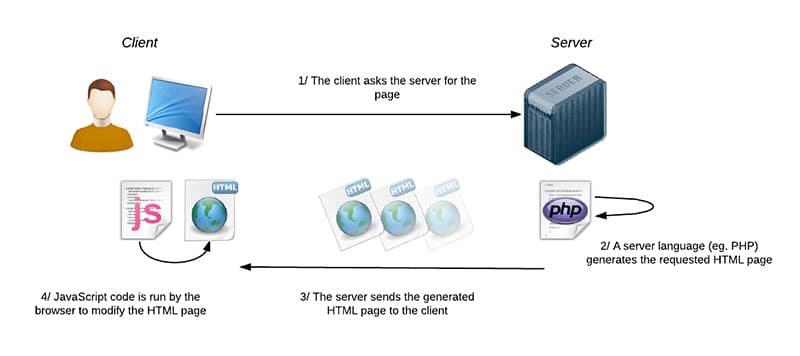
Credit: wp-rocket.me
Frequently Asked Questions
What Is WordPress Cache?
WordPress cache stores temporary data to enhance website performance. It helps speed up load times by serving cached content. This reduces server load and improves user experience. Cached data includes HTML pages, images, and scripts. Implementing caching solutions can significantly boost website speed.
How Does Caching Improve Website Speed?
Caching improves website speed by storing frequently accessed data. It reduces the need to generate content dynamically. This leads to faster load times for visitors. Cached data is served quickly, minimizing server requests. This enhances user experience and can positively impact search engine rankings.
Can Caching Affect Website Updates?
Yes, caching can affect website updates by displaying outdated content. When you update your site, cached data might not refresh immediately. Clear the cache to ensure users see the latest changes. Many caching plugins offer options to automatically clear the cache after updates.
Are Caching Plugins Necessary For WordPress?
Caching plugins are essential for optimizing WordPress performance. They help reduce server load and improve page speed. Popular plugins include W3 Total Cache and WP Super Cache. These tools offer customization options to suit different website needs. Implementing a caching plugin can enhance user experience and SEO.
Conclusion
WordPress cache boosts website speed and efficiency. Users experience quicker load times. This improvement leads to better engagement. A faster site can attract more visitors. It enhances user satisfaction. Managing cache is crucial for optimal performance. Regular updates keep the cache effective.
Monitoring helps prevent issues. Site owners should learn cache basics. It aids in smoother operation. Implementing caching strategies can be beneficial. For WordPress sites, cache is key. It plays a vital role in overall success. Understanding its function empowers users.
Improved speed equals happier visitors. Consider cache a valuable tool.



