
Imagine crafting a WordPress site that’s not just functional but also captivates your audience with every click. You’re probably wondering how to achieve this level of engagement.
One powerful tool in your WordPress toolkit is the concept of being “hooked. ” But what does “hooked” really mean in the world of WordPress? In this post, we’re diving into the heart of WordPress functionality to unravel what being “hooked” entails and how it can transform your website.
If you’ve ever felt overwhelmed by WordPress jargon or unsure about optimizing your site, you’re in the right place. Understanding hooks can be your secret weapon to customize and enhance your site’s functionality without touching the core code. Ready to discover how this can work wonders for you? Let’s get started!
Hooks In WordPress
Hooks in WordPress are special tools. They help developers connect their code. This makes WordPress sites do more things. There are two main types of hooks: actions and filters. Actions let you add new features. Filters let you change existing ones.
Developers use hooks to customize sites. They can make changes without touching core files. This keeps the site safe from updates. It also helps with easy maintenance. Hooks are like building blocks. They are simple yet powerful.
Understanding hooks is important. It helps in creating dynamic websites. Learning to use them opens many possibilities. Hooks make WordPress flexible and user-friendly. They are essential for every WordPress developer.
Types Of Hooks
Action hooks let you add or change features in WordPress. They run at specific times in the code. Developers use them to add functions without changing core files. This makes the site more flexible. You can add extra features, like a custom footer. Action hooks help keep your site organized and easy to update. They make coding simpler for everyone.
Filter hooks let you change data before it is shown. They are useful for modifying content. You can change text, images, or other data. This helps in making the content unique for each user. Filter hooks give developers control over displayed information. They help in personalizing user experiences. These hooks make WordPress adaptable.
How Hooks Work
Hooks are special places in WordPress. They let you add or change code. Actions and filters are two types of hooks. Actions let you add new functions. Filters let you change data. A hook gets triggered at certain times. This means it runs at a special event. For example, when a post is saved, a hook can run. It can change the post or send an email. Hooks make WordPress flexible. They let developers add features without changing core files.
Hooked functions are like helpers. They do special tasks when hooks trigger. First, you write a function. Then, you attach it to a hook. This is called registering the function. Functions can do many things. They can change text or add styles. They can also check user info. Using hooked functions is easy. It allows WordPress to be powerful and adaptable.

Credit: www.toptal.com
Common Uses Of Hooks
Hooks in WordPress help change how a theme looks. They let users add or remove parts. This makes your site unique. For example, you might want a special header. You can use a hook for that. Hooks make it easy to update themes. No need to change the main code. This keeps the site safe and clean.
Plugins get more power with hooks. They allow adding new features. You don’t have to touch the plugin code. This means fewer mistakes. Hooks help plugins work with other plugins. They help make sites better. A user can add a new button. Or a new form. All with a simple hook.
Creating Custom Hooks
Hooks in WordPress allow you to add or change code without editing core files. They are like magical helpers. You can create custom hooks to run your own code. First, give your hook a unique name. Use `do_action` or `apply_filters` to define it. This tells WordPress when to use your code. Add your function to the hook using `add_action` or `add_filter`. Now, your code runs at the right time. It’s easy to make WordPress do what you want with hooks.
Themes and plugins often use hooks to modify features. You can add custom hooks to them. This lets you change theme parts without breaking them. Start by finding the right spot in the theme or plugin files. Define your hook there. Then, add your functions using hooks. Your functions can change how the theme looks or works. Plugins use hooks to add new features. Hooks make themes and plugins flexible. They keep your changes safe during updates.
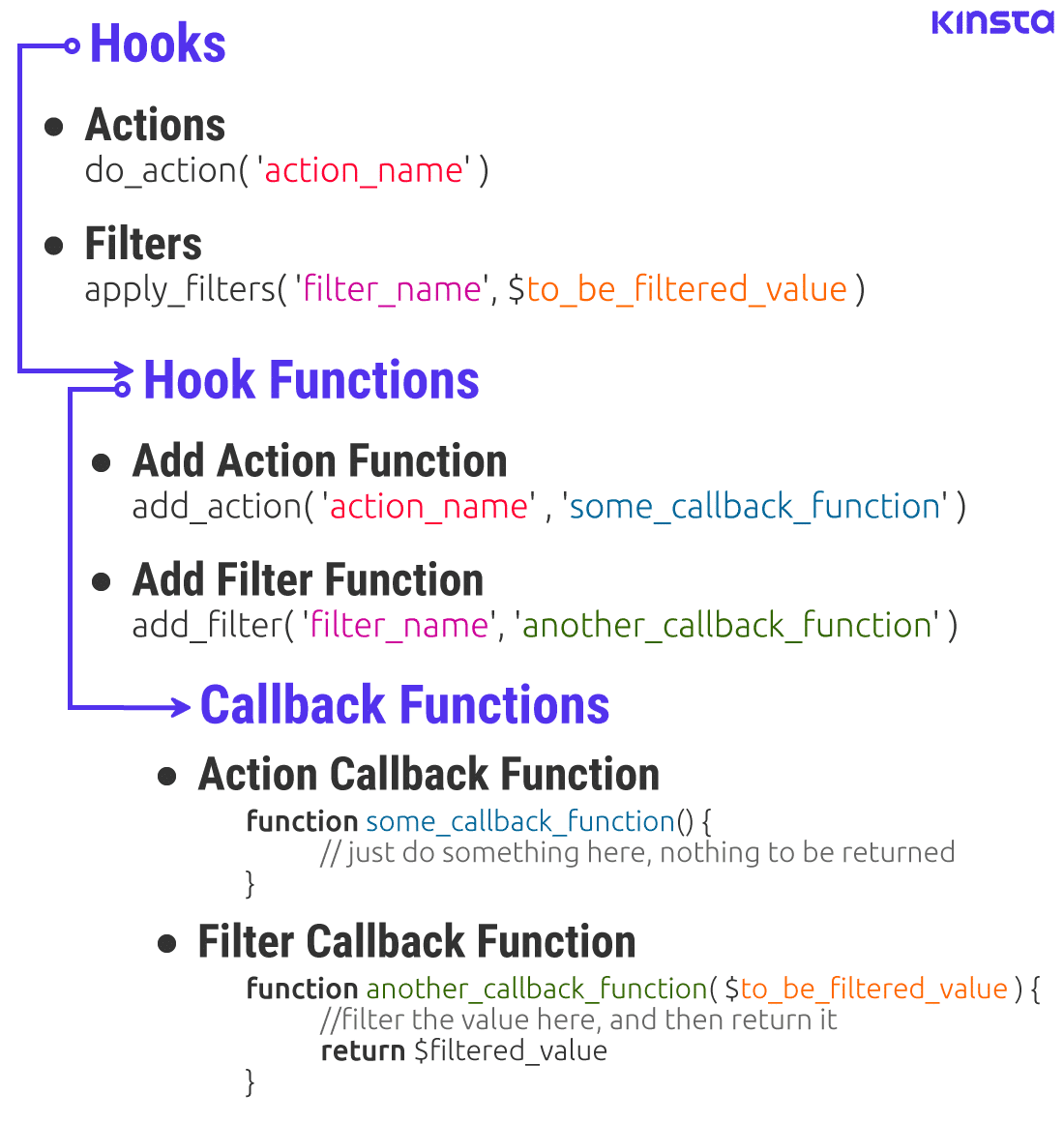
Credit: kinsta.com
Best Practices For Using Hooks
Hooks in WordPress are essential tools for developers to control the behavior of themes and plugins. They allow custom functions to modify or extend functionalities without altering core files. Mastering hooks ensures seamless updates and compatibility, keeping your WordPress site efficient and flexible.
Managing Hook Priorities
Hooks in WordPress let you add or change features. Each hook has a priority number. Lower numbers run first. Higher numbers run later. Choose your numbers wisely. Keep track of them in a list. This helps organize the hooks. You can change hook priorities if needed. Start with priority 10 for most cases. Adjust if things don’t work as expected. Remember, hooks are powerful tools. Use them to control WordPress actions.
Avoiding Conflicts
Conflicts happen when two hooks clash. They try to do the same thing. Plan your hooks with care. Read the code before adding new hooks. Check if similar hooks already exist. Use unique names for your hooks. This helps avoid mix-ups. Always test your changes. Test them in a safe space first. Make backups before big changes. This keeps your site safe. Avoid conflicts by being careful and organized.
Troubleshooting Hook Issues
Understanding “hooked” in WordPress means recognizing how custom code connects with core functions. Hooks allow developers to add or change functionality without altering the main code. Troubleshooting involves identifying which hook might be causing issues and ensuring compatibility with themes and plugins.
Debugging Techniques
Use debugging tools to find hook problems in WordPress. Install a plugin that shows the active hooks. This helps spot where the issue lies. Check if the hook is firing by adding error logs. Look at your site’s debug log file for any errors. Disable plugins one by one. This can reveal if one is causing the problem. Recheck the hook after each change. It is a bit like solving a puzzle.
Common Pitfalls
Hooks sometimes don’t work because of typos. Make sure names match exactly. Another issue is using the wrong priority. This can stop hooks from running. Be careful with hook placement. It matters where you put them in the code. Not clearing cache can hide changes. Always clear cache after updates. Double-check these areas to avoid common mistakes.

Credit: make.wordpress.org
Frequently Asked Questions
What Is A Hook In WordPress?
A hook in WordPress is a method used by developers to modify or extend the functionality of the platform. Hooks allow you to execute custom code at specific points in WordPress processes. There are two types: actions and filters. Actions let you add functionality, while filters modify existing data.
How Do Hooks Work In WordPress?
Hooks work by attaching custom functions to predefined points in WordPress core processes. When these points are reached, WordPress executes the attached functions. This allows developers to add or modify features without altering the core code. Hooks make WordPress flexible and extendable, enhancing customization capabilities.
Why Are Hooks Important For WordPress Development?
Hooks are crucial because they enable developers to create custom features without editing core files. This ensures that updates won’t overwrite customizations. Hooks enhance WordPress’s flexibility, allowing developers to tailor websites to specific needs. They streamline development and encourage best practices in coding and customization.
How Can I Add A Hook In WordPress?
To add a hook, you need to identify the action or filter you want to use. Then, write a custom function and attach it using add_action() or add_filter(). Place the code in your theme’s functions. php file or a custom plugin.
This executes your function at the desired point.
Conclusion
Understanding hooks in WordPress can boost your site’s functionality. They let you customize without altering core files. This keeps your site safe during updates. Hooks make adding or changing features easier. They offer flexibility and control. You can enhance user experience with them.
For beginners, hooks might seem complex. But with practice, they become clearer. Start small and learn gradually. Experiment with different hooks. Your WordPress skills will grow over time. Remember, patience is key. Embrace the learning journey. Soon, you’ll harness the power of WordPress hooks effectively.



