
Have you ever uploaded a featured image on your WordPress site only to find it doesn’t look quite right? You’re not alone.
Many WordPress users face challenges when it comes to choosing the right dimensions for their featured images. But why does this matter? The right featured image not only makes your blog posts visually appealing but also impacts your site’s loading speed and user engagement.
Imagine landing on a page where the images are blurry or cut off—would you stick around? Probably not. That’s why understanding the optimal dimensions for WordPress featured images is crucial for maintaining a professional and engaging website. Your audience craves content that looks good and loads fast, and the first step to achieving that is mastering the art of image dimensions. Dive into this article, and you’ll discover how to choose the perfect featured image size that enhances your site’s aesthetics and performance. Let’s ensure your images captivate and invite readers to explore more.

Credit: snappa.com
Importance Of Featured Images
Featured images are like book covers. They grab attention fast. They tell the story of the post. A good image can make people click. It can make them stay longer on the page.
Blog posts with strong images get more views. They also get more shares. People love visual content. It is easier to understand. It breaks up the text nicely.
Featured images help in branding. They make posts look professional. They bring more visitors. A clear image is a must. It should be relevant to the content.
Choosing the right image is important. It must be of high quality. It should match the post’s topic. This builds trust with readers.

Credit: wpindigo.com
Standard Dimensions
WordPress featured images need the right size. 1200 x 628 pixels is the most common size. It works well for social media shares. This size fits neatly. It avoids cropping in most platforms. Another popular size is 1920 x 1080 pixels. This is perfect for large screens. It ensures high-quality display.
Featured images should be clear and attractive. They draw people in. Smaller sizes like 640 x 360 pixels are used too. These are good for mobile devices. Always check your theme’s guidelines. They may suggest different sizes.
Choosing The Right Size
Picking the right size for your WordPress featured image is key. Too large images can slow down your site. Too small images might look blurry. Aim for a balanced size.
Large images make web pages load slow. This can annoy visitors. Smaller images help pages load faster. Fast sites make users happy. They stay longer on the site.
Search engines like fast sites. Optimized images improve SEO. They help your site rank higher. Use clear and descriptive alt texts. This helps search engines understand images better.
Images should look good on all devices. High-quality images attract users. They make content more engaging. Avoid pixelated or stretched images. They can make your site look unprofessional.
Customizing Image Dimensions
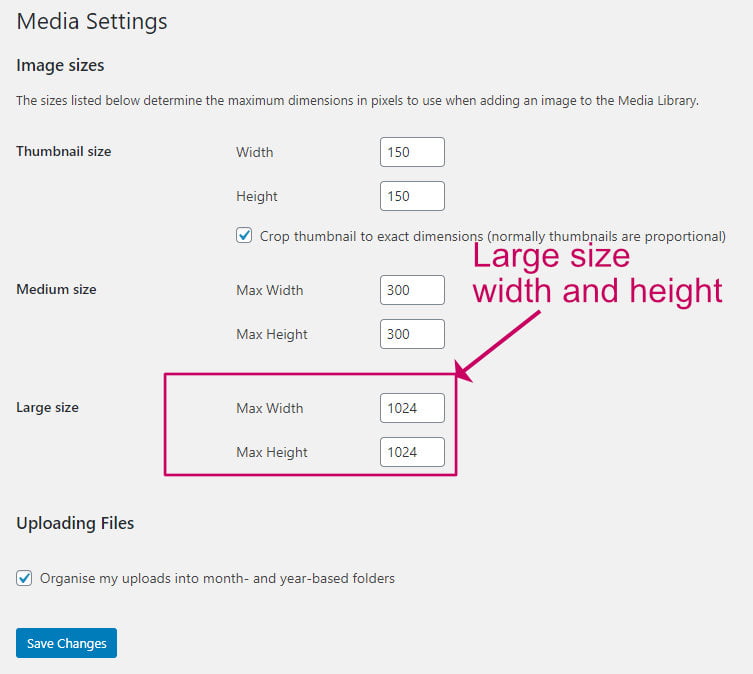
Using WordPress Settings helps adjust image sizes easily. Go to the dashboard. Click on “Settings” and then “Media”. Choose the size for thumbnails, medium, and large images. Set dimensions that fit your design. It’s simple and effective.
Theme-Specific Options provide more choices. Some themes have their own settings. Check the theme’s documentation. Adjust image sizes to match the theme’s design. This ensures images look great across the site.
Use plugins for customization if you need extra features. Some plugins offer advanced options. Install a plugin, and follow the instructions. They can help resize or crop images. This adds more flexibility to your site design.
Best Practices
Images should fit small screens. This helps users see them well. A good size is 640×320 pixels. This size loads fast. Visitors will have a better experience.
Keep images clear. Use high-quality images. Blurry images look bad and confuse readers. Save images in JPEG format. It keeps them clear and small in size.
Use the same size for all featured images. This makes your blog look neat. Readers will find it easy to follow. A common size is 1200×628 pixels. Consistency builds trust with the audience.
Common Mistakes
Images should fit well in their places. Wrong ratios make them look odd. They can stretch or squeeze. This can ruin the site’s look. It’s vital to choose the right ratio. The best ratio is often 16:9. This looks nice on most screens. Always check how it looks.
Big images take up space. They slow down loading time. This can annoy visitors. Images should be light. 300 KB or less is ideal. Smaller images load faster. Quick sites keep visitors happy. Optimizing images is key. Use tools to reduce size. TinyPNG and ImageOptim can help.
Thumbnails matter. They show previews to users. Wrong thumbnails confuse visitors. Pick thumbnails carefully. They should be clear and attractive. Thumbnails should match the full image. Always preview them before posting. Good thumbnails increase clicks. They make posts more engaging.
Tools For Image Resizing
Many online tools help with image resizing. These tools are easy to use. Websites like Canva and Pixlr are popular choices. They offer simple interfaces for beginners. No need to download anything. Just upload your image and resize. You can adjust the dimensions with a few clicks. These tools often have free options. Great for quick edits.
Plugins make resizing images easy. WP Smush and EWWW Image Optimizer are popular plugins. They help compress and resize images. This makes your website faster. You can set default dimensions for images. Plugins handle the rest. They work right inside WordPress. No need to switch between tools. Install a plugin and save time.
WordPress has its own tools for images. The Media Library is easy to find. You can crop and resize images there. No extra software needed. Just click on the image you want to change. WordPress lets you edit right away. This is great for quick fixes. Simple and effective.
Credit: wpkind.com
Frequently Asked Questions
What Is The Ideal Size For WordPress Featured Images?
The ideal size for WordPress featured images is 1200 x 628 pixels. This size ensures optimal display across different devices and platforms. Using this dimension helps maintain image quality and prevents distortion or pixelation, providing a visually appealing presentation for your blog posts.
Why Should Featured Images Be The Correct Size?
Correctly sized featured images enhance your website’s aesthetics and improve loading times. They ensure images are clear and professional, avoiding cropping issues. Proper dimensions also help with SEO, as search engines favor websites with optimized images, enhancing visibility and user engagement.
How Do I Resize Images For WordPress?
You can resize images using photo editing tools like Photoshop or online platforms like Canva. Upload the image and choose the desired dimensions, then save and upload to WordPress. This process ensures your images are perfectly sized for featured image requirements.
Can Featured Image Size Affect Website Speed?
Yes, featured image size impacts website speed. Large images can slow down loading times, affecting user experience. Optimize image size by compressing files without losing quality. This improves speed, maintains visual appeal, and enhances SEO performance, keeping visitors engaged.
Conclusion
Choosing the right dimensions for your WordPress featured image is crucial. It ensures your site looks professional. Images too large slow down your site. Too small, and they look pixelated. Aim for a balance. Remember, 1200×628 pixels is often recommended.
This size fits well with most themes. Consistent dimensions enhance your site’s appeal. They also improve user experience. Don’t overlook image quality. High-resolution images captivate your audience. Take time to choose wisely. A good image tells your story. It leaves a lasting impression.
Make your blog stand out with the right featured image.



