Are you finding it tricky to access your WordPress site because you can’t remember the login URL? You’re not alone.
Many website owners and bloggers face this hiccup at some point. Understanding the default WordPress login URL is crucial for efficiently managing your site, whether it’s for quick updates or essential security tweaks. Imagine the ease of logging in swiftly without the frustration of forgotten URLs.
This article will unravel the mystery behind the default WordPress login URL, ensuring you can access your site effortlessly whenever needed. Dive in to discover how a simple URL can streamline your website management experience.
Default WordPress Login Url
The default login URL for WordPress is example.com/wp-admin. This is where users go to access their WordPress dashboard. It’s important to remember this URL. Many forget it and get confused. If you install WordPress in a folder, the URL changes. It becomes example.com/foldername/wp-admin. Always replace “example.com” with your own website’s name. This makes it unique to your site.
Some users change the login URL for security. This makes it harder for hackers. Plugins can help you change this URL. Be careful and remember the new URL. Losing it means you can’t log in easily. Always note it down safely.
Accessing The Login Page
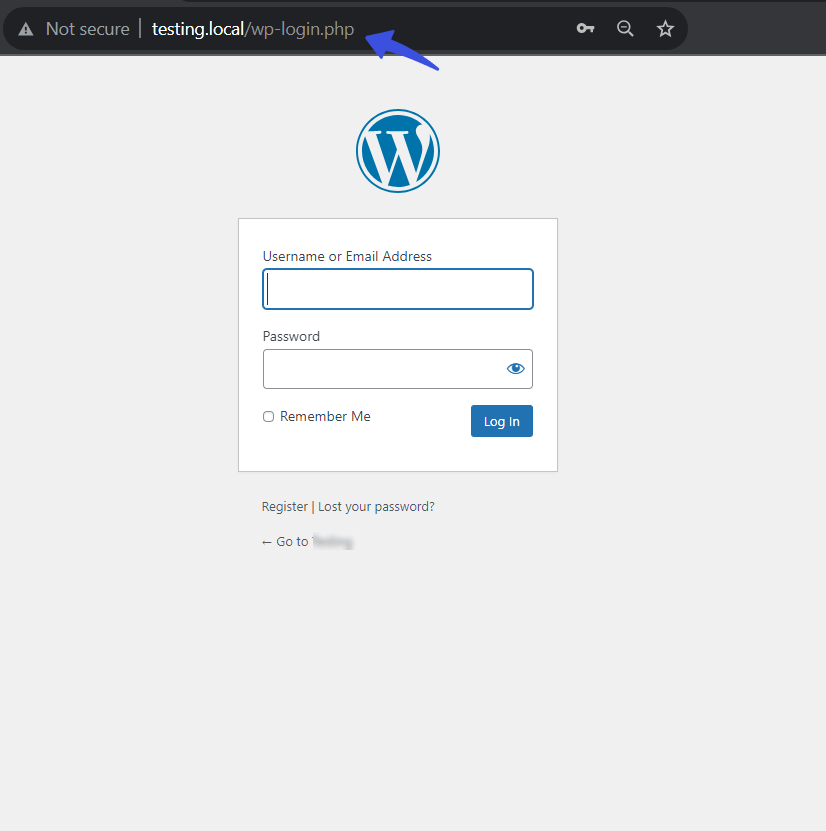
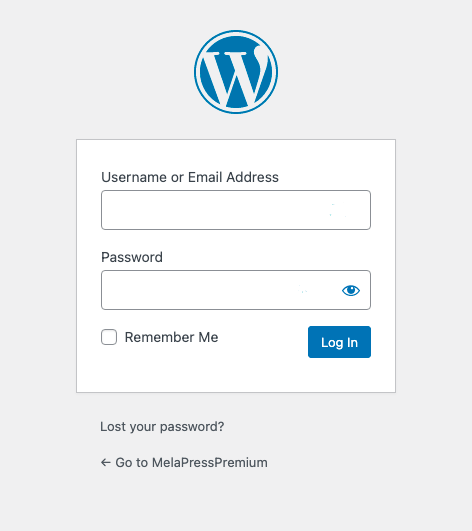
The login URL helps you access your WordPress site. The default URL is usually yourwebsite.com/wp-login.php. This URL lets you enter your username and password. You can find the login page easily if you know the URL. Remember, some websites may use a different URL for security.
Changing your login URL can make your site safer. Use plugins or edit the code to customize it. This helps keep hackers away. Choose a URL that is easy to remember. Avoid using common words or numbers. This makes it harder for others to guess.
Troubleshooting Login Issues
The default WordPress login URL is typically yourwebsite. com/wp-admin. Accessing this page allows users to manage their website content. Encountering login issues? Double-check the URL and ensure your credentials are correct to troubleshoot effectively.
Common Login Problems
Many users face login problems with WordPress. The most common issue is entering the wrong password. Sometimes, users forget their username. Another problem is the site not loading. Slow internet can also cause login issues.
Resetting Passwords
If a password is forgotten, resetting is easy. Click on “Forgot Password” link. Enter your email and follow the instructions. You will get a reset link in your email. Click the link to set a new password. Make sure your new password is strong. Use letters, numbers, and symbols.
Bypassing Login Errors
Sometimes, login errors happen. Clear your browser cache to fix this. Try a different browser. Check if your site is down. If still facing issues, contact your web host. They can help solve the login errors.
Credit: loginpress.pro
Enhancing Login Security
The default WordPress login URL is commonly set as “/wp-login. php” for accessing the login page. Changing this URL can enhance security by reducing the risk of unauthorized access. This simple tweak helps in protecting your site from potential threats.
Implementing Two-factor Authentication
Two-Factor Authentication adds an extra layer of security. It requires a second step to log in. This second step can be a code sent to your phone. Or it could be an app like Google Authenticator. This means even if someone knows your password, they can’t log in. They need the second code too. This keeps your site much safer.
Limiting Login Attempts
Limiting login attempts prevents multiple wrong tries. Set a limit for how many times someone can enter the wrong password. This stops bots from guessing passwords. After too many wrong tries, block them for a time. It makes your site more secure. And keeps bad people out.
Changing The Login Url
Changing the login URL hides it from hackers. The default WordPress login URL is easy to find. Use a plugin to change it. Pick a URL that is hard to guess. This makes it harder for bad people to find your login page. It is a simple step for better security.
Plugins For Custom Login Urls
WordPress defaults the login URL to ‘/wp-login. php’. This URL allows users to access the admin dashboard. Plugins can customize this URL for better security.
Popular Plugins Overview
Many plugins help change the default login URL in WordPress. These plugins make it easy to create a custom login URL. Popular ones include WPS Hide Login, Custom Login URL, and LoginPress. Each has unique features to help with security and design. They protect your site from hackers. Some plugins offer extra features. They let you customize login pages with colors and logos. Others focus on hiding the login URL. This makes it harder for bad people to find it.
Installing And Configuring Plugins
First, go to the WordPress dashboard. Click on Plugins and then Add New. Type the plugin name in the search box. Click Install and then Activate. After activation, find the plugin settings. Change the login URL to something unique. Save your changes to finish the setup. This makes your site safer. Keep your plugins updated for the best security.

Credit: jetpack.com
Managing User Access
Exploring the basics of managing user access on WordPress often leads to the default login URL. This URL is typically “yourwebsite. com/wp-admin” or “yourwebsite. com/wp-login. php”, granting administrators easy access to manage their site efficiently.
Creating And Managing User Roles
WordPress allows creating different user roles. These roles include Administrator, Editor, and Subscriber. Administrators have the most power. They can make changes to the site. Editors can write and publish posts. Subscribers can only read posts. Each role has specific tasks they can do. This helps keep the site safe and organized.
Customizing User Permissions
Permissions control what users can do. Administrators can change these permissions. They can decide who can write posts. Or who can change settings. Permissions are important for security. They keep the site safe from unwanted changes. It’s easy to change permissions. This helps manage the site better.
Credit: melapress.com
Frequently Asked Questions
How Do I Find My WordPress Login Url?
To find your WordPress login URL, add “/wp-admin” or “/wp-login. php” to your website’s domain. For example, if your site is “example. com”, your login URL would be “example. com/wp-admin”. This URL directs you to the WordPress login page where you can enter your credentials.
Can I Change The Default Login Url?
Yes, you can change the default login URL for security reasons. Use plugins like WPS Hide Login to customize your login URL. Changing it helps protect your site from unauthorized access and brute force attacks by making it less predictable.
Why Can’t I Access The WordPress Login Page?
Several factors may prevent access to the login page. Possible reasons include incorrect URL entry, server issues, or plugin conflicts. Check your internet connection, clear browser cache, and deactivate suspicious plugins. If problems persist, contact your hosting provider for assistance.
Is It Safe To Use The Default Login Url?
Using the default login URL is generally safe, but it’s susceptible to brute force attacks. Consider changing it for enhanced security. Utilize security plugins and strong passwords to protect against unauthorized access and keep your WordPress site secure.
Conclusion
Finding the default WordPress login URL is simple. This URL is essential for accessing your WordPress dashboard. Typically, it looks like “yoursite. com/wp-admin” or “yoursite. com/wp-login. php. ” Knowing this helps you manage your site efficiently. Always bookmark the URL for easy access.
Keep your login details secure to protect your website. Understanding this basic step is crucial for every WordPress user. It sets the foundation for managing your site effectively. Regularly updating your login credentials ensures better security. Stay informed and keep your WordPress site safe.