
Are you curious about how WordPress can do more than just publish your blog posts? Imagine having the power to connect your WordPress site with other applications seamlessly.
That’s where the WordPress API comes into play. It’s like giving your website a superpower to communicate and interact with various platforms in real-time. If you’ve ever wondered how to enhance your website’s functionality or streamline your workflow, understanding the WordPress API is your key.
By the end of this article, you’ll discover how this powerful tool can transform your website, making it more dynamic and efficient. Ready to unlock the potential of your WordPress site? Let’s dive in!
Credit: css-tricks.com
WordPress Api Basics
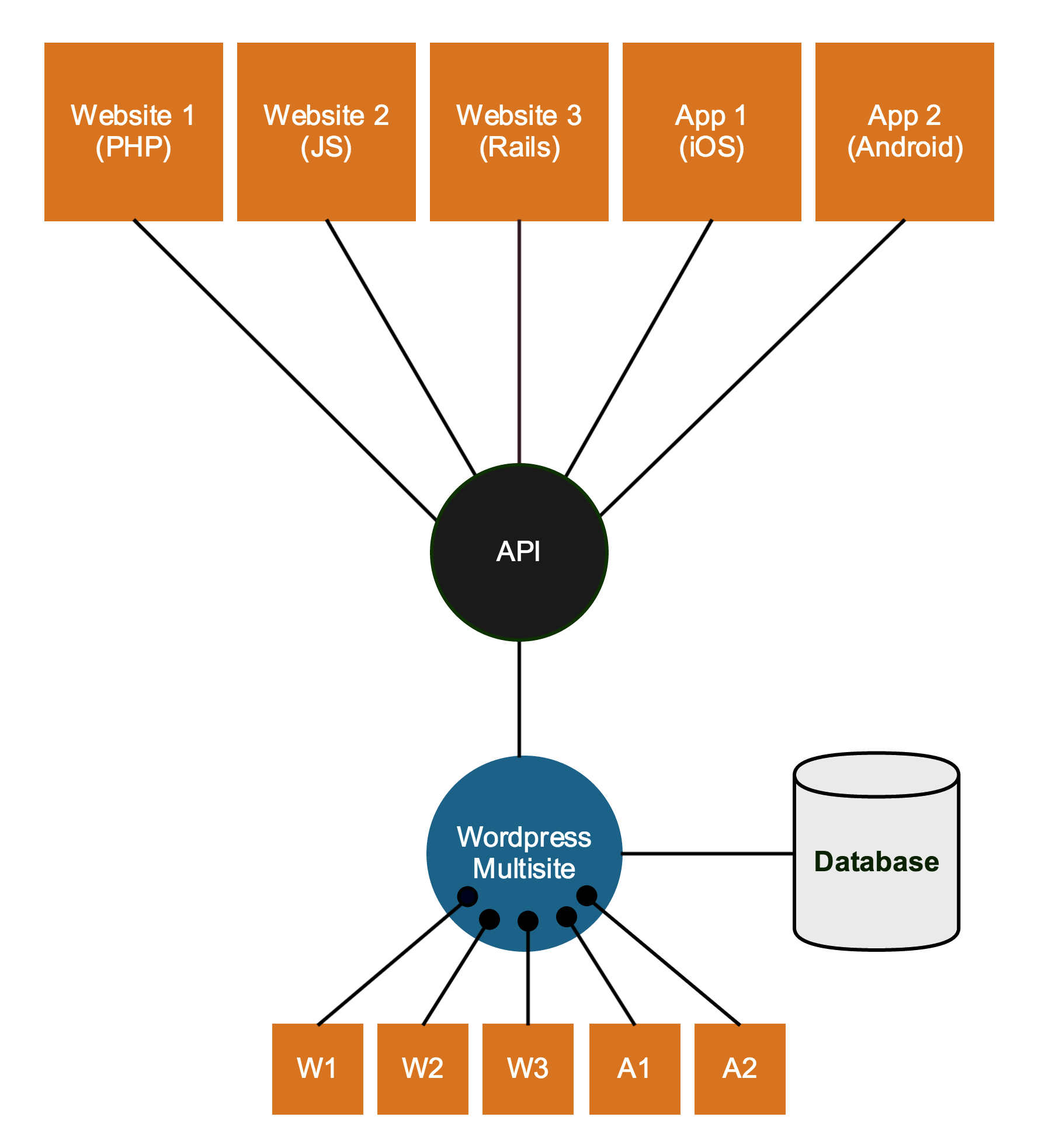
The WordPress API helps developers connect with WordPress sites. It allows access to data and features without using the main dashboard. This API lets you create custom themes and plugins. It also helps integrate WordPress with other tools. The main goal is to make tasks easier and faster. This can improve site performance and user experience.
WordPress API provides several important features. It allows data retrieval for posts, pages, and users. It supports data updates and deletions. Developers can use it for authentication to secure sites. The API is extensible, meaning it can grow with the site. It uses standard formats like JSON. This makes data easy to handle. The API works well with mobile apps and web services.

Credit: kinsta.com
Types Of WordPress Apis
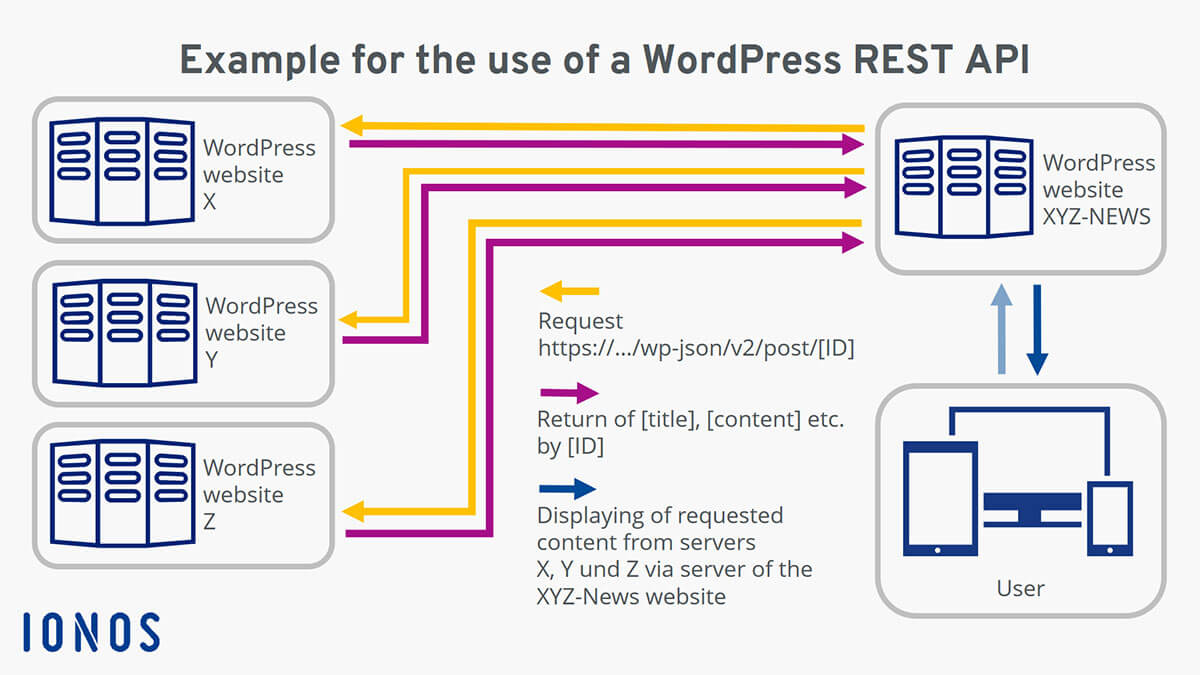
The REST API helps you talk to WordPress using HTTP. It lets you get data and send data easily. You can get posts, pages, and comments. This API makes it easy to build apps. Developers love it. It’s easy and fast.
XML-RPC lets you send commands to WordPress. It’s been around for a long time. You can publish posts or get info. It works with different tools. It’s not as popular now. But some still use it.
The WP-Cron API helps schedule tasks in WordPress. It automates things. Like publishing posts at a set time. Or cleaning the database. It makes WordPress work without you. But it’s not like server cron jobs. It’s different and simpler.
Benefits Of Using WordPress Api
WordPress API offers great flexibility. It allows developers to create custom solutions. With API, you can tailor the site’s behavior. This means you can have unique features. Your website can stand out. You can manage data more effectively. Adjust settings as needed. API helps with dynamic content creation. It supports multiple languages. The API adapts to different needs. This gives control over design. Developers can use API for better performance. It helps in creating interactive websites. API supports new ideas. It brings creativity to your site. Flexibility is key to growth.
WordPress API improves integration with other systems. Connect your site with apps easily. Share data without hassle. It’s great for e-commerce websites. API allows smooth transactions. Social media integration becomes simple. Connect and share content quickly. API enhances user experience. It allows automation of tasks. Saves time and effort. Data exchange is fast and secure. APIs make third-party services accessible. Integration boosts functionality. It supports real-time updates. Keep information fresh. API helps in cross-platform compatibility. It makes systems work together better.
How To Access WordPress Api
WordPress API needs authentication for access. There are several methods available. One popular method is OAuth. OAuth is a standard for access delegation. Another method is API keys. These are like secret passwords. Keep them safe. You can also use cookie authentication. This method is for logged-in users. Each method has pros and cons. Choose based on your needs.
The structure of API endpoints is simple. Start with your website URL. Add /wp-json/wp/v2/. This is the base path. After this, add the endpoint you need. For example, to get posts, use /posts. Each endpoint gives access to different parts. Posts, pages, or users. Remember, using the correct endpoint is key.
Common Use Cases
WordPress API helps create mobile apps. It connects apps to websites. Data moves easily between them. Developers use it for real-time updates. Users see fresh content instantly. It makes apps interactive and lively. API is like a bridge. It links mobile apps and WordPress sites. This is very useful for businesses. They can reach more people.
Plugins add special features to WordPress. API helps them talk to the site. Developers can make unique plugins. They fit exact needs. API makes this process smooth. Plugins become part of the WordPress system. They work seamlessly with other tools. This makes sites more powerful. Users enjoy better functions and options.
Security Considerations
WordPress API needs careful security considerations to protect data. Limit API access to trusted users. Regularly update plugins and themes to prevent vulnerabilities.
Best Practices
Keeping your WordPress API secure is important. Use strong passwords. Change them often. Limit the number of login attempts. This helps keep hackers away. Always update your plugins and themes. New updates fix security issues. Use a security plugin. It can scan for malware. It also helps block unwanted access.
Common Threats
There are threats to the WordPress API. Hackers can try to steal data. They may inject bad code. This is called SQL injection. Another threat is brute force attacks. These try many passwords until one works. DDoS attacks are also common. They flood your site with traffic. This can make your site slow or crash. Always stay alert and protect your site.
Future Of WordPress Api
WordPress API is getting better. It will soon have new features. These features make it easier to use. Developers will find it more user-friendly. It will support more languages. This helps people from different places. The API will also be faster. Speed is important for websites. A fast website keeps visitors happy.
Another feature is better security. Security keeps your data safe. WordPress cares about safety. They always work on it. Expect more updates in the future. These updates will bring more improvements. It’s exciting to see what’s next.
The WordPress community is very active. Many people contribute to it. They share ideas and solutions. This helps the API grow and improve. Volunteers write code and fix bugs. They help make WordPress better for everyone.
Community efforts are key. They bring fresh perspectives. WordPress values these contributions. Together, they build a better platform. Everyone benefits from their hard work. It’s a team effort that pays off.
Credit: www.ionos.com
Frequently Asked Questions
What Is The WordPress Api Used For?
The WordPress API is used for interacting with WordPress sites. It allows developers to create, read, update, and delete data. This makes it easier to build custom plugins, themes, and applications. The API offers flexibility for developers to extend WordPress functionalities beyond its core features.
How Does WordPress Rest Api Work?
The WordPress REST API uses HTTP requests to interact with WordPress data. Developers can send requests to specific endpoints. These requests allow them to retrieve or modify content. The API provides a standardized interface for accessing WordPress functionality. This makes it easier to integrate with other platforms.
Can I Use WordPress Api For Mobile Apps?
Yes, the WordPress API is ideal for mobile app development. It allows developers to fetch WordPress data for mobile applications. This includes posts, pages, and custom data types. The API ensures seamless integration, making it easier to maintain content consistency across platforms.
Is WordPress Api Free To Use?
Yes, the WordPress API is free to use for developers. It is included as a core feature in WordPress. This accessibility allows developers to create innovative solutions without additional costs. The open-source nature of WordPress promotes community collaboration and development.
Conclusion
Understanding the WordPress API opens new possibilities for website management. It allows seamless integration with other tools. You can automate tasks efficiently. This saves time and effort. Developers find it useful for custom solutions. Users can enhance their site’s functionality.
The API is a powerful tool. Easy to learn and implement. Businesses and individuals benefit from its features. Keep exploring its potential. Boost your website’s performance. Embrace the flexibility it offers. With WordPress API, the possibilities are endless. Start using it today.
Transform your WordPress experience. Discover what works best for you.



