
Are you looking to make your website stand out in the crowded online world? If so, you might have heard of WordPress SEO.
But what exactly is it, and why should you care? Imagine having a tool that helps your website climb to the top of search results, bringing in more visitors and potential customers. That’s what WordPress SEO can do for you.
It’s not just about adding a few keywords here and there—it’s a powerful strategy to enhance your site’s visibility and performance. By the end of this article, you’ll understand how WordPress SEO works and how it can transform your website into a magnet for traffic. Ready to unlock the secrets of successful online presence? Let’s dive in!
Basics Of WordPress Seo
SEO helps your website get more visitors. It makes your site show up in search results. People use search engines to find things. If your site ranks high, more people will see it. This means more traffic and more people reading your content. Good SEO means more visibility. This is vital for your site. WordPress is popular, and many use it. SEO is important for standing out.
Use keywords in your titles and content. This helps search engines know your topic. Use plugins to improve SEO. They help optimize your site. Write good meta descriptions. They explain your content to search engines. Use alt tags for images. This helps with image search. Keep your site speed fast. Search engines prefer quick sites. Check your links. Good links help with SEO.
Setting Up WordPress For Seo
Choosing the right theme is important for SEO. Pick a theme that is fast and responsive. This helps your site load quickly on all devices. A good theme has clean code. It makes your site easy for search engines to read. Make sure the theme is mobile-friendly. Many people use phones to browse. The theme should also be compatible with popular SEO plugins.
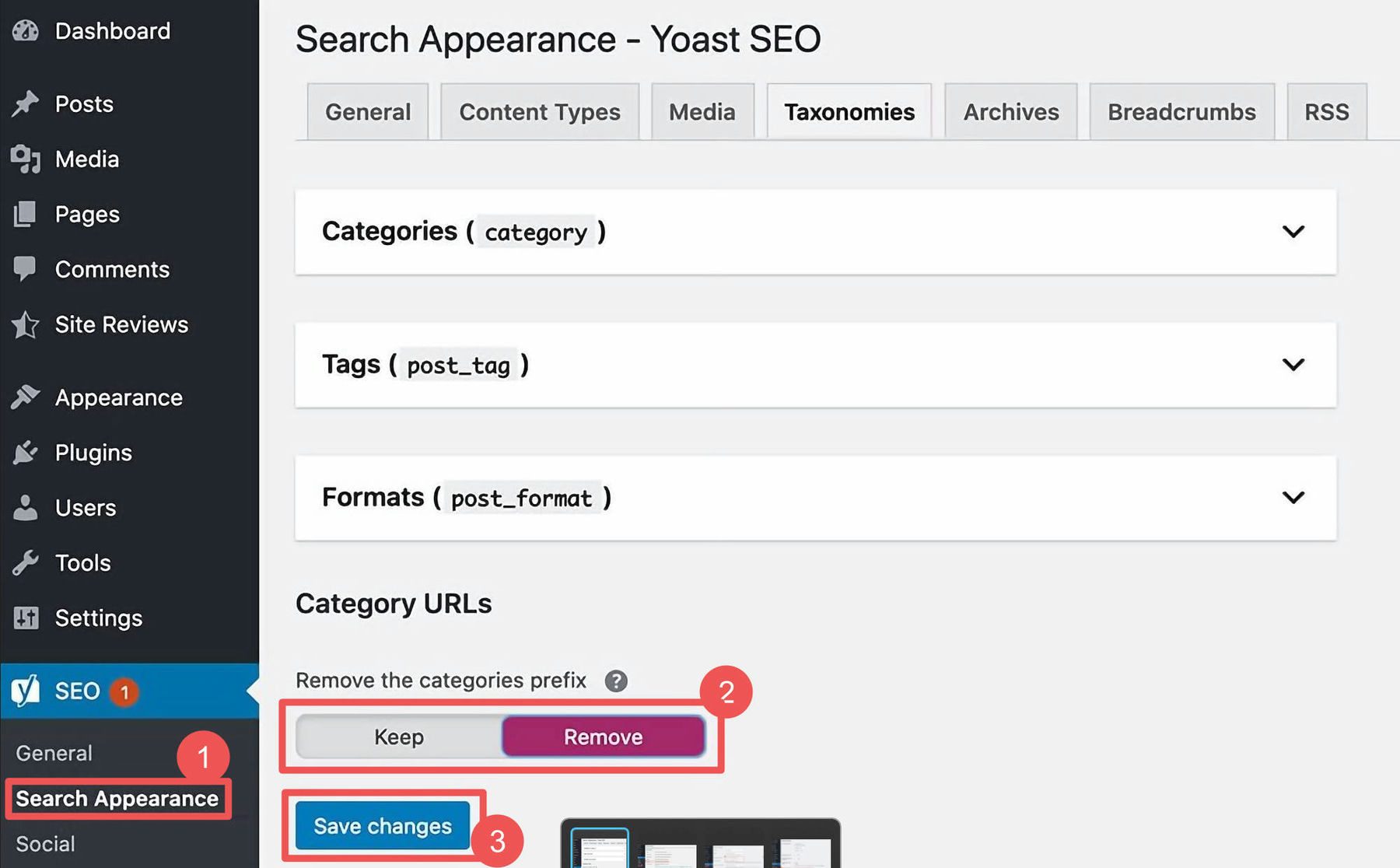
SEO plugins can help improve your site’s visibility. They make it easier to manage your site’s SEO. Popular plugins like Yoast or Rank Math offer helpful tools. These tools guide you in optimizing your content. They suggest improvements for better rankings. Always keep your plugins updated. This ensures they work well with your WordPress version. Choose plugins that are easy to use. This makes managing SEO simple for everyone.
Optimizing Content
Finding the right keywords is very important. Use tools like Google Keyword Planner. It helps to find words people search often. Choose simple words that match your content. Check the competition for these keywords. If it’s too high, pick different words. Long-tail keywords are more specific. They have less competition. They can help your content rank better. For example, “best shoes for kids” is a long-tail keyword. Always update your keywords. Trends change, so should your keywords.
Titles and descriptions should be clear. Keep them short and sweet. Use your main keyword in the title. Put it at the start if possible. Descriptions should tell what the page is about. Use a call to action, like “learn more”. This makes people want to click. Keep the description under 160 characters. This fits well in search results. A good title and description can help bring more visitors to your site.
Credit: www.elegantthemes.com
Technical Seo In WordPress
Technical SEO in WordPress focuses on optimizing your site’s backend for better search engine visibility. It involves improving site speed, mobile responsiveness, and structured data, ensuring search engines easily crawl and index your content. Proper technical setup enhances user experience and boosts your site’s ranking.
Improving Site Speed
WordPress sites must load fast. Fast sites keep visitors happy. Compress images to reduce size. Use caching plugins. Minimize CSS and JavaScript files. Choose a reliable hosting provider. Hosting affects site speed. Use a content delivery network (CDN). CDNs distribute content globally. Regularly update your WordPress version. Updates fix bugs and improve speed. Avoid using too many plugins. Plugins can slow down your site. Optimize your database regularly. A clean database runs faster.
Enhancing Mobile Responsiveness
Mobile users need a responsive site. Responsive sites fit any screen. Use responsive themes for WordPress. Themes should adjust to different devices. Test your site on various devices. Check how it looks on phones and tablets. Use mobile-friendly designs. Simple designs are better for mobile. Optimize images for mobile viewing. Smaller images load faster on phones. Ensure buttons are easy to click. Big buttons work better on mobile. Keep text readable on small screens. Avoid tiny fonts.
On-page Seo Techniques
WordPress SEO focuses on optimizing your website for search engines. Essential techniques include using relevant keywords in titles and headings. Improving meta descriptions also boosts visibility in search results.
Optimizing Images And Media
Images help make your content interesting. Always use high-quality images that are clear. Each image should have a descriptive filename. Use alt text for every image. Alt text tells search engines about the image. This helps with SEO ranking. Compress images to reduce load time. Smaller images make pages load faster. Fast loading pages rank better.
Using Internal And External Links Effectively
Links connect different pages. Use internal links to guide users to more content. Internal links help users stay longer on your site. Use external links to show sources. External links help build trust with readers. Choose reliable sources for external links. Always link to relevant pages. Links should be natural in your content. Too many links can confuse readers.
Off-page Seo Strategies
Quality backlinks can improve your site’s ranking. These links come from trusted sources. They show your site is reliable and valuable. Guest blogging is a great way to get backlinks. Write posts for other websites. Include a link back to your site in the post. This helps people find your site and builds credibility.
Social media can boost your site’s visibility. Share your posts on platforms like Facebook and Twitter. This attracts more visitors to your site. Engage with your audience in comments and messages. This builds trust and encourages sharing. More shares mean more people see your content. Use images and videos to capture attention. These elements are more engaging than plain text.
Monitoring And Analytics
WordPress SEO involves optimizing your website for search engines to improve visibility. Monitoring and analytics help track performance and identify areas for improvement. This process ensures your content reaches a broader audience effectively.
Using Google Analytics For Seo
Google Analytics helps you track website traffic. It shows how many people visit your site. You can see which pages are most popular. This helps you understand what people like. It also shows how long they stay on a page. Longer visits mean they find it interesting. If a page has few visitors, you might need to improve it. Google Analytics can help you make your site better for visitors.
Tracking Seo Performance
Tracking SEO is important. It shows how your site is doing. You can see which keywords bring people to your site. If a keyword works well, use it more. This helps more people find your site. You can also see where your visitors come from. If most come from one place, focus on that area. Tracking helps you keep improving.
Credit: www.nexcess.net

Credit: wp-eventmanager.com
Frequently Asked Questions
How Does WordPress Seo Work?
WordPress SEO works by optimizing content to rank higher on search engines. It uses plugins like Yoast SEO to improve meta tags, keywords, and readability. SEO-friendly themes and structured URLs also enhance website visibility. Regular updates and quality content further boost search rankings, helping attract more organic traffic.
Why Is Seo Important For WordPress?
SEO is crucial for WordPress because it enhances website visibility on search engines. Improved visibility leads to increased traffic and potential conversions. Effective SEO strategies help achieve higher rankings, which are essential for reaching a wider audience. Without SEO, your WordPress site might struggle to compete with others in search results.
What Are WordPress Seo Plugins?
WordPress SEO plugins are tools that help optimize your website for search engines. Popular plugins like Yoast SEO and All-in-One SEO provide features like keyword analysis, meta tag editing, and readability checks. These plugins simplify SEO tasks, ensuring your content aligns with best practices for higher search engine rankings.
Can WordPress Themes Affect Seo?
Yes, WordPress themes can impact SEO. SEO-friendly themes ensure faster loading times, mobile responsiveness, and clean code. These factors contribute to better search engine rankings. Choosing a theme with optimized code and structure helps your site perform better in search results, enhancing user experience and attracting more visitors.
Conclusion
WordPress SEO is essential for website visibility. It helps attract more visitors. Start by choosing the right plugins. They simplify SEO tasks. Focus on keywords that match your content. This boosts search engine rankings. Optimize images for faster page loads.
Fast websites improve user experience. Use internal links wisely. They guide visitors and enhance navigation. Regularly update content to keep it fresh. Search engines favor updated sites. Monitor your site’s performance. Adjust strategies based on results. Consistent efforts bring long-term benefits.
Keep learning and adapting. Your website’s success depends on it.


