Are you diving into the world of WordPress and feeling a bit overwhelmed by technical terms? You’re not alone.
One term you’ll often encounter is the “WordPress root directory. ” Understanding this is crucial because it’s the starting point for managing and customizing your WordPress site. Imagine having the key to unlock a treasure chest filled with possibilities for your website.
That’s what grasping the concept of the root directory can do for you. It holds the essential files that make your site run smoothly and allows you to tweak things just the way you want. Ready to uncover what makes your WordPress site tick? Let’s dive in and explore what the WordPress root directory is and why it’s so important for your digital presence.

Credit: themehunk.com
WordPress File Structure
WordPress has many files. The core files are very important. wp-admin helps to manage your site. wp-includes has essential files. These files run your site. wp-content stores user files. This includes themes and plugins. wp-config.php is crucial. It has site settings. It connects the database.
Themes change your site’s look. They are stored in wp-content/themes. Plugins add features. They are found in wp-content/plugins. Each plugin has its folder. Each theme has its folder too. Custom plugins are unique. Custom themes are special.
wp-config.php is a key file. It tells WordPress how to behave. It sets database details. It controls language settings. .htaccess is another file. It manages site rules. It helps with security. It redirects pages. Keep these files safe. They’re important for your site.
Locating The Root Directory
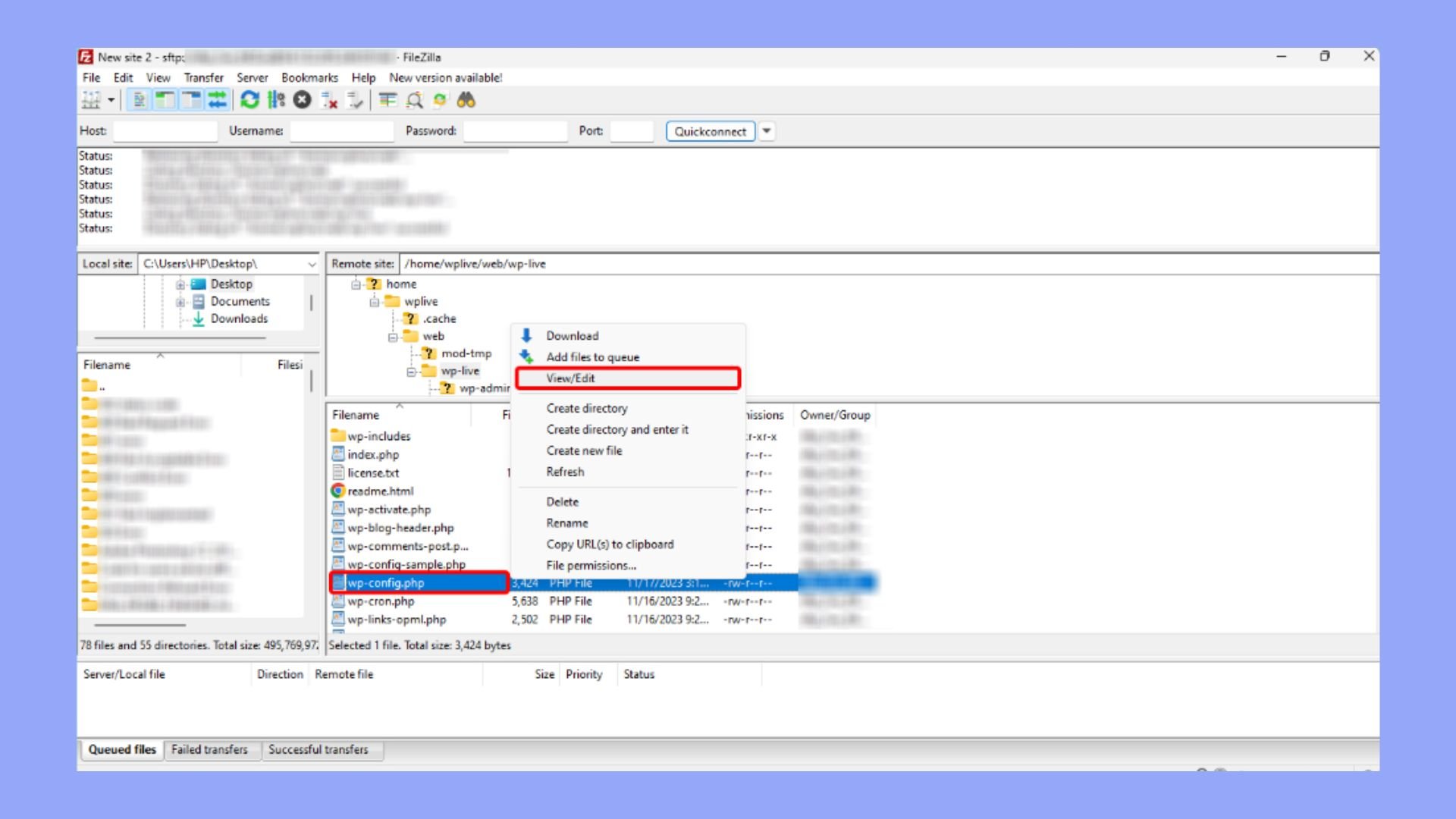
FTP clients help access the root directory. First, install an FTP client like FileZilla. Next, enter your website’s credentials. Connect to the server to view the files. The root directory usually has folders like wp-content and wp-admin. Explore these folders safely. Always back up files before changes. This prevents loss of data.
cPanel is another way to find the root directory. Log in to your hosting account. Look for the File Manager option. Click to open it. The root directory appears on the left side. It contains vital files. Do not delete them. cPanel is user-friendly and safe. Use it for quick access. Always follow hosting guidelines.
Key Files In The Root Directory
The wp-config.php file is very important. It holds settings for your WordPress site. Without it, your site cannot connect to the database. This file keeps your data safe and private.
The .htaccess file controls how your server behaves. It helps with security and redirects. This file can stop bad people from entering your site. It also helps with URL structure and performance.
The index.php file is the first page people see. It acts as the main door to your site. This file tells the server to load WordPress. It allows visitors to view your posts and pages.
Credit: 10web.io
Importance Of The Root Directory
The root directory holds the main files for your site. It includes important files like wp-config.php and .htaccess. These files help your site run well. Changing settings here can change how your site works. But be careful. Wrong changes can break things.
The root directory needs good security. Hackers may try to access it. Always keep your files safe. Use strong passwords and update them often. Backup your files. This way, you can restore them if needed.
Backups are very important. They help if something goes wrong. Use tools to make regular backups of your root directory. Store these backups in a safe place. If your site breaks, you can use backups to fix it. Restoring files is easier with backups.
Modifying Root Directory Files
WordPress root directory holds the core files that power your website. It contains essential files like wp-config. php and. htaccess. Modifying these files can enhance or disrupt your site, so proceed with caution.
Editing Wp-config.php
The wp-config.php file is very important. It holds the settings for your WordPress site. You can change database details here. Always make a backup first. A small mistake can break the site. Be careful with each change.
Managing .htaccess Rules
The .htaccess file controls server settings. It helps with redirects and security rules. Changing it can affect your site. Check your changes before saving. A wrong rule can stop your site from loading. Always keep a backup copy. This way, you can fix errors easily.
Common Issues And Troubleshooting
Understanding the WordPress root directory can solve many issues. It holds core files essential for site operation. Accessing it helps in troubleshooting problems and maintaining your website efficiently.
Missing Or Corrupted Files
The WordPress root directory holds essential files. Sometimes, these files go missing or get corrupted. This can break your website. Check for missing files first. Look for wp-config.php and .htaccess files. Are they there? If not, re-upload them. If files are corrupted, replace them with fresh copies. Always back up before changes. Use a backup plugin for safety. This helps restore files if needed. Keep your WordPress updated. Updates fix bugs and issues. Regular checks prevent file problems.
Permission Errors
Permission errors stop access to files. This is frustrating. Check file permissions in the root directory. Correct permissions solve most issues. Use FTP clients to change permissions. Set folders to 755 and files to 644. These are safe settings. Avoid setting permissions to 777. This is risky. It exposes your site to hackers. Regular checks are crucial. Keep your site safe and secure. Permissions should be monitored often. This ensures smooth operation.

Credit: themehunk.com
Frequently Asked Questions
What Is The WordPress Root Directory?
The WordPress root directory is the main folder containing your WordPress files. It includes core files, themes, plugins, and configuration files. This directory is crucial for WordPress to function properly. Accessing it usually requires using an FTP client or the file manager in your hosting control panel.
How To Access The WordPress Root Directory?
To access the WordPress root directory, use an FTP client or your hosting control panel. Connect to your server with your credentials. Navigate to the folder where WordPress is installed. This directory contains all essential WordPress files and folders. Ensure you have the necessary permissions to access it.
What Files Are In The WordPress Root Directory?
The WordPress root directory contains essential files like wp-config. php,. htaccess, and index. php. It also includes folders like wp-content, wp-admin, and wp-includes. These files and folders are crucial for WordPress functionality. They handle configuration, content management, and site administration.
Why Is The WordPress Root Directory Important?
The WordPress root directory is vital because it holds all essential WordPress files. These files ensure your website functions correctly. It manages configuration, themes, plugins, and core files. Understanding its importance helps you troubleshoot issues and manage your site effectively.
Conclusion
Exploring the WordPress root directory? It’s simpler than it seems. This directory holds all essential files. Themes, plugins, and core files live here. Knowing its contents helps manage your site better. You can troubleshoot issues quickly. Accessing this directory requires a hosting account.
Most hosting providers offer easy access. Understanding the root directory empowers website management. You’ll feel more confident making changes. Keep exploring and learning. Your WordPress skills will grow. With time, managing your site becomes second nature. Enjoy the journey of mastering WordPress!