Have you ever found yourself locked out of your WordPress site, desperately trying to figure out the MySQL password for the user “WordPress”? You’re not alone.
This is a common hiccup that can leave you feeling frustrated and helpless, especially when you’re eager to make updates or troubleshoot issues. But don’t worry! You’re about to discover how simple it can be to unlock this mystery. By understanding where this password is stored and how to access it safely, you’ll regain control in no time.
Dive into the secrets of your WordPress database, and empower yourself with the knowledge you need to keep your site running smoothly. Ready to take charge? Let’s unravel the details together!
Mysql And WordPress Connection
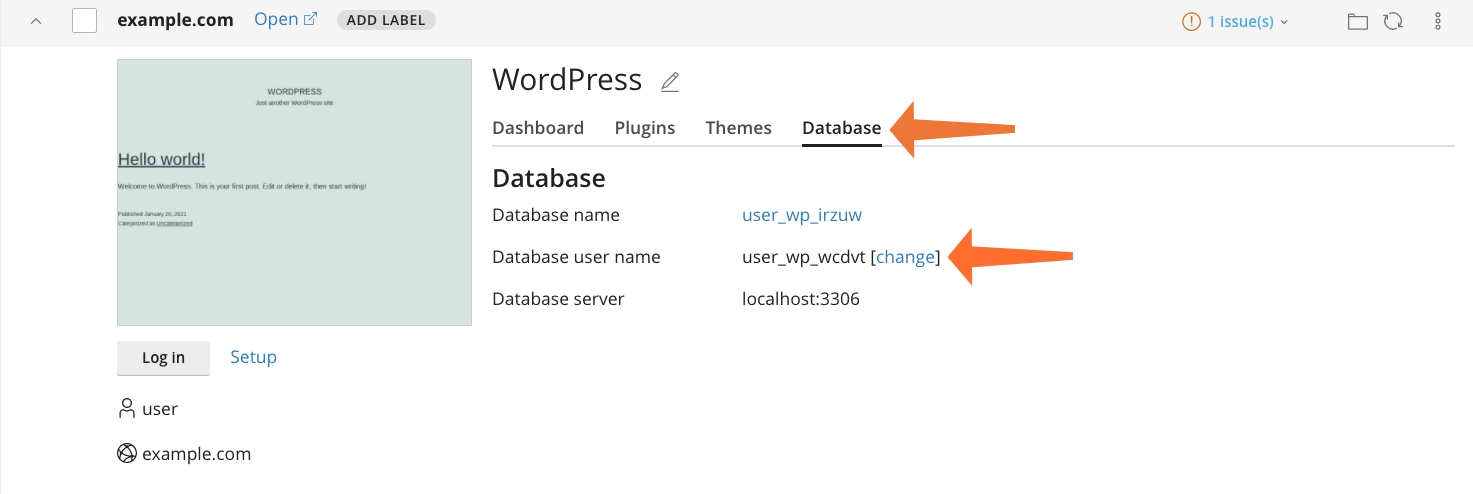
A MySQL database connects with WordPress. This connection stores data like posts, users, and settings. Each WordPress user needs a username and a password. These are set during the WordPress installation. The MySQL username and password are stored in a file named wp-config.php. This file is in the WordPress directory.
The username and password are important for security. Changing these can help protect your site. Always keep them secret. If forgotten, check the wp-config.php file. This will show the current username and password.
For safety, make a backup before changing anything. Use strong passwords to keep the site safe. Strong passwords have letters, numbers, and symbols.
Credit: cpanel.net
Locating The WordPress Configuration
The wp-config.php file is very important. It holds the keys to your WordPress. This file is in the main folder of WordPress. You can find this folder on your server. Open the file using a text editor. Be careful not to change anything by mistake.
Inside the file, look for the line that says ‘DB_PASSWORD’. This line shows your MySQL password. You will also see the ‘DB_USER’ line. It tells who can access the database. The database name is on the ‘DB_NAME’ line. All these details help WordPress talk to your database.
Accessing Mysql Database
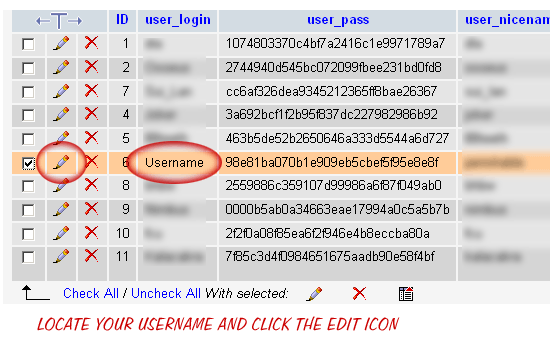
phpMyAdmin is a tool for managing MySQL databases. It’s easy to use. Login with a username and password. You need admin rights to see passwords. Once logged in, go to the Users tab. Find the WordPress user. Click on Edit Privileges. Here, you can see or change the password. If it’s hidden, click Show to see it. Remember to save any changes.
The command line is another way to access MySQL. Open the terminal. Type mysql -u username -p and hit enter. It will ask for your password. Enter the password and press enter. You are now inside the MySQL interface. Type SHOW GRANTS FOR ‘wordpress_user’@’localhost’; to see privileges. Change the password using SET PASSWORD command if needed.
Credit: help.one.com
Retrieving Mysql Password
The wp-config.php file holds the MySQL password. Open this file in a text editor. Look for the line that says define(‘DB_PASSWORD’, ‘your_password’);. The text inside the quotes is the password. Keep this file safe. It has important data.
You can change the MySQL password if needed. Log in to your hosting account. Go to the MySQL Databases section. Find your WordPress database user. Click on Change Password. Enter a new password. Save the changes. Update the wp-config.php with the new password. This keeps your site running smoothly.
Security Considerations
Strong passwords keep your data safe. Hackers try to steal weak passwords. Make passwords hard to guess. Use a mix of letters, numbers, and symbols. Do not use your name or birthdate. These are easy to guess. A strong password is like a strong lock. It keeps your information secure.
Change your passwords often. This helps protect your account. Old passwords can be found by hackers. Update them every few months. Write down your new password safely. Do not share it with others. Keeping credentials fresh keeps your data safe.
Credit: digwp.com
Troubleshooting Connection Issues
Many users face problems with WordPress database connection. Error messages like “Error establishing a database connection” are common. This usually means WordPress can’t reach the MySQL database. Check if your database login details are correct. Sometimes, the database server is down. Make sure the MySQL server is running. You may have to contact your web host for help.
Enable WordPress debugging to find issues. Add define('WP_DEBUG', true); in your wp-config.php file. Check for detailed error messages. Examine your database credentials in wp-config.php. Ensure the username, password, and host details are correct. Test your connection using MySQL command line tools. If all else fails, reset your MySQL password. Follow steps from your hosting provider for this.
Frequently Asked Questions
How To Find Mysql Password For WordPress User?
The MySQL password for the WordPress user is stored in the `wp-config. php` file. Access your WordPress installation directory and open `wp-config. php`. Look for the line containing `DB_PASSWORD`. This value is your MySQL password. Always keep this information secure to protect your database.
Can I Change Mysql Password For WordPress?
Yes, you can change the MySQL password for the WordPress user. Update the password in the MySQL database using your hosting control panel. After that, update the new password in the `wp-config. php` file. Ensure both are synchronized to prevent connection errors.
Why Is Mysql Password Important For WordPress?
The MySQL password is crucial for WordPress as it connects the CMS to the database. Without the correct password, WordPress cannot access the database. This would result in your website being inaccessible. Always ensure your MySQL password is strong and secure.
Where Is WordPress Mysql Password Stored?
The WordPress MySQL password is stored in the `wp-config. php` file. This file is located in the root directory of your WordPress installation. It contains important configuration settings, including database connection details. Always secure this file to prevent unauthorized access.
Conclusion
Finding the MySQL password for WordPress is crucial. It ensures a smooth operation. Remember, it’s stored in the wp-config. php file. This file holds key configuration settings. Always handle it with care. Security is important. So, keep passwords private and complex.
Regular updates can prevent potential issues. Back up your data often. It safeguards against unexpected losses. If unsure, seek expert advice. Always prioritize learning and understanding. Knowledge strengthens your WordPress experience. Follow best practices for peace of mind. A secure site benefits everyone.
Stay informed, and keep your WordPress site running smoothly.