Imagine you’re working on your WordPress website, crafting that perfect look and feel. You’re tweaking colors, adjusting fonts, and placing images just right.
But there’s one part of your site that holds power beyond aesthetics—the head section. You might wonder, “What exactly is this head section, and why should I care? ” Well, it’s more than just a technical part of your site; it’s the unseen backbone that can significantly impact your website’s performance and visibility.
Understanding the head section is crucial because it influences how search engines perceive your site. It’s where metadata lives—those tiny pieces of information that tell search engines what your site is about. This is also the place where you can link to external resources, like stylesheets and scripts, which can enhance your site’s functionality and appearance. By mastering the head section, you’re not only boosting your site’s SEO but also ensuring a smoother user experience for your visitors. Unlocking the secrets of the head section can transform your WordPress site from ordinary to exceptional. Dive in, and discover how you can harness its potential to make your website stand out in the crowded digital world.
Credit: saeedkhosravi.com
Purpose Of The Head Section
The head section of a WordPress website is crucial. It contains metadata and links to stylesheets. This section helps browsers understand the page. It also improves SEO and performance.
Inside the head, you will find the title tag. This tag shows the page title in the browser tab. It is important for search engines too. The meta tags provide page description. They are not visible on the page but help in search rankings.
Links to CSS files are also in the head. These files control the look of the website. Scripts can be linked here as well. But it is better to place them at the bottom. This way, the page loads faster for users.
Credit: help.ortto.com
Key Elements In The Head
Title tags are very important. They show the page’s name. Search engines read these tags. They help websites rank better. Short and clear title tags work best. Use important words in title tags. Keep them relevant to the page’s content.
Meta descriptions tell about the page. They are short summaries. Search engines show them in results. A good description attracts clicks. It should be clear and inviting. Use keywords naturally. Keep it under 160 characters.
Link tags connect to other files. Stylesheets use link tags. They make pages look nice. Link tags are in the head. They help load styles faster. They keep the design consistent. Proper use of link tags is key.
Script tags add special features. They run JavaScript on the page. These tags are inside the head section. They can also be at the end of the body. Placing them in the head can slow pages. Use them wisely for better speed.
Seo Importance
The head section of a WordPress site holds key elements for SEO. It includes meta tags and title tags. Search engines use these tags to understand the page content. Good tags help improve rankings. They tell search engines what your page is about. This helps your site show up in searches.
Meta tags influence click-through rates. A well-crafted title tag can attract clicks. It should be clear and interesting. People decide to click based on the title. The description meta tag also matters. It gives a summary of the page. Good summaries encourage clicks. More clicks mean better visibility. Better visibility means more traffic.
Customization Options
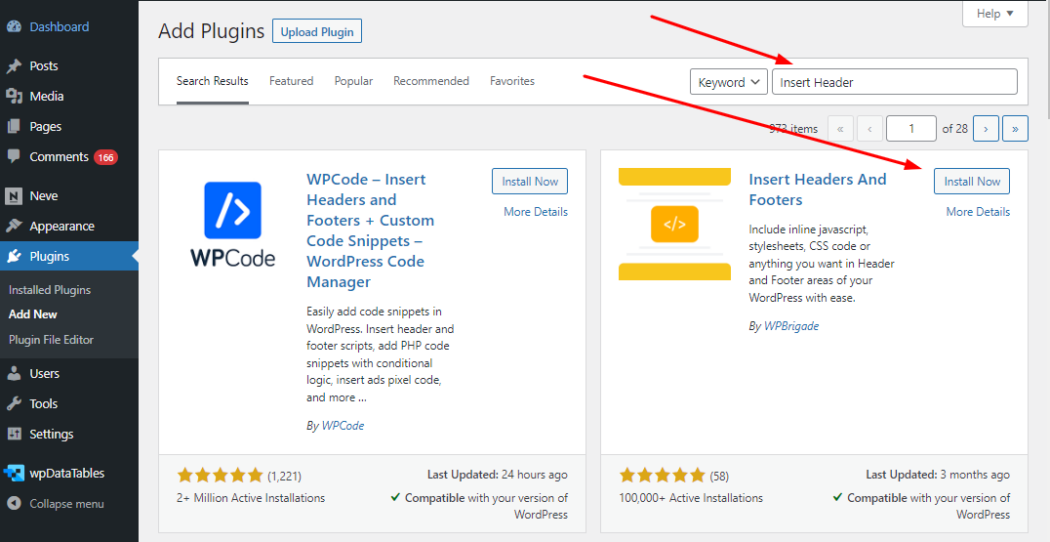
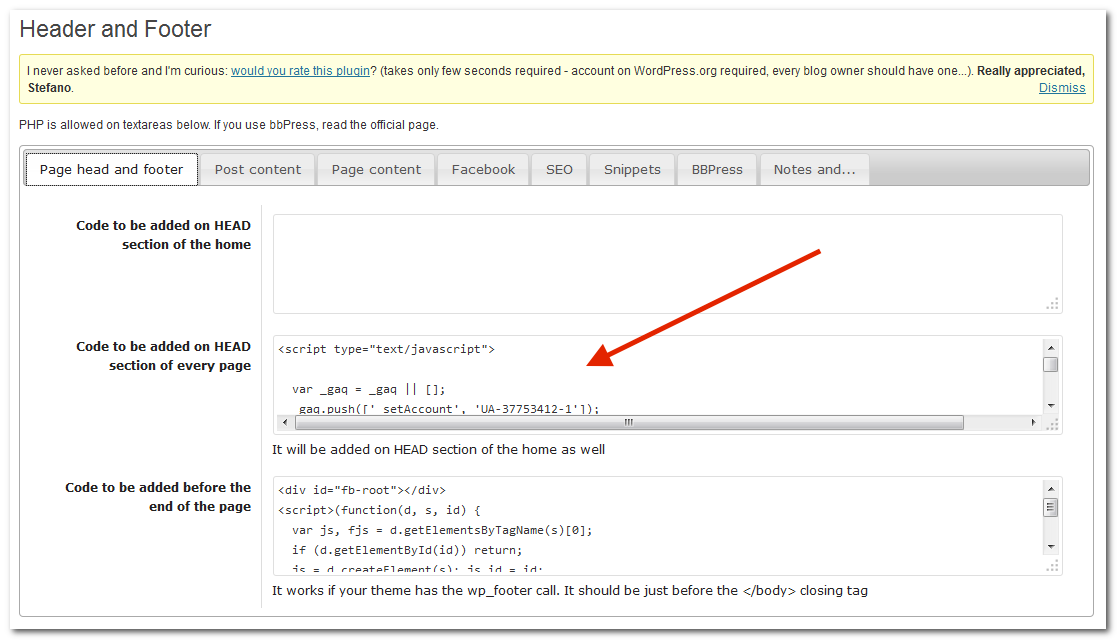
Plugins help in changing the head section easily. They offer many tools. These tools can add meta tags and scripts. Some plugins also improve SEO. Others help with analytics. You can find many free plugins. Paid ones have more features. Make sure to pick the right plugin. It should be easy to use. Always check reviews before installing.
Editing code manually is another way. This method is for those who know coding. It involves changing the theme files. You can add custom CSS or JavaScript. But be careful. Mistakes can break your site. Always make a backup before editing. Use a child theme to avoid losing changes. This way, updates won’t erase your work.
Common Mistakes To Avoid
Meta tags help search engines understand your page. Having duplicate meta tags can confuse search engines. This can lead to poor rankings. Each page should have unique tags. This includes title and description. Check your WordPress settings. Make sure no page has the same tags.
Too many scripts can slow down your website. Slow pages lose visitors. This is bad for business. Use only necessary scripts. Remove unused scripts. Check plugin settings. Sometimes plugins add extra scripts. Optimize your site for better speed. Faster sites keep users happy.
Best Practices
The head section of a WordPress website contains crucial metadata and links. It helps search engines understand your site’s structure. Optimize this area for better site performance and SEO benefits.
Keeping It Organized
The head section is the brain of your website. It helps browsers know what your page is about. Always keep it neat and tidy. Use clear labels for meta tags. This helps search engines find you. Avoid too much code. It makes loading slow. Check your links. They should work fine. Organize scripts and stylesheets. This helps maintain order.
Regular Updates
Websites need fresh content. Update the head section often. Add new meta descriptions as needed. Check for errors. Fix them fast. Change keywords if needed. It keeps your site current. Regular updates help improve your site’s SEO. It also keeps visitors happy. A well-maintained head section shows you care.

Credit: www.godaddy.com
Frequently Asked Questions
What Is The Head Section In WordPress?
The head section in WordPress is part of the HTML code. It includes essential elements like meta tags, links to stylesheets, and scripts. This section helps with SEO, controls appearance, and improves functionality. Customizing it can enhance website performance and user experience.
Why Is The Head Section Important?
The head section is crucial for website optimization. It contains elements like meta tags for SEO, links to CSS for styling, and scripts for functionality. Proper configuration improves visibility in search engines, ensures consistent design, and enhances user experience. It’s a vital part of website management.
Can I Customize The Head Section?
Yes, you can customize the head section in WordPress. Use plugins or modify the theme’s functions. php file to add custom code. This allows you to insert meta tags, scripts, and other elements for better SEO and functionality. Always backup your site before making changes.
How Does The Head Section Affect Seo?
The head section significantly impacts SEO. Meta tags like title and description influence search engine rankings. Properly configured tags improve visibility and click-through rates. Adding structured data and canonical tags enhances search engine understanding. Optimizing this section boosts overall website performance.
Conclusion
The head section in a WordPress website holds great importance. It contains essential elements like meta tags and links. These influence how search engines view your site. A well-structured head section improves site performance. It also affects your site’s SEO ranking.
Understanding these components helps in better website management. Focus on optimizing your head section. This ensures your website runs smoothly and efficiently. A clear and organized head section makes a big difference. It’s a crucial step in building a successful WordPress website.
So, make sure you pay attention to this key area.