
Are you worried about losing your hard work in WordPress due to unexpected glitches or accidental clicks? Understanding the default autosave setting in WordPress might be your solution.
Imagine working on a blog post or a website update, and just as you’re about to hit save, your computer crashes or your internet connection drops. Frustrating, right? Luckily, WordPress has a built-in autosave feature that can save you from these headaches.
But how does it work, and what are its default settings? This article is your guide to unraveling the mystery behind WordPress’s autosave function, ensuring you never lose your progress again. Dive in to discover how this simple yet powerful feature can be your safety net in the digital world.

Credit: bplugins.com
Autosave Feature In WordPress
WordPress has a helpful tool. It’s called the Autosave Feature. This feature keeps your work safe. Every 60 seconds, WordPress saves your draft. Even if the power goes out, your work is still there. This feature helps writers a lot. You don’t have to worry about losing your text. It’s like having a backup plan every minute. Drafts are important. They hold your ideas and words. With autosave, these drafts are protected. You can focus on writing, not saving. Autosave is always working in the background. It makes sure your work is safe.
Purpose Of Autosave
Autosave in WordPress keeps your work safe. It saves drafts while you write. This helps if your computer crashes. You won’t lose your work. Every 60 seconds, autosave updates your draft. You can see the last saved time. Check it at the top of the editor.
Autosave prevents loss of important text. It’s like a safety net. If you close the tab by mistake, your work is saved. Recover it easily when you return. This feature is useful. Especially during long writing sessions. It helps keep your content secure.
Default Autosave Interval
WordPress saves your work every 60 seconds by default. This is called autosave. Autosave helps you keep your writing safe. If your computer crashes, your work is saved. Autosave is very useful for bloggers. You can change the autosave time if you want. Some people like to save more often. Others save less often. You can do this by editing the code. But, be careful with code changes. Wrong code can break your website. Always back up your website first.
Autosave only saves your post or page. It does not save settings or comments. This is important to remember. Autosave is different from revisions. Revisions save every time you click “Save”. Autosave does not replace revisions. Both are useful tools in WordPress. They help you keep track of your work. They are there to protect your writing.
How Autosave Works
Autosave keeps your work safe while you write. It saves changes every 60 seconds. This happens without you doing anything. Autosave helps if your computer stops working suddenly. You can easily get your content back. WordPress does this to make sure you don’t lose your work.
Triggers For Autosave
Autosave starts when you begin typing. It also triggers when you make changes. Even if you stop typing, it saves your work. This is very useful. It keeps your content updated. You don’t need to worry about losing data. WordPress handles it for you.
Storage Location
Autosave data is stored in the WordPress database. It uses a special table. This table is called wp_posts. Autosave entries are temporary. They don’t take much space. They help you recover content quickly. You can find them in your site’s admin panel.
Customizing Autosave Settings
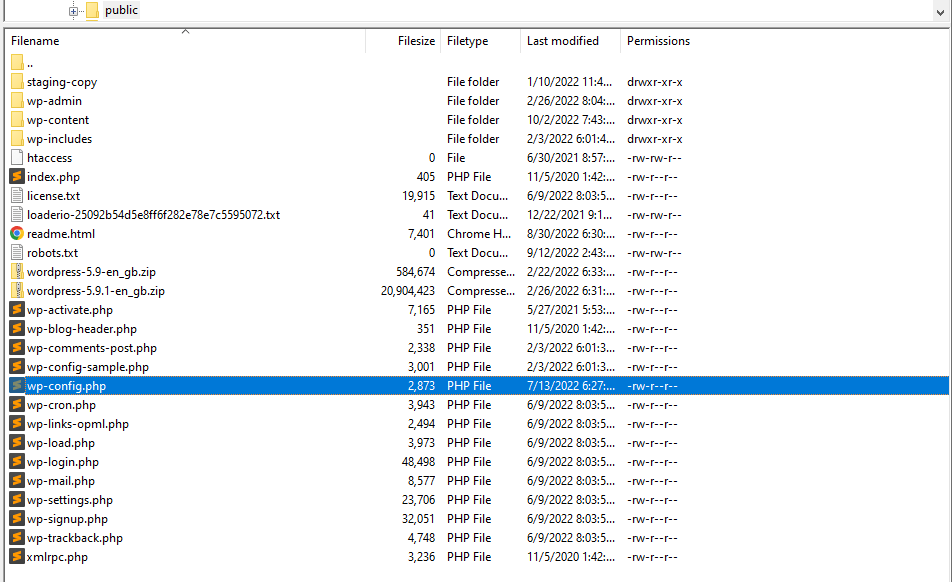
WordPress saves your work every 60 seconds. This is the default setting. You can change this interval to suit your needs. Open the wp-config.php file. Add this line: define('AUTOSAVE_INTERVAL', 120); This changes the interval to 120 seconds. You can set any number of seconds you like. Just replace 120 with your number. Always remember to save your changes. This helps keep your work safe.
Plugins can help you customize autosave settings easily. Some plugins offer extra features. Search for autosave plugins in the WordPress plugin directory. Install and activate the one you like. Each plugin has its instructions. Follow them to adjust autosave settings. This makes managing autosave simple and effective.
Credit: jetpack.com
Benefits Of Autosave
Autosave helps keep your work safe. It saves drafts while you write. This means you won’t lose your work if something happens. A sudden power cut won’t erase your content. You can focus more on creating without worry.
WordPress autosaves every 60 seconds. This is very helpful. You don’t need to remember to click save. It happens automatically. Autosave makes writing easier. You can find your latest changes easily. If you make a mistake, you can go back to your last save. Autosave gives peace of mind.
Limitations Of Autosave
WordPress autosave helps protect your work. But it has limits. Autosave occurs every 60 seconds. This can be too long if you write fast. Some changes might be lost. Also, only one copy is saved. This means older versions are gone. You cannot go back to them. This might be a problem if you make a mistake.
Internet connection is crucial. Without it, autosave won’t work. If your connection breaks, your work might be lost. These limits can be frustrating. It is wise to save your work often. Use the manual save option whenever needed. This ensures your work is safe.
Troubleshooting Autosave Issues
WordPress autosave can sometimes fail. It might not save your latest changes. You might see a spinning wheel forever. This is frustrating. Another issue is missing content. Autosave might not capture everything. This happens during internet disconnection. Autosave settings could be incorrect. This can lead to unexpected behavior. It’s crucial to understand these issues.
Check your internet connection. A stable connection helps autosave work. Update your WordPress version. Old versions can have bugs. Adjust autosave settings if needed. You can change autosave frequency. Save drafts manually to avoid data loss. Consider using a backup plugin. Backups protect your content. Clear browser cache if issues persist. This can resolve minor bugs. Following these steps can help fix autosave problems.

Credit: jetpack.com
Frequently Asked Questions
How Often Does WordPress Autosave?
WordPress autosaves every 60 seconds while you are editing a post. This feature ensures your content is not lost due to unexpected issues. It helps maintain your workflow by automatically saving changes, allowing you to recover your work in case of browser crashes or accidental closures.
Can I Change WordPress Autosave Settings?
Yes, you can change WordPress autosave settings by editing the wp-config. php file. However, altering default autosave intervals requires technical knowledge. It’s important to back up your website before making changes to avoid potential issues. Modifying settings can optimize performance based on your needs.
Where Are WordPress Autosave Files Stored?
WordPress autosave files are stored in your database under the post revisions section. Each autosave creates a new revision, ensuring your content’s safety. This allows you to revert to previous versions if needed. You can manage these revisions through your WordPress dashboard to maintain optimal database health.
Does Autosave Affect Site Performance?
Autosave can slightly impact site performance due to frequent database writes. However, this effect is minimal for most users. Optimizing your database and managing revisions can help mitigate any performance issues. Regular maintenance ensures your website runs smoothly while benefiting from autosave features.
Conclusion
Understanding WordPress autosave settings is crucial for content safety. Autosave protects your work from unexpected mishaps. It saves drafts automatically, reducing data loss risk. The default autosave interval is 60 seconds. This feature ensures minimal disruption during editing. Regularly saving your work is still important.
Autosave acts as a helpful backup. Knowing how autosave functions can improve your workflow. It boosts confidence in maintaining content integrity. Adjusting settings can tailor the experience to your needs. Explore WordPress features to enhance your blogging journey. Keep your content secure and your mind at ease.



