
Imagine this: You’re working on your WordPress website, perfecting every detail to ensure your visitors have a seamless experience. Suddenly, something’s off.
Content starts misbehaving, spilling out of its designated area and disrupting the layout you spent hours crafting. If this sounds familiar, you’re likely facing an issue with overflow in WordPress. Overflow might seem like a minor glitch, but it can have a major impact on how your site looks and functions.
And let’s be honest, in the digital world, first impressions are everything. You want your audience to engage with your content, not get distracted by a chaotic design. We’ll unravel the mystery of overflow in WordPress, helping you understand what it is and why it matters for your website. By the end, you’ll have the tools and knowledge to tackle overflow issues head-on, ensuring your site looks professional and inviting. Stick around, because mastering this one concept could transform your site’s user experience.
Credit: themeforest.net
Overview Of Overflow In WordPress
Overflow in WordPress happens when content is too big. It goes beyond its container. This can mess up website design. Text or images might spill over. They can cover other parts of the page. This looks messy and unprofessional.
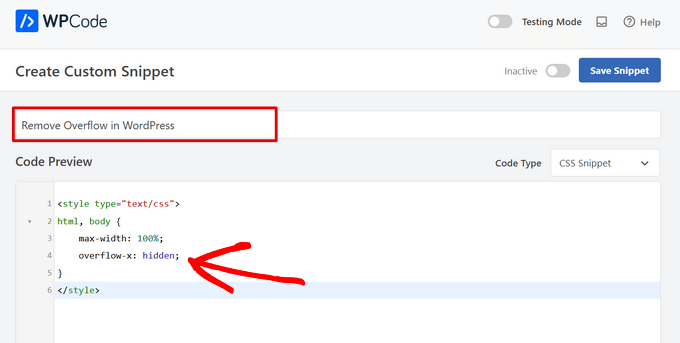
Fixing overflow is important. It helps keep your site neat. You can use CSS to handle this issue. The CSS property “overflow” is useful. It controls how content is shown. You can set it to “hidden” or “scroll”. “Hidden” cuts off the extra parts. “Scroll” adds a scroll bar to view all content. This keeps your website looking tidy.
Credit: enginetemplates.com
Common Causes
Plugins add features to your WordPress site. But not all plugins work well together. A new plugin might not fit with others. This can cause overflow issues. Keep plugins updated and choose trusted ones.
Themes control how your site looks. Some themes might have bugs or errors. These can lead to overflow. Always use themes from trusted sources. Update your theme regularly to fix problems.
Adding custom code can make your site unique. But even a small mistake can cause problems. Overflow is one of these issues. Check your code carefully. Ask for help if needed.
Identifying Overflow
Overflow often shows as text or images spilling outside their boxes. This makes the page look messy. Sometimes, scrollbars appear where they shouldn’t. These signs are easy to spot. They make the website hard to use. Users may leave if they can’t read or see content well.
Error messages can pop up due to overflow issues. These messages might mention memory limits or script timeouts. They signal that something is wrong with the code. Fixing these errors is important. It keeps the site running smoothly.
Overflow can cause the website to slow down. This happens when the site uses too much memory or resources. Slow websites frustrate users. They might leave and not come back. Ensuring the site runs fast is key to keeping visitors happy.
Troubleshooting Steps
Plugins can cause trouble sometimes. Deactivate all plugins to see if the problem stops. If it does, reactivate plugins one by one. Find the plugin causing the issue.
Sometimes themes can break your site. Switch to a default theme like Twenty Twenty-One. Check if the issue is gone. If it is, your theme may have a problem.
Custom code can be tricky. Review your custom code carefully. Look for errors or mistakes. Fix any problems you find.
Preventive Measures
Keeping WordPress updated is very important. Updates fix bugs and improve security. They make sure your site runs smoothly. Always update plugins and themes too. They often get updates with new features or fixes. Check your site for updates often. It helps avoid problems later.
Backups are like a safety net. They save your site if something breaks. You can use backup plugins for this. They make it easy to save your site. Store backups in a safe place. Use cloud storage or an external drive. Always have more than one backup. It helps keep your site safe.
A testing environment is a practice area for your site. It helps you try new things without risk. Use it to test new plugins or themes. This way, your main site stays safe. You can fix problems in the test area first. This keeps your real site running well.
Tools For Diagnosis
Debugging plugins can help find problems fast. They show where errors happen. Use plugins like Query Monitor. It watches your website closely. You can see what needs fixing right away. Tools like these are easy to use. They save you time. They make solving problems simple.
Error logs keep track of mistakes. They list errors that occur. These logs are helpful. They tell you what went wrong. You can open the log file anytime. Check it for details. It helps you find the problem quickly. Error logs are like a diary of issues. They are essential for fixing errors.
Developer tools help see how your website works. They show the code behind the page. You can find hidden issues. Tools like Google DevTools are very useful. They help fix layout problems. You can watch how changes affect the site. These tools make it easier to debug.
Credit: www.wpbeginner.com
Frequently Asked Questions
What Causes Overflow Issues In WordPress?
Overflow issues in WordPress usually occur due to improper CSS settings, where content exceeds its container boundaries. Misconfigured themes, plugins, or custom code can lead to overflow problems. Identifying and correcting the CSS properties responsible for layout errors can help resolve these issues effectively.
How To Fix Overflow In WordPress?
Fixing overflow in WordPress involves adjusting CSS properties like width, height, and overflow settings. Reviewing and editing theme or plugin styles can eliminate layout problems. Ensure elements fit within their containers and use appropriate overflow handling to maintain a responsive design.
Why Does My WordPress Site Look Distorted?
Distortion in a WordPress site often results from overflow issues. Content exceeding its designated space can cause layout misalignment. Check CSS rules for width and height and adjust them to ensure all elements fit within their containers, resolving distortion problems.
Can Plugins Cause Overflow In WordPress?
Yes, plugins can cause overflow issues if they inject custom styles or scripts that alter layout properties. Conflicts between plugin styles and theme CSS can lead to overflow. Review plugin settings and CSS to ensure compatibility and proper element containment.
Conclusion
Understanding overflow in WordPress is crucial for smooth site management. It affects layout and design significantly. Fixing overflow issues ensures better user experience. Your site’s functionality improves with proper handling. Visitors enjoy a clean, organized interface. This enhances engagement and reduces bounce rates.
Regular checks prevent overflow problems. A seamless WordPress site boosts credibility. Keep learning and adapting for optimal results. Prioritize solving overflow for a hassle-free website. Simple steps make a big difference in performance. Stay proactive and ensure your site runs efficiently.



